> For the complete documentation index, see [llms.txt](https://docs.panther.com/llms.txt). Markdown versions of documentation pages are available by appending `.md` to page URLs; this page is available as [Markdown](https://docs.panther.com/data-onboarding/field-discovery.md).
# Field Discovery
Capture unexpected fields in evolving log data
## Overview
Field discovery helps ensure that if a log source you've connected in Panther changes the structure of the events it generates upstream, you won't lose the data in changed fields.
Log source schemas define how incoming raw events are parsed and stored in Panther by outlining which fields, for a given log type, Panther should expect to find. When an incoming event includes a field not defined in the corresponding schema:
* **Without field discovery enabled**, data from this unrecognized field is dropped.
* **With field discovery enabled**, the field is identified and its data stored. This means you can subsequently query data from these fields, and write detections referencing them.
Field discovery is available for [custom log schemas](/data-onboarding/custom-log-types.md) and many [Panther-managed schemas](/data-onboarding/supported-logs.md).
## Enabling field discovery
### Enabling field discovery for a custom schema
To enable field discovery for a custom schema:
* Follow these [Editing a custom schema](/data-onboarding/custom-log-types.md#editing-a-custom-schema) instructions, making sure to toggle **Field Discovery** `ON` in the **Basic Info** section.
### Enabling field discovery for a Panther-managed schema
No action is required to enable field discovery for Panther-managed schemas—it is enabled by default for all schemas that support it. To determine if field discovery is enabled for a certain Panther-managed schema, see [the instructions below](#verifying-field-discovery-is-enabled).
### Verifying field discovery is enabled
To verify field discovery is enabled for a (Panther-managed or custom) schema:
1. In the left-hand navigation bar of your Panther Console, click **Schemas**.
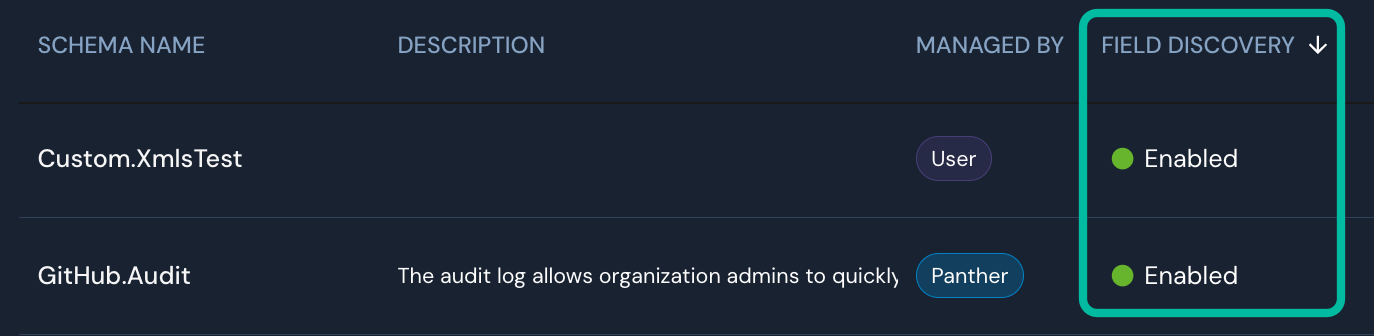
2. In the list, locate the schema for which you'd like to verify field discovery is enabled, and note the value in its **Field Discovery** column.
## How a schema is changed when a field is discovered
When a field is discovered:
* For a custom schema: The schema is updated to include the discovered field.
* For a Panther-managed schema: The schema in your Panther instance is updated to include the discovered field. If the field is discovered with regularity and stability across multiple Panther instances, it may be promoted permanently to the Panther-managed schema.
## Resetting discovered fields
You can clear all previously discovered fields for a schema by toggling **Field Discovery** `OFF` and then `ON` again. The discovered fields are dropped immediately, and Panther will begin rediscovering fields from incoming events going forward.
{% hint style="warning" %}
Resetting discovered fields removes them from your schema. Any detections or queries referencing those fields will no longer find them until they are rediscovered.
{% endhint %}
## Handling of special characters in field names
If the name of a discovered field contains a special character—i.e., a character that is not alphanumeric, an underscore (`_`), or a dash (`-`)— it will be transliterated using the algorithm below:
* `@` to `at_sign`
* `,` to `comma`
* `` ` `` to `backtick`
* `'` to `apostrophe`
* `$` to `dollar_sign`
* `*` to `asterisk`
* `&` to `ambersand`
* `!` to `exclamation`
* `%` to `percent`
* `+` to `plus`
* `/` to `slash`
* `\` to `backslash`
* `#` to `hash`
* `~` to `tilde`
* `=` to `eq`
Additionally, if a dash (`-`) or number is the first character of a field name, it will be transliterated. A dash becomes `dash`, and numbers are spelled out (e.g., `7` becomes `seven`).
All other ASCII characters (including `space`) will be replaced with an underscore (`_`). Non-ASCII characters are transliterated to their closest ASCII equivalent.
This transliteration affects only field names; values are not modified.
## Limitations of field discovery
Field discovery currently has the following limitations:
* The maximum number of top-level fields that can be discovered is 2,000. Within each `object` field, a maximum of 1,000 fields can be discovered.
* There is no limitation on the number of overall fields discovered.
* If your schema uses the [`csv` parser](/data-onboarding/custom-log-types/csv-parser.md) and you are parsing CSV logs without a header, only fields included in the `columns` section of your schema will be discovered.
* This does not apply if your schema uses the [`csv` parser](/data-onboarding/custom-log-types/csv-parser.md) and you are parsing CSV logs *with* a header.
* If your schema uses the [`fastmatch` parser](/data-onboarding/custom-log-types/fastmatch-parser.md), only fields defined inside the `match` patterns will be discovered.
* If your schema uses the [`regex` parser](/data-onboarding/custom-log-types/regex-parser.md), only fields defined inside the `match` patterns will be discovered.
---
# Agent Instructions
This documentation is published with GitBook. GitBook is the documentation platform designed so that both humans and AI agents can read, navigate, and reason over technical content effectively. Learn more at gitbook.com.
## Querying This Documentation
If you need additional information that is not directly available in this page, you can query the documentation dynamically by asking a question.
Perform an HTTP GET request on the current page URL with the `ask` query parameter, and the optional `goal` query parameter:
```
GET https://docs.panther.com/data-onboarding/field-discovery.md?ask=&goal=
```
`ask` is the immediate question: it should be specific, self-contained, and written in natural language.
`goal` is optional and describes the broader end goal you are ultimately trying to accomplish on behalf of the user. GitBook uses it to tailor the answer towards what is most useful for that goal.
The response will contain a direct answer to the question and relevant excerpts and sources from the documentation.
Use this mechanism when the answer is not explicitly present in the current page, you need clarification or additional context, or you want to retrieve related documentation sections.