> For the complete documentation index, see [llms.txt](https://docs.panther.com/llms.txt). Markdown versions of documentation pages are available by appending `.md` to page URLs; this page is available as [Markdown](https://docs.panther.com/enrichment/google-threat-intelligence.md).
# Google Threat Intelligence
Enrich incoming events with the Google Threat Intelligence IoC Stream
## Overview
[Google Threat Intelligence](https://www.virustotal.com/) provides comprehensive threat intelligence data. This integration uses the [Google Threat Intelligence IoC Stream API](https://gtidocs.virustotal.com/docs/ioc-stream-guide) to ingest a near real-time feed of Indicators of Compromise (IoCs) from the Google Threat Intelligence collections you follow, and matches them against log events ingested into Panther for high-fidelity alerts.
{% hint style="warning" %}
Google Threat Intelligence enrichment in Panther requires a [Premium API key](https://virustotal.readme.io/reference/public-vs-premium-api) and active IoC stream subscriptions in your Google Threat Intelligence account.
IoC streams are tied to a Google Threat Intelligence user: you only receive IoCs from collections that the user who owns the API key is following. Make sure the API key you provide to Panther belongs to the same Google Threat Intelligence user that subscribed to the collections you want to ingest.
{% endhint %}
## How Google Threat Intelligence enrichment works in Panther
By default, Google Threat Intelligence is configured to run against every log source in your Panther environment ([yet is possible to disable for a log type, if desired](#enabling-disabling-or-modifying-google-threat-intelligence-enrichment-for-a-log-type)). Panther will attempt to match each incoming log event, across all log types, against the Google Threat Intelligence Panther-managed enrichment before it passes through the detection engine.
If Panther [identifies a match](#how-a-match-between-a-log-event-and-google-threat-intelligence-is-made) between an incoming event and Google Threat Intelligence entry, Google Threat Intelligence data is appended to the matching log event under a top-level `p_enrichment` key. It can then be referenced in detection logic and searches.
Panther pulls new IoCs from your subscribed Google Threat Intelligence collections every hour. Each pull fetches only the IoCs added to the stream since the last successful run, and previously pulled IoCs are retained in the lookup table (deduplicated by the IoC `id`). IoCs older than the configured maximum age are automatically filtered out on each refresh.
For more information on detection writing using an enrichment source, see [Writing a detection using custom enrichment data](/enrichment/custom.md#writing-a-detection-using-custom-enrichment-data).
### How a match between a log event and Google Threat Intelligence is made
A log event is enriched with Google Threat Intelligence Panther-managed enrichment data (under `p_enrichment`) if a match is found between:
* Any of the values of the Selector field(s) configured for each associated log type.
* For each log type, the default Selectors are the [Indicator Fields](/search/panther-fields.md#indicator-fields) (represented by `p_any_*`) associated with the enrichment table's primary key's indicator field designations (though the Selectors are configurable). [Learn more about this auto-mapping here](/enrichment/custom.md#option-2-let-log-types-and-selectors-be-automatically-mapped-by-indicator-fields).
* The value of the `match` key in a Google Threat Intelligence table entry in Panther.
* `match` is the primary key of the Google Threat Intelligence table and contains the indicator value (IP address, domain, file hash, URL, etc.).
* See an example of `match` in the [Example Google Threat Intelligence table entry](#example-google-threat-intelligence-enrichment-table-entry) below.
## Setting up Google Threat Intelligence enrichment
### Step 1: Configure Google Threat Intelligence IoC collections
Before setting up Google Threat Intelligence enrichment in Panther, you must configure IoC stream subscriptions in your Google Threat Intelligence account so that Panther can pull threat intelligence data.
1. Log in to [Google Threat Intelligence](https://www.virustotal.com/).
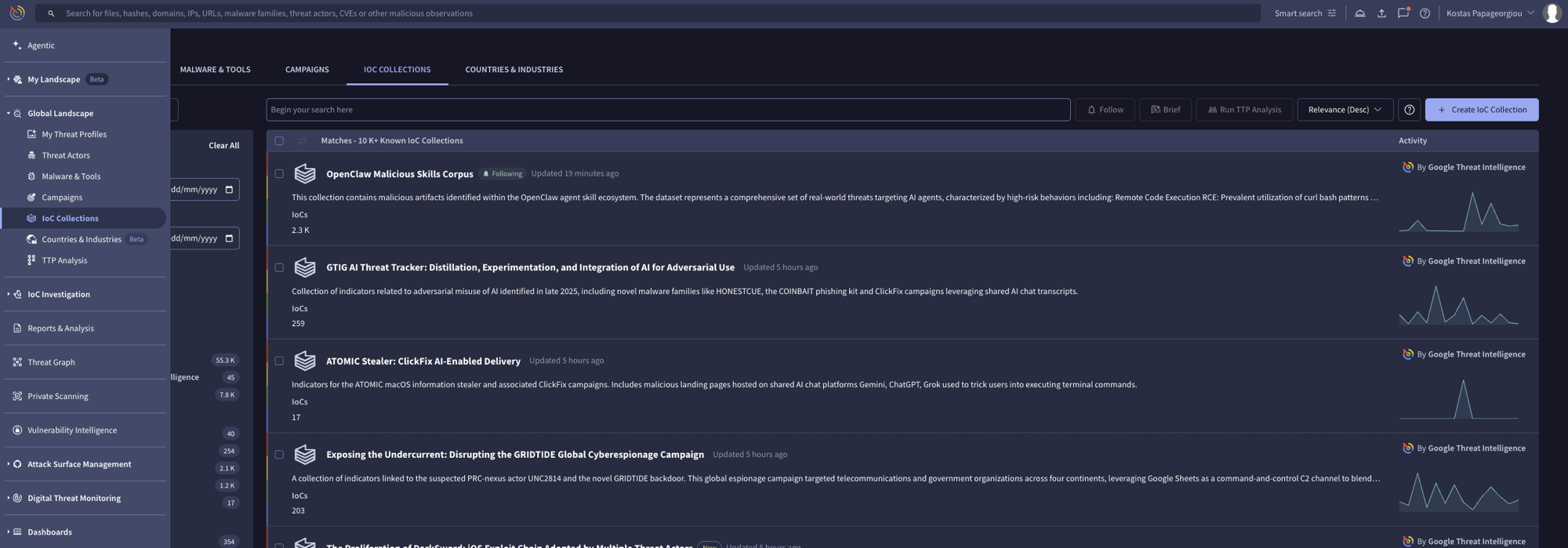
2. Navigate to the **IoC Collections** section in your dashboard.
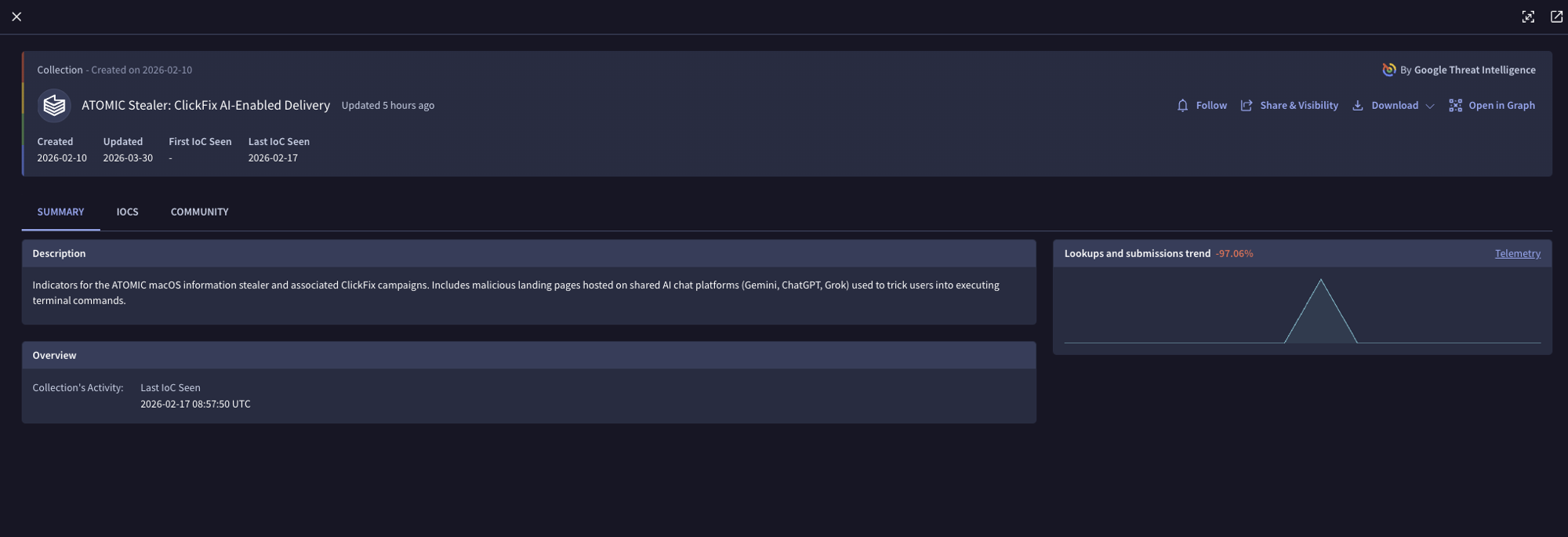
3. Find the collection(s) you are interested in and click on them.
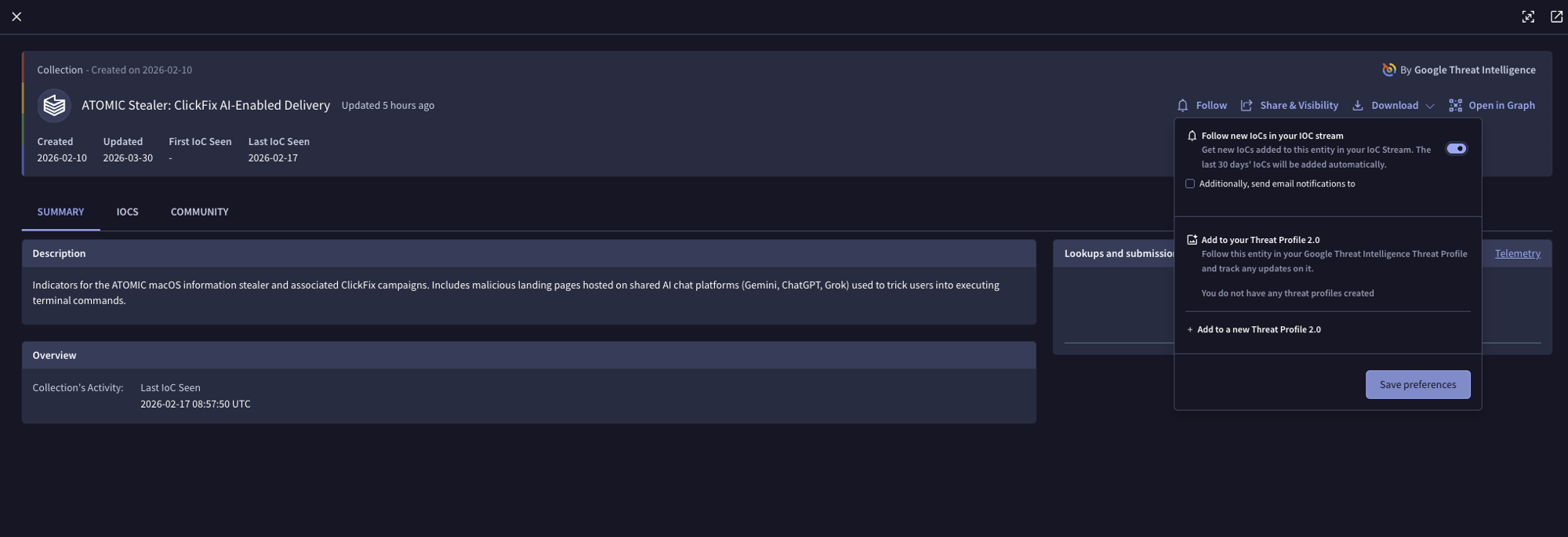
4. For each collection you want to monitor:
* Click **Follow**.
* Enable the toggle to get new IoCs in your stream.
* Click **Save preferences**.
5. Repeat for all collections you want to subscribe to.
{% hint style="info" %}
For detailed guidance on IoC streams, see the [Google Threat Intelligence IoC Stream Guide](https://gtidocs.virustotal.com/docs/ioc-stream-guide).
{% endhint %}
### Step 2: Create the Google Threat Intelligence enrichment in Panther
To configure Google Threat Intelligence enrichment in Panther:
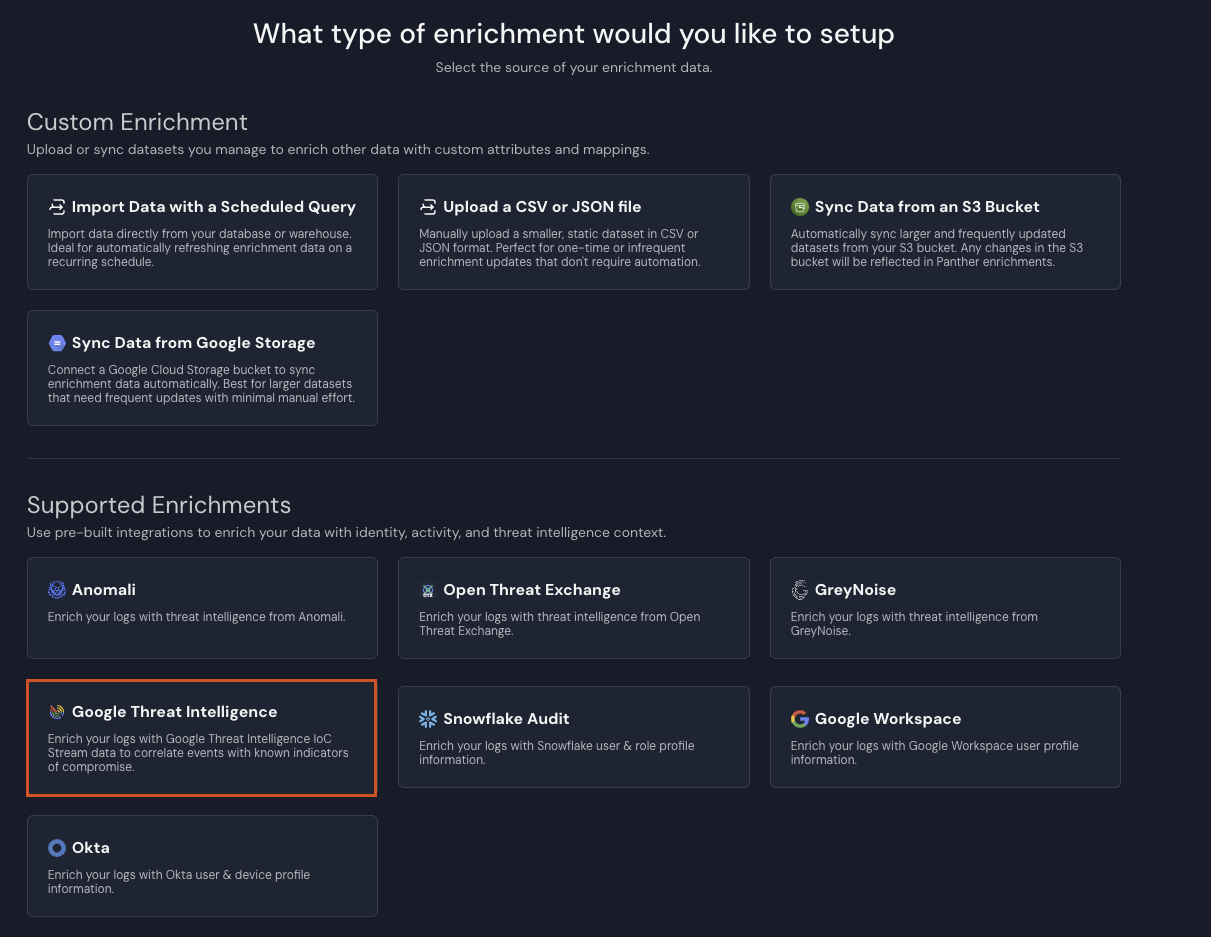
1. In the left-hand navigation bar of your Panther Console, click **Enrichments**.
2. In the upper-right corner, click **Create New**.
3. Click **Google Threat Intelligence**.
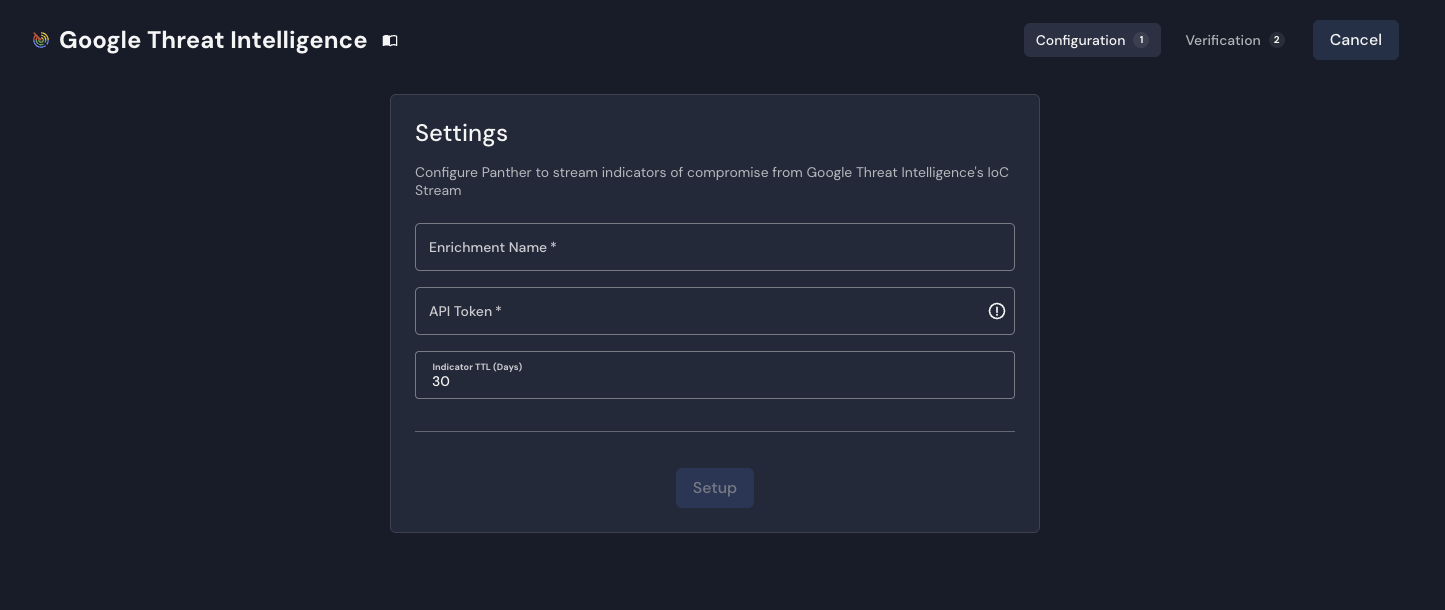
4. On the **Configuration** tab, in the **Settings** form, provide values for the following fields:
* **Enrichment Name**: Enter a descriptive name for your integration.
* **API Token**: Enter your Google Threat Intelligence API key.
* **Indicator TTL (Days)**: Configure the maximum age in days for IoCs to retain in the enrichment table. IoCs older than this cutoff are automatically filtered out during each refresh and are permanently removed.
5. Click **Setup**.
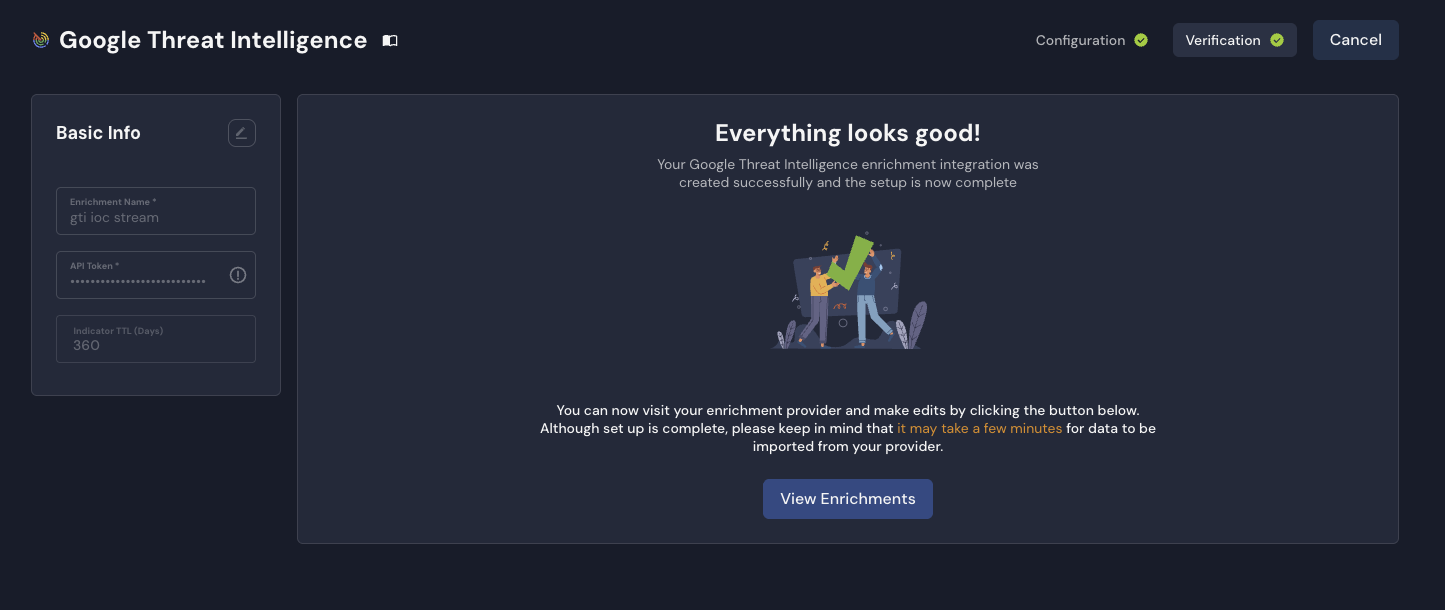
6. On the **Verification** tab, confirm the integration was created successfully, then click **View Enrichments**.
* Your new Google Threat Intelligence configuration will be visible in the **Enrichments** page.
{% hint style="info" %}
After adding a Google Threat Intelligence enrichment, there may be a delay (a few minutes) before incoming log data begins to be enriched. This allows time for the initial data synchronization to complete.
{% endhint %}
## Enabling, disabling, or modifying Google Threat Intelligence enrichment for a log type
Google Threat Intelligence enrichment is enabled by default for each log type in your Panther instance.
If you'd like to disable (or later enable) Google Threat Intelligence enrichment for a certain log type, or alter a log type's selectors:
1. In the left-hand navigation bar in your Panther Console, click **Enrichments**.
2. In the list of Enrichments, locate the Google Threat Intelligence source you'd like to modify, and click its name.
3. Click on the **Enriched Log Types** tab.
4. On the right-hand side, click **Edit Log Types**.
* If you'd like to enable this enrichment for a new log type, click **Add Log Type**.
* In the new row that populates, select a **Log Type** and, in the **Selectors** field, at least one event field.
* If you'd like to disable this enrichment for a log type, locate that log type's row, and click the trash icon.
* If you don't see a log type listed, click on the drop-down arrow next to **Auto-mapped Log Types**. Locate the log type's row and click the edit icon.
* If you'd like to alter the selectors for a log type, click into the **Selectors** field and add or remove selections for event fields.
5. In the upper-right corner, click **Save**.
## Example Google Threat Intelligence enrichment table entry
The below is an example of a Google Threat Intelligence IoC entry normalized by Panther. Each IoC from a subscribed collection creates its own row, with the indicator value stored in the `match` field.
```json
{
"match": ["198.51.100.42"],
"type": "ip_address",
"id": "198.51.100.42",
"gti_url": "https://www.virustotal.com/gui/ip-address/198.51.100.42",
"last_analysis_date": "2025-03-10T14:30:00Z",
"tags": ["malware", "c2"],
"country": "US",
"as_owner": "Example ISP",
"asn": 12345,
"network": "198.51.100.0/24",
"continent": "NA",
"regional_internet_registry": "ARIN",
"reputation": -15,
"last_analysis_stats": {
"malicious": 12,
"suspicious": 3,
"undetected": 55,
"harmless": 2,
"timeout": 0
},
"p_event_time": "2025-03-10T14:30:00Z",
"p_log_type": "GTI.IoCStream",
"p_parse_time": "2025-03-10T15:00:00Z",
"p_row_id": "abc123def456ghi789",
"p_schema_version": 0
}
```
### `GTI.IoCStream` schema
The following is the Panther-managed `GTI.IoCStream` schema, representing how Google Threat Intelligence IoC data is stored in Panther. Each indicator from a subscribed collection becomes its own row.
```yaml
schema: GTI.IoCStream
description: Google Threat Intelligence (GTI) indicators of compromise (IoCs) from GTI IoC Stream API, including files, IPs, domains, and URLs
referenceURL: https://gtidocs.virustotal.com/reference/ioc-collection-object
fields:
- name: match
required: true
description: The indicator value (e.g., file hash, IP address, domain, URL).
type: array
element:
type: string
indicators:
- ip
- domain
- md5
- sha1
- sha256
- url
- name: type
required: true
description: 'The type of indicator: file, ip_address, domain, or url.'
type: string
- name: gti_url
description: Direct link to this indicator on Google Threat Intelligence.
type: string
- name: id
description: Unique identifier for the Indicator of Compromise.
type: string
- name: last_analysis_date
description: UTC timestamp representing the last time the indicator was scanned.
type: timestamp
timeFormats:
- unix
isEventTime: true
- name: tags
description: List of representative attributes associated with this indicator.
type: array
element:
type: string
- name: last_modified_date
description: UTC timestamp representing the last time the indicator's information was updated (file/domain/url types).
type: timestamp
timeFormats:
- unix
- name: last_modification_date
description: UTC timestamp representing the last time the indicator's information was updated (ip_address type).
type: timestamp
timeFormats:
- unix
- name: first_seen_itw_date
description: UTC timestamp when the indicator was first seen in the wild.
type: timestamp
timeFormats:
- unix
- name: last_seen_itw_date
description: UTC timestamp of the most recent observation of the indicator in the wild.
type: timestamp
timeFormats:
- unix
- name: creation_date
description: UTC timestamp extracted from the file's metadata or domain WHOIS data when possible.
type: timestamp
timeFormats:
- unix
- name: last_submission_date
description: UTC timestamp of the most recent date the indicator was posted to Google Threat Intelligence.
type: timestamp
timeFormats:
- unix
- name: type_tags
description: Broader tags related to the specific file type.
type: array
element:
type: string
- name: threat_severity
description: Threat severity level and details, including severity level (SEVERITY_NONE, LOW, MEDIUM, HIGH, or UNKNOWN) and the timestamp when it was calculated.
type: json
- name: meaningful_name
description: The most interesting name out of all the file's names.
type: string
- name: type_description
description: Describes the file type (e.g., PE32 executable, PDF document).
type: string
- name: country
description: ISO-3166 country code indicating where the IP address is geographically situated.
type: string
- name: as_owner
description: Owner of the Autonomous System to which the IP belongs.
type: string
- name: asn
description: Autonomous System Number to which the IP belongs.
type: bigint
- name: network
description: IPv4 network range to which the IP belongs.
type: string
indicators:
- net_addr
- name: categories
description: Dictionary mapping categorization services to the category assigned to the domain or URL.
type: json
- name: whois
description: WHOIS information as returned from the pertinent whois server.
type: string
- name: url
description: The original URL that was scanned.
type: string
indicators:
- url
- name: last_final_url
description: If the original URL redirects, the final destination URL.
type: string
indicators:
- url
- name: md5
description: The file's MD5 hash.
type: string
indicators:
- md5
- name: sha1
description: The file's SHA-1 hash.
type: string
indicators:
- sha1
- name: sha256
description: The file's SHA-256 hash.
type: string
indicators:
- sha256
- name: gti_confidence_score
description: Confidence score (0-100) indicating likelihood of being malicious.
type: bigint
- name: reputation
description: Score calculated from community votes.
type: bigint
- name: size
description: File size in bytes.
type: bigint
- name: type_extension
description: Specifies the file extension.
type: string
- name: type_tag
description: Tag representing file type for filtering in searches.
type: string
- name: names
description: All file names associated with the file.
type: array
element:
type: string
- name: first_submission_date
description: UTC timestamp when the indicator was first submitted to Google Threat Intelligence.
type: timestamp
timeFormats:
- unix
- name: times_submitted
description: Number of times the indicator has been posted to Google Threat Intelligence.
type: bigint
- name: unique_sources
description: Number of different sources the file has been posted from.
type: bigint
- name: tlsh
description: File's TLSH locality-sensitive hash.
type: string
- name: permhash
description: File's Permhash.
type: string
- name: vhash
description: In-house similarity clustering algorithm value.
type: string
- name: capabilities_tags
description: Tags related to file capabilities (premium only).
type: array
element:
type: string
- name: downloadable
description: Whether the file can be downloaded (premium only).
type: boolean
- name: continent
description: Geographic region code using ISO-3166 format.
type: string
- name: jarm
description: JARM hash for TLS fingerprinting.
type: string
- name: last_https_certificate_date
description: UTC timestamp when the SSL certificate was retrieved.
type: timestamp
timeFormats:
- unix
- name: regional_internet_registry
description: RIR designation (AFRINIC, ARIN, APNIC, LACNIC, or RIPE NCC).
type: string
- name: whois_date
description: UTC timestamp of the last WHOIS record refresh.
type: timestamp
timeFormats:
- unix
- name: last_http_response_code
description: HTTP response status code.
type: bigint
- name: last_http_response_content_length
description: Response content size in bytes.
type: bigint
- name: last_http_response_content_sha256
description: SHA256 hash of the HTTP response body content.
type: string
indicators:
- sha256
- name: outgoing_links
description: Links to different domains found on the page.
type: array
element:
type: string
indicators:
- url
- name: redirection_chain
description: Redirect history URLs (excluding the final URL).
type: array
element:
type: string
indicators:
- url
- name: title
description: Webpage title.
type: string
- name: has_content
description: Whether the URL contains content.
type: boolean
- name: last_dns_records_date
description: UTC timestamp when DNS records were retrieved.
type: timestamp
timeFormats:
- unix
- name: last_update_date
description: Updated date from WHOIS (UTC).
type: timestamp
timeFormats:
- unix
- name: registrar
description: Company that registered the domain.
type: string
- name: last_analysis_stats
description: Summary of the latest scan results, including counts of malicious, suspicious, undetected, harmless, timeout, confirmed-timeout, failure, and type-unsupported verdicts.
type: json
- name: trid
description: TrID file type identification results, each containing the detected file_type and its probability.
type: array
element:
type: json
- name: available_tools
description: List of additional analysis tools available for the file (e.g., sigcheck, exiftool).
type: array
element:
type: string
- name: detectiteasy
description: Detect It Easy file type identification results, including filetype and an array of matched values with type, name, and info.
type: json
- name: popular_threat_classification
description: Threat classification based on popular detection names and categories, including suggested_threat_label, popular_threat_name, and popular_threat_category.
type: json
- name: exiftool
description: Metadata extracted by the ExifTool utility, including file type, MIME type, CPU architecture, and other format-specific metadata fields.
type: json
- name: crowdsourced_ai_results
description: Crowdsourced AI analysis results, each containing a natural language analysis summary, source, category, verdict, and result ID.
type: array
element:
type: json
- name: sources
description: The different sources associated to the IoC item.
type: array
element:
type: json
```
## Example of using Google Threat Intelligence data in detections
Google Threat Intelligence enrichment data can be used in detection logic to identify known threats. The following example checks whether an event matched a Google Threat Intelligence indicator and whether it was flagged as malicious:
```python
def rule(event):
enrichment = event.get('p_enrichment', {})
gti_data = enrichment.get('GTI.IoCStream', {})
if not gti_data:
return False
# Check the analysis stats for malicious verdicts
stats = gti_data.get('last_analysis_stats', {})
malicious_count = stats.get('malicious', 0)
return malicious_count > 0
```
## Troubleshooting Google Threat Intelligence enrichment
### Common issues
* **No data being pulled**: Ensure you have active IoC collection subscriptions in your Google Threat Intelligence account. You must follow and enable at least one collection for Panther to receive data. Also confirm the API key configured in Panther belongs to the same Google Threat Intelligence user that subscribed to those collections — IoC streams are scoped per user, so a key from a different user will return an empty stream.
* **API key issues**: Verify your Google Threat Intelligence API key is valid, is a [Premium API key](https://virustotal.readme.io/reference/public-vs-premium-api), and has the appropriate permissions for IoC stream access.
* **Data freshness**: Check your **Indicator TTL (Days)** setting to ensure it's appropriate for your use case. IoCs older than this threshold are automatically filtered out.
For additional troubleshooting, visit the Panther Knowledge Base to [view articles about enrichment](https://help.panther.com/Enrichment) that answer frequently asked questions and help you resolve common errors and issues.
---
# Agent Instructions
This documentation is published with GitBook. GitBook is the documentation platform designed so that both humans and AI agents can read, navigate, and reason over technical content effectively. Learn more at gitbook.com.
## Querying This Documentation
If you need additional information that is not directly available in this page, you can query the documentation dynamically by asking a question.
Perform an HTTP GET request on the current page URL with the `ask` query parameter, and the optional `goal` query parameter:
```
GET https://docs.panther.com/enrichment/google-threat-intelligence.md?ask=&goal=
```
`ask` is the immediate question: it should be specific, self-contained, and written in natural language.
`goal` is optional and describes the broader end goal you are ultimately trying to accomplish on behalf of the user. GitBook uses it to tailor the answer towards what is most useful for that goal.
The response will contain a direct answer to the question and relevant excerpts and sources from the documentation.
Use this mechanism when the answer is not explicitly present in the current page, you need clarification or additional context, or you want to retrieve related documentation sections.