> For the complete documentation index, see [llms.txt](https://docs.panther.com/llms.txt). Markdown versions of documentation pages are available by appending `.md` to page URLs; this page is available as [Markdown](https://docs.panther.com/ko/data-onboarding/supported-logs/axonius.md).
# Axonius 로그
Panther 콘솔에서 Axonius 로그를 연결
## 개요
Panther가 수집합니다 [Axonius](https://www.axonius.com/) Axonius를 구성하여 Panther의 HTTP 엔드포인트로 로그를 전송함으로써 활동 로그를 수집합니다.
Axonius는 환경 내의 디바이스, 사용자, 소프트웨어에 대한 가시성과 제어 기능을 제공하는 사이버 보안 자산 관리 플랫폼입니다.
## Axonius 로그를 Panther에 연동하는 방법
### 1단계: Panther에서 새 Axonius 소스 생성
1. Panther Console의 왼쪽 탐색 표시줄에서 **로그 소스**.
2. 클릭 **새로 만들기**.
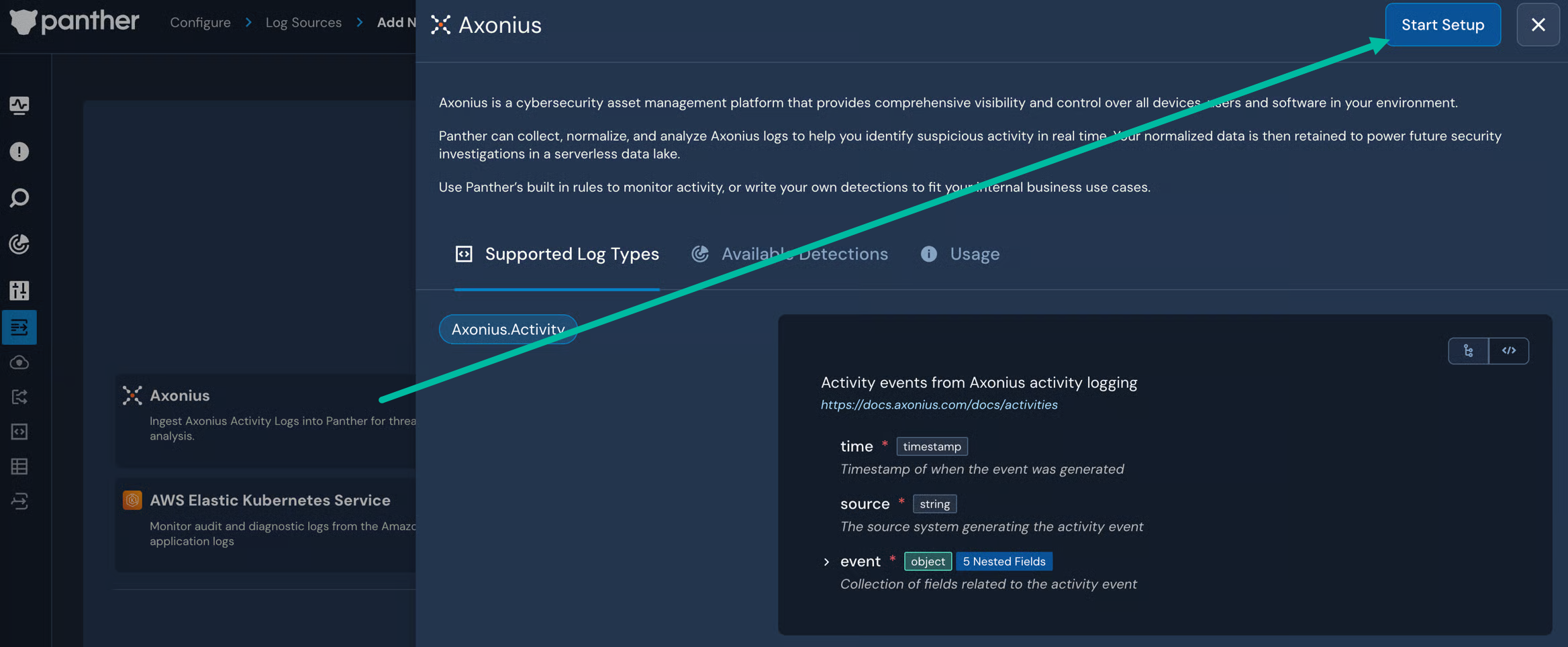
3. "Axonius"를 검색한 다음 해당 타일을 클릭합니다.
4. 슬라이드아웃 패널에서 **설정 시작**.
5. 따르세요 [HTTP 소스를 구성하기 위한 Panther의 지침](/ko/data-onboarding/data-transports/http.md#how-to-set-up-an-http-log-source-in-panther), 5단계부터 시작합니다.
* 다음을 설정할 때 **인증 방식** 소스에 대해 다음 중에서 선택하게 됩니다 [공유 비밀](/ko/data-onboarding/data-transports/http.md#shared-secret), [베어러](/ko/data-onboarding/data-transports/http.md#bearer), 그리고 [기본](/ko/data-onboarding/data-transports/http.md#basic). 공유 비밀 사용을 권장합니다.
* 다음을 선택하면 **SharedSecret**, 해당 **헤더 이름** 값이 다음으로 고정됩니다 `x-panther-axonius`.
* 이 소스로 전송된 페이로드는 다음의 적용을 받습니다 [모든 HTTP 소스의 페이로드 요구 사항](/ko/data-onboarding/data-transports/http.md#payload-requirements).
* HTTP 엔드포인트 생성이 완료될 때까지 다음 단계로 진행하지 마십시오.
### 2단계: Axonius에서 HTTPS 웹훅 만들기
* Axonius에서 HTTPS 웹훅을 만들려면 다음의 지침을 따르세요 [Axonius HTTPS 로그 설정 구성 문서](https://docs.axonius.com/docs/configuring-https-log-settings).
* 다음의 **HTTPS 로그 호스트** 필드에 1단계에서 생성한 URL을 입력합니다.
* 1단계에서 사용한 방식에 따라 인증을 구성합니다:
* 공유 비밀 인증을 사용한 경우 다음의 **사용자 지정 요청 헤더(JSON 형식)**에 다음을 입력합니다 `{"x-panther-axonius": "[your-shared-secret-token]"}`.
* 베어러 인증을 사용한 경우 다음의 **Authorization 헤더** 필드에 다음을 입력합니다 `Bearer `.
* 기본 인증을 사용한 경우 다음의 **Authorization 헤더** 필드에 다음을 입력합니다 `Basic `.
## 지원되는 로그 유형
### Axonius.Activity
```yaml
스키마: Axonius.Activity
설명: Axonius 활동 로깅의 활동 이벤트
참조 URL: https://docs.axonius.com/docs/activities
필드:
- 이름: time
필수: true
이벤트가 생성된 시점의 타임스탬프
유형: timestamp
시간 형식:
- unix
이벤트 시간 여부: true
- 이름: source
필수: true
활동 이벤트를 생성하는 소스 시스템
유형: string
- 이름: event
필수: true
활동 이벤트와 관련된 필드 모음
유형: object
필드:
- 이름: action
필수: true
설명: 수행된 구체적인 작업
유형: string
- 이름: category
필수: true
설명: 활동 이벤트의 범주
유형: string
- 이름: type
필수: true
설명: 이벤트의 유형/심각도 수준
유형: string
- 이름: user
설명: 이벤트와 연결된 사용자(사용자 시작 작업)
유형: string
- 이름: params
설명: 이벤트에 대한 추가 매개변수 및 세부 정보(구조는 이벤트 범주에 따라 다름)
유형: object
필드:
- 이름: source
설명: 작업에 관여한 소스 시스템 또는 통합(UserManagement 이벤트)
유형: string
- 이름: user_name
설명: 작업에 관여한 사용자의 사용자 이름 또는 이메일(UserManagement 이벤트)
유형: string
- 이름: adapter
설명: 작업에 관여한 어댑터 이름(CustomDiscovery, Adapters 이벤트)
유형: string
- 이름: client_id
설명: 어댑터 인스턴스의 클라이언트 식별자(Adapters 이벤트)
유형: string
- 이름: devices_count
설명: 처리된 디바이스 수(Adapters 이벤트)
유형: bigint
- 이름: users_count
설명: 처리된 사용자 수(Adapters 이벤트)
유형: bigint
- 이름: duration
설명: 어댑터 작업의 지속 시간(HH:MM:SS 형식)(Adapters 이벤트)
유형: string
- 이름: generic_counts_msg
설명: 처리된 엔터티에 대한 포괄적인 통계가 포함된 자세한 개수 메시지(Adapters 이벤트)
유형: string
- 이름: space_id
설명: 대시보드 공간의 고유 식별자(Dashboard 이벤트)
유형: json
- 이름: space_name
설명: 대시보드 공간의 사람이 읽을 수 있는 이름(Dashboard 이벤트)
유형: string
- 이름: ip
설명: 사용자 세션과 연결된 IP 주소(UserSession 이벤트)
유형: string
지표:
- ip
- 이름: status
설명: 인증 시도의 상태(UserSession 이벤트)
유형: string
- 이름: name
설명: 강제 적용 룰, 정책, 워크플로 또는 저장된 쿼리의 이름(Enforcements, Workflows, SavedQueries 이벤트)
유형: string
- 이름: access_type
설명: 저장된 쿼리의 접근 수준(SavedQueries 이벤트)
유형: string
- 이름: module
설명: 저장된 쿼리가 대상으로 하는 데이터 모듈(SavedQueries 이벤트)
유형: string
- 이름: action_name
설명: 실행 중인 작업의 설명적 이름(RunAction 이벤트)
유형: string
- 이름: enforcement
설명: 실행 중인 강제 적용 룰 식별자(Enforcements RunAction 이벤트)
유형: string
- 이름: workflow
설명: 실행 중인 워크플로 식별자 또는 이름(Workflows RunAction 이벤트)
유형: string
- 이름: run_id
설명: 작업 실행 추적용 실행 식별자(RunAction 이벤트)
유형: string
- 이름: id
설명: 액세스 중인 데이터 항목의 고유 식별자(Users ViewItem 이벤트)
유형: string
- 이름: config_id
설명: 웹훅 구성 식별자(WebhookManagement 이벤트)
유형: string
- 이름: vendor_name
설명: 외부 공급업체 또는 서비스 이름(WebhookManagement 이벤트)
유형: string
```
---
# Agent Instructions
This documentation is published with GitBook. GitBook is the documentation platform designed so that both humans and AI agents can read, navigate, and reason over technical content effectively. Learn more at gitbook.com.
## Querying This Documentation
If you need additional information that is not directly available in this page, you can query the documentation dynamically by asking a question.
Perform an HTTP GET request on the current page URL with the `ask` query parameter, and the optional `goal` query parameter:
```
GET https://docs.panther.com/ko/data-onboarding/supported-logs/axonius.md?ask=&goal=
```
`ask` is the immediate question: it should be specific, self-contained, and written in natural language.
`goal` is optional and describes the broader end goal you are ultimately trying to accomplish on behalf of the user. GitBook uses it to tailor the answer towards what is most useful for that goal.
The response will contain a direct answer to the question and relevant excerpts and sources from the documentation.
Use this mechanism when the answer is not explicitly present in the current page, you need clarification or additional context, or you want to retrieve related documentation sections.