> For the complete documentation index, see [llms.txt](https://docs.panther.com/llms.txt). Markdown versions of documentation pages are available by appending `.md` to page URLs; this page is available as [Markdown](https://docs.panther.com/ko/data-onboarding/supported-logs/gcp.md).
# GCP 로그
GCP 로그를 Panther 콘솔에 연결
## 개요
Panther는 수집을 지원합니다 [Google Cloud Platform (GCP)](https://cloud.google.com/) 공통 방식의 로그 [데이터 전송](https://docs.panther.com/data-onboarding/data-transports) 옵션.
{% hint style="info" %}
GCP 로그를 Panther에 연결하려면, 다음을 사용하는 것이 권장됩니다: [Pub/Sub Data Transport 소스](/ko/data-onboarding/data-transports/google/pubsub.md) 및 [log sink](https://cloud.google.com/logging/docs/routing/overview#sinks), 이렇게 하면 대기 시간이 가장 짧아집니다—대략 5분입니다.
대신 다음을 사용하면 [Google Cloud Storage (GCS) Data Transport 소스](/ko/data-onboarding/data-transports/google/cloud-storage.md) 와 log sink를 사용하면 로그가 Panther에 한 시간 단위로만 전달됩니다.
{% endhint %}
## GCP 로그를 Panther에 온보딩하는 방법
### 사전 요구 사항
* Google Cloud 서비스에 기본 Data Access 감사 로깅 구성을 설정합니다:
1. GCP 콘솔에서 다음으로 이동하세요: **IAM & Admin** 서비스. 탐색 표시줄에서 클릭합니다 **Audit Logs**.
2. 클릭합니다 **기본 구성 설정**.\ 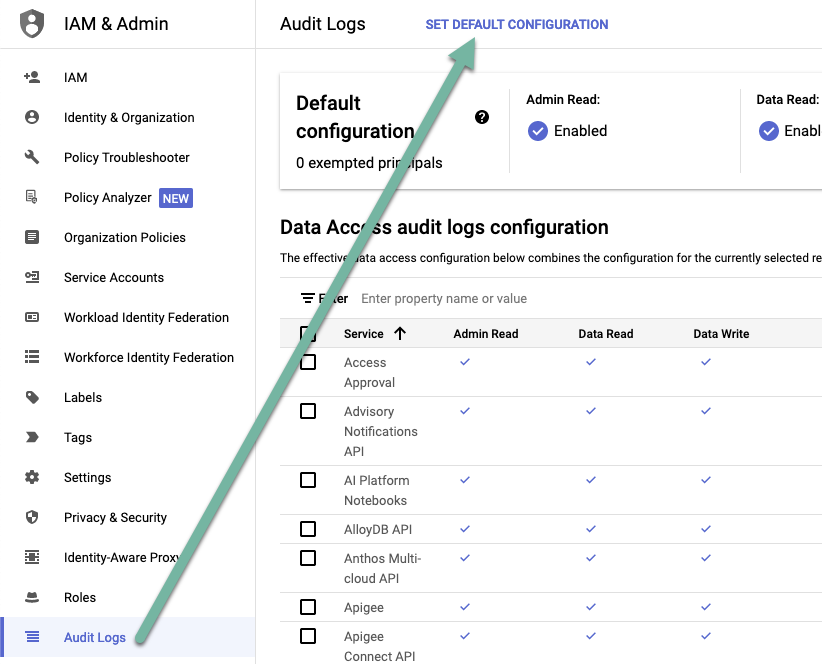 3. 다음 **로그 유형** 탭에서 다음 유형의 확인란을 선택합니다: **관리자 읽기**, **데이터 읽기**, 및 **데이터 쓰기**.\

4. 클릭합니다 **저장**.
{% hint style="info" %}
Google Cloud 서비스에 대한 기본 Data Access 감사 로그 구성을 설정하는 방법은 GCP 문서에서도 확인할 수 있습니다: [기본 구성 설정](https://cloud.google.com/logging/docs/audit/configure-data-access#config-console-default).
{% endhint %}
### 1단계: Panther에서 Google Cloud 소스 만들기
1. Panther Console의 왼쪽 탐색 모음에서 **로그 소스**.
2. 클릭합니다 **새로 만들기**.
3. "GCP"를 검색한 다음 Google Cloud 타일을 클릭합니다.
4. 슬라이드아웃 패널의 **전송 메커니즘** 오른쪽 상단 드롭다운에서 **Google Cloud Pub/Sub**.
* 다음의 [데이터 전송](/ko/data-onboarding/data-transports.md) 옵션 중 아무 것이나 사용할 수 있지만, Pub/Sub를 다음과 함께 사용하는 것이 권장됩니다: [log sink](https://cloud.google.com/logging/docs/routing/overview#sinks)이는 다음 단계에서 구성하게 됩니다.
5. 선택한 [데이터 전송](/ko/data-onboarding/data-transports.md).
* Pub/Sub를 선택한 경우, 다음 [Pub/Sub Source 지침](/ko/data-onboarding/data-transports/google/pubsub.md#how-to-set-up-a-cloud-pub-sub-log-source-in-panther).
### 2단계: GCP가 로그를 Data Transport 소스로 푸시하도록 구성하기
* 선택한 Data Transport 소스로 로그를 전달하는 방법은 GCP 문서를 참조하세요.
* 다음을 사용하는 경우 [Pub/Sub](/ko/data-onboarding/data-transports/google/pubsub.md) 또는 [Google Cloud Storage](/ko/data-onboarding/data-transports/google/cloud-storage.md) 를 Data Transport로 [log sink를 구성하세요](https://cloud.google.com/logging/docs/routing/overview#sinks).
* log sink에서 포함 또는 제외 필터를 구성하는 방법은 다음에 대한 Panther Knowledge Base 문서를 참조하세요: [GCP 로그에 대한 포함 필터](https://help.panther.com/articles/8343852886-what-inclusion-filter-should-i-use-in-my-gcs-logging-sink-to-only-push-panther-supported-gcp-logs-to-panther) 및 [GCP 통합에서 로그 제외](https://help.panther.com/articles/5981620705-how-can-i-exclude-logs-from-my-panther-gcp-integration).
## 동영상 안내: GCS를 사용한 설정
{% hint style="warning" %}
아래 동영상은 GCS를 사용해 GCP 로그를 전달하는 방법을 보여주지만, [GCS](/ko/data-onboarding/data-transports/google/cloud-storage.md)대신 다음을 사용하는 것이 권장됩니다: [Pub/Sub](/ko/data-onboarding/data-transports/google/pubsub.md) GCS보다 낮은 지연 시간을 제공하므로
{% endhint %}
{% embed url="" %}
## Panther 관리형 탐지
다음을 참조하세요: [Panther 관리형](https://docs.panther.com/detections/panther-managed) Google Cloud Platform용 규칙을 [panther-analysis GitHub 저장소의](https://github.com/panther-labs/panther-analysis/tree/main/rules).
## 지원되는 로그 유형
### GCP.AccessTransparency
Access Transparency 로그는 Google 직원이 고객 콘텐츠에 액세스할 때 수행한 활동을 기록합니다. 이러한 로그는 액세스 사유와 수행한 작업 등을 기록하여 Google Cloud 지원 작업에 대한 가시성을 제공하고 규정 준수 요구 사항을 충족하는 데 도움이 됩니다.
자세한 내용은 다음을 참조하세요 [Access Transparency 로그에 대한 GCP 문서](https://cloud.google.com/assured-workloads/access-transparency/docs/reading-logs).
```yaml
스키마: GCP.AccessTransparency
설명: |
Access Transparency 로그는 Google 직원이 고객 콘텐츠에 액세스할 때 수행한 활동을 기록합니다.
이러한 로그는 Google Cloud 지원 작업에 대한 가시성을 제공하고 규정 준수 요구 사항을 충족하는 데 도움이 됩니다.
참조 URL: https://cloud.google.com/assured-workloads/access-transparency/docs/reading-logs
필드:
- 이름: logName
필수: true
설명: 이 로그 항목이 속한 로그의 리소스 이름입니다.
유형: string
검증:
allowContains: ['cloudaudit.googleapis.com%2Faccess_transparency']
- 이름: severity
설명: 로그 항목의 심각도입니다. 기본값은 LogSeverity.DEFAULT입니다.
유형: string
- 이름: insertId
설명: 로그 항목의 고유 식별자입니다.
유형: string
- 이름: resource
설명: 이 로그 항목을 생성한 모니터링된 리소스입니다.
유형: object
필드:
- 이름: type
필수: true
설명: 이 로그 항목을 생성한 리소스의 유형
유형: string
- 이름: labels
설명: 리소스를 설명하는 라벨
유형: json
- 이름: timestamp
설명: 로그 항목에 설명된 이벤트가 발생한 시각입니다.
유형: timestamp
시간 형식:
- rfc3339
이벤트 시간 여부: true
- 이름: receiveTimestamp
설명: Logging이 로그 항목을 수신한 시각입니다.
유형: timestamp
시간 형식:
- rfc3339
이벤트 시간 여부: true
- 이름: labels
설명: 로그 항목에 대한 추가 정보를 제공하는 사용자 정의 (키, 값) 데이터 집합입니다.
유형: json
- 이름: operation
설명: 해당하는 경우 로그 항목과 관련된 작업에 대한 정보입니다.
유형: object
필드:
- 이름: id
설명: 동일한 식별자를 가진 로그 항목은 동일한 작업의 일부로 간주됩니다.
유형: string
- 이름: producer
설명: 임의의 producer 식별자입니다. id와 producer의 조합은 전역적으로 고유해야 합니다.
유형: string
- 이름: first
설명: 작업의 첫 번째 항목입니다
유형: boolean
- 이름: last
설명: 작업의 마지막 항목입니다
유형: boolean
- 이름: trace
설명: 해당하는 경우 로그 항목과 연결된 trace의 리소스 이름입니다. trace 필드는 로그와 trace를 연결합니다.
유형: string
- 이름: spanId
설명: 로그 항목과 연결된 trace 내의 span ID입니다.
유형: string
- 이름: traceSampled
설명: 로그 항목과 연결된 trace의 샘플링 결정입니다.
유형: boolean
- 이름: sourceLocation
설명: 해당하는 경우 로그 항목과 연결된 소스 코드 위치 정보입니다.
유형: object
필드:
- 이름: file
설명: 소스 파일 이름입니다. 런타임 환경에 따라 단순 이름이거나 전체 정규화된 이름일 수 있습니다.
유형: string
- 이름: line
설명: 소스 파일 내의 줄 번호입니다. 1부터 시작하며, 0은 사용 가능한 줄 번호가 없음을 의미합니다.
유형: bigint
- 이름: function
설명: 호출되는 함수 또는 메서드의 사람이 읽을 수 있는 이름이며, 클래스나 패키지 이름과 같은 선택적 컨텍스트를 포함합니다. 형식은 언어에 따라 다를 수 있습니다
유형: string
- 이름: jsonPayload
필수: true
설명: Access Transparency 로그 페이로드
유형: object
필드:
- 이름: at_sign_type
필수: true
설명: 페이로드의 유형이며 type.googleapis.com/google.cloud.audit.TransparencyLog여야 합니다
이름 바꾸기:
from: '@type'
유형: string
- 이름: location
접근자에 대한 지리적 데이터
유형: object
필드:
- 이름: principalOfficeCountry
설명: Google 직원의 영구적인 책상 위치에 대한 ISO 3166-1 alpha-2 국가 코드
유형: string
- 이름: principalEmployingEntity
설명: Google 직원의 고용 주체입니다(예: Google LLC)
유형: string
- 이름: principalPhysicalLocationCountry
설명: 액세스가 시작된 물리적 위치에 대한 ISO 3166-1 alpha-2 국가 코드
유형: string
- 이름: principalJobTitle
설명: 리소스에 액세스한 Google 직원의 직무 분류입니다(예: 엔지니어링, 지원)
유형: string
- 이름: product
설명: 액세스된 GCP 서비스 목록
유형: array
요소:
유형: string
- 이름: reason
설명: 액세스에 대한 정당화 세부정보
유형: array
요소:
유형: object
필드:
- 이름: type
설명: 사유 분류(예: CUSTOMER_INITIATED_SUPPORT, GOOGLE_INITIATED_SERVICE, GOOGLE_INITIATED_REVIEW, THIRD_PARTY_DATA_REQUEST, GOOGLE_RESPONSE_TO_PRODUCTION_알러트)
유형: string
- 이름: detail
설명: 구체적인 정당화 텍스트(예: 사건 번호, 티켓 참조)
유형: string
- 이름: permissionDetails
설명: 액세스에 대한 IAM 권한 정보
유형: array
요소:
유형: object
필드:
- 이름: permissionType
설명: 최대 IAM 권한 범주(admin_read, admin_write, data_read, data_write)
유형: string
- 이름: logAccessed
설명: 액세스가 로그 데이터로만 제한되었는지 여부를 나타내는 부울
유형: boolean
- 이름: eventId
설명: 이 액세스 정당화에 대한 고유 이벤트 식별자
유형: string
- 이름: accesses
설명: Google 직원이 수행한 특정 작업
유형: array
요소:
유형: object
필드:
- 이름: methodName
설명: 작업 유형(표준 API 메서드, 사용자 지정 메서드 또는 GoogleInternal 메서드)
유형: string
- 이름: resourceName
설명: 액세스된 전체 리소스 식별자(예: //googleapis.com/storage/buckets/BUCKET_NAME/objects/OBJECT_NAME)
유형: string
- 이름: accessApprovals
설명: 이 액세스와 관련된 Access Approval 요청 리소스 이름 목록
유형: array
요소:
유형: string
```
### GCP.AuditLog
GCP.AuditLog 스키마는 Google Cloud 감사 로그의 네 가지 유형을 모두 수집할 수 있도록 지원합니다:
* [관리자 활동 감사 로그](https://cloud.google.com/logging/docs/audit#admin-activity)
* [Data Access 감사 로그](https://cloud.google.com/logging/docs/audit#data-access)
* [시스템 이벤트 감사 로그](https://cloud.google.com/logging/docs/audit#system-event)
* [정책 거부 감사 로그](https://cloud.google.com/logging/docs/audit#policy_denied)
자세한 내용은 다음을 참조하세요 [Cloud Audit Logs에 대한 GCP 문서.](https://cloud.google.com/logging/docs/audit)
```yaml
스키마: GCP.AuditLog
설명: |
Cloud Audit Logs는 각 Google Cloud 프로젝트, 폴더, 조직에 대해 Admin Activity, Data Access, System Event 및 Policy Denied 감사 로그를 유지합니다.
Google Cloud 서비스는 이러한 로그에 감사 로그 항목을 작성하여 Google Cloud 리소스 내에서 "누가, 무엇을, 어디서, 언제 했는가?"에 대한 질문에 답할 수 있도록 도와줍니다.
참조 URL: https://cloud.google.com/logging/docs/audit
필드:
- 이름: logName
필수: true
설명: 이 로그 항목이 속한 로그의 리소스 이름입니다.
유형: string
- 이름: severity
설명: 로그 항목의 심각도입니다. 기본값은 LogSeverity.DEFAULT입니다.
유형: string
- 이름: insertId
설명: 로그 항목의 고유 식별자입니다.
유형: string
- 이름: resource
설명: 이 로그 항목을 생성한 모니터링된 리소스입니다.
유형: object
필드:
- 이름: type
필수: true
설명: 이 로그 항목을 생성한 리소스의 유형
유형: string
- 이름: labels
설명: 리소스를 설명하는 라벨
유형: json
- 이름: timestamp
설명: 로그 항목에 설명된 이벤트가 발생한 시각입니다.
유형: timestamp
시간 형식:
- rfc3339
이벤트 시간 여부: true
- 이름: receiveTimestamp
필수: true
설명: Logging이 로그 항목을 수신한 시각입니다.
유형: timestamp
시간 형식:
- rfc3339
이벤트 시간 여부: true
- 이름: labels
설명: 로그 항목에 대한 추가 정보를 제공하는 사용자 정의 (키, 값) 데이터 집합입니다.
유형: json
- 이름: operation
설명: 해당하는 경우 로그 항목과 관련된 작업에 대한 정보입니다.
유형: object
필드:
- 이름: id
설명: 동일한 식별자를 가진 로그 항목은 동일한 작업의 일부로 간주됩니다.
유형: string
- 이름: producer
설명: 임의의 producer 식별자입니다. id와 producer의 조합은 전역적으로 고유해야 합니다.
유형: string
- 이름: first
설명: 작업의 첫 번째 항목입니다
유형: boolean
- 이름: last
설명: 작업의 마지막 항목입니다
유형: boolean
- 이름: trace
설명: 해당하는 경우 로그 항목과 연결된 trace의 리소스 이름입니다. trace 필드는 로그와 trace를 연결합니다.
유형: string
- 이름: httpRequest
설명: 해당하는 경우 이 로그 항목과 연결된 HTTP 요청에 대한 정보입니다.
유형: object
필드:
- 이름: requestMethod
설명: 요청 HTTP 메서드입니다.
유형: string
- 이름: requestURL
설명: 요청된 URL의 스키마(http, https), 호스트 이름, 경로 및 쿼리 부분입니다.
유형: string
지표:
- url
- 이름: requestSize
설명: 요청 헤더와 요청 본문을 포함한 HTTP 요청 메시지의 바이트 크기입니다.
유형: bigint
- 이름: status
설명: 응답 HTTP 상태 코드입니다
유형: smallint
- 이름: responseSize
설명: 응답 헤더와 응답 본문을 포함하여 클라이언트로 다시 전송된 HTTP 응답 메시지의 바이트 크기입니다.
유형: bigint
- 이름: userAgent
설명: 클라이언트가 보낸 사용자 에이전트입니다.
유형: string
- 이름: remoteIP
설명: HTTP 요청을 보낸 클라이언트의 IP 주소(IPv4 또는 IPv6)입니다.
유형: string
지표:
- ip
- 이름: serverIP
설명: 요청이 전송된 원본 서버의 IP 주소(IPv4 또는 IPv6)입니다.
유형: string
지표:
- ip
- 이름: referer
설명: 요청의 referer URL입니다
유형: string
지표:
- url
- 이름: latency
설명: 서버에서 요청이 수신된 시점부터 응답이 전송될 때까지의 요청 처리 지연 시간(초)입니다.
유형: string
- 이름: cacheLookup
설명: 캐시 조회를 시도했는지 여부입니다.
유형: boolean
- 이름: cacheHit
설명: 엔터티가 캐시에서 제공되었는지 여부입니다(검증 여부와 무관).
유형: boolean
- 이름: cacheValidatedWithOriginServer
설명: 엔터티가 캐시에서 제공되었는지 여부입니다(검증 여부와 무관).
유형: boolean
- 이름: cacheFillBytes
설명: 엔터티가 캐시에서 제공되었는지 여부입니다(검증 여부와 무관).
유형: bigint
- 이름: protocol
설명: 요청에 사용된 프로토콜입니다.
유형: string
- 이름: spanId
설명: 로그 항목과 연결된 trace 내의 span ID입니다.
유형: string
- 이름: traceSampled
설명: 로그 항목과 연결된 trace의 샘플링 결정입니다.
유형: boolean
- 이름: sourceLocation
설명: 해당하는 경우 로그 항목과 연결된 소스 코드 위치 정보입니다.
유형: object
필드:
- 이름: file
설명: 소스 파일 이름입니다. 런타임 환경에 따라 단순 이름이거나 전체 정규화된 이름일 수 있습니다.
유형: string
- 이름: line
설명: 소스 파일 내의 줄 번호입니다. 1부터 시작하며, 0은 사용 가능한 줄 번호가 없음을 의미합니다.
유형: bigint
- 이름: function
설명: 호출되는 함수 또는 메서드의 사람이 읽을 수 있는 이름이며, 클래스나 패키지 이름과 같은 선택적 컨텍스트를 포함합니다. 형식은 언어에 따라 다를 수 있습니다
유형: string
- 이름: protoPayload
필수: true
설명: AuditLog 페이로드
유형: object
필드:
- 이름: '@type'
필수: true
설명: 페이로드의 유형
유형: string
- 이름: serviceName
설명: 작업을 수행하는 API 서비스의 이름
유형: string
- 이름: methodName
설명: 서비스 메서드 또는 작업의 이름입니다. API 호출의 경우 API 메서드 이름이어야 합니다.
유형: string
- 이름: resourceName
설명: 작업의 대상인 리소스 또는 컬렉션입니다. 이름은 API 서비스 이름을 포함하지 않는 scheme-less URI입니다.
유형: string
- 이름: numResponseItems
설명: 해당하는 경우 List 또는 Query API 메서드에서 반환된 항목 수입니다.
유형: bigint
- 이름: status
설명: 전체 작업의 상태입니다.
유형: object
필드:
- 이름: code
설명: 상태 코드이며 google.rpc.Code의 enum 값이어야 합니다.
유형: int
- 이름: message
설명: 개발자용 오류 메시지이며 영어여야 합니다.
유형: string
- 이름: details
설명: 오류 세부정보를 담는 메시지 목록입니다. API가 사용할 수 있는 메시지 유형의 공통 집합이 있습니다.
유형: json
- 이름: authenticationInfo
설명: 인증 정보입니다.
유형: object
필드:
- 이름: principalSubject
설명: 요청 당사자의 신원을 나타내는 문자열 표현입니다. 1차 및 3자 신원 모두에 대해 채워집니다.
유형: string
- 이름: serviceAccountKeyName
설명: 요청하는 서비스 계정을 인증하기 위해 서비스 계정의 자격 증명을 생성하거나 교환하는 데 사용된 서비스 계정 키의 이름입니다. scheme-less URI 전체 리소스 이름입니다.
유형: string
지표:
- domain
- 이름: principalEmail
설명: 요청을 수행한 인증된 사용자의 이메일 주소입니다.
유형: string
지표:
- email
- 이름: authoritySelector
설명: 요청자가 지정한 권한 선택자입니다(있는 경우). 주체가 이 권한을 사용할 수 있도록 허용되었는지는 보장되지 않습니다.
유형: string
- 이름: thirdPartyPrincipal
설명: 요청을 수행한 인증된 사용자의 3자 식별 정보(있는 경우)입니다. 여기에 표시된 JSON 객체에 proto 대응 항목이 있으면 proto 이름이 @type 속성에 표시됩니다.
유형: json
- 이름: serviceAccountDelegationInfo
설명: 요청을 수행하는 인증된 서비스 계정의 신원 위임 기록입니다. 서비스 계정을 위임하여 GCP 리소스에 액세스하려는 실제 권한 주체에 대한 정보가 포함됩니다. 여러 권한 주체가 있는 경우, 신원 위임 이벤트의 원래 순서를 기준으로 정렬된 것이 보장됩니다.
유형: array
요소:
유형: object
필드:
- 이름: firstPartyPrincipal
설명: 실제 권한 주체로서의 1자(Google) 신원입니다.
유형: object
필드:
- 이름: principalEmail
설명: Google 계정의 이메일 주소입니다.
유형: string
지표:
- email
- 이름: serviceMetadata
설명: 서비스 계정을 사용하는 서비스에 대한 메타데이터입니다.
유형: json
- 이름: thirdPartyPrincipal
설명: 실제 권한 주체로서의 3자 신원입니다.
유형: object
필드:
- 이름: thirdPartyClaims
설명: 3자 신원에 대한 메타데이터입니다.
유형: json
- 이름: principalSubject
설명: 요청 당사자의 신원을 나타내는 문자열 표현입니다.
유형: string
- 이름: authorizationInfo
설명: 승인 정보입니다. 여러 리소스 또는 권한이 관련된 경우 각 {resource, permission} 튜플에 대해 하나의 AuthorizationInfo 요소가 있습니다.
유형: array
요소:
유형: object
필드:
- 이름: resource
설명: REST 스타일 문자열로서 액세스되는 리소스입니다.
유형: string
- 이름: permission
설명: 필요한 IAM 권한
유형: string
- 이름: granted
설명: 리소스와 권한에 대한 승인이 부여되었는지 여부입니다.
유형: boolean
- 이름: resourceAttributes
설명: IAM 조건 평가에 사용되는 리소스 속성입니다. 이 필드에는 리소스 유형과 리소스 이름과 같은 리소스 속성이 포함됩니다. IAM 조건 평가에 사용된 속성의 전체 보기를 얻으려면 사용자는 AuditLog.request_metadata.request_attributes도 확인해야 합니다.
유형: object
필드:
- 이름: service
설명: 이 리소스가 속한 서비스의 이름입니다. 예: pubsub.googleapis.com. 서비스는 실제로 요청을 제공하는 DNS 호스트 이름과 다를 수 있습니다.
유형: string
- 이름: name
설명: 서비스의 리소스에 대한 안정적인 식별자(이름)입니다.
유형: string
- 이름: type
설명: 리소스의 유형입니다. 서로 다른 플랫폼이 리소스를 다르게 정의하므로 구문은 플랫폼별입니다.
유형: string
- 이름: labels
설명: AWS 리소스 태그 및 Kubernetes 리소스 라벨과 같은 리소스의 라벨 또는 태그입니다.
유형: string
- 이름: uid
설명: 리소스의 고유 식별자입니다. UID는 서비스 범위 내에서 이 리소스에 대해 시간과 공간에서 고유합니다. 일반적으로 리소스 생성에 성공하면 서버에서 생성되며 변경되어서는 안 됩니다. UID는 리소스 이름 재사용이 있는 리소스를 고유하게 식별하는 데 사용됩니다. UUID4여야 합니다.
유형: string
- 이름: requestMetadata
설명: 요청에 대한 메타데이터
유형: object
필드:
- 이름: callerIP
설명: 호출자의 IP 주소입니다.
유형: string
지표:
- ip
- 이름: callerSuppliedUserAgent
설명: 호출자의 사용자 에이전트입니다. 이 정보는 인증되지 않으며 그에 따라 처리해야 합니다.
유형: string
- 이름: callerNetwork
설명: 호출자의 네트워크입니다. 네트워크 호스트 프로젝트가 액세스된 리소스와 동일한 GCP 조직(또는 프로젝트)의 일부인 경우에만 설정됩니다.
유형: string
- 이름: requestAttributes
설명: IAM 조건 평가에 사용되는 요청 속성입니다. 이 필드에는 요청 시간 및 요청과 관련된 액세스 수준과 같은 요청 속성이 포함됩니다.
유형: json
- 이름: destinationAttributes
설명: TCP 연결을 수락하는 것과 같은 네트워크 활동의 대상입니다.
유형: json
- 이름: request
설명: 작업 요청입니다. 여기에는 너무 크거나, 개인정보에 민감하거나, 로그 레코드의 다른 곳에 중복된 요청 매개변수 등 모든 요청 매개변수가 포함되지 않을 수 있습니다. 여기에 표시된 JSON 객체에 proto 대응 항목이 있으면 proto 이름이 @type 속성에 표시됩니다.
유형: json
- 이름: response
설명: 작업 응답입니다. 여기에는 너무 크거나, 개인정보에 민감하거나, 로그 레코드의 다른 곳에 중복된 모든 응답 매개변수가 포함되지 않을 수 있습니다. 여기에 표시된 JSON 객체에 proto 대응 항목이 있으면 proto 이름이 @type 속성에 표시됩니다.
유형: json
- 이름: metadata
설명: 현재 감사된 이벤트와 관련된 요청, 응답 및 기타 정보에 대한 서비스별 기타 데이터입니다.
유형: json
- 이름: serviceData
설명: 요청, 응답 및 기타 활동에 대한 서비스별 기타 데이터입니다.
유형: json
```
### GCP.DNS
Google Cloud DNS 쿼리 로그에는 Cloud DNS 영역이 수신하는 DNS 쿼리에 대한 자세한 정보가 포함됩니다. 이러한 로그는 쿼리 이름, 소스 및 대상 IP 주소, 프로토콜 정보 등을 캡처하여 DNS 활동을 모니터링하고 DNS 관련 문제를 해결하는 데 도움이 됩니다.
자세한 내용은 다음을 참조하세요 [DNS 쿼리 로깅에 대한 GCP 문서](https://cloud.google.com/dns/docs/monitoring).
```yaml
스키마: GCP.DNS
설명: Google Cloud DNS 쿼리 로그에는 Cloud DNS 영역이 수신하는 DNS 쿼리에 대한 자세한 정보가 포함됩니다.
참조 URL: https://cloud.google.com/dns/docs/monitoring
필드:
- 이름: alias_query_response_code
유형: string
- 이름: egressError
유형: string
- 이름: healthyIps
유형: string
- 이름: unHealthyIps
유형: string
- 이름: insertId
필수: true
유형: string
- 이름: jsonPayload
필수: true
유형: object
필드:
- 이름: authAnswer
유형: boolean
- 이름: dns64Translated
유형: boolean
설명: 응답이 DNS64를 사용하여 IPv4 주소에서 IPv6 주소로 변환되었는지 여부를 나타냅니다.
- 이름: serverLatency
유형: float
- 이름: queryName
유형: string
지표:
- domain
- 이름: vmProjectId
유형: string
- 이름: vmZoneName
유형: string
- 이름: vmInstanceName
유형: string
- 이름: vmInstanceId
유형: float
설명: 숫자 VM 인스턴스 ID입니다. 부동소수점 표현으로 인해 매우 큰 값에서는 정밀도가 손실될 수 있습니다. 정확한 값은 vmInstanceIdString을 사용하세요.
- 이름: vmInstanceIdString
유형: string
설명: 전체 정밀도를 가진 VM 인스턴스 ID의 문자열 표현입니다
- 이름: responseCode
유형: string
- 이름: destinationIP
유형: string
지표:
- ip
- 이름: protocol
유형: string
- 이름: structuredRdata
유형: array
요소:
유형: object
필드:
- 이름: class
유형: string
- 이름: ttl
유형: string
- 이름: domainName
유형: string
지표:
- domain
- 이름: rvalue
유형: string
- 이름: type
유형: string
- 이름: queryType
유형: string
- 이름: sourceIP
유형: string
지표:
- ip
- 이름: sourceNetwork
유형: string
- 이름: egressIP
유형: string
지표:
- ip
- 이름: rdata
유형: json
설명: 다양한 형식의 DNS 응답 데이터입니다. DNS 레코드 필드가 있는 객체, NXDOMAIN 응답의 빈 문자열, 또는 완전히 생략될 수 있습니다.
- 이름: resource
필수: true
유형: object
필드:
- 이름: type
필수: true
유형: string
- 이름: labels
유형: object
필드:
- 이름: target_type
유형: string
- 이름: location
유형: string
- 이름: source_type
유형: string
- 이름: project_id
유형: string
- 이름: target_name
유형: string
- 이름: timestamp
유형: timestamp
시간 형식:
- rfc3339
이벤트 시간 여부: true
- 이름: severity
필수: true
유형: string
- 이름: logName
필수: true
유형: string
검증:
allowContains: ['dns.googleapis.com%2Fdns_queries']
- 이름: receiveTimestamp
필수: true
유형: timestamp
시간 형식:
- rfc3339
```
### GCP.방화벽
Google Cloud VPC 방화벽 룰 로깅을 사용하면 방화벽 룰의 영향을 감사, 검증 및 분석할 수 있습니다. 이러한 로그는 방화벽 룰과 일치하는 네트워크 연결에 대한 정보를 캡처합니다.
자세한 내용은 다음을 참조하세요 [VPC 방화벽 룰 로깅에 대한 GCP 문서](https://cloud.google.com/vpc/docs/firewall-rules-logging).
```yaml
스키마: GCP.방화벽
설명: Google Cloud VPC 방화벽 룰 로깅을 사용하면 방화벽 룰의 영향을 감사, 검증 및 분석할 수 있습니다.
참조 URL: https://cloud.google.com/vpc/docs/firewall-rules-logging
필드:
- 이름: insertId
필수: true
유형: string
- 이름: jsonPayload
필수: true
유형: object
필드:
- 이름: connection
유형: object
필드:
- 이름: dest_ip
유형: string
지표:
- ip
- 이름: dest_port
유형: bigint
- 이름: protocol
유형: bigint
- 이름: src_ip
유형: string
지표:
- ip
- 이름: src_port
유형: bigint
- 이름: disposition
유형: string
- 이름: instance
유형: object
필드:
- 이름: project_id
유형: string
- 이름: region
유형: string
- 이름: vm_name
유형: string
- 이름: zone
유형: string
- 이름: remote_instance
유형: object
필드:
- 이름: project_id
유형: string
- 이름: region
유형: string
- 이름: vm_name
유형: string
- 이름: zone
유형: string
- 이름: remote_location
유형: object
필드:
- 이름: city
유형: string
- 이름: continent
유형: string
- 이름: country
유형: string
- 이름: region
유형: string
- 이름: remote_vpc
유형: object
필드:
- 이름: project_id
유형: string
- 이름: subnetwork_name
유형: string
- 이름: vpc_name
유형: string
- 이름: 룰_details
유형: object
필드:
- 이름: action
유형: string
- 이름: destination_address_groups
유형: array
요소:
유형: string
- 이름: destination_fqdn
유형: array
요소:
유형: string
지표:
- domain
- 이름: destination_range
유형: array
요소:
유형: string
- 이름: destination_region_code
유형: array
요소:
유형: string
- 이름: destination_threat_intelligence
유형: array
요소:
유형: string
- 이름: direction
유형: string
- 이름: ip_port_info
유형: array
요소:
유형: object
필드:
- 이름: ip_protocol
유형: string
- 이름: port_range
유형: array
요소:
유형: string
- 이름: priority
유형: bigint
- 이름: reference
유형: string
- 이름: source_address_groups
유형: array
요소:
유형: string
- 이름: source_fqdn
유형: array
요소:
유형: string
지표:
- domain
- 이름: source_range
유형: array
요소:
유형: string
- 이름: source_region_code
유형: array
요소:
유형: string
- 이름: source_service_account
유형: array
요소:
유형: string
- 이름: source_tag
유형: array
요소:
유형: string
- 이름: source_threat_intelligence
유형: array
요소:
유형: string
- 이름: target_service_account
유형: array
요소:
유형: string
- 이름: target_tag
유형: array
요소:
유형: string
- 이름: vpc
유형: object
필드:
- 이름: project_id
유형: string
- 이름: subnetwork_name
유형: string
- 이름: vpc_name
유형: string
- 이름: logName
필수: true
유형: string
검증:
allowContains: ['compute.googleapis.com%2Ffirewall']
- 이름: receiveTimestamp
필수: true
유형: timestamp
시간 형식:
- rfc3339
- 이름: resource
필수: true
유형: object
필드:
- 이름: labels
유형: object
필드:
- 이름: firewall_룰_id
유형: string
- 이름: location
유형: string
- 이름: project_id
유형: string
- 이름: subnetwork_id
유형: string
- 이름: subnetwork_name
유형: string
- 이름: type
필수: true
유형: string
- 이름: timestamp
유형: timestamp
시간 형식:
- rfc3339
이벤트 시간 여부: true
```
### GCP.HTTP 로드 밸런서
외부 HTTP(S) 로드 밸런싱은 Compute Engine, Google Kubernetes Engine(GKE), Cloud Storage 등 다양한 Google Cloud 플랫폼에 호스팅된 백엔드뿐만 아니라, 인터넷을 통해 또는 하이브리드 연결을 통해 연결된 외부 백엔드로 HTTP 및 HTTPS 트래픽을 분산합니다. HTTP(S) 로드 밸런싱 로그는 웹 트래픽을 모니터링하고 디버깅하는 데 필요한 정보를 제공합니다.
자세한 내용은 다음을 참조하세요 [HTTP 로드 밸런서](https://cloud.google.com/load-balancing/docs/https/https-logging-monitoring) 문서.
```yaml
스키마: GCP.HTTPLoadBalancer
파서:
네이티브:
이름: GCP.HTTPLoadBalancer
필드:
- 이름: httpRequest
필수: true
설명: httpRequest
유형: object
필드:
- 이름: referer
설명: referer
유형: string
지표:
- url
- 이름: latency
필수: true
설명: latency
유형: string
- 이름: remoteIp
필수: true
설명: remoteIp
유형: string
지표:
- ip
- 이름: requestMethod
필수: true
설명: 요청 메서드
유형: string
- 이름: requestSize
필수: true
설명: 요청 크기
유형: bigint
- 이름: 요청 URL
필수: true
설명: 요청 URL
유형: string
지표:
- url
- 이름: responseSize
설명: 응답 크기
유형: bigint
- 이름: 서버 IP
설명: 서버 IP
유형: string
지표:
- ip
- 이름: status
설명: 상태
유형: bigint
- 이름: userAgent
설명: 사용자 에이전트
유형: string
- 이름: insertId
필수: true
설명: 삽입 ID
유형: string
- 이름: jsonPayload
필수: true
설명: jsonPayload
유형: json
- 이름: logName
필수: true
설명: logName
유형: string
- 이름: receiveTimestamp
필수: true
설명: receiveTimestamp
유형: timestamp
시간 형식: rfc3339
- 이름: resource
필수: true
설명: resource
유형: object
필드:
- 이름: labels
필수: true
설명: labels
유형: object
필드:
- 이름: backend_service_name
필수: true
설명: backend_service_name
유형: string
- 이름: forwarding_룰_name
필수: true
설명: forwarding_룰_name
유형: string
- 이름: project_id
필수: true
설명: project_id
유형: string
- 이름: target_proxy_name
필수: true
설명: target_proxy_name
유형: string
- 이름: url_map_name
필수: true
설명: url_map_name
유형: string
- 이름: zone
필수: true
설명: zone
유형: string
- 이름: type
필수: true
설명: type
유형: string
- 이름: severity
필수: true
설명: severity
유형: string
- 이름: spanId
필수: true
설명: spanId
유형: string
- 이름: timestamp
필수: true
설명: timestamp
유형: timestamp
시간 형식: rfc3339
이벤트 시간 여부: true
- 이름: trace
필수: true
설명: trace
유형: string
지표:
- trace_id
```
---
# Agent Instructions
This documentation is published with GitBook. GitBook is the documentation platform designed so that both humans and AI agents can read, navigate, and reason over technical content effectively. Learn more at gitbook.com.
## Querying This Documentation
If you need additional information that is not directly available in this page, you can query the documentation dynamically by asking a question.
Perform an HTTP GET request on the current page URL with the `ask` query parameter, and the optional `goal` query parameter:
```
GET https://docs.panther.com/ko/data-onboarding/supported-logs/gcp.md?ask=&goal=
```
`ask` is the immediate question: it should be specific, self-contained, and written in natural language.
`goal` is optional and describes the broader end goal you are ultimately trying to accomplish on behalf of the user. GitBook uses it to tailor the answer towards what is most useful for that goal.
The response will contain a direct answer to the question and relevant excerpts and sources from the documentation.
Use this mechanism when the answer is not explicitly present in the current page, you need clarification or additional context, or you want to retrieve related documentation sections.
3. 다음 **로그 유형** 탭에서 다음 유형의 확인란을 선택합니다: **관리자 읽기**, **데이터 읽기**, 및 **데이터 쓰기**.\

4. 클릭합니다 **저장**.
{% hint style="info" %}
Google Cloud 서비스에 대한 기본 Data Access 감사 로그 구성을 설정하는 방법은 GCP 문서에서도 확인할 수 있습니다: [기본 구성 설정](https://cloud.google.com/logging/docs/audit/configure-data-access#config-console-default).
{% endhint %}
### 1단계: Panther에서 Google Cloud 소스 만들기
1. Panther Console의 왼쪽 탐색 모음에서 **로그 소스**.
2. 클릭합니다 **새로 만들기**.
3. "GCP"를 검색한 다음 Google Cloud 타일을 클릭합니다.
4. 슬라이드아웃 패널의 **전송 메커니즘** 오른쪽 상단 드롭다운에서 **Google Cloud Pub/Sub**.
* 다음의 [데이터 전송](/ko/data-onboarding/data-transports.md) 옵션 중 아무 것이나 사용할 수 있지만, Pub/Sub를 다음과 함께 사용하는 것이 권장됩니다: [log sink](https://cloud.google.com/logging/docs/routing/overview#sinks)이는 다음 단계에서 구성하게 됩니다.
5. 선택한 [데이터 전송](/ko/data-onboarding/data-transports.md).
* Pub/Sub를 선택한 경우, 다음 [Pub/Sub Source 지침](/ko/data-onboarding/data-transports/google/pubsub.md#how-to-set-up-a-cloud-pub-sub-log-source-in-panther).
### 2단계: GCP가 로그를 Data Transport 소스로 푸시하도록 구성하기
* 선택한 Data Transport 소스로 로그를 전달하는 방법은 GCP 문서를 참조하세요.
* 다음을 사용하는 경우 [Pub/Sub](/ko/data-onboarding/data-transports/google/pubsub.md) 또는 [Google Cloud Storage](/ko/data-onboarding/data-transports/google/cloud-storage.md) 를 Data Transport로 [log sink를 구성하세요](https://cloud.google.com/logging/docs/routing/overview#sinks).
* log sink에서 포함 또는 제외 필터를 구성하는 방법은 다음에 대한 Panther Knowledge Base 문서를 참조하세요: [GCP 로그에 대한 포함 필터](https://help.panther.com/articles/8343852886-what-inclusion-filter-should-i-use-in-my-gcs-logging-sink-to-only-push-panther-supported-gcp-logs-to-panther) 및 [GCP 통합에서 로그 제외](https://help.panther.com/articles/5981620705-how-can-i-exclude-logs-from-my-panther-gcp-integration).
## 동영상 안내: GCS를 사용한 설정
{% hint style="warning" %}
아래 동영상은 GCS를 사용해 GCP 로그를 전달하는 방법을 보여주지만, [GCS](/ko/data-onboarding/data-transports/google/cloud-storage.md)대신 다음을 사용하는 것이 권장됩니다: [Pub/Sub](/ko/data-onboarding/data-transports/google/pubsub.md) GCS보다 낮은 지연 시간을 제공하므로
{% endhint %}
{% embed url="" %}
## Panther 관리형 탐지
다음을 참조하세요: [Panther 관리형](https://docs.panther.com/detections/panther-managed) Google Cloud Platform용 규칙을 [panther-analysis GitHub 저장소의](https://github.com/panther-labs/panther-analysis/tree/main/rules).
## 지원되는 로그 유형
### GCP.AccessTransparency
Access Transparency 로그는 Google 직원이 고객 콘텐츠에 액세스할 때 수행한 활동을 기록합니다. 이러한 로그는 액세스 사유와 수행한 작업 등을 기록하여 Google Cloud 지원 작업에 대한 가시성을 제공하고 규정 준수 요구 사항을 충족하는 데 도움이 됩니다.
자세한 내용은 다음을 참조하세요 [Access Transparency 로그에 대한 GCP 문서](https://cloud.google.com/assured-workloads/access-transparency/docs/reading-logs).
```yaml
스키마: GCP.AccessTransparency
설명: |
Access Transparency 로그는 Google 직원이 고객 콘텐츠에 액세스할 때 수행한 활동을 기록합니다.
이러한 로그는 Google Cloud 지원 작업에 대한 가시성을 제공하고 규정 준수 요구 사항을 충족하는 데 도움이 됩니다.
참조 URL: https://cloud.google.com/assured-workloads/access-transparency/docs/reading-logs
필드:
- 이름: logName
필수: true
설명: 이 로그 항목이 속한 로그의 리소스 이름입니다.
유형: string
검증:
allowContains: ['cloudaudit.googleapis.com%2Faccess_transparency']
- 이름: severity
설명: 로그 항목의 심각도입니다. 기본값은 LogSeverity.DEFAULT입니다.
유형: string
- 이름: insertId
설명: 로그 항목의 고유 식별자입니다.
유형: string
- 이름: resource
설명: 이 로그 항목을 생성한 모니터링된 리소스입니다.
유형: object
필드:
- 이름: type
필수: true
설명: 이 로그 항목을 생성한 리소스의 유형
유형: string
- 이름: labels
설명: 리소스를 설명하는 라벨
유형: json
- 이름: timestamp
설명: 로그 항목에 설명된 이벤트가 발생한 시각입니다.
유형: timestamp
시간 형식:
- rfc3339
이벤트 시간 여부: true
- 이름: receiveTimestamp
설명: Logging이 로그 항목을 수신한 시각입니다.
유형: timestamp
시간 형식:
- rfc3339
이벤트 시간 여부: true
- 이름: labels
설명: 로그 항목에 대한 추가 정보를 제공하는 사용자 정의 (키, 값) 데이터 집합입니다.
유형: json
- 이름: operation
설명: 해당하는 경우 로그 항목과 관련된 작업에 대한 정보입니다.
유형: object
필드:
- 이름: id
설명: 동일한 식별자를 가진 로그 항목은 동일한 작업의 일부로 간주됩니다.
유형: string
- 이름: producer
설명: 임의의 producer 식별자입니다. id와 producer의 조합은 전역적으로 고유해야 합니다.
유형: string
- 이름: first
설명: 작업의 첫 번째 항목입니다
유형: boolean
- 이름: last
설명: 작업의 마지막 항목입니다
유형: boolean
- 이름: trace
설명: 해당하는 경우 로그 항목과 연결된 trace의 리소스 이름입니다. trace 필드는 로그와 trace를 연결합니다.
유형: string
- 이름: spanId
설명: 로그 항목과 연결된 trace 내의 span ID입니다.
유형: string
- 이름: traceSampled
설명: 로그 항목과 연결된 trace의 샘플링 결정입니다.
유형: boolean
- 이름: sourceLocation
설명: 해당하는 경우 로그 항목과 연결된 소스 코드 위치 정보입니다.
유형: object
필드:
- 이름: file
설명: 소스 파일 이름입니다. 런타임 환경에 따라 단순 이름이거나 전체 정규화된 이름일 수 있습니다.
유형: string
- 이름: line
설명: 소스 파일 내의 줄 번호입니다. 1부터 시작하며, 0은 사용 가능한 줄 번호가 없음을 의미합니다.
유형: bigint
- 이름: function
설명: 호출되는 함수 또는 메서드의 사람이 읽을 수 있는 이름이며, 클래스나 패키지 이름과 같은 선택적 컨텍스트를 포함합니다. 형식은 언어에 따라 다를 수 있습니다
유형: string
- 이름: jsonPayload
필수: true
설명: Access Transparency 로그 페이로드
유형: object
필드:
- 이름: at_sign_type
필수: true
설명: 페이로드의 유형이며 type.googleapis.com/google.cloud.audit.TransparencyLog여야 합니다
이름 바꾸기:
from: '@type'
유형: string
- 이름: location
접근자에 대한 지리적 데이터
유형: object
필드:
- 이름: principalOfficeCountry
설명: Google 직원의 영구적인 책상 위치에 대한 ISO 3166-1 alpha-2 국가 코드
유형: string
- 이름: principalEmployingEntity
설명: Google 직원의 고용 주체입니다(예: Google LLC)
유형: string
- 이름: principalPhysicalLocationCountry
설명: 액세스가 시작된 물리적 위치에 대한 ISO 3166-1 alpha-2 국가 코드
유형: string
- 이름: principalJobTitle
설명: 리소스에 액세스한 Google 직원의 직무 분류입니다(예: 엔지니어링, 지원)
유형: string
- 이름: product
설명: 액세스된 GCP 서비스 목록
유형: array
요소:
유형: string
- 이름: reason
설명: 액세스에 대한 정당화 세부정보
유형: array
요소:
유형: object
필드:
- 이름: type
설명: 사유 분류(예: CUSTOMER_INITIATED_SUPPORT, GOOGLE_INITIATED_SERVICE, GOOGLE_INITIATED_REVIEW, THIRD_PARTY_DATA_REQUEST, GOOGLE_RESPONSE_TO_PRODUCTION_알러트)
유형: string
- 이름: detail
설명: 구체적인 정당화 텍스트(예: 사건 번호, 티켓 참조)
유형: string
- 이름: permissionDetails
설명: 액세스에 대한 IAM 권한 정보
유형: array
요소:
유형: object
필드:
- 이름: permissionType
설명: 최대 IAM 권한 범주(admin_read, admin_write, data_read, data_write)
유형: string
- 이름: logAccessed
설명: 액세스가 로그 데이터로만 제한되었는지 여부를 나타내는 부울
유형: boolean
- 이름: eventId
설명: 이 액세스 정당화에 대한 고유 이벤트 식별자
유형: string
- 이름: accesses
설명: Google 직원이 수행한 특정 작업
유형: array
요소:
유형: object
필드:
- 이름: methodName
설명: 작업 유형(표준 API 메서드, 사용자 지정 메서드 또는 GoogleInternal 메서드)
유형: string
- 이름: resourceName
설명: 액세스된 전체 리소스 식별자(예: //googleapis.com/storage/buckets/BUCKET_NAME/objects/OBJECT_NAME)
유형: string
- 이름: accessApprovals
설명: 이 액세스와 관련된 Access Approval 요청 리소스 이름 목록
유형: array
요소:
유형: string
```
### GCP.AuditLog
GCP.AuditLog 스키마는 Google Cloud 감사 로그의 네 가지 유형을 모두 수집할 수 있도록 지원합니다:
* [관리자 활동 감사 로그](https://cloud.google.com/logging/docs/audit#admin-activity)
* [Data Access 감사 로그](https://cloud.google.com/logging/docs/audit#data-access)
* [시스템 이벤트 감사 로그](https://cloud.google.com/logging/docs/audit#system-event)
* [정책 거부 감사 로그](https://cloud.google.com/logging/docs/audit#policy_denied)
자세한 내용은 다음을 참조하세요 [Cloud Audit Logs에 대한 GCP 문서.](https://cloud.google.com/logging/docs/audit)
```yaml
스키마: GCP.AuditLog
설명: |
Cloud Audit Logs는 각 Google Cloud 프로젝트, 폴더, 조직에 대해 Admin Activity, Data Access, System Event 및 Policy Denied 감사 로그를 유지합니다.
Google Cloud 서비스는 이러한 로그에 감사 로그 항목을 작성하여 Google Cloud 리소스 내에서 "누가, 무엇을, 어디서, 언제 했는가?"에 대한 질문에 답할 수 있도록 도와줍니다.
참조 URL: https://cloud.google.com/logging/docs/audit
필드:
- 이름: logName
필수: true
설명: 이 로그 항목이 속한 로그의 리소스 이름입니다.
유형: string
- 이름: severity
설명: 로그 항목의 심각도입니다. 기본값은 LogSeverity.DEFAULT입니다.
유형: string
- 이름: insertId
설명: 로그 항목의 고유 식별자입니다.
유형: string
- 이름: resource
설명: 이 로그 항목을 생성한 모니터링된 리소스입니다.
유형: object
필드:
- 이름: type
필수: true
설명: 이 로그 항목을 생성한 리소스의 유형
유형: string
- 이름: labels
설명: 리소스를 설명하는 라벨
유형: json
- 이름: timestamp
설명: 로그 항목에 설명된 이벤트가 발생한 시각입니다.
유형: timestamp
시간 형식:
- rfc3339
이벤트 시간 여부: true
- 이름: receiveTimestamp
필수: true
설명: Logging이 로그 항목을 수신한 시각입니다.
유형: timestamp
시간 형식:
- rfc3339
이벤트 시간 여부: true
- 이름: labels
설명: 로그 항목에 대한 추가 정보를 제공하는 사용자 정의 (키, 값) 데이터 집합입니다.
유형: json
- 이름: operation
설명: 해당하는 경우 로그 항목과 관련된 작업에 대한 정보입니다.
유형: object
필드:
- 이름: id
설명: 동일한 식별자를 가진 로그 항목은 동일한 작업의 일부로 간주됩니다.
유형: string
- 이름: producer
설명: 임의의 producer 식별자입니다. id와 producer의 조합은 전역적으로 고유해야 합니다.
유형: string
- 이름: first
설명: 작업의 첫 번째 항목입니다
유형: boolean
- 이름: last
설명: 작업의 마지막 항목입니다
유형: boolean
- 이름: trace
설명: 해당하는 경우 로그 항목과 연결된 trace의 리소스 이름입니다. trace 필드는 로그와 trace를 연결합니다.
유형: string
- 이름: httpRequest
설명: 해당하는 경우 이 로그 항목과 연결된 HTTP 요청에 대한 정보입니다.
유형: object
필드:
- 이름: requestMethod
설명: 요청 HTTP 메서드입니다.
유형: string
- 이름: requestURL
설명: 요청된 URL의 스키마(http, https), 호스트 이름, 경로 및 쿼리 부분입니다.
유형: string
지표:
- url
- 이름: requestSize
설명: 요청 헤더와 요청 본문을 포함한 HTTP 요청 메시지의 바이트 크기입니다.
유형: bigint
- 이름: status
설명: 응답 HTTP 상태 코드입니다
유형: smallint
- 이름: responseSize
설명: 응답 헤더와 응답 본문을 포함하여 클라이언트로 다시 전송된 HTTP 응답 메시지의 바이트 크기입니다.
유형: bigint
- 이름: userAgent
설명: 클라이언트가 보낸 사용자 에이전트입니다.
유형: string
- 이름: remoteIP
설명: HTTP 요청을 보낸 클라이언트의 IP 주소(IPv4 또는 IPv6)입니다.
유형: string
지표:
- ip
- 이름: serverIP
설명: 요청이 전송된 원본 서버의 IP 주소(IPv4 또는 IPv6)입니다.
유형: string
지표:
- ip
- 이름: referer
설명: 요청의 referer URL입니다
유형: string
지표:
- url
- 이름: latency
설명: 서버에서 요청이 수신된 시점부터 응답이 전송될 때까지의 요청 처리 지연 시간(초)입니다.
유형: string
- 이름: cacheLookup
설명: 캐시 조회를 시도했는지 여부입니다.
유형: boolean
- 이름: cacheHit
설명: 엔터티가 캐시에서 제공되었는지 여부입니다(검증 여부와 무관).
유형: boolean
- 이름: cacheValidatedWithOriginServer
설명: 엔터티가 캐시에서 제공되었는지 여부입니다(검증 여부와 무관).
유형: boolean
- 이름: cacheFillBytes
설명: 엔터티가 캐시에서 제공되었는지 여부입니다(검증 여부와 무관).
유형: bigint
- 이름: protocol
설명: 요청에 사용된 프로토콜입니다.
유형: string
- 이름: spanId
설명: 로그 항목과 연결된 trace 내의 span ID입니다.
유형: string
- 이름: traceSampled
설명: 로그 항목과 연결된 trace의 샘플링 결정입니다.
유형: boolean
- 이름: sourceLocation
설명: 해당하는 경우 로그 항목과 연결된 소스 코드 위치 정보입니다.
유형: object
필드:
- 이름: file
설명: 소스 파일 이름입니다. 런타임 환경에 따라 단순 이름이거나 전체 정규화된 이름일 수 있습니다.
유형: string
- 이름: line
설명: 소스 파일 내의 줄 번호입니다. 1부터 시작하며, 0은 사용 가능한 줄 번호가 없음을 의미합니다.
유형: bigint
- 이름: function
설명: 호출되는 함수 또는 메서드의 사람이 읽을 수 있는 이름이며, 클래스나 패키지 이름과 같은 선택적 컨텍스트를 포함합니다. 형식은 언어에 따라 다를 수 있습니다
유형: string
- 이름: protoPayload
필수: true
설명: AuditLog 페이로드
유형: object
필드:
- 이름: '@type'
필수: true
설명: 페이로드의 유형
유형: string
- 이름: serviceName
설명: 작업을 수행하는 API 서비스의 이름
유형: string
- 이름: methodName
설명: 서비스 메서드 또는 작업의 이름입니다. API 호출의 경우 API 메서드 이름이어야 합니다.
유형: string
- 이름: resourceName
설명: 작업의 대상인 리소스 또는 컬렉션입니다. 이름은 API 서비스 이름을 포함하지 않는 scheme-less URI입니다.
유형: string
- 이름: numResponseItems
설명: 해당하는 경우 List 또는 Query API 메서드에서 반환된 항목 수입니다.
유형: bigint
- 이름: status
설명: 전체 작업의 상태입니다.
유형: object
필드:
- 이름: code
설명: 상태 코드이며 google.rpc.Code의 enum 값이어야 합니다.
유형: int
- 이름: message
설명: 개발자용 오류 메시지이며 영어여야 합니다.
유형: string
- 이름: details
설명: 오류 세부정보를 담는 메시지 목록입니다. API가 사용할 수 있는 메시지 유형의 공통 집합이 있습니다.
유형: json
- 이름: authenticationInfo
설명: 인증 정보입니다.
유형: object
필드:
- 이름: principalSubject
설명: 요청 당사자의 신원을 나타내는 문자열 표현입니다. 1차 및 3자 신원 모두에 대해 채워집니다.
유형: string
- 이름: serviceAccountKeyName
설명: 요청하는 서비스 계정을 인증하기 위해 서비스 계정의 자격 증명을 생성하거나 교환하는 데 사용된 서비스 계정 키의 이름입니다. scheme-less URI 전체 리소스 이름입니다.
유형: string
지표:
- domain
- 이름: principalEmail
설명: 요청을 수행한 인증된 사용자의 이메일 주소입니다.
유형: string
지표:
- email
- 이름: authoritySelector
설명: 요청자가 지정한 권한 선택자입니다(있는 경우). 주체가 이 권한을 사용할 수 있도록 허용되었는지는 보장되지 않습니다.
유형: string
- 이름: thirdPartyPrincipal
설명: 요청을 수행한 인증된 사용자의 3자 식별 정보(있는 경우)입니다. 여기에 표시된 JSON 객체에 proto 대응 항목이 있으면 proto 이름이 @type 속성에 표시됩니다.
유형: json
- 이름: serviceAccountDelegationInfo
설명: 요청을 수행하는 인증된 서비스 계정의 신원 위임 기록입니다. 서비스 계정을 위임하여 GCP 리소스에 액세스하려는 실제 권한 주체에 대한 정보가 포함됩니다. 여러 권한 주체가 있는 경우, 신원 위임 이벤트의 원래 순서를 기준으로 정렬된 것이 보장됩니다.
유형: array
요소:
유형: object
필드:
- 이름: firstPartyPrincipal
설명: 실제 권한 주체로서의 1자(Google) 신원입니다.
유형: object
필드:
- 이름: principalEmail
설명: Google 계정의 이메일 주소입니다.
유형: string
지표:
- email
- 이름: serviceMetadata
설명: 서비스 계정을 사용하는 서비스에 대한 메타데이터입니다.
유형: json
- 이름: thirdPartyPrincipal
설명: 실제 권한 주체로서의 3자 신원입니다.
유형: object
필드:
- 이름: thirdPartyClaims
설명: 3자 신원에 대한 메타데이터입니다.
유형: json
- 이름: principalSubject
설명: 요청 당사자의 신원을 나타내는 문자열 표현입니다.
유형: string
- 이름: authorizationInfo
설명: 승인 정보입니다. 여러 리소스 또는 권한이 관련된 경우 각 {resource, permission} 튜플에 대해 하나의 AuthorizationInfo 요소가 있습니다.
유형: array
요소:
유형: object
필드:
- 이름: resource
설명: REST 스타일 문자열로서 액세스되는 리소스입니다.
유형: string
- 이름: permission
설명: 필요한 IAM 권한
유형: string
- 이름: granted
설명: 리소스와 권한에 대한 승인이 부여되었는지 여부입니다.
유형: boolean
- 이름: resourceAttributes
설명: IAM 조건 평가에 사용되는 리소스 속성입니다. 이 필드에는 리소스 유형과 리소스 이름과 같은 리소스 속성이 포함됩니다. IAM 조건 평가에 사용된 속성의 전체 보기를 얻으려면 사용자는 AuditLog.request_metadata.request_attributes도 확인해야 합니다.
유형: object
필드:
- 이름: service
설명: 이 리소스가 속한 서비스의 이름입니다. 예: pubsub.googleapis.com. 서비스는 실제로 요청을 제공하는 DNS 호스트 이름과 다를 수 있습니다.
유형: string
- 이름: name
설명: 서비스의 리소스에 대한 안정적인 식별자(이름)입니다.
유형: string
- 이름: type
설명: 리소스의 유형입니다. 서로 다른 플랫폼이 리소스를 다르게 정의하므로 구문은 플랫폼별입니다.
유형: string
- 이름: labels
설명: AWS 리소스 태그 및 Kubernetes 리소스 라벨과 같은 리소스의 라벨 또는 태그입니다.
유형: string
- 이름: uid
설명: 리소스의 고유 식별자입니다. UID는 서비스 범위 내에서 이 리소스에 대해 시간과 공간에서 고유합니다. 일반적으로 리소스 생성에 성공하면 서버에서 생성되며 변경되어서는 안 됩니다. UID는 리소스 이름 재사용이 있는 리소스를 고유하게 식별하는 데 사용됩니다. UUID4여야 합니다.
유형: string
- 이름: requestMetadata
설명: 요청에 대한 메타데이터
유형: object
필드:
- 이름: callerIP
설명: 호출자의 IP 주소입니다.
유형: string
지표:
- ip
- 이름: callerSuppliedUserAgent
설명: 호출자의 사용자 에이전트입니다. 이 정보는 인증되지 않으며 그에 따라 처리해야 합니다.
유형: string
- 이름: callerNetwork
설명: 호출자의 네트워크입니다. 네트워크 호스트 프로젝트가 액세스된 리소스와 동일한 GCP 조직(또는 프로젝트)의 일부인 경우에만 설정됩니다.
유형: string
- 이름: requestAttributes
설명: IAM 조건 평가에 사용되는 요청 속성입니다. 이 필드에는 요청 시간 및 요청과 관련된 액세스 수준과 같은 요청 속성이 포함됩니다.
유형: json
- 이름: destinationAttributes
설명: TCP 연결을 수락하는 것과 같은 네트워크 활동의 대상입니다.
유형: json
- 이름: request
설명: 작업 요청입니다. 여기에는 너무 크거나, 개인정보에 민감하거나, 로그 레코드의 다른 곳에 중복된 요청 매개변수 등 모든 요청 매개변수가 포함되지 않을 수 있습니다. 여기에 표시된 JSON 객체에 proto 대응 항목이 있으면 proto 이름이 @type 속성에 표시됩니다.
유형: json
- 이름: response
설명: 작업 응답입니다. 여기에는 너무 크거나, 개인정보에 민감하거나, 로그 레코드의 다른 곳에 중복된 모든 응답 매개변수가 포함되지 않을 수 있습니다. 여기에 표시된 JSON 객체에 proto 대응 항목이 있으면 proto 이름이 @type 속성에 표시됩니다.
유형: json
- 이름: metadata
설명: 현재 감사된 이벤트와 관련된 요청, 응답 및 기타 정보에 대한 서비스별 기타 데이터입니다.
유형: json
- 이름: serviceData
설명: 요청, 응답 및 기타 활동에 대한 서비스별 기타 데이터입니다.
유형: json
```
### GCP.DNS
Google Cloud DNS 쿼리 로그에는 Cloud DNS 영역이 수신하는 DNS 쿼리에 대한 자세한 정보가 포함됩니다. 이러한 로그는 쿼리 이름, 소스 및 대상 IP 주소, 프로토콜 정보 등을 캡처하여 DNS 활동을 모니터링하고 DNS 관련 문제를 해결하는 데 도움이 됩니다.
자세한 내용은 다음을 참조하세요 [DNS 쿼리 로깅에 대한 GCP 문서](https://cloud.google.com/dns/docs/monitoring).
```yaml
스키마: GCP.DNS
설명: Google Cloud DNS 쿼리 로그에는 Cloud DNS 영역이 수신하는 DNS 쿼리에 대한 자세한 정보가 포함됩니다.
참조 URL: https://cloud.google.com/dns/docs/monitoring
필드:
- 이름: alias_query_response_code
유형: string
- 이름: egressError
유형: string
- 이름: healthyIps
유형: string
- 이름: unHealthyIps
유형: string
- 이름: insertId
필수: true
유형: string
- 이름: jsonPayload
필수: true
유형: object
필드:
- 이름: authAnswer
유형: boolean
- 이름: dns64Translated
유형: boolean
설명: 응답이 DNS64를 사용하여 IPv4 주소에서 IPv6 주소로 변환되었는지 여부를 나타냅니다.
- 이름: serverLatency
유형: float
- 이름: queryName
유형: string
지표:
- domain
- 이름: vmProjectId
유형: string
- 이름: vmZoneName
유형: string
- 이름: vmInstanceName
유형: string
- 이름: vmInstanceId
유형: float
설명: 숫자 VM 인스턴스 ID입니다. 부동소수점 표현으로 인해 매우 큰 값에서는 정밀도가 손실될 수 있습니다. 정확한 값은 vmInstanceIdString을 사용하세요.
- 이름: vmInstanceIdString
유형: string
설명: 전체 정밀도를 가진 VM 인스턴스 ID의 문자열 표현입니다
- 이름: responseCode
유형: string
- 이름: destinationIP
유형: string
지표:
- ip
- 이름: protocol
유형: string
- 이름: structuredRdata
유형: array
요소:
유형: object
필드:
- 이름: class
유형: string
- 이름: ttl
유형: string
- 이름: domainName
유형: string
지표:
- domain
- 이름: rvalue
유형: string
- 이름: type
유형: string
- 이름: queryType
유형: string
- 이름: sourceIP
유형: string
지표:
- ip
- 이름: sourceNetwork
유형: string
- 이름: egressIP
유형: string
지표:
- ip
- 이름: rdata
유형: json
설명: 다양한 형식의 DNS 응답 데이터입니다. DNS 레코드 필드가 있는 객체, NXDOMAIN 응답의 빈 문자열, 또는 완전히 생략될 수 있습니다.
- 이름: resource
필수: true
유형: object
필드:
- 이름: type
필수: true
유형: string
- 이름: labels
유형: object
필드:
- 이름: target_type
유형: string
- 이름: location
유형: string
- 이름: source_type
유형: string
- 이름: project_id
유형: string
- 이름: target_name
유형: string
- 이름: timestamp
유형: timestamp
시간 형식:
- rfc3339
이벤트 시간 여부: true
- 이름: severity
필수: true
유형: string
- 이름: logName
필수: true
유형: string
검증:
allowContains: ['dns.googleapis.com%2Fdns_queries']
- 이름: receiveTimestamp
필수: true
유형: timestamp
시간 형식:
- rfc3339
```
### GCP.방화벽
Google Cloud VPC 방화벽 룰 로깅을 사용하면 방화벽 룰의 영향을 감사, 검증 및 분석할 수 있습니다. 이러한 로그는 방화벽 룰과 일치하는 네트워크 연결에 대한 정보를 캡처합니다.
자세한 내용은 다음을 참조하세요 [VPC 방화벽 룰 로깅에 대한 GCP 문서](https://cloud.google.com/vpc/docs/firewall-rules-logging).
```yaml
스키마: GCP.방화벽
설명: Google Cloud VPC 방화벽 룰 로깅을 사용하면 방화벽 룰의 영향을 감사, 검증 및 분석할 수 있습니다.
참조 URL: https://cloud.google.com/vpc/docs/firewall-rules-logging
필드:
- 이름: insertId
필수: true
유형: string
- 이름: jsonPayload
필수: true
유형: object
필드:
- 이름: connection
유형: object
필드:
- 이름: dest_ip
유형: string
지표:
- ip
- 이름: dest_port
유형: bigint
- 이름: protocol
유형: bigint
- 이름: src_ip
유형: string
지표:
- ip
- 이름: src_port
유형: bigint
- 이름: disposition
유형: string
- 이름: instance
유형: object
필드:
- 이름: project_id
유형: string
- 이름: region
유형: string
- 이름: vm_name
유형: string
- 이름: zone
유형: string
- 이름: remote_instance
유형: object
필드:
- 이름: project_id
유형: string
- 이름: region
유형: string
- 이름: vm_name
유형: string
- 이름: zone
유형: string
- 이름: remote_location
유형: object
필드:
- 이름: city
유형: string
- 이름: continent
유형: string
- 이름: country
유형: string
- 이름: region
유형: string
- 이름: remote_vpc
유형: object
필드:
- 이름: project_id
유형: string
- 이름: subnetwork_name
유형: string
- 이름: vpc_name
유형: string
- 이름: 룰_details
유형: object
필드:
- 이름: action
유형: string
- 이름: destination_address_groups
유형: array
요소:
유형: string
- 이름: destination_fqdn
유형: array
요소:
유형: string
지표:
- domain
- 이름: destination_range
유형: array
요소:
유형: string
- 이름: destination_region_code
유형: array
요소:
유형: string
- 이름: destination_threat_intelligence
유형: array
요소:
유형: string
- 이름: direction
유형: string
- 이름: ip_port_info
유형: array
요소:
유형: object
필드:
- 이름: ip_protocol
유형: string
- 이름: port_range
유형: array
요소:
유형: string
- 이름: priority
유형: bigint
- 이름: reference
유형: string
- 이름: source_address_groups
유형: array
요소:
유형: string
- 이름: source_fqdn
유형: array
요소:
유형: string
지표:
- domain
- 이름: source_range
유형: array
요소:
유형: string
- 이름: source_region_code
유형: array
요소:
유형: string
- 이름: source_service_account
유형: array
요소:
유형: string
- 이름: source_tag
유형: array
요소:
유형: string
- 이름: source_threat_intelligence
유형: array
요소:
유형: string
- 이름: target_service_account
유형: array
요소:
유형: string
- 이름: target_tag
유형: array
요소:
유형: string
- 이름: vpc
유형: object
필드:
- 이름: project_id
유형: string
- 이름: subnetwork_name
유형: string
- 이름: vpc_name
유형: string
- 이름: logName
필수: true
유형: string
검증:
allowContains: ['compute.googleapis.com%2Ffirewall']
- 이름: receiveTimestamp
필수: true
유형: timestamp
시간 형식:
- rfc3339
- 이름: resource
필수: true
유형: object
필드:
- 이름: labels
유형: object
필드:
- 이름: firewall_룰_id
유형: string
- 이름: location
유형: string
- 이름: project_id
유형: string
- 이름: subnetwork_id
유형: string
- 이름: subnetwork_name
유형: string
- 이름: type
필수: true
유형: string
- 이름: timestamp
유형: timestamp
시간 형식:
- rfc3339
이벤트 시간 여부: true
```
### GCP.HTTP 로드 밸런서
외부 HTTP(S) 로드 밸런싱은 Compute Engine, Google Kubernetes Engine(GKE), Cloud Storage 등 다양한 Google Cloud 플랫폼에 호스팅된 백엔드뿐만 아니라, 인터넷을 통해 또는 하이브리드 연결을 통해 연결된 외부 백엔드로 HTTP 및 HTTPS 트래픽을 분산합니다. HTTP(S) 로드 밸런싱 로그는 웹 트래픽을 모니터링하고 디버깅하는 데 필요한 정보를 제공합니다.
자세한 내용은 다음을 참조하세요 [HTTP 로드 밸런서](https://cloud.google.com/load-balancing/docs/https/https-logging-monitoring) 문서.
```yaml
스키마: GCP.HTTPLoadBalancer
파서:
네이티브:
이름: GCP.HTTPLoadBalancer
필드:
- 이름: httpRequest
필수: true
설명: httpRequest
유형: object
필드:
- 이름: referer
설명: referer
유형: string
지표:
- url
- 이름: latency
필수: true
설명: latency
유형: string
- 이름: remoteIp
필수: true
설명: remoteIp
유형: string
지표:
- ip
- 이름: requestMethod
필수: true
설명: 요청 메서드
유형: string
- 이름: requestSize
필수: true
설명: 요청 크기
유형: bigint
- 이름: 요청 URL
필수: true
설명: 요청 URL
유형: string
지표:
- url
- 이름: responseSize
설명: 응답 크기
유형: bigint
- 이름: 서버 IP
설명: 서버 IP
유형: string
지표:
- ip
- 이름: status
설명: 상태
유형: bigint
- 이름: userAgent
설명: 사용자 에이전트
유형: string
- 이름: insertId
필수: true
설명: 삽입 ID
유형: string
- 이름: jsonPayload
필수: true
설명: jsonPayload
유형: json
- 이름: logName
필수: true
설명: logName
유형: string
- 이름: receiveTimestamp
필수: true
설명: receiveTimestamp
유형: timestamp
시간 형식: rfc3339
- 이름: resource
필수: true
설명: resource
유형: object
필드:
- 이름: labels
필수: true
설명: labels
유형: object
필드:
- 이름: backend_service_name
필수: true
설명: backend_service_name
유형: string
- 이름: forwarding_룰_name
필수: true
설명: forwarding_룰_name
유형: string
- 이름: project_id
필수: true
설명: project_id
유형: string
- 이름: target_proxy_name
필수: true
설명: target_proxy_name
유형: string
- 이름: url_map_name
필수: true
설명: url_map_name
유형: string
- 이름: zone
필수: true
설명: zone
유형: string
- 이름: type
필수: true
설명: type
유형: string
- 이름: severity
필수: true
설명: severity
유형: string
- 이름: spanId
필수: true
설명: spanId
유형: string
- 이름: timestamp
필수: true
설명: timestamp
유형: timestamp
시간 형식: rfc3339
이벤트 시간 여부: true
- 이름: trace
필수: true
설명: trace
유형: string
지표:
- trace_id
```
---
# Agent Instructions
This documentation is published with GitBook. GitBook is the documentation platform designed so that both humans and AI agents can read, navigate, and reason over technical content effectively. Learn more at gitbook.com.
## Querying This Documentation
If you need additional information that is not directly available in this page, you can query the documentation dynamically by asking a question.
Perform an HTTP GET request on the current page URL with the `ask` query parameter, and the optional `goal` query parameter:
```
GET https://docs.panther.com/ko/data-onboarding/supported-logs/gcp.md?ask=&goal=
```
`ask` is the immediate question: it should be specific, self-contained, and written in natural language.
`goal` is optional and describes the broader end goal you are ultimately trying to accomplish on behalf of the user. GitBook uses it to tailor the answer towards what is most useful for that goal.
The response will contain a direct answer to the question and relevant excerpts and sources from the documentation.
Use this mechanism when the answer is not explicitly present in the current page, you need clarification or additional context, or you want to retrieve related documentation sections.