> For the complete documentation index, see [llms.txt](https://docs.panther.com/llms.txt). Markdown versions of documentation pages are available by appending `.md` to page URLs; this page is available as [Markdown](https://docs.panther.com/ko/data-onboarding/supported-logs/microsoft-intune.md).
# Microsoft Intune 로그(베타)
Microsoft Intune 로그를 Panther 콘솔에 연결
## 개요
{% hint style="info" %}
Panther 버전 1.114부터 Microsoft Intune 로그 수집이 공개 베타로 제공되며, 모든 고객이 이용할 수 있습니다. 모든 버그 보고와 기능 요청은 Panther 지원 팀과 공유해 주세요.
{% endhint %}
Panther는 Azure Event Hub를 통해 Microsoft Intune 로그 수집을 지원합니다 [데이터 전송](https://docs.panther.com/data-onboarding/data-transports).
## Panther에 Microsoft Intune 로그를 온보딩하는 방법
먼저 Panther에서 Azure Event Hub 소스를 생성한 다음, 해당 위치로 로그를 내보내도록 Azure를 구성합니다.
### 사전 요구 사항
Panther에 Microsoft Intune 로그를 온보딩하기 전에 다음을 확인하세요:
* Azure 구독이 있고 사용자가 다음 권한 중 하나를 보유하고 있습니다 [소유자](https://learn.microsoft.com/en-us/azure/role-based-access-control/built-in-roles/privileged#owner) 또는 [기여자](https://learn.microsoft.com/en-us/azure/role-based-access-control/built-in-roles/privileged#contributor) 역할을 가져야 합니다.
* 이미 생성된 [Event Hubs 네임스페이스](https://learn.microsoft.com/en-us/azure/event-hubs/event-hubs-features#namespace) 및 Event Hub(다음에 명시된 대로 [Event Hub 소스 사전 요구 사항](/ko/data-onboarding/data-transports/azure/event-hub.md#prerequisites)).
### 1단계: Panther에서 새 Microsoft Intune 소스 생성
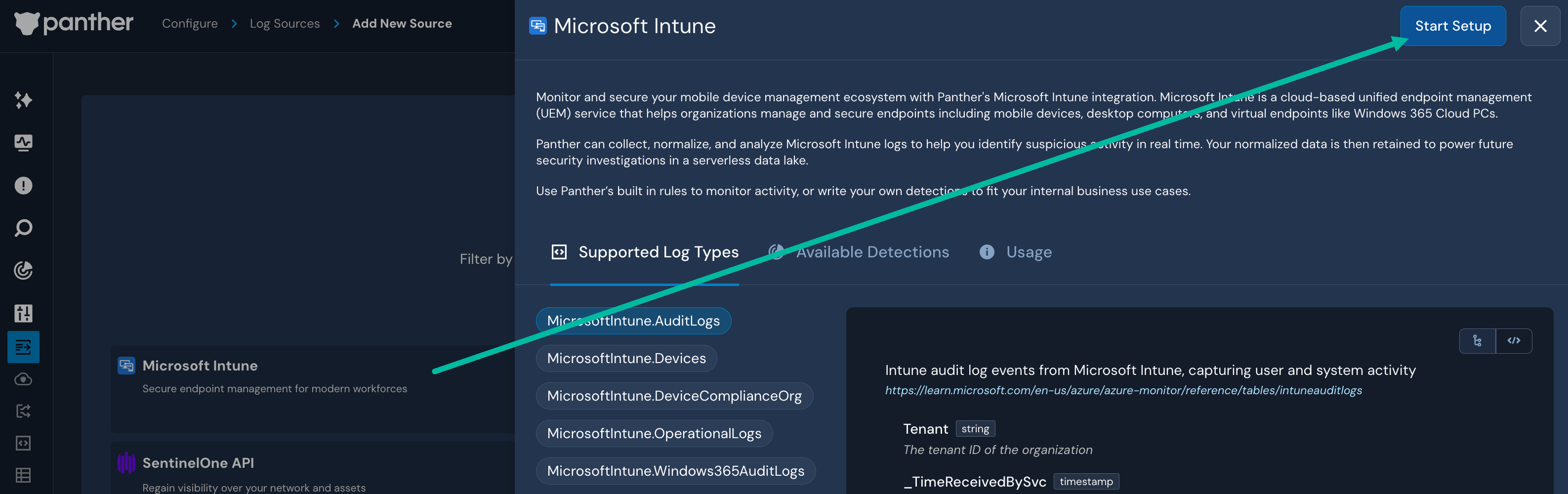
1. Panther Console의 왼쪽 탐색 모음에서 **로그 소스**.
2. 클릭합니다 **새로 만들기**.
3. “Microsoft Intune”을 검색한 다음 해당 타일을 클릭합니다.
4. 슬라이드아웃 패널에서 다음을 클릭합니다 **설정 시작**.
5. Panther의 지침에 따라 다음을 구성하세요 [Azure Event Hub](/ko/data-onboarding/data-transports/azure/event-hub.md).
### 2단계: Intune 로그를 Event Hub로 내보내기
Microsoft Intune 로그를 Event Hub로 내보내려면 아래 지침을 따르세요.
{% hint style="info" %}
추가 지원이 필요하면 Microsoft의 [Intune 로그 데이터를 Azure Storage, Event Hubs 또는 Log Analytics로 전송](https://learn.microsoft.com/en-us/intune/intune-service/fundamentals/review-logs-using-azure-monitor) 문서.
{% endhint %}
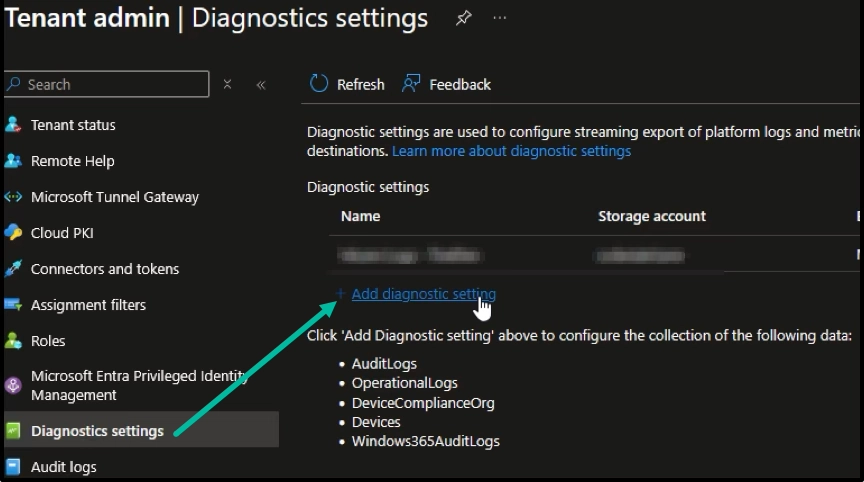
1. Azure Portal에서 Intune 관리 센터로 이동합니다.
2. 탐색 모음에서 다음을 클릭합니다. **진단 설정**.
3. 클릭합니다 **+ 진단 설정 추가**.
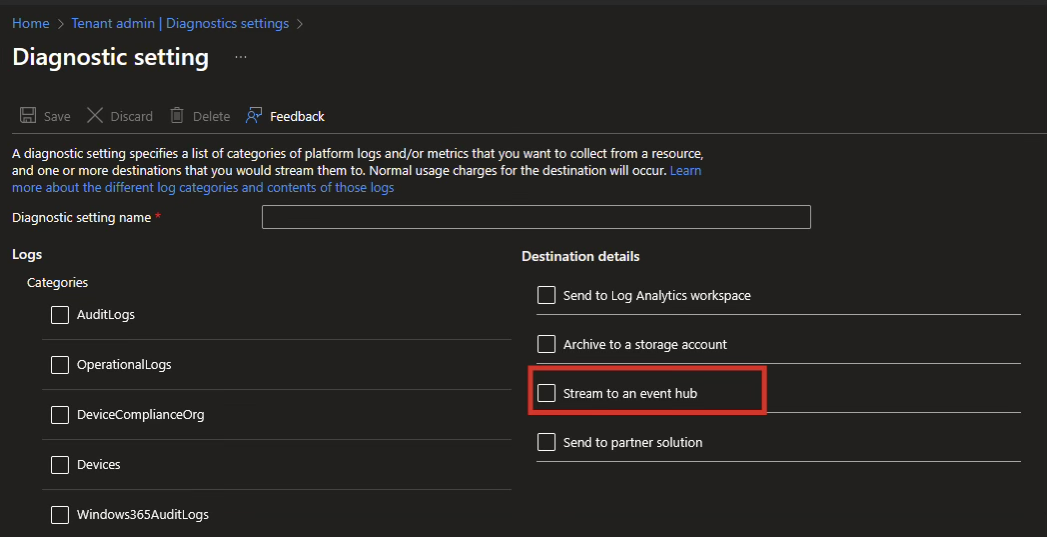
4. 다음 필드를 입력합니다:
1. 다음 **진단 설정 이름** 필드에 설명적인 이름을 입력하세요.
2. 아래 **대상 세부 정보**, 다음을 클릭합니다 **이벤트 허브로 스트리밍** 확인란.
3. 다음 **이벤트 허브** 필드에서 Panther에 온보딩한 Event Hub 네임스페이스와 Event Hub를 선택합니다 [1단계](#step-1-create-the-microsoft-intune-source-in-panther).
4. 아래 **로그**, Panther에 수집하려는 모든 로그 유형을 선택합니다.
5. 클릭합니다 **저장**.
## 지원되는 로그 유형
### MicrosoftIntune.AuditLogs
```yaml
schema: MicrosoftIntune.AuditLogs
description: Microsoft Intune의 Intune 감사 로그 이벤트로, 사용자 및 시스템 활동을 캡처합니다
referenceURL: https://learn.microsoft.com/en-us/azure/azure-monitor/reference/tables/intuneauditlogs
필드:
- name: Tenant
유형: string
description: 조직의 테넌트 ID
- name: _TimeReceivedBySvc
유형: timestamp
시간 형식:
- rfc3339
description: 서비스가 로그를 수신한 시각
- 이름: category
필수: true
유형: string
description: 감사 로그 이벤트의 범주
검증:
allow: ['AuditLogs']
- name: correlationId
유형: string
description: 여러 작업을 연관시키는 데 사용되는 고유 식별자
- 이름: identity
유형: string
지표:
- email
description: 작업을 수행한 사용자 또는 서비스의 ID
- name: operationName
유형: string
description: 수행된 작업의 이름
- name: tenantId
유형: string
description: 이벤트가 발생한 테넌트 ID
- name: time
필수: true
유형: timestamp
이벤트 시간 여부: true
시간 형식:
- rfc3339
description: 작업이 발생한 시각
- name: resultType
유형: string
description: 작업 결과 유형(예: 성공, 실패)
- name: resultDescription
유형: string
description: 작업이 실패한 경우 결과 또는 오류에 대한 설명
- name: properties
유형: object
description: 감사 이벤트에 대한 추가 메타데이터
필드:
- name: ActivityDate
유형: timestamp
시간 형식:
- '%m/%d/%Y %I:%M:%S %p'
description: 활동이 발생한 날짜와 시간
- name: ActivityResultStatus
유형: bigint
description: 활동 결과의 상태 코드
- name: ActivityType
유형: bigint
description: 수행된 활동의 유형
- name: Actor
유형: object
description: 작업을 시작한 행위자에 대한 정보
필드:
- 이름: Application
유형: string
description: 행위자의 애플리케이션 ID
- name: ApplicationName
유형: string
description: 사용된 애플리케이션 이름
- name: ObjectId
유형: string
description: 행위자의 개체 ID
- name: UPN
유형: string
지표:
- email
description: 행위자의 사용자 주체 이름
- name: ActorType
유형: bigint
description: 행위자 유형(사용자, 앱 등)
- name: IsDelegatedAdmin
유형: boolean
description: 행위자가 위임된 관리자인지 여부
- name: PartnerTenantId
유형: string
description: 해당되는 경우 파트너 테넌트 ID
- name: UserPermissions
유형: array
description: 행위자가 보유한 권한 목록
요소:
유형: string
- name: AdditionalDetails
유형: string
설명: 작업에 대한 추가 메타데이터
- name: AuditEventId
유형: string
설명: 감사 이벤트의 고유 식별자
- 이름: Category
유형: bigint
description: 감사 이벤트의 범주 코드
- name: TargetDisplayNames
유형: array
description: 작업의 영향을 받은 대상의 표시 이름
요소:
유형: string
- name: TargetObjectIds
유형: array
description: 작업의 영향을 받은 대상의 개체 ID
요소:
유형: string
- name: Targets
유형: array
description: 영향을 받은 대상 및 수정된 속성
요소:
유형: object
필드:
- 이름: Name
유형: string
description: 영향을 받은 대상의 이름
- name: ModifiedProperties
유형: array
description: 수정된 속성
요소:
유형: object
필드:
- 이름: Name
유형: string
description: 수정된 속성의 이름
- name: Old
유형: string
description: 수정 전 이전 값
- name: New
유형: string
description: 수정 후 새 값
- name: records
유형: array
description: 추가 세부 정보를 제공하는 중첩 레코드
요소:
유형: object
필드:
- 이름: category
유형: string
description: 중첩된 이벤트의 범주
- name: correlationId
유형: string
description: 중첩된 이벤트의 상관 관계 ID
- 이름: identity
유형: string
지표:
- email
description: 중첩된 이벤트와 관련된 ID
- name: operationName
유형: string
description: 중첩된 이벤트에서 수행된 작업
- name: properties
유형: object
description: 중첩된 이벤트에 대한 추가 데이터
필드:
- name: ActivityDate
유형: timestamp
시간 형식:
- rfc3339
description: 활동이 발생한 시점
- name: ActivityResultStatus
유형: bigint
description: 결과 상태 코드
- name: ActivityType
유형: bigint
description: 활동 유형
- name: Actor
유형: object
description: 행위자 정보
필드:
- 이름: Application
유형: string
description: 행위자 애플리케이션 ID
- name: ApplicationName
유형: string
description: 행위자 애플리케이션 이름
- name: ObjectId
유형: string
description: 행위자 개체 ID
- name: UPN
유형: string
지표:
- email
description: 행위자 UPN
- name: ActorType
유형: bigint
description: 행위자 유형
- name: IsDelegatedAdmin
유형: boolean
description: 행위자가 위임된 관리자인지 여부
- name: PartnerTenantId
유형: string
description: 파트너 테넌트 ID
- name: UserPermissions
유형: array
description: 행위자의 권한
요소:
유형: string
- name: AdditionalDetails
유형: string
description: 추가 컨텍스트
- name: AuditEventId
유형: string
description: 감사 이벤트 ID
- 이름: Category
유형: bigint
description: 숫자 범주 코드
- name: TargetDisplayNames
유형: array
description: 영향을 받은 대상의 이름
요소:
유형: string
- name: TargetObjectIds
유형: array
description: 영향을 받은 대상의 ID
요소:
유형: string
- name: Targets
유형: array
description: 대상에 대한 자세한 정보
요소:
유형: object
필드:
- 이름: Name
유형: string
description: 대상 이름
- name: ModifiedProperties
유형: array
description: 수정된 속성
요소:
유형: object
필드:
- 이름: Name
유형: string
- name: Old
유형: string
- name: New
유형: string
```
### MicrosoftIntune.Devices
```yaml
schema: MicrosoftIntune.Devices
description: Intune에 등록되고 관리되는 디바이스에 대한 디바이스 인벤토리 및 상태 정보
referenceURL: https://learn.microsoft.com/en-us/azure/azure-monitor/reference/tables/intunedevices
필드:
- name: Tenant
유형: string
description: 조직의 테넌트 ID
- name: _TimeReceivedBySvc
유형: timestamp
시간 형식:
- rfc3339
description: 서비스가 이벤트를 수신한 시각
- 이름: category
필수: true
유형: string
description: 디바이스 이벤트의 범주
검증:
allow: ['Devices']
- name: operationName
유형: string
description: 디바이스 이벤트와 연결된 작업 이름
- name: tenantId
유형: string
description: 디바이스 이벤트가 발생한 테넌트 ID
- name: time
필수: true
유형: timestamp
이벤트 시간 여부: true
시간 형식:
- rfc3339
description: 디바이스 이벤트가 발생한 시각
- name: resultType
유형: string
description: 디바이스 작업의 결과(예: 성공, 실패)
- name: properties
유형: object
description: 디바이스 이벤트에 대한 추가 메타데이터 및 컨텍스트
필드:
- name: Stats
유형: object
description: 디바이스 쿼리에 대한 집계 통계
필드:
- name: RecordCount
유형: bigint
description: 이벤트에서 반환된 레코드 수
- name: GraphDeviceIsManaged
유형: boolean
description: 디바이스가 Microsoft Graph를 통해 관리되는지 여부를 나타냄
- name: AADTenantId
유형: string
description: Azure Active Directory 테넌트 ID
- name: AndroidPatchLevel
유형: string
description: 디바이스의 Android 패치 수준
- name: CategoryName
유형: string
description: 디바이스에 할당된 범주 이름
- name: CompliantState
유형: string
description: 디바이스의 규정 준수 상태
- name: CreatedDate
유형: timestamp
시간 형식:
- rfc3339
- '%Y-%m-%d %H:%M:%S.%N'
description: 디바이스 항목이 생성된 날짜와 시간
- 이름: DeviceId
유형: string
description: 디바이스의 고유 식별자
- name: DeviceName
유형: string
description: 디바이스 이름
- name: DeviceRegistrationState
유형: string
description: 디바이스의 등록 상태
- name: DeviceState
유형: string
description: 디바이스 상태
- name: EasID
유형: string
description: 디바이스의 Exchange ActiveSync ID
- name: EncryptionStatusString
유형: string
description: 디바이스의 암호화 상태
- name: IMEI
유형: string
description: 디바이스의 국제 이동 단말기 식별 번호
- name: InGracePeriodUntil
유형: timestamp
시간 형식:
- rfc3339
- '%Y-%m-%d %H:%M:%S.%N'
description: 규정 준수 유예 기간의 종료 시각
- name: JailBroken
유형: string
description: 디바이스가 탈옥되었는지 여부를 나타냄
- name: JoinType
유형: string
description: 디바이스의 조인 유형(예: Azure AD에 조인됨)
- name: LastContact
유형: timestamp
시간 형식:
- rfc3339
- '%Y-%m-%d %H:%M:%S.%N'
description: 디바이스가 Intune에 마지막으로 연결한 시각
- name: MEID
유형: string
description: 디바이스의 이동식 장비 식별자
- name: ManagedBy
유형: string
description: 디바이스의 관리 주체
- name: ManagedDeviceName
유형: string
description: 디바이스의 관리 이름
- name: Manufacturer
유형: string
description: 디바이스 제조사
- name: Model
유형: string
description: 디바이스 모델
- name: OS
유형: string
description: 디바이스의 운영 체제
- name: OSVersion
유형: string
description: 디바이스의 운영 체제 버전
- name: Ownership
유형: string
description: 디바이스의 소유권 유형(예: 회사, 개인)
- name: PhoneNumber
유형: string
description: 디바이스와 연결된 전화번호
- name: PrimaryUser
유형: string
description: 디바이스의 기본 사용자
- name: ReferenceId
유형: string
description: 디바이스의 참조 ID
- name: SerialNumber
유형: string
description: 디바이스의 일련번호
- name: SkuFamily
유형: string
description: 디바이스의 SKU 패밀리
- name: StorageFree
유형: bigint
description: 디바이스의 남은 저장 공간(바이트)
- name: StorageTotal
유형: bigint
description: 디바이스의 총 저장 용량(바이트)
- name: SubscriberCarrierNetwork
유형: string
description: 디바이스의 가입자 통신사 네트워크
- name: SupervisedStatusString
유형: string
description: 디바이스의 감독 상태
- name: UPN
유형: string
지표:
- email
description: 할당된 사용자의 사용자 주체 이름
- name: UserEmail
유형: string
지표:
- email
description: 할당된 사용자의 이메일 주소
- name: UserName
유형: string
지표:
- username
description: 할당된 사용자의 이름
- name: WifiMacAddress
유형: string
지표:
- mac
description: 디바이스의 Wi-Fi MAC 주소
- name: BatchId
유형: string
description: 이 디바이스 레코드가 속한 배치의 식별자
- name: IntuneAccountId
유형: string
description: Intune에서 사용하는 내부 계정 ID
```
### MicrosoftIntune.DeviceComplianceOrg
```yaml
schema: MicrosoftIntune.DeviceComplianceOrg
description: Microsoft Intune의 조직 수준 디바이스 규정 준수 이벤트
referenceURL: https://learn.microsoft.com/en-us/azure/azure-monitor/reference/tables/intunedevicecomplianceorg
필드:
- name: Tenant
유형: string
description: 조직의 테넌트 ID
- name: _TimeReceivedBySvc
유형: timestamp
시간 형식:
- rfc3339
description: 서비스가 이벤트를 수신한 시각
- 이름: category
필수: true
유형: string
description: 디바이스 규정 준수 이벤트의 범주
검증:
allow: ['DeviceComplianceOrg']
- name: operationName
유형: string
description: 규정 준수 이벤트와 연결된 작업 이름
- name: tenantId
유형: string
description: 규정 준수 이벤트가 발생한 테넌트 ID
- name: time
필수: true
유형: timestamp
이벤트 시간 여부: true
시간 형식:
- rfc3339
description: 규정 준수 이벤트가 발생한 시각
- name: resultType
유형: string
description: 규정 준수 작업의 결과(예: 성공, 실패)
- name: properties
유형: object
description: 규정 준수 이벤트에 대한 추가 메타데이터 및 컨텍스트
필드:
- name: Stats
유형: object
description: 규정 준수 쿼리에 대한 집계 통계
필드:
- name: RecordCount
유형: bigint
description: 이벤트에서 반환된 레코드 수
- name: AADTenantId
유형: string
description: Azure AD 테넌트 ID
- name: BatchId
유형: string
description: 이 디바이스 규정 준수 결과가 속한 배치를 나타내는 ID
- name: ComplianceState
유형: string
description: 디바이스의 규정 준수 상태
- name: ComplianceState_loc
유형: string
description: 규정 준수 상태의 현지화된 설명
- name: DeviceHealthThreatLevel
유형: bigint
description: 디바이스가 보고한 위협 수준
- name: DeviceHealthThreatLevel_loc
유형: string
description: 디바이스 위협 수준의 현지화된 설명
- 이름: DeviceId
유형: string
description: 디바이스의 고유 식별자
- name: DeviceName
유형: string
description: 디바이스 이름
- name: DeviceType
유형: bigint
description: 디바이스 유형(예: 데스크톱, 모바일)
- name: IMEI
유형: string
description: 해당되는 경우 디바이스의 IMEI
- name: InGracePeriodUntil
# 실제로는 타임스탬프로 파싱할 수 없습니다. 값이 9999-12-31 23:59:59.0000000처럼 보이기 때문입니다(끝에 0이 7개 있음)
유형: string
description: 규정 준수 유예 기간의 종료를 나타내는 타임스탬프
- name: LastContact
# 실제로는 타임스탬프로 파싱할 수 없습니다. 값이 2025-05-07 22:27:19.0000000처럼 보이기 때문입니다(끝에 0이 7개 있음)
유형: string
description: 디바이스가 Intune에 마지막으로 연결한 시각
- name: ManagementAgents
유형: bigint
description: 디바이스를 관리하는 데 사용된 에이전트 유형
- name: ManagementAgents_loc
유형: string
description: 현지화된 관리 에이전트 이름
- name: OS
유형: string
description: 운영 체제 이름(예: Windows, iOS)
- name: OSDescription
유형: string
description: 운영 체제에 대한 친숙한 설명
- name: OSVersion
유형: string
description: 운영 체제 버전
- name: OS_loc
유형: string
description: 운영 체제의 현지화된 이름
- name: OwnerType
유형: bigint
description: 디바이스의 소유권 분류(예: 회사, 개인)
- name: OwnerType_loc
유형: string
description: 소유권 유형의 현지화된 설명
- name: RetireAfterDatetime
유형: timestamp
시간 형식:
- rfc3339
description: 디바이스가 폐기 예정인 시각
- name: SerialNumber
유형: string
description: 디바이스의 일련번호
- name: UPN
유형: string
지표:
- email
description: 할당된 사용자의 사용자 주체 이름
- name: UserEmail
유형: string
지표:
- email
description: 할당된 사용자의 이메일 주소
- name: UserId
유형: string
description: 할당된 사용자의 식별자
- name: UserName
유형: string
지표:
- username
description: 할당된 사용자의 이름
- name: IntuneAccountId
유형: string
description: Intune에서 사용하는 내부 계정 ID
```
### MicrosoftIntune.OperationalLogs
```yaml
schema: MicrosoftIntune.OperationalLogs
description: 프로비저닝, 등록 및 ESP 이벤트를 캡처하는 Intune 운영 로그
referenceURL: https://learn.microsoft.com/en-us/azure/azure-monitor/reference/tables/intuneoperationallogs
필드:
- name: Tenant
유형: string
description: 조직의 테넌트 ID
- name: _TimeReceivedBySvc
유형: timestamp
시간 형식:
- rfc3339
description: 서비스가 로그를 수신한 시각
- 이름: category
필수: true
유형: string
description: 운영 로그 이벤트의 범주
검증:
allow: ['OperationalLogs']
- name: operationName
유형: string
description: 로그와 연결된 작업 이름
- name: tenantId
유형: string
description: 이벤트가 발생한 테넌트 ID
- name: time
필수: true
유형: timestamp
이벤트 시간 여부: true
시간 형식:
- rfc3339
description: 작업이 발생한 시각
- name: resultType
유형: string
description: 작업 결과(예: 성공, 실패)
- name: properties
유형: object
description: 운영 이벤트에 대한 추가 메타데이터 및 컨텍스트
필드:
- name: ESPPolicyId
유형: string
- name: ESPPolicyName
유형: string
- name: IsDeviceEspEnabled
유형: boolean
- name: ZtdDeviceRegisteredTime
유형: timestamp
시간 형식:
- rfc3339
- '%Y-%m-%dT%H:%M:%S.%N'
- name: DeviceEspEndTime
유형: timestamp
시간 형식:
- rfc3339
- name: SlaEventEndTime
유형: timestamp
시간 형식:
- rfc3339
- name: ZtdDeviceSerialNumber
유형: string
- name: DeviceEspStartTime
유형: timestamp
시간 형식:
- rfc3339
- name: SlaEventStartTime
유형: timestamp
시간 형식:
- rfc3339
- name: EnrollmentEndTime
유형: timestamp
시간 형식:
- rfc3339
- name: EnrollmentStartTime
유형: timestamp
시간 형식:
- rfc3339
- name: TimeDiff
유형: int
- 이름: Status
유형: string
- name: DidUserReachDesktop
유형: boolean
- name: IsUserEspEnabled
유형: boolean
- name: Stage
유형: string
- name: TimeoutInMinutes
유형: int
- name: AadDeviceId
유형: string
- name: DeviceEspStatus
유형: bigint
- 이름: DeviceId
유형: string
- name: EnrollmentTypeMessage
유형: string
- name: EspStatus
유형: bigint
- name: EventId
유형: string
- name: IsAutopilot
유형: boolean
- name: IsDuringEsp
유형: bigint
- 이름: Scope
유형: string
- name: StartTime
유형: timestamp
시간 형식:
- rfc3339
- '%Y-%m-%dT%H:%M:%S'
- name: Timestamp
유형: timestamp
시간 형식:
- rfc3339
- '%Y-%m-%dT%H:%M:%S'
- name: UserEspStatus
유형: bigint
- name: UserId
유형: string
- 이름: Version
유형: string
- name: EnrollmentTimeUTC
유형: timestamp
시간 형식:
- rfc3339
- name: FailureCategory
유형: string
- name: FailureReason
유형: string
- name: MessageId
유형: string
- name: Os
유형: string
- 이름: OsVersion
유형: string
- name: EnrollmentType
유형: string
- name: AlertDisplayName
유형: string
- name: AlertType
유형: string
- 이름: Description
유형: string
- 이름: DeviceDnsDomain
유형: string
- 이름: DeviceHostName
유형: string
- name: DeviceName
유형: string
- 이름: DeviceNetBiosName
유형: string
- 이름: DeviceOperatingSystem
유형: string
- 이름: StartTimeUtc
유형: timestamp
시간 형식:
- rfc3339
- 이름: UPNSuffix
유형: string
- 이름: UserDisplayName
유형: string
- name: UserName
유형: string
지표:
- username
- name: AADTenantId
유형: string
- name: IntuneAccountId
유형: string
- 이름: IntuneDeviceId
유형: string
- 이름: IntuneUserId
유형: string
- 이름: OperationalLogCategory
유형: string
- 이름: ScaleUnit
유형: string
- 이름: ScenarioName
유형: string
```
### MicrosoftIntune.Windows365AuditLogs
```yaml
스키마: MicrosoftIntune.Windows365AuditLogs
설명: Microsoft Intune의 Windows 365 활동에 대한 감사 로그
참조 URL: https://learn.microsoft.com/en-us/azure/azure-monitor/reference/tables/windows365auditlogs
필드:
- name: Tenant
유형: string
description: 조직의 테넌트 ID
- name: _TimeReceivedBySvc
유형: timestamp
시간 형식:
- rfc3339
description: 서비스가 로그를 수신한 시각
- 이름: category
필수: true
유형: string
description: 운영 로그 이벤트의 범주
검증:
허용: ['Windows365AuditLogs']
- name: operationName
유형: string
description: 로그와 연결된 작업 이름
- name: tenantId
유형: string
description: 이벤트가 발생한 테넌트 ID
- name: time
필수: true
유형: timestamp
이벤트 시간 여부: true
시간 형식:
- rfc3339
description: 작업이 발생한 시각
- name: resultType
유형: string
description: 작업 결과(예: 성공, 실패)
- name: properties
유형: object
description: 운영 이벤트에 대한 추가 메타데이터 및 컨텍스트
필드:
- 이름: ActivityId
유형: string
설명: 작업의 활동 ID
- name: ApplicationId
유형: string
설명: 작업을 호출한 애플리케이션 ID
- name: ApplicationName
유형: string
설명: 작업의 애플리케이션 이름
- 이름: _BilledSize
유형: float
설명: 바이트 단위의 레코드 크기
- 이름: BuildVersion
유형: string
설명: 작업의 빌드 버전
- 이름: CallerExtendedProperties
유형: string
설명: 호출자의 확장 속성
- 이름: ComponentName
유형: string
설명: 작업의 구성 요소 이름
- 이름: _IsBillable
유형: string
설명: 이 데이터의 수집이 청구 대상인지 여부를 나타냄
- 이름: OperationName
유형: string
설명: 작업 이름
- 이름: OtherAuditEventProperties
유형: string
설명: 상관 관계 ID와 범주를 포함한 추가 감사 이벤트 세부 정보
- 이름: OtherIdentityProperties
유형: string
설명: 권한, 표시 이름, 범위 태그와 같은 ID 세부 정보
- 이름: Pid
유형: string
설명: 작업의 PID
- 이름: RelatedActivityId
유형: string
설명: 관련 활동 ID
- 이름: ResourceExtendedProperties
유형: string
설명: 작업의 확장된 리소스 세부 정보
- 이름: _ResourceId
유형: string
설명: 로그와 연결된 리소스 ID
- 이름: Result
유형: string
설명: 작업 결과
- 이름: ScenarioId
유형: string
설명: 로그와 연결된 시나리오 ID
- 이름: ScenarioInstanceId
유형: string
설명: 작업의 시나리오 인스턴스 ID
- name: ServiceName
유형: string
설명: 로그를 생성한 서비스의 이름
- 이름: SessionId
유형: string
설명: 작업과 연결된 세션 ID
- 이름: SourceSystem
유형: string
설명: 이벤트를 수집한 에이전트 유형(예: Azure, OpsManager)
- 이름: _SubscriptionId
유형: string
설명: 레코드의 구독 ID
- 이름: TenantId
유형: string
설명: Log Analytics 작업 영역 ID(테넌트)
- 이름: Tid
유형: string
설명: 이벤트의 테넌트 ID
- 이름: TimeGenerated
유형: timestamp
이벤트 시간 여부: true
시간 형식:
- rfc3339
설명: 보고서가 생성된 시간(UTC)
- 이름: Type
유형: string
설명: 이벤트의 테이블 이름(항상 Windows365AuditLogs)
- name: UserId
유형: string
설명: 이벤트와 관련된 사용자 ID
- 이름: UserPrincipalName
유형: string
지표:
- email
설명: 이벤트와 관련된 사용자의 UPN
```
---
# Agent Instructions
This documentation is published with GitBook. GitBook is the documentation platform designed so that both humans and AI agents can read, navigate, and reason over technical content effectively. Learn more at gitbook.com.
## Querying This Documentation
If you need additional information that is not directly available in this page, you can query the documentation dynamically by asking a question.
Perform an HTTP GET request on the current page URL with the `ask` query parameter, and the optional `goal` query parameter:
```
GET https://docs.panther.com/ko/data-onboarding/supported-logs/microsoft-intune.md?ask=&goal=
```
`ask` is the immediate question: it should be specific, self-contained, and written in natural language.
`goal` is optional and describes the broader end goal you are ultimately trying to accomplish on behalf of the user. GitBook uses it to tailor the answer towards what is most useful for that goal.
The response will contain a direct answer to the question and relevant excerpts and sources from the documentation.
Use this mechanism when the answer is not explicitly present in the current page, you need clarification or additional context, or you want to retrieve related documentation sections.