> For the complete documentation index, see [llms.txt](https://docs.panther.com/llms.txt). Markdown versions of documentation pages are available by appending `.md` to page URLs; this page is available as [Markdown](https://docs.panther.com/ko/data-onboarding/supported-logs/okta.md).
# Okta 로그
Panther는 Okta에서 로그를 직접 가져오는 것을 지원합니다
## 개요
Panther는 쿼리하여 Okta 이벤트를 가져올 수 있습니다 [Okta System Log API](https://developer.okta.com/docs/reference/api/system-log/). Panther는 System Log API를 1분마다 쿼리합니다. Panther가 API에 액세스하려면 새 API 토큰을 만들거나 기존 토큰을 사용해야 합니다.
또한 다음을 활성화할 수 있습니다 [Okta 사용자 및 디바이스 프로필](/ko/enrichment/okta.md).
**Identity Threat Protection (ITP) 지원**: Panther의 Okta.SystemLog 스키마에는 Identity Threat Protection이 활성화된 Okta Identity Engine용 필드가 포함되어 있습니다. 이러한 필드는 봇 보호, IP 평판, 위험 점수, 사용자 행동 분석을 포함한 enrichment 데이터를 수집하며, ITP 기능이 Okta 환경에서 활성화되어 있을 때 보안 가시성을 향상시킵니다.
## Panther에 Okta 로그를 온보딩하는 방법
{% tabs %}
{% tab title="Okta API 폴링" %}
### 1단계: 새 Okta API 토큰 만들기
{% hint style="info" %}
System Logs를 쿼리할 권한이 있는 Okta API 토큰을 만들려면 다음 유형의 Okta 관리자 중 하나로 로그인되어 있어야 합니다: a [최고 관리자](https://help.okta.com/en-us/Content/Topics/Security/administrators-super-admin.htm), [조직 관리자](https://help.okta.com/en-us/Content/Topics/Security/administrators-org-admin.htm), 또는 [읽기 전용 관리자](https://help.okta.com/en-us/Content/Topics/Security/administrators-read-only-admin.htm).
다음을 사용하는 것을 권장합니다: [읽기 전용 관리자](https://help.okta.com/en-us/Content/Topics/Security/administrators-read-only-admin.htm) 역할, 최소 권한 원칙을 위해.
다음을 참조하세요 [Okta 문서](https://help.okta.com/en-us/Content/Topics/Security/Administrators.htm) 관리자 역할 관리에 대한 자세한 내용은 여기를 참조하세요.
{% endhint %}
1. Okta 관리자로 로그인합니다.
2. Okta Admin Console에서 다음으로 이동합니다: **Security** > **API.**
3. 다음으로 이동합니다: **토큰** 탭.
4. 클릭합니다 **토큰 만들기.**
5. 토큰에 대한 설명적인 이름을 입력합니다. 예: `Panther API 토큰`.
6. 다음을 복사하고 **토큰 값** 를 안전한 위치에 저장하세요. 다음 단계에서 필요합니다.
* **참고**: Okta는 이 값을 다시 표시하지 않습니다.
### 2단계: Panther에서 새 Okta 소스 만들기
1. Panther Console의 왼쪽 탐색 막대에서 다음을 클릭합니다: **로그 소스**.
2. 클릭합니다 **새로 만들기.**
3. “Okta”를 검색한 다음 해당 타일을 클릭합니다.
4. 슬라이드아웃 패널에서 다음을 클릭합니다: **설정 시작**.
5. 다음에서 **구성** 페이지에서 다음 필드를 입력합니다:
* **이름**: 소스에 대한 설명적인 이름을 입력합니다. 예: `내 Okta 로그`.
* **Okta 하위 도메인**: Okta 조직 도메인의 하위 도메인을 입력합니다. 다음을 참조할 수 있습니다: [Okta 문서](https://developer.okta.com/docs/guides/find-your-domain/main/) 에서 Okta 조직 도메인에 대해 자세히 알아볼 수 있습니다.
* **Okta 도메인**: Okta 도메인 드롭다운에서 적절한 도메인 이름을 선택합니다.
* **API 토큰**: 이전 단계에서 생성한 토큰 값을 입력합니다.
6. 클릭합니다 **설정**.
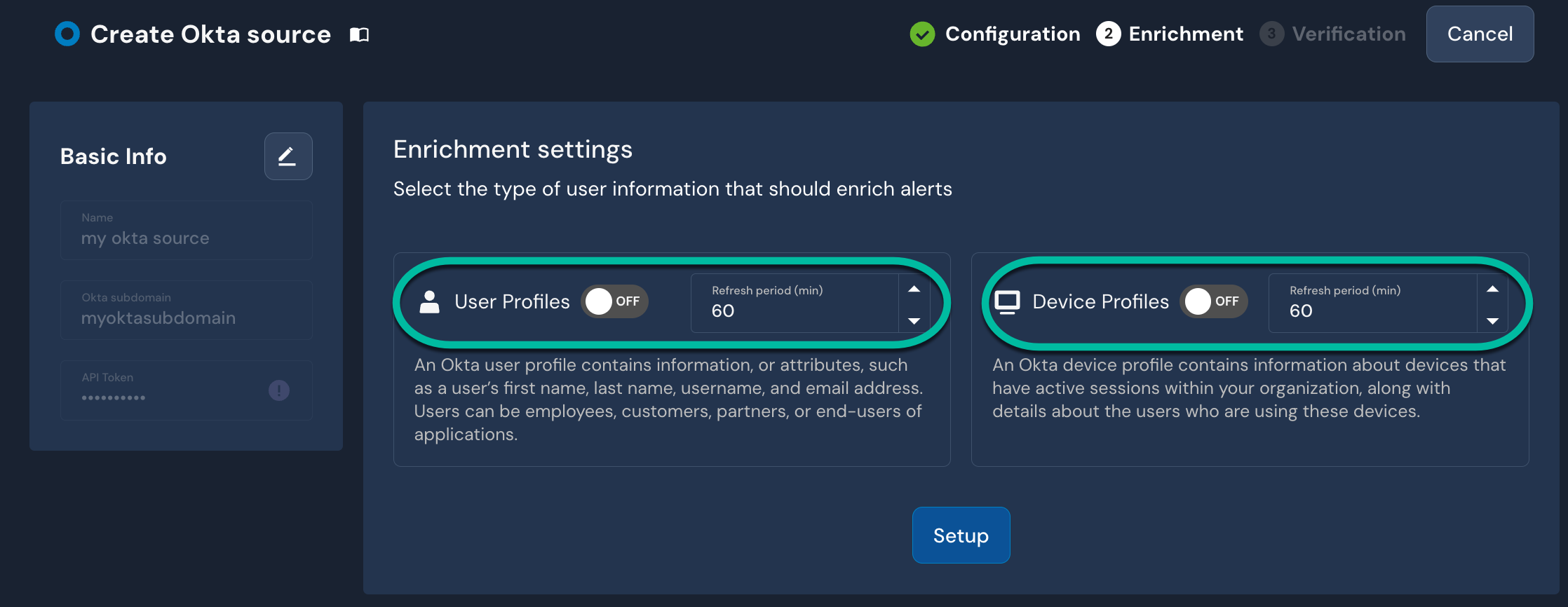
7. 다음에서 **Enrichment** 페이지에서 다음을 활성화하려는 경우 [Okta Identity 프로필](/ko/enrichment/okta.md), 오른쪽에 있는 **사용자 프로필** 및/또는 **디바이스 프로필**, 토글을 클릭합니다 `켬`.
* 참고 [Okta 디바이스 프로필 활성화의 전제 조건](/ko/enrichment/okta.md#prerequisite-for-okta-device-profiles).
* 켬으로 설정된 각 토글에 대해 `켬`, 다음을 설정합니다: **새로고침 주기(분)**. 이는 Panther가 Okta에 저장된 값으로 프로필 데이터를 업데이트하는 주기를 나타냅니다.
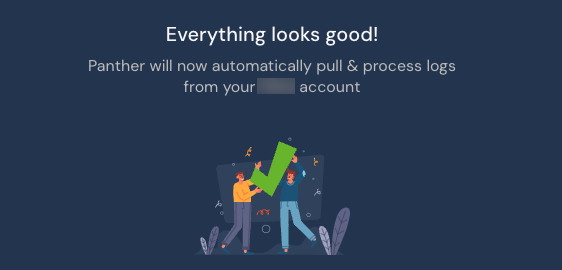
8. 클릭합니다 **설정**. 성공 화면으로 이동합니다:\\\\
* 선택적으로 하나 이상의 다음을 활성화할 수 있습니다 [디택션 팩](https://docs.panther.com/detections/panther-managed/packs).
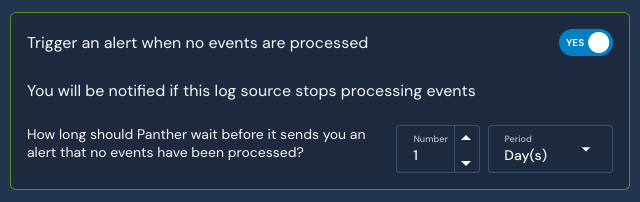
* 다음 **이벤트가 처리되지 않을 때 알러트를 트리거합니다** 설정의 기본값은 **예**. 일정 시간이 지난 후 로그 소스에서 데이터 흐름이 멈추면 알러트를 받게 되므로 이 기능을 활성화된 상태로 두는 것을 권장합니다. 시간 범위는 구성 가능하며 기본값은 24시간입니다.
{% endtab %}
{% tab title="Okta 로그 스트리밍(비공개 베타)" %}
### 1단계: Okta 로그 스트리밍 설정
{% hint style="warning" %}
이 온보딩 방법은 다음을 지원하지 않습니다 [보강 기능](/ko/enrichment.md).
{% endhint %}
{% hint style="info" %}
Okta 로그 스트리밍을 설정하려면 다음으로 로그인되어 있어야 합니다: [최고 관리자](https://help.okta.com/en-us/Content/Topics/Security/administrators-super-admin.htm).
다음을 참조하세요 [Okta 문서](https://help.okta.com/en-us/Content/Topics/Security/Administrators.htm) 관리자 역할 관리에 대한 자세한 내용은 여기를 참조하세요.\n\n또한 Panther 계정의 AWS 콘솔에 액세스할 수 있어야 합니다.
{% endhint %}
1. Okta로 로그인합니다 [최고 관리자](https://help.okta.com/en-us/Content/Topics/Security/administrators-super-admin.htm).
2. Okta Admin Console에서 다음으로 이동합니다: **보고서** > **로그 스트리밍.**
3. 클릭합니다 **새로 추가**.
4. 클릭합니다 **AWS EventBridge**.
5. 소스에 대한 설명적인 이름을 입력합니다. 예: `Panther API 토큰`, Bus의 설명적인 이름, AWS 리전 및 Panther 인스턴스의 AWS 계정 ID.
* 다음에서 리전을 찾을 수 있습니다: **기본 정보 및 기본 설정** Panther Console의 설정 페이지 섹션.
6. 클릭합니다 **저장**. 해당 EventBridge 연결은 AWS 계정에서 찾을 수 있습니다.
### 2단계: Panther에서 새 Okta 소스 만들기
1. AWS 계정에 로그인한 다음 다음으로 이동합니다: **Amazon EventBridge.**
2. 다음으로 이동합니다: **통합** > **Partner 이벤트 소스.**
3. 새로 만든 이벤트 소스를 클릭한 다음 다음을 클릭합니다: **EventBus와 연결.**
4. 콘솔에 표시되는 연결된 EventBridge 버스의 이름을 기록해 둡니다.
5. Panther Console에서 왼쪽 탐색 막대로 이동한 다음 다음을 클릭합니다: **로그 소스**.
6. 클릭합니다 **새로 만들기.**
7. “Okta Streaming”을 검색한 다음 해당 타일을 클릭합니다.
8. 클릭합니다 **설정 시작**.
9. 다음에서 **구성** 페이지에서 다음 필드를 입력합니다:
* **이름**: 소스에 대한 설명적인 이름을 입력합니다. 예: `내 Okta 로그`.
* **버스 이름**: 위 단계에서 연결한 EventBridge Bus ARN을 입력합니다.
* AWS 계정 콘솔에 쉽게 액세스할 수 없다면 이 이름을 시도해 볼 수 있으며 연결이 자동으로 수행됩니다
```
aws.partner/okta.com/integrator-9763277/
```
10. 클릭합니다 **설정**.
{% endtab %}
{% endtabs %}
### Panther에서 관리하는 디택션
다음을 참조하세요 [Panther에서 관리하는](/ko/detections/panther-managed.md) Okta에 대한 룰은 다음에 있는 [panther-analysis GitHub 저장소](https://github.com/panther-labs/panther-analysis/tree/main/rules/okta_rules). 여기에는 다음이 포함됩니다:
* [Okta 관리자 역할 할당](https://github.com/panther-labs/panther-analysis/blob/cd220c87982011d4ad156c7daecd2857c358d154/rules/okta_rules/okta_admin_role_assigned.py) - 사용자가 Okta에서 관리 권한을 부여받았습니다
* [Okta API 키 생성](https://github.com/panther-labs/panther-analysis/blob/cd220c87982011d4ad156c7daecd2857c358d154/rules/okta_rules/okta_api_key_created.py) - 사용자가 Okta에서 API 키를 생성했습니다
* [Okta API 키 철회](https://github.com/panther-labs/panther-analysis/blob/cd220c87982011d4ad156c7daecd2857c358d154/rules/okta_rules/okta_api_key_revoked.py) - 사용자가 Okta에서 API 키를 철회했습니다
* [지리적으로 불가능한 Okta 로그인](https://github.com/panther-labs/panther-analysis/blob/cd220c87982011d4ad156c7daecd2857c358d154/rules/okta_rules/okta_geo_improbable_access.py) - 사용자가 매우 멀리 떨어진 두 지리적 위치에서 연속으로 로그인했습니다
* [Okta MFA 전역 비활성화](https://github.com/panther-labs/panther-analysis/blob/cd220c87982011d4ad156c7daecd2857c358d154/rules/okta_rules/okta_admin_disabled_mfa.py) - Okta의 시스템 전체 MFA가 관리자 사용자에 의해 비활성화되었습니다
* [Okta 지원 자격 증명 재설정](https://github.com/panther-labs/panther-analysis/blob/cd220c87982011d4ad156c7daecd2857c358d154/rules/okta_rules/okta_support_reset.py) - Okta 지원이 사용자의 비밀번호 또는 MFA를 재설정했습니다
* [Okta 지원 액세스 허용](https://github.com/panther-labs/panther-analysis/blob/cd220c87982011d4ad156c7daecd2857c358d154/rules/okta_rules/okta_account_support_access.py) - Okta 지원 액세스가 허용되었습니다
## 사용자 정의 디택션
#### 의심스러운 행동 보고 예시
사용자가 자신의 계정에서 의심스러운 행동을 보고했습니다:
```python
def 룰(event):
if event.get('eventtype') == 'user.account.report_suspicious_activity_by_enduser':
return True
```
#### 사용자 정의 디택션 패턴
아래는 몇 가지 일반적인 함수와 예시입니다 [`deep_get()`](/ko/detections/rules/python.md#deep_get) Okta 로그에 대한 사용자 정의 디택션을 작성할 때 사용됩니다. Okta의 다양한 이벤트 유형에 대한 자세한 정보는 다음에서 확인하세요: [문서](https://developer.okta.com/docs/reference/api/event-types/).
```python
#Okta에는 여기에 나열된 많은 이벤트 유형이 있습니다. 이러한 eventtype 중 하나를 기반으로 디택션을 시작할 수 있습니다
#https://developer.okta.com/docs/reference/api/event-types/
event.get('eventtype')
#도시, 주, 위도, 경도 등을 액세스하려면
deep_get(event, 'client', 'geographicalContext', 'city')
deep_get(event, 'client', 'geographicalContext', 'state')
deep_get(event, 'client', 'geographicalContext', 'country')
deep_get(event, 'client', 'geographicalContext', 'geolocation', 'lon')
deep_get(event, 'client', 'geographicalContext', 'geolocation', 'lat')
#이벤트 출처에 대한 세부 정보
deep_get(event, 'client' 'device')
deep_get(event, 'client', 'ipAddress')
deep_get(event, 'client', 'userAgent')
deep_get(event, 'actor', 'alternateId')
deep_get(event, 'actor', 'displayName')
## Okta와 함께 유용할 수 있는 전역 헬퍼
# panther_base_helpers 내부
def okta_알러트_context(event: dict):
"""Okta 알러트 자동화를 위한 공통 컨텍스트를 반환합니다"""
return {
"ips": event.get("p_any_ip_addresses", []),
"actor": event.get("actor", ""),
"target": event.get("target", ""),
"client": event.get("client", ""),
}
# panther_base_helpers 내부
def is_ip_in_network(ip_addr, networks):
"""주어진 IP가 IP 범위 목록 내에 있는지 확인합니다"""
return any(ip_address(ip_addr) in ip_network(network) for network in networks)
```
## 지원되는 로그 유형
### Okta.SystemLog
Okta System Log는 조직과 관련된 시스템 이벤트를 기록하여 플랫폼 활동을 이해하고 문제를 진단하는 데 사용할 수 있는 감사 추적을 제공합니다.
참고: [System Log API에 대한 Okta 문서.](https://developer.okta.com/docs/reference/api/system-log/)
```yaml
schema: Okta.SystemLog
description: |
Okta System Log는 조직과 관련된 시스템 이벤트를 기록하여 플랫폼 활동을 이해하고 문제를 진단하는 데 사용할 수 있는 감사 추적을 제공합니다.
referenceURL: https://developer.okta.com/docs/reference/api/system-log/
fields:
- name: uuid
required: true
description: 개별 이벤트의 고유 식별자
type: string
- name: published
required: true
description: 이벤트가 게시된 시각
type: timestamp
timeFormat: rfc3339
isEventTime: true
- name: eventType
required: true
description: 게시된 이벤트의 유형
type: string
- name: version
required: true
description: 버전 표시자
type: string
- name: severity
required: true
description: '이벤트의 심각도 수준을 나타냅니다: DEBUG, INFO, WARN, ERROR'
type: string
- name: legacyEventType
description: 연관된 Events API Action objectType 속성 값
type: string
- name: displayMessage
description: 이벤트의 표시 메시지
type: string
- name: actor
description: 작업을 수행한 엔터티를 설명합니다
유형: 객체
fields:
- 이름: id
required: true
설명: 행위자의 ID
type: string
- 이름: type
required: true
설명: 행위자의 유형
type: string
- 이름: alternateId
설명: 행위자의 대체 ID
type: string
지표:
- 이메일
- 이름: displayName
설명: 행위자의 표시 이름
type: string
- 이름: details
설명: 행위자에 대한 세부 정보
유형: JSON
- 이름: detailEntry
설명: 세부 항목
유형: JSON
- 이름: client
설명: 작업을 요청한 클라이언트
유형: 객체
fields:
- 이름: id
설명: OAuth 요청의 경우 요청을 수행하는 OAuth 클라이언트의 ID입니다. SSWS 토큰 요청의 경우 요청을 수행하는 에이전트의 ID입니다.
type: string
- 이름: userAgent
설명: 행위자가 작업을 수행할 때 사용한 사용자 에이전트
유형: 객체
fields:
- 이름: browser
설명: 클라이언트가 웹 브라우저인 경우 이 필드는 웹 브라우저 유형을 식별합니다(예: CHROME, FIREFOX)
type: string
- 이름: os
설명: 클라이언트가 실행되는 운영 체제(예: Windows 10)
type: string
- 이름: rawUserAgent
설명: HTTP/1.1 Semantics and Content의 5.5.3절에 따라 형식화된 사용자 에이전트의 원시 문자열 표현입니다. browser와 OS 필드는 모두 이 필드에서 파생될 수 있습니다.
type: string
- 이름: geographicalContext
설명: 클라이언트가 요청을 보낸 물리적 위치
유형: 객체
fields:
- 이름: geolocation
설명: 지리적 위치 좌표(위도, 경도)를 포함합니다
유형: 객체
fields:
- 이름: lat
설명: 위도
유형: float
- 이름: lon
설명: 경도
유형: float
- 이름: city
설명: 사용 가능한 경우 지리적 위치 좌표가 포함된 지역을 아우르는 도시(예: Seattle, San Francisco)
type: string
- 이름: state
설명: 지리적 위치 좌표가 포함된 지역을 아우르는 주/도 이름 전체(예: Montana, Incheon)
type: string
- 이름: country
설명: 지리적 위치 좌표가 포함된 지역을 아우르는 국가 이름 전체(예: France, Uganda)
type: string
- 이름: postalCode
설명: 지리적 위치 좌표가 포함된 지역을 아우르는 국가 이름 전체(예: France, Uganda)
type: string
- 이름: zone
설명: 클라이언트의 위치가 매핑되는 Zone의 이름
type: string
- 이름: ipAddress
설명: 클라이언트가 요청을 보낸 IP 주소
type: string
지표:
- IP
- 이름: device
설명: 클라이언트가 사용한 기기 유형(예: 컴퓨터)
type: string
- 이름: request
설명: 작업을 시작한 요청
유형: 객체
fields:
- 이름: ipChain
설명: 들어오는 요청이 프록시를 거치는 경우 해당 프록시의 IP 주소가 (clientIp, proxy1, proxy2, ...) 형식으로 여기에 저장됩니다.
유형: 배열
요소:
유형: 객체
fields:
- 이름: ip
설명: IP 주소
type: string
지표:
- IP
- 이름: geographicalContext
설명: IP 주소의 지리적 맥락
유형: 객체
fields:
- 이름: geolocation
설명: 지리적 위치 좌표(위도, 경도)를 포함합니다
유형: 객체
fields:
- 이름: lat
설명: 위도
유형: float
- 이름: lon
설명: 경도
유형: float
- 이름: city
설명: 사용 가능한 경우 지리적 위치 좌표가 포함된 지역을 아우르는 도시(예: Seattle, San Francisco)
type: string
- 이름: state
설명: 지리적 위치 좌표가 포함된 지역을 아우르는 주/도 이름 전체(예: Montana, Incheon)
type: string
- 이름: country
설명: 지리적 위치 좌표가 포함된 지역을 아우르는 국가 이름 전체(예: France, Uganda)
type: string
- 이름: postalCode
설명: 지리적 위치 좌표가 포함된 지역을 아우르는 국가 이름 전체(예: France, Uganda)
type: string
- name: version
설명: IP 버전
type: string
- 이름: source
설명: 소스에 관한 세부 정보
type: string
- 이름: ipDetails
설명: 관련 IP 주소에 대한 세부 정보
유형: 객체
fields:
- 이름: asNumber
설명: IP 주소와 연결된 자율 시스템 번호
유형: bigint
- 이름: asOrg
설명: 자율 시스템 번호(ASN)와 연결된 이름
type: string
- 이름: domain
설명: IP 주소와 연결된 도메인 이름
type: string
지표:
- 도메인
- 이름: ipServiceCategories
설명: IP 주소와 연결된 IP 서비스 범주
유형: 배열
요소:
type: string
- 이름: isp
설명: IP 주소와 연결된 인터넷 서비스 제공업체
type: string
- 이름: outcome
설명: 작업의 결과
유형: 객체
fields:
- 이름: result
설명: '작업의 결과: SUCCESS, FAILURE, SKIPPED, ALLOW, DENY, CHALLENGE, UNKNOWN'
type: string
- 이름: reason
설명: 결과의 사유, 예: INVALID_CREDENTIALS
type: string
- 이름: target
설명: 작업의 대상이 0개 이상
유형: 배열
요소:
유형: 객체
fields:
- 이름: id
required: true
설명: 대상의 ID
type: string
- 이름: type
required: true
설명: 대상의 유형
type: string
- 이름: alternateId
설명: 대상의 대체 ID
type: string
- 이름: displayName
설명: 대상의 표시 이름
type: string
- 이름: details
설명: 대상에 대한 세부 정보
유형: JSON
- 이름: detailEntry
설명: 세부 항목
유형: JSON
- 이름: changeDetails
설명: 변경에 대한 세부 정보
유형: JSON
- 이름: transaction
설명: 작업의 트랜잭션 세부 정보
유형: 객체
fields:
- 이름: id
설명: 이 트랜잭션의 고유 식별자.
type: string
- 이름: type
설명: 트랜잭션의 종류를 설명합니다. WEB은 웹 요청을 의미합니다. JOB은 비동기 작업을 의미합니다.
type: string
- 이름: detail
설명: 이 트랜잭션에 대한 세부 정보.
유형: JSON
- 이름: debugContext
설명: 작업의 디버그 요청 데이터
유형: 객체
fields:
- 이름: debugData
설명: 이벤트 유형에 따라 달라지는 기타 정보를 포함하는 동적 필드.
유형: JSON
- 이름: authenticationContext
설명: 행위의 인증 데이터
유형: 객체
fields:
- 이름: authenticationProvider
설명: 제공된 자격 증명을 사용해 행위자의 신원을 증명하는 시스템
type: string
- 이름: authenticationStep
설명: 인증 파이프라인의 0부터 시작하는 단계 번호입니다. 현재는 사용되지 않으며 항상 0으로 설정됩니다.
유형: int
- 이름: credentialProvider
설명: 자격 증명 제공자는 신원과 그에 연관된 자격 증명을 관리하는 소프트웨어 서비스입니다. 자격 증명 제공자가 제공한 자격 증명을 통해 인증이 발생하면, 해당 자격 증명 제공자가 여기에 기록됩니다.
type: string
- 이름: credentialType
설명: 자격 증명에 사용된 기반 기술/스키마
type: string
- 이름: rootSessionId
type: string
- 이름: issuer
설명: 자격 증명을 생성하고 발급한 특정 소프트웨어 엔티티.
유형: 객체
fields:
- 이름: id
설명: 인증 유형에 따라 달라집니다. 인증이 SAML 2.0이면 id는 SAML assertion의 발급자입니다. 소셜 로그인인 경우 id는 토큰의 발급자입니다.
type: string
- 이름: type
설명: SAML assertion 또는 토큰의 발급자와 출처에 대한 정보.
type: string
- 이름: externalSessionId
설명: 행위자의 세션 ID를 대리하는 값
type: string
- 이름: interface
설명: 있는 경우, 행위자가 인증하는 제3자 사용자 인터페이스.
type: string
- 이름: authenticatorProvider
설명: '사용 중단됨: 이 필드는 이전 버전과의 호환성을 위해 유지됩니다.'
type: string
- 이름: authenticatorContext
설명: 인증 요청을 충족하는 데 사용된 인증자의 바인딩 컨텍스트(예: Platform SSO/SSO extension 바인딩).
유형: 객체
fields:
- 이름: applicationVersion
설명: 인증자 바인딩을 요청한 애플리케이션의 버전
type: string
- 이름: binaryIdentifier
설명: 인증자 바인딩을 요청한 바이너리의 식별자
type: string
- 이름: binaryPath
설명: 인증자 바인딩을 요청한 바이너리의 파일 시스템 경로
type: string
- 이름: bindingMethod
설명: 인증자를 요청에 바인딩하는 데 사용된 방법(예: APPLE_SSO_EXTENSION 또는 LOOPBACK)
type: string
- 이름: operator
설명: 서비스 운영자의 이름
type: string
- 이름: securityContext
설명: 행위의 보안 데이터
유형: 객체
fields:
- 이름: asNumber
설명: 이벤트 요청의 출처가 된 자율 시스템과 연관된 자율 시스템 번호
유형: bigint
- 이름: asOrg
설명: 이벤트 요청의 출처가 된 자율 시스템과 연관된 조직
type: string
- 이름: isp
설명: 이벤트의 요청을 전송하는 데 사용된 인터넷 서비스 제공업체
type: string
- 이름: domain
설명: 수신 이벤트 요청의 IP 주소와 연관된 도메인 이름
type: string
지표:
- 도메인
- 이름: isProxy
설명: 이벤트의 요청이 알려진 프록시에서 온 것인지 지정합니다
유형: boolean
- 이름: botProtection
설명: 이벤트와 관련된 봇 보호 디택션 결과
유형: 객체
fields:
- 이름: level
설명: 봇 보호 구성 대상과 관련된 봇 디택션 수준
type: string
- 이름: ipDetails
설명: 관련 IP 주소에 대한 세부 정보
유형: 객체
fields:
- 이름: asNumber
설명: IP 주소와 연결된 자율 시스템 번호
유형: bigint
- 이름: asOrg
설명: 자율 시스템 번호(ASN)와 연결된 이름
type: string
- 이름: domain
설명: IP 주소와 연결된 도메인 이름
type: string
지표:
- 도메인
- 이름: ipServiceCategories
설명: IP 주소와 연결된 IP 서비스 범주
유형: 배열
요소:
type: string
- 이름: isp
설명: IP 주소와 연결된 인터넷 서비스 제공업체
type: string
- 이름: risk
설명: 이벤트와 관련된 위험
유형: 객체
fields:
- 이름: 디택션Name
설명: 위험을 식별한 디택션 메커니즘의 이름
type: string
- 이름: issuer
설명: 관련 위험을 발급한 개체
type: string
- 이름: level
설명: 요청과 관련된 위험 수준
type: string
- 이름: previousLevel
설명: 사용자와 관련된 이전 위험 수준(있는 경우)
type: string
- 이름: userBehaviors
설명: 이벤트와 관련된 사용자 행동 디택션 모델의 결과
유형: 배열
요소:
유형: 객체
fields:
- 이름: id
설명: 사용자 행동 디택션 모델의 고유 식별자
type: string
- 이름: name
설명: 관리자가 구성한 사용자 행동 디택션 모델의 이름
type: string
- 이름: result
설명: 사용자 행동 분석 결과
type: string
```
---
# Agent Instructions
This documentation is published with GitBook. GitBook is the documentation platform designed so that both humans and AI agents can read, navigate, and reason over technical content effectively. Learn more at gitbook.com.
## Querying This Documentation
If you need additional information that is not directly available in this page, you can query the documentation dynamically by asking a question.
Perform an HTTP GET request on the current page URL with the `ask` query parameter, and the optional `goal` query parameter:
```
GET https://docs.panther.com/ko/data-onboarding/supported-logs/okta.md?ask=&goal=
```
`ask` is the immediate question: it should be specific, self-contained, and written in natural language.
`goal` is optional and describes the broader end goal you are ultimately trying to accomplish on behalf of the user. GitBook uses it to tailor the answer towards what is most useful for that goal.
The response will contain a direct answer to the question and relevant excerpts and sources from the documentation.
Use this mechanism when the answer is not explicitly present in the current page, you need clarification or additional context, or you want to retrieve related documentation sections.