> For the complete documentation index, see [llms.txt](https://docs.panther.com/llms.txt). Markdown versions of documentation pages are available by appending `.md` to page URLs; this page is available as [Markdown](https://docs.panther.com/ko/data-onboarding/supported-logs/onelogin.md).
# OneLogin 로그
Panther는 OneLogin에서 로그를 직접 가져오는 것을 지원합니다
## 개요
Panther는 다음을 통해 OneLogin 로그 수집을 지원합니다 [OneLogin의 통합](https://www.onelogin.com/blog/aws-eventbridge-integration) Amazon EventBridge와 함께합니다. 이를 통해 Panther는 확장 가능하고 안정적이며 지연 시간이 짧은 방식으로 OneLogin 로그를 처리할 수 있습니다.
Panther가 OneLogin 로그를 처리할 수 있도록 OneLogin 계정을 구성하여 Panther의 Amazon Web Services(AWS) 계정에 있는 Amazon EventBridge로 데이터를 전송해야 합니다.
## OneLogin 로그를 Panther에 온보딩하는 방법
### OneLogin이 Panther로 데이터를 전송하도록 구성
{% hint style="info" %}
참고: Panther 인스턴스가 배포된 AWS 계정 ID와 AWS 리전의 기록을 보관하세요. 이 정보는 Panther Console의 **설정** > **일반 설정** > **기본 정보 및 기본 설정**에서 **인프라** 섹션.
{% endhint %}
1. OneLogin 관리 콘솔에서 **Developers** > **Webhooks.**
2. 다음으로 이동하세요 **새 Webhook** > **Amazon EventBridge용 이벤트 Webhook.**
3. 설명적인 이름을 추가하세요. 예: `Panther 통합`
4. 앞서 메모한 AWS 계정 ID와 리전을 입력하고 **저장.**
5. 방금 생성한 새 통합을 클릭합니다. **Event Source** 필드는 다음 단계에서 사용되므로 기록해 두세요.
* 다음 형식이어야 합니다 `aws.partner/onelogin.com/US-123456/ffffffffff.`
### Panther에 새 OneLogin 소스 생성
1. Panther Console의 왼쪽 탐색 표시줄에서 **로그 소스**.
2. 클릭합니다 **새로 만들기.**
3. “OneLogin”을 검색한 다음 해당 타일을 클릭합니다.
4. 클릭합니다 **설정 시작**.
5. 다음 페이지에서 **소스 구성** 페이지에서 다음 필드를 입력합니다:
* **이름**: 소스에 대한 설명적인 이름입니다. 예: `내 OneLogin 이벤트`
* **로그 유형**: 선택 `OneLogin.Events`
* **버스 이름**: 이전 텍스트에서 메모한 필드입니다(형식: `aws.partner/onelogin.com/US-123456/ffffffffff`)
6. 클릭합니다 **설정**. 성공 화면으로 이동합니다:\\
* 선택적으로 하나 이상의 [디택션 팩](https://docs.panther.com/detections/panther-managed/packs).
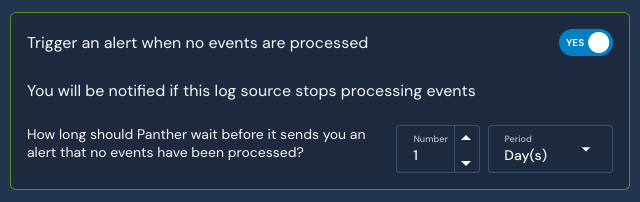
* 다음 **이벤트가 처리되지 않으면 알러트를 발생시키기** 설정의 기본값은 **예**. 일정 시간이 지난 후 로그 소스에서 데이터 흐름이 멈추면 알러트를 받게 되므로 이 설정을 활성화한 상태로 두는 것을 권장합니다. 이 시간 범위는 구성 가능하며 기본값은 24시간입니다.\\
## Panther 관리형 탐지
다음을 참조하세요 [Panther에서 관리하는](https://docs.panther.com/detections/panther-managed) OneLogin용 규칙이 [panther-analysis GitHub 저장소](https://github.com/panther-labs/panther-analysis/tree/master/rules/onelogin_rules).
## 지원되는 로그 유형
### OneLogin.Events
OneLogin은 조직에 싱글 사인온과 ID 관리를 제공합니다.
자세한 내용은 다음을 참조하세요 [이벤트 및 리소스 유형에 대한 OneLogin 설명서.](https://developers.onelogin.com/api-docs/1/events/event-resource)
```yaml
schema: OneLogin.Events
description: OneLogin은 조직에 싱글 사인온과 ID 관리를 제공합니다
referenceURL: https://developers.onelogin.com/api-docs/1/events/event-resource
필드:
- name: uuid
필수: true
description: OneLogin에서 생성한 이 메시지의 범용 고유 식별자.
유형: string
- 이름: account_id
필수: true
description: 이벤트를 트리거한 계정.
유형: string
- name: event_timestamp
필수: true
description: 이벤트가 생성된 날짜와 시간입니다. 이 값은 OneLogin에 의해 자동 생성됩니다.
유형: timestamp
시간 형식:
- '%Y-%m-%d %H:%M:%S %Z'
이벤트 시간 여부: true
- name: error_description
description: 해당되는 경우 프로비저닝 오류 세부 정보.
유형: string
- name: login_name
description: 로그인 사용자 이름
유형: string
- 이름: app_name
description: 해당되는 경우 이벤트와 관련된 앱 이름.
유형: string
- name: authentication_factor_description
description: 사용된 인증 요소에 대한 자세한 정보.
유형: string
- name: certificate_name
description: 요청에 포함된 인증서의 이름.
유형: string
- name: certificate_id
description: 요청에 포함된 인증서의 ID.
유형: string
- name: assumed_by_superadmin_or_reseller
description: 작업이 슈퍼관리자 또는 리셀러에 의해 수행되었음을 나타냅니다.
유형: bigint
- 이름: directory_name
description: 디렉터리 이름.
유형: string
- name: actor_user_id
description: 작업으로 이벤트가 트리거된 사용자의 ID.
유형: string
지표:
- actor_id
- name: user_name
description: 이벤트를 트리거하기 위해 작업 대상이 된 사용자의 이름.
유형: string
지표:
- username
- name: mapping_id
description: 작업에 포함된 매핑의 ID.
유형: string
- name: radius_config_id
description: 작업에 포함된 RADIUS 구성의 ID.
유형: string
- name: risk_score
description: 이 숫자가 클수록 위험도도 더 높습니다.
유형: float
- name: otp_device_id
description: 이벤트와 관련된 장치의 ID.
유형: string
- name: imported_user_id
description: 가져온 사용자의 ID.
유형: string
지표:
- actor_id
- name: resolution
description: 해결 상태.
유형: string
- 이름: directory_id
description: 디렉터리 ID.
유형: string
- name: authentication_factor_id
description: 사용된 인증 요소의 ID.
유형: string
- name: risk_cookie_id
description: 위험 쿠키의 ID.
유형: string
- name: app_id
description: 해당되는 경우 이벤트와 관련된 앱의 ID.
유형: string
- name: custom_message
description: 이벤트에 대한 자세한 정보.
유형: string
- name: browser_fingerprint
description: 브라우저 지문.
유형: string
- name: otp_device_name
description: 이벤트와 관련된 장치의 이름.
유형: string
- name: actor_user_name
description: 이벤트를 트리거한 사용자의 이름과 성.
유형: string
지표:
- username
- name: actor_system
description: 행위자가 사용자가 아닐 때 이벤트를 트리거한 행위 시스템.
유형: string
- name: user_field_name
description: 사용자 지정 사용자 필드의 이름.
유형: string
- name: user_field_id
description: 사용자 지정 사용자 필드의 ID.
유형: string
- name: assuming_acting_user_id
description: 해당되는 경우, 이벤트를 트리거하기 위해 행위 사용자 역할을 대신한 사용자의 ID.
유형: string
- name: api_credential_name
description: 사용된 API 자격 증명의 이름.
유형: string
- name: imported_user_name
description: 가져온 사용자의 이름.
유형: string
지표:
- username
- name: note_title
description: 메모의 제목.
유형: string
- name: trusted_idp_name
description: 신뢰할 수 있는 IDP의 이름.
유형: string
- name: policy_id
description: 이벤트와 관련된 정책의 ID.
유형: string
- name: role_name
description: 이벤트와 관련된 역할의 이름.
유형: string
- name: resolved_by_user_id
description: 문제를 해결한 사용자의 ID.
유형: string
- name: group_id
description: 이벤트와 관련된 그룹의 ID.
유형: string
- name: client_id
description: 이벤트를 생성한 API 호출을 발생시킨 액세스 토큰을 생성하는 데 사용된 클라이언트 ID.
유형: string
- name: ipaddr
description: 이벤트를 트리거하는 데 사용된 머신의 IP 주소.
유형: string
지표:
- ip
- name: notes
description: 이벤트에 대한 자세한 정보.
유형: string
- name: event_type_id
필수: true
description: 트리거된 이벤트 유형.
유형: string
- 이름: user_id
description: 이벤트를 트리거하기 위해 작업 대상이 된 사용자의 ID.
유형: string
지표:
- actor_id
- name: risk_reasons
description: 이는 위험 점수의 이유를 모두 나열한 것은 아니며 참고용으로만 사용해야 합니다
유형: string
- name: proxy_agent_name
description: 프록시 에이전트의 이름.
유형: string
- name: policy_type
description: 정책 유형.
유형: string
- name: role_id
description: 이벤트와 관련된 역할의 ID.
유형: string
- 이름: user_agent
description: 요청이 호출된 사용자 에이전트
유형: string
- name: privilege_name
description: 권한의 이름.
유형: string
- name: group_name
description: 이벤트와 관련된 그룹의 이름.
유형: string
- name: entity
description: 이 요청과 관련된 엔터티.
유형: string
- name: resource_type_id
description: 이벤트와 관련된 리소스(사용자, 역할, 그룹 등)의 ID.
유형: string
- name: mapping_name
description: 매핑의 이름.
유형: string
- name: task_name
description: 작업의 이름.
유형: string
- name: authentication_factor_type
description: 인증 유형의 유형.
유형: string
- name: radius_config_name
description: 사용된 RADIUS 구성의 이름.
유형: string
- name: policy_name
description: 이벤트와 관련된 정책의 이름.
유형: string
- name: privilege_id
description: 권한의 ID.
유형: string
- name: directory_sync_run_id
description: 디렉터리 동기화 실행 ID.
유형: string
- name: operation_name
description: 작업의 이름
유형: string
```
---
# Agent Instructions
This documentation is published with GitBook. GitBook is the documentation platform designed so that both humans and AI agents can read, navigate, and reason over technical content effectively. Learn more at gitbook.com.
## Querying This Documentation
If you need additional information that is not directly available in this page, you can query the documentation dynamically by asking a question.
Perform an HTTP GET request on the current page URL with the `ask` query parameter, and the optional `goal` query parameter:
```
GET https://docs.panther.com/ko/data-onboarding/supported-logs/onelogin.md?ask=&goal=
```
`ask` is the immediate question: it should be specific, self-contained, and written in natural language.
`goal` is optional and describes the broader end goal you are ultimately trying to accomplish on behalf of the user. GitBook uses it to tailor the answer towards what is most useful for that goal.
The response will contain a direct answer to the question and relevant excerpts and sources from the documentation.
Use this mechanism when the answer is not explicitly present in the current page, you need clarification or additional context, or you want to retrieve related documentation sections.