> For the complete documentation index, see [llms.txt](https://docs.panther.com/llms.txt). Markdown versions of documentation pages are available by appending `.md` to page URLs; this page is available as [Markdown](https://docs.panther.com/ko/data-onboarding/supported-logs/zscaler/zia.md).
# Zscaler ZIA
Zscaler ZIA 로그를 Panther 콘솔에 연결
## 개요
Panther는 수집을 지원합니다 [Zscaler](https://www.zscaler.com/) HTTP Source 또는 AWS S3 Source를 사용하여 Internet and SaaS Access (ZIA) 로그.
{% hint style="warning" %}
Panther에 Zscaler ZIA 로그를 온보딩하려면 Zscaler ZIA 구독이 있어야 합니다.
{% endhint %}
## Panther에 Zscaler ZIA 로그를 온보딩하는 방법
Panther에 Zscaler ZIA 로그를 온보딩하려면 먼저 Panther에서 Zscaler ZIA 소스를 만든 다음 Zscaler에서 NSS Cloud Feed를 구성합니다.
둘 이상을 온보딩하는 경우 [Zscaler ZIA 로그 유형](#supported-log-types) Panther에서:
* Zscaler에서는 로그 유형마다 별도의 NSS Cloud Feed를 만들어야 합니다.
* Panther에서는 모든 NSS Cloud Feed에 대해 Zscaler ZIA 소스 하나를 만들거나, NSS Cloud Feed마다 Zscaler ZIA 소스 하나를 만들 수 있습니다.
### 사전 요구 사항
* Zscaler Admin Console에 액세스할 수 있는 권한이 있어야 합니다.
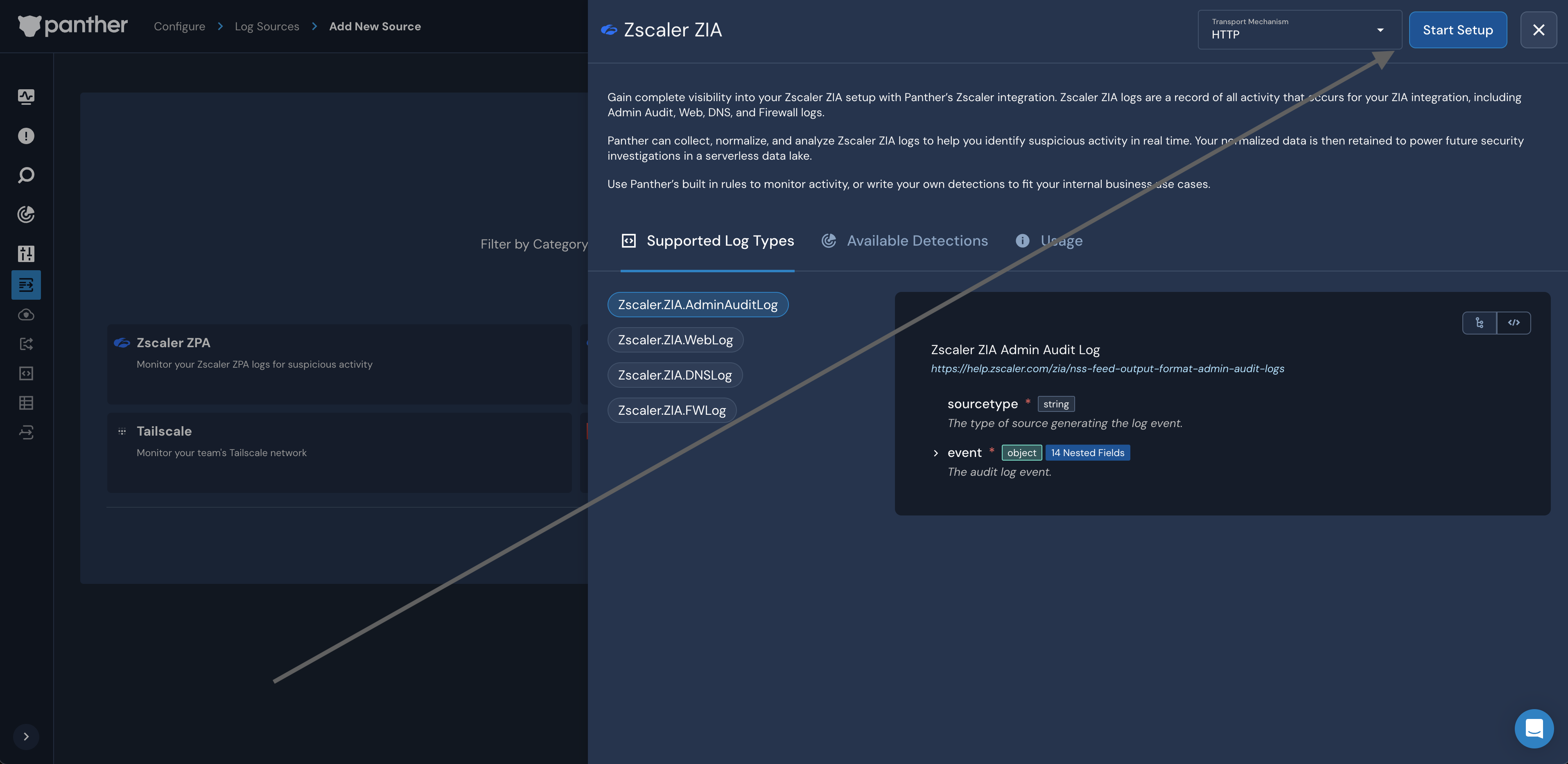
### 1단계: Panther에서 Zscaler ZIA 소스 설정
1. Panther Console의 왼쪽 탐색 모음에서 **로그 소스**.
2. 오른쪽 상단에서 다음을 클릭합니다 **새로 만들기.**
3. "Zscaler ZIA"를 검색한 다음 해당 타일을 클릭합니다.
4. 다음 **전송 메커니즘** 드롭다운에서 다음을 선택합니다 [데이터 전송](/ko/data-onboarding/data-transports.md) 이 통합에 사용할 방법: **HTTP** 또는 **AWS S3 버킷**.
* Zscaler를 구성하여 ZIA 로그를 Panther HTTP 엔드포인트로 직접 스트리밍하거나, 또는 여러분의 환경에 있는 S3 버킷으로 스트리밍할 수 있으며, 이후 Panther가 그곳에서 가져옵니다.\\
5. 클릭합니다 **설정 시작**.
6. 선택한 데이터 전송 방법을 구성하는 방법은 Panther의 지침을 따르세요:
* **HTTP**: Panther의 [HTTP 소스 구성 지침을 따르세요](https://docs.panther.com/data-onboarding/data-transports/http#how-to-set-up-an-http-log-source-in-panther), 5단계부터 시작합니다.
* 설정 중에 **구성** 페이지에서 다음을 사용해야 합니다 [공유 비밀 인증](/ko/data-onboarding/data-transports/http.md#shared-secret).
* 이 소스로 전송되는 페이로드는 [모든 HTTP 소스의 페이로드 요구사항](https://docs.panther.com/data-onboarding/data-transports/http#payload-requirements).
* HTTP 엔드포인트 생성이 완료될 때까지 다음 단계로 진행하지 마세요.
* **S3**: 다음을 따르세요. [Panther에서 S3 Source를 구성하는 지침](/ko/data-onboarding/data-transports/aws/s3.md).
* 다음을 따르세요. [Panther에서 S3 source를 설정하는 방법에 대한 지침](https://docs.panther.com/data-onboarding/data-transports/aws/s3#how-set-up-an-aws-s3-bucket-log-source-in-panther), 1.5단계부터 시작합니다.
### 2단계(S3 ingest 전용): S3 버킷 설정
* 이 문서에서는 [Zscaler SaaS Security API 및 Amazon S3 배포 가이드](https://help.zscaler.com/downloads/zscaler-technology-partners/cloud/zscaler-saas-security-api-and-amazon-s3-deployment-guide/Zscaler-S3-Deployment-Guide-FINAL.pdf), 다음을 따르세요 **Amazon S3와 Zscaler Cloud NSS 통합** , 18페이지부터 시작합니다.
* 다음에 도달하면 중지합니다 **ZIA Admin Portal에 Cloud NSS Feed 추가** (37페이지), 다음 단계에서 완료할 것이므로.
### 3단계: Zscaler admin console에서 Cloud NSS Feed 구성
둘 이상을 온보딩하는 경우 [Zscaler ZIA 로그 유형](#supported-log-types), 로그 유형마다 별도의 NSS Cloud Feed를 만들어야 합니다. 각 로그 유형에 대해 이 단계를 반복합니다.
{% tabs %}
{% tab title="HTTP 소스" %}
HTTP를 Data Transport로 사용하는 경우:
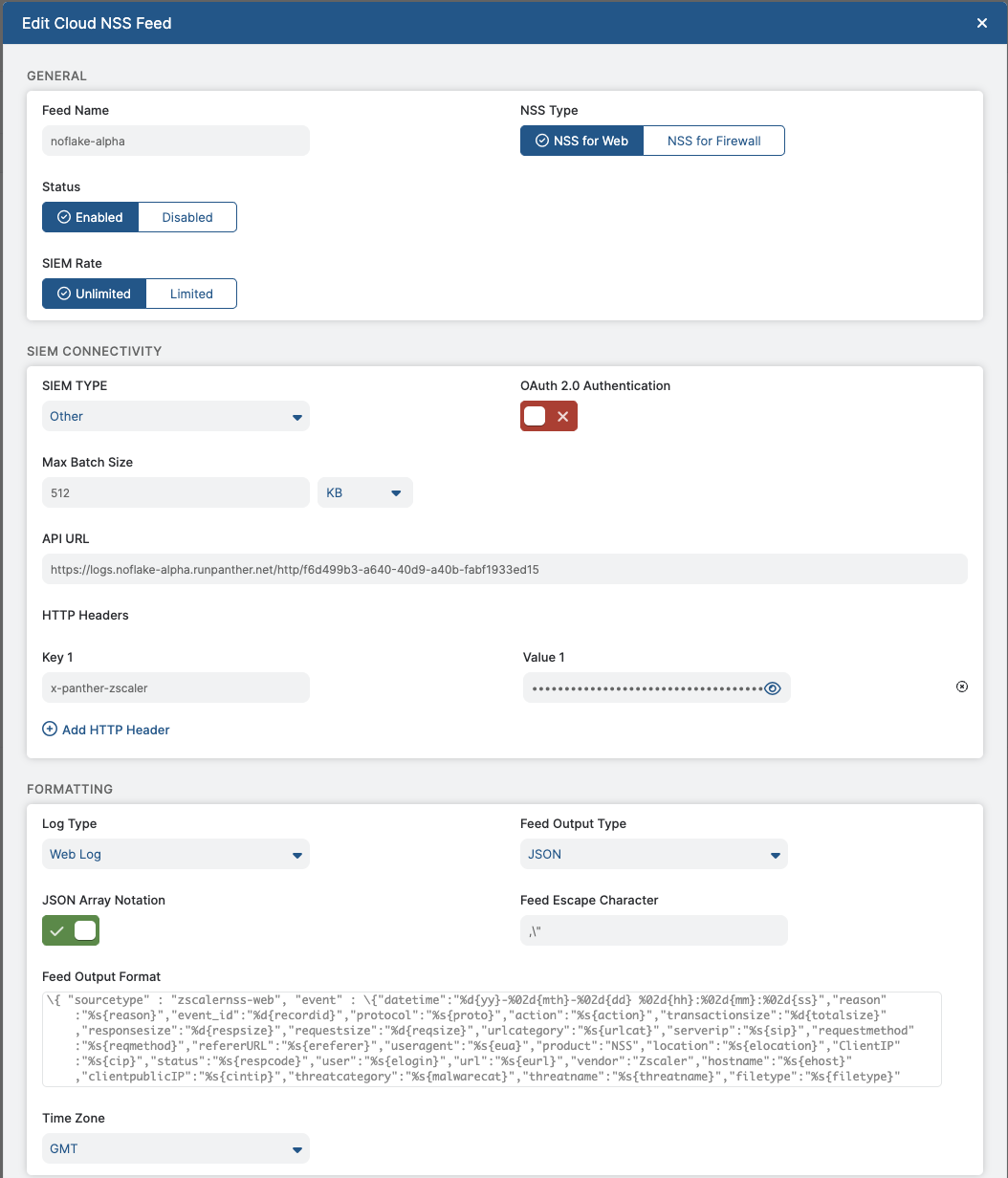
* Zscaler 내 가이드를 따르세요 [Cloud NSS Feed 추가](https://help.zscaler.com/zia/documentation-knowledgebase/analytics/nss/nss-feeds/adding-cloud-nss-feeds) 온보딩하는 로그 유형에 따라 문서를 참조하세요:
* 다음의 경우 [Zscaler.ZIA.AdminAuditLog](#zscaler.zia.adminauditlog), 다음을 따르세요 [Admin Audit 로그에 대한 Cloud NSS Feed 추가](https://help.zscaler.com/zia/adding-cloud-nss-feeds-admin-audit-logs).
* 다음의 경우 [Zscaler.ZIA.WebLog](#zscaler.zia.weblog), 다음을 따르세요 [Web 로그에 대한 Cloud NSS Feed 추가](https://help.zscaler.com/zia/adding-cloud-nss-feeds-web-logs).
* 다음의 경우 [Zscaler.ZIA.FWLog](#zscaler.zia.fwlog), 다음을 따르세요 [Firewall 로그에 대한 Cloud NSS Feed 추가](https://help.zscaler.com/zia/adding-cloud-nss-feeds-for-firewall-logs).
* 다음의 경우 [Zscaler.ZIA.DNSLog](#zscaler.zia.dnslog), 다음을 따르세요 [DNS 로그에 대한 Cloud NSS Feed 추가](https://help.zscaler.com/zia/adding-cloud-nss-feeds-dns-logs).
* Cloud NSS Feed를 구성할 때 다음 사항에 유의하세요:
* **NSS 유형:** 선택 **웹용 NSS** 온보딩하려는 경우 `Admin Audit` 또는 `웹` 로그 유형, 또는 **Firewall용 NSS** 온보딩하려는 경우 `Firewall` 또는 `DNS` 로그 유형.
* **SIEM 속도**: 다음으로 둡니다 **제한 없음**.
* **SIEM 유형:** 선택 **기타**.
* **OAuth 2.0 인증**: 이 설정은 비활성화해야 합니다.
* **최대 배치 크기**: 그대로 둡니다.
* **API URL**: 다음을 입력하세요. **HTTP 소스 URL** Panther Console에서 생성한 [1단계](#step-1-set-up-the-zscaler-zia-source-in-panther).
* **HTTP 헤더**: **키 1** 필드에 다음을 입력합니다 `x-panther-zscaler`. **값 1** 필드에 다음을 입력합니다 **공유 비밀 값** Panther에서 생성하거나 입력한 [1단계](#step-1-set-up-the-zscaler-zia-source-in-panther).
* **로그 유형**: Panther로 로그를 보낼 로그 유형을 선택하고 나머지 필드는 그대로 둡니다.
* **시간대**: 선택 **GMT**, 따라서 [Panther는 UTC 타임스탬프를 예상합니다](/ko/data-onboarding/custom-log-types/reference.md#timestamps).
{% endtab %}
{% tab title="S3 소스" %}
S3를 데이터 전송 방식으로 사용하는 경우:
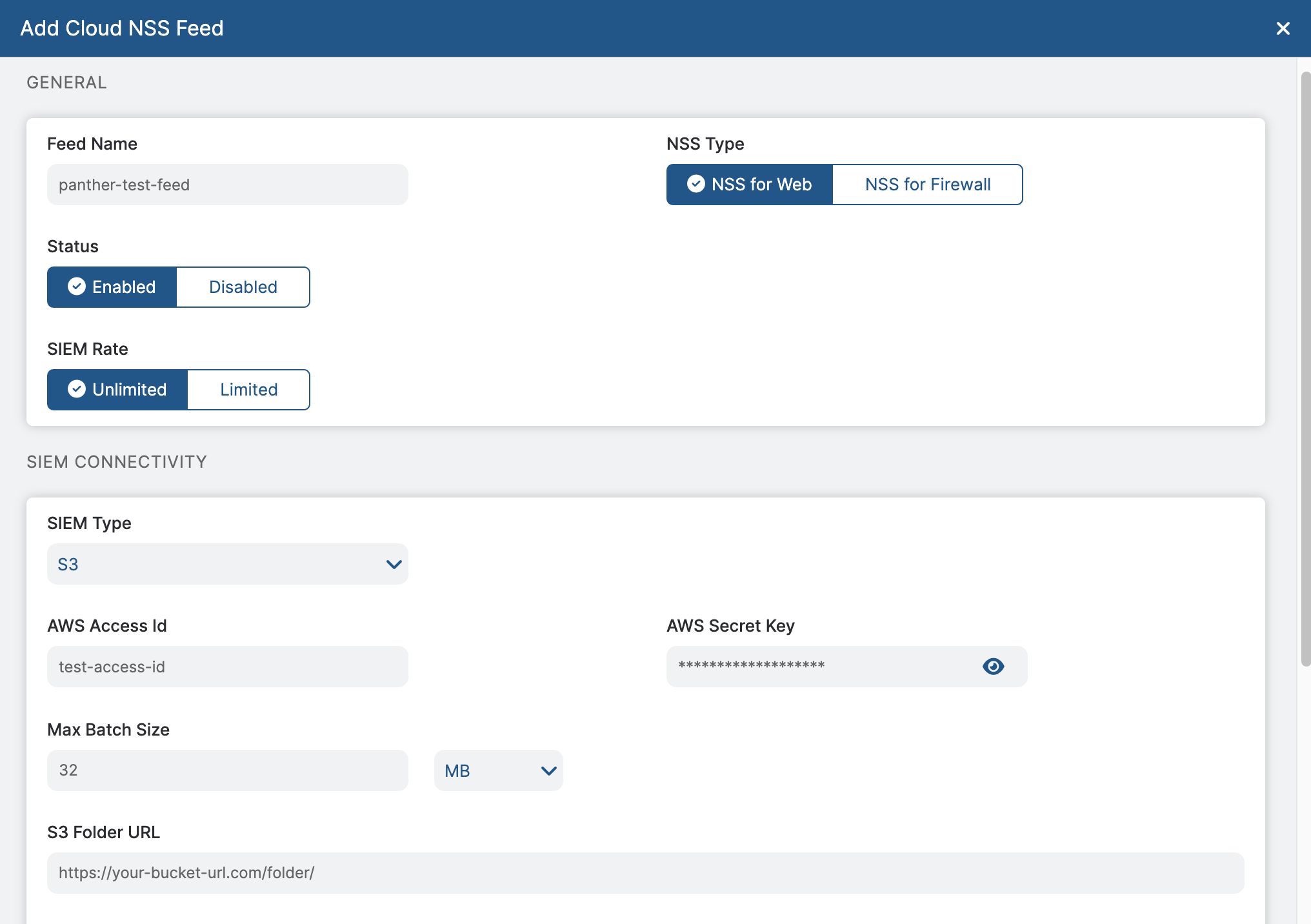
* 이 문서에서는 [Zscaler SaaS Security API 및 Amazon S3 배포 가이드](https://help.zscaler.com/downloads/zscaler-technology-partners/cloud/zscaler-saas-security-api-and-amazon-s3-deployment-guide/Zscaler-S3-Deployment-Guide-FINAL.pdf), 다음을 따르세요 **ZIA Admin Portal에 Cloud NSS Feed 추가** 지침, 37페이지부터 시작합니다.
{% endtab %}
{% endtabs %}
## 지원되는 로그 유형
### Zscaler.ZIA.AdminAuditLog
Admin Audit 로그는 로그인, 로그아웃, 리소스 작업(예: 생성 및 업데이트)과 같은 Zscaler admin console의 주요 이벤트를 기록합니다. Admin Audit 로그는 주로 잠재적으로 의심스러운 활동을 조사하거나 오류를 진단 및 문제 해결하는 데 사용됩니다.
참조:
* [Audit Logs에 대한 일반 정보](https://help.zscaler.com/zia/about-audit-logs)
* [Admin Audit 로그 형식](https://help.zscaler.com/zia/nss-feed-output-format-admin-audit-logs)
```yaml
스키마: Zscaler.ZIA.AdminAuditLog
설명: Zscaler ZIA Admin Audit Log
참조 URL: https://help.zscaler.com/zia/nss-feed-output-format-admin-audit-logs
필드:
- name: sourcetype
필수: true
설명: 로그 이벤트를 생성하는 소스의 유형.
유형: string
- 이름: event
필수: true
설명: 감사 로그 이벤트.
유형: object
필드:
- name: time
필수: true
설명: 감사 로그의 타임스탬프.
유형: timestamp
시간 형식:
- '%a %b %e %H:%M:%S %Y'
이벤트 시간 여부: true
- name: recordid
필수: true
설명: 로그의 고유 식별자.
유형: string
- 이름: action
필수: true
설명: 수행된 작업.
유형: string
- 이름: category
설명: 작업이 수행된 포털 내 위치.
유형: string
- name: subcategory
설명: 작업이 수행된 포털 내 하위 위치.
유형: string
- 이름: resource
설명: 하위 카테고리 내의 특정 위치.
유형: string
- 이름: 인터페이스
설명: 사용자가 작업을 수행한 수단.
유형: string
- name: adminid
설명: 작업을 수행한 관리자 로그인 ID.
유형: string
지표:
- email
- actor_id
- name: clientip
설명: 관리자의 소스 IP 주소.
유형: string
지표:
- ip
- 이름: result
설명: 작업의 결과.
유형: string
- name: errorcode
설명: 작업이 실패한 경우의 오류 코드.
유형: string
- name: auditlogtype
설명: Admin Audit 로그 유형.
유형: string
- name: preaction
설명: 정책 또는 구성 변경 전의 데이터.
유형: json
- name: postaction
설명: 정책 또는 구성 변경 후의 데이터.
유형: json
```
### Zscaler.ZIA.WebLog
Web Log는 Zscaler를 통한 사용자 인터넷 활동에 대한 자세한 정보를 기록하며, 웹사이트에 대한 허용 및 차단 요청을 포함합니다. URL 범주, 위험 수준, 정책 적용 작업을 추적하므로 브라우징 행동을 모니터링하고, 규정 준수를 시행하며, 잠재적 위협을 탐지하는 데 필수적입니다.
참조:
* [Web 로그 형식](https://help.zscaler.com/zia/nss-feed-output-format-web-logs)
```yaml
스키마: Zscaler.ZIA.WebLog
설명: Zscaler ZIA Web Log
참조 URL: https://help.zscaler.com/zia/nss-feed-output-format-web-logs
필드:
- name: sourcetype
필수: true
설명: 로그 이벤트를 생성하는 소스의 유형.
유형: string
- 이름: event
필수: true
설명: 웹 로그 이벤트.
유형: object
필드:
- name: datetime
필수: true
유형: timestamp
설명: 거래의 시간과 날짜
시간 형식:
- '%Y-%m-%d %H:%M:%S'
이벤트 시간 여부: true
- 이름: reason
유형: string
설명: 서비스가 수행한 작업과, 거래가 차단된 경우 적용된 정책
- name: event_id
설명: 각 로그의 고유 레코드 식별자
유형: string
- 이름: protocol
설명: 거래의 프로토콜 유형
유형: string
- 이름: action
설명: 서비스가 거래에 대해 수행한 작업
유형: string
- name: transactionsize
설명: HTTP 거래의 총 크기(바이트)
유형: bigint
- name: responsesize
설명: 헤더와 페이로드를 포함한 HTTP 응답의 총 크기(바이트)
유형: bigint
- name: requestsize
설명: 요청 크기(바이트)
유형: bigint
- name: ClientIP
설명: 사용자의 IP 주소
유형: string
지표:
- ip
- name: appclass
설명: 액세스된 애플리케이션의 웹 애플리케이션 클래스.
유형: string
- name: appname
설명: 클라우드 애플리케이션의 이름
유형: string
- name: bwthrottle
설명: 구성된 대역폭 정책으로 인해 거래가 throttling되었는지 여부를 나타냅니다
유형: string
- name: clientpublicIP
설명: 클라이언트의 공용 IP 주소
유형: string
지표:
- ip
- name: contenttype
설명: 콘텐츠 유형의 이름
유형: string
- 이름: department
설명: 사용자의 부서
유형: string
- name: devicehostname
설명: 장치의 호스트 이름
유형: string
- name: deviceowner
설명: 장치의 소유자
유형: string
- name: dlpdictionaries
설명: 일치한 DLP 사전(있는 경우)
유형: string
- name: dlpengine
설명: 일치한 DLP 엔진(있는 경우)
유형: string
- name: fileclass
설명: 거래 중 다운로드된 파일의 클래스
유형: string
- 이름: filetype
설명: 거래에 관련된 파일 유형.
유형: string
- 이름: hostname
설명: 액세스 중인 URL의 호스트 이름.
지표:
- 호스트 이름
유형: string
- name: keyprotectiontype
설명: HSM Protection 또는 Software Protection 중간 CA 인증서가 사용되는지 여부를 나타냅니다
유형: string
- 이름: location
설명: 소스의 게이트웨이 위치 또는 하위 위치.
유형: string
- name: pagerisk
설명: 대상 URL의 Page Risk Index 점수.
유형: string
- 이름: product
설명: 제품 이름
유형: string
- name: refererURL
설명: 참조 URL
유형: string
- name: requestmethod
설명: 요청 메서드
유형: string
- name: serverip
설명: 대상 서버 IP 주소. 요청이 차단된 경우 0.0.0.0으로 표시됩니다.
유형: string
지표:
- ip
- 이름: status
설명: 응답 코드
유형: string
- name: threatcategory
설명: 거래에서 감지된 멀웨어의 범주(있는 경우)
유형: string
- name: threatclass
설명: 거래에서 감지된 멀웨어의 클래스(있는 경우)
유형: string
- name: threatname
설명: 거래에서 감지된 위협의 이름(있는 경우)
유형: string
- name: unscannabletype
설명: 검사할 수 없는 파일 유형
유형: string
- 이름: url
필수: true
설명: 대상 URL
유형: string
지표:
- url
- name: urlcategory
설명: 대상 URL의 범주
유형: string
- name: urlclass
설명: 대상 URL의 클래스
유형: string
- name: urlsupercategory
설명: 대상 URL의 상위 범주
유형: string
- 이름: user
필수: true
설명: 이메일 주소 형식의 사용자의 로그인 이름
유형: string
지표:
- email
- actor_id
- username
- 이름: useragent
설명: 사용자 에이전트
유형: string
- name: vendor
설명: 공급업체 이름
유형: string
```
### Zscaler.ZIA.FWLog
방화벽 로그는 Zscaler ZIA 방화벽이 관리하는 웹 이외의 트래픽 이벤트를 기록하며, 소스 및 대상 IP, 프로토콜, 포트, 세션 작업에 대한 세부 정보를 포함합니다. 애플리케이션 사용량을 모니터링하고, 네트워크 정책을 시행하며, 의심스럽거나 승인되지 않은 트래픽 패턴을 식별하는 데 사용됩니다.
참조:
* [Firewall 로그 형식](https://help.zscaler.com/zia/nss-feed-output-format-firewall-logs)
```yaml
스키마: Zscaler.ZIA.FWLog
설명: Zscaler ZIA Firewall Log
참조 URL: https://help.zscaler.com/zia/nss-feed-output-format-firewall-logs
필드:
- name: sourcetype
필수: true
설명: 로그 이벤트를 생성하는 소스의 유형.
유형: string
- 이름: event
필수: true
설명: 방화벽 로그 이벤트.
유형: object
필드:
- name: datetime
필수: true
유형: timestamp
설명: 거래의 시간과 날짜
시간 형식:
- '%a %b %e %H:%M:%S %Y'
이벤트 시간 여부: true
- 이름: action
설명: 서비스가 거래에 대해 수행한 작업, 허용됨 또는 차단됨
유형: string
- name: aggregate
설명: Firewall 세션이 집계되었는지 여부를 나타냅니다
유형: string
- name: avgduration
설명: 세션이 집계된 경우, 평균 세션 지속 시간(밀리초)
유형: bigint
- name: cdip
설명: 클라이언트 목적지 IP 주소
유형: string
지표:
- ip
- name: cdport
설명: 클라이언트 소스 포트
유형: bigint
- name: csip
필수: true
설명: 클라이언트 소스 IP 주소
유형: string
지표:
- ip
- name: csport
설명: 클라이언트 소스 포트
유형: bigint
- 이름: department
설명: 사용자의 부서
유형: string
- name: destcountry
설명: 대상 IP 주소의 국가 약어 코드
유형: string
- name: devicehostname
설명: 장치의 호스트 이름
유형: string
- name: deviceowner
설명: 장치의 소유자
유형: string
- name: dnat
설명: 대상 NAT 정책이 적용되었는지 여부를 나타냅니다
유형: string
- 이름: duration
설명: 세션 또는 요청 지속 시간(초)
유형: bigint
- name: durationms
설명: 세션 또는 요청 지속 시간(밀리초)
유형: bigint
- name: inbytes
설명: 서버에서 클라이언트로 전송된 바이트 수
유형: bigint
- name: ipcat
설명: 서버 IP 주소에 해당하는 URL 범주
유형: string
- name: ipsrulelabel
설명: Firewall 세션에 적용된 IPS 정책 이름
유형: string
- name: locationname
설명: 세션이 시작된 위치의 이름
유형: string
- name: numsessions
설명: 집계된 세션 수
유형: bigint
- name: nwapp
설명: 액세스된 네트워크 애플리케이션
유형: string
- name: nwsvc
설명: 사용된 네트워크 서비스
유형: string
- name: outbytes
설명: 클라이언트에서 서버로 전송된 바이트 수
유형: bigint
- 이름: proto
설명: IP 프로토콜 유형
유형: string
- name: rulelabel
설명: 거래에 적용된 룰의 이름
유형: string
- name: sdip
설명: 서버 목적지 IP 주소
유형: string
지표:
- ip
- name: sdport
설명: 서버 목적지 포트
유형: bigint
- name: ssip
설명: 서버 소스 IP 주소
유형: string
지표:
- ip
- name: ssport
설명: 서버 소스 포트
유형: bigint
- name: stateful
설명: Firewall 세션이 상태 저장형인지 여부를 나타냅니다
유형: string
- name: threatcat
설명: IPS 엔진이 Firewall 세션에서 탐지한 위협의 범주
유형: string
- name: threatname
설명: IPS 엔진이 Firewall 세션에서 탐지한 위협의 이름
유형: string
- name: tsip
설명: 클라이언트(소스)의 터널 IP 주소
유형: string
지표:
- ip
- name: tunsport
설명: 터널 포트
유형: bigint
- name: tuntype
설명: 트래픽을 Firewall로 전송하는 데 사용된 트래픽 전달 방법
유형: string
- 이름: user
필수: true
설명: 이메일 주소 형식의 사용자의 로그인 이름
유형: string
지표:
- email
- username
- actor_id
```
### Zscaler.ZIA.DNSLog
DNS 로그는 허용, 차단 또는 확인되지 않은 도메인을 포함하여 Zscaler ZIA가 처리한 모든 DNS 쿼리와 응답을 캡처합니다. 도메인 사용 현황을 파악하고, DNS 터널링과 같은 악의적이거나 의심스러운 활동을 탐지하며, 안전한 DNS 필터링을 위한 정책 적용을 지원합니다.
참조:
* [DNS 로그 형식](https://help.zscaler.com/zia/nss-feed-output-format-dns-logs)
```yaml
스키마: Zscaler.ZIA.DNSLog
설명: Zscaler ZIA DNS Log
참조 URL: https://help.zscaler.com/zia/nss-feed-output-format-dns-logs
필드:
- name: sourcetype
필수: true
설명: 로그 이벤트를 생성하는 소스의 유형.
유형: string
- 이름: event
필수: true
설명: DNS 로그 이벤트.
유형: object
필드:
- name: datetime
필수: true
유형: timestamp
설명: 거래의 시간과 날짜
시간 형식:
- '%a %b %e %H:%M:%S %Y'
이벤트 시간 여부: true
- 이름: category
유형: string
설명: 이벤트 범주
- name: clt_sip
설명: 사용자의 IP 주소
유형: string
지표:
- ip
- 이름: department
설명: 사용자의 부서
유형: string
- name: devicehostname
설명: 장치의 호스트 이름
유형: string
- name: deviceowner
설명: 장치의 소유자
유형: string
- name: dns_req
설명: DNS 요청
유형: string
지표:
- domain
- name: dns_reqtype
필수: true
설명: DNS 요청 유형
유형: string
- name: dns_resp
설명: DNS 응답
유형: string
- name: durationms
설명: DNS 요청의 지속 시간(밀리초)
유형: bigint
- 이름: location
설명: 이벤트 위치
유형: string
- name: reqaction
설명: DNS 요청에 적용된 작업 이름
유형: string
- name: reqrulelabel
설명: DNS 요청에 적용된 룰의 이름
유형: string
- name: resaction
설명: DNS 응답에 적용된 작업 이름
유형: string
- name: respipcategory
설명: 응답 IP 범주
유형: string
- name: resrulelabel
설명: DNS 응답에 적용된 룰의 이름
유형: string
- name: srv_dip
설명: 서버 IP
유형: string
지표:
- ip
- name: srv_dport
설명: 서버 포트
유형: bigint
- 이름: user
필수: true
설명: 이메일 주소 형식의 로그인 이름
유형: string
지표:
- email
- username
- actor_id
```
---
# Agent Instructions
This documentation is published with GitBook. GitBook is the documentation platform designed so that both humans and AI agents can read, navigate, and reason over technical content effectively. Learn more at gitbook.com.
## Querying This Documentation
If you need additional information that is not directly available in this page, you can query the documentation dynamically by asking a question.
Perform an HTTP GET request on the current page URL with the `ask` query parameter, and the optional `goal` query parameter:
```
GET https://docs.panther.com/ko/data-onboarding/supported-logs/zscaler/zia.md?ask=&goal=
```
`ask` is the immediate question: it should be specific, self-contained, and written in natural language.
`goal` is optional and describes the broader end goal you are ultimately trying to accomplish on behalf of the user. GitBook uses it to tailor the answer towards what is most useful for that goal.
The response will contain a direct answer to the question and relevant excerpts and sources from the documentation.
Use this mechanism when the answer is not explicitly present in the current page, you need clarification or additional context, or you want to retrieve related documentation sections.