> For the complete documentation index, see [llms.txt](https://docs.panther.com/llms.txt). Markdown versions of documentation pages are available by appending `.md` to page URLs; this page is available as [Markdown](https://docs.panther.com/ko/enrichment/google-threat-intelligence.md).
# Google 위협 인텔리전스
들어오는 이벤트를 Google Threat Intelligence IoC 스트림으로 보강합니다
## 개요
[Google Threat Intelligence](https://www.virustotal.com/) 포괄적인 위협 인텔리전스 데이터를 제공합니다. 이 통합은 [Google Threat Intelligence IoC Stream API](https://gtidocs.virustotal.com/docs/ioc-stream-guide) 를 사용하여, 팔로우하는 Google Threat Intelligence 컬렉션에서 침해 지표(IoC)의 거의 실시간 피드를 수집하고, 이를 Panther로 수집된 로그 이벤트와 매칭하여 높은 신뢰도의 알림을 생성합니다.
{% hint style="warning" %}
Panther에서 Google Threat Intelligence 보강을 사용하려면 [프리미엄 API 키](https://virustotal.readme.io/reference/public-vs-premium-api) 와 Google Threat Intelligence 계정에서 활성화된 IoC 스트림 구독이 필요합니다.
IoC 스트림은 Google Threat Intelligence 사용자에 연결됩니다. 즉, API 키 소유자가 팔로우하는 컬렉션의 IoC만 받을 수 있습니다. Panther에 제공하는 API 키가, 가져오려는 컬렉션을 구독한 동일한 Google Threat Intelligence 사용자에게 속해 있는지 확인하세요.
{% endhint %}
## Panther에서 Google Threat Intelligence 보강이 작동하는 방식
기본적으로 Google Threat Intelligence는 Panther 환경의 모든 로그 소스([필요한 경우 로그 유형별로 비활성화할 수도 있습니다](#enabling-disabling-or-modifying-google-threat-intelligence-enrichment-for-a-log-type))에 대해 실행되도록 구성됩니다. Panther는 수신되는 각 로그 이벤트를 모든 로그 유형에 걸쳐 Google Threat Intelligence Panther 관리 보강과 매칭한 뒤, 이를 디택션 엔진을 통과시킵니다.
Panther가 [일치를 식별하면](#how-a-match-between-a-log-event-and-google-threat-intelligence-is-made) 수신 이벤트와 Google Threat Intelligence 항목 사이에 매칭이 이루어지면, Google Threat Intelligence 데이터는 일치하는 로그 이벤트에 최상위 `p_enrichment` 키 아래에 일치하는 로그 이벤트에 추가됩니다. 이후 디택션 로직과 검색에서 참조할 수 있습니다.
Panther는 구독 중인 Google Threat Intelligence 컬렉션에서 매시간 새 IoC를 가져옵니다. 각 가져오기는 마지막 성공 실행 이후 스트림에 추가된 IoC만 가져오며, 이전에 가져온 IoC는 조회 테이블에 유지됩니다(IoC `id`). 구성된 최대 수명보다 오래된 IoC는 각 새로고침 시 자동으로 필터링됩니다.
엔리치먼트 소스를 사용한 디택션 작성에 대한 자세한 내용은 다음을 참조하세요. [사용자 지정 엔리치먼트 데이터를 사용한 디택션 작성](/ko/enrichment/custom.md#writing-a-detection-using-custom-enrichment-data).
### 로그 이벤트와 Google Threat Intelligence가 어떻게 매칭되는지
로그 이벤트는 Google Threat Intelligence Panther 관리 보강 데이터로 보강됩니다( `p_enrichment`) 다음 항목 간에 일치가 발견되면 엔리치됩니다:
* 연결된 각 로그 유형에 대해 구성된 Selector 필드의 값 중 하나라도.
* 각 로그 유형의 기본 Selectors는 다음과 같습니다. [지표 필드](/ko/search/panther-fields.md#indicator-fields) (다음으로 표시됨 `p_any_*`)는 엔리치먼트 테이블의 기본 키에 있는 indicator field 지정과 연결됩니다(단, Selectors는 구성할 수 있습니다). [여기에서 이 자동 매핑에 대해 자세히 알아보세요](/ko/enrichment/custom.md#option-2-let-log-types-and-selectors-be-automatically-mapped-by-indicator-fields).
* 다음의 값은 `match` 는 Panther의 Google Threat Intelligence 테이블 항목에 있는 키입니다.
* `match` 는 Google Threat Intelligence 테이블의 기본 키이며, 지표 값(IP 주소, 도메인, 파일 해시, URL 등)을 포함합니다.
* 다음 예시를 보세요. `match` 에서 [Google Threat Intelligence 테이블 항목 예시](#example-google-threat-intelligence-enrichment-table-entry) 아래를 참조하세요.
## Google Threat Intelligence 보강 설정하기
### 1단계: Google Threat Intelligence IoC 컬렉션 구성
Panther에서 Google Threat Intelligence 보강을 설정하기 전에, Panther가 위협 인텔리전스 데이터를 가져올 수 있도록 Google Threat Intelligence 계정에서 IoC 스트림 구독을 구성해야 합니다.
1. 다음에 로그인하세요 [Google Threat Intelligence](https://www.virustotal.com/).
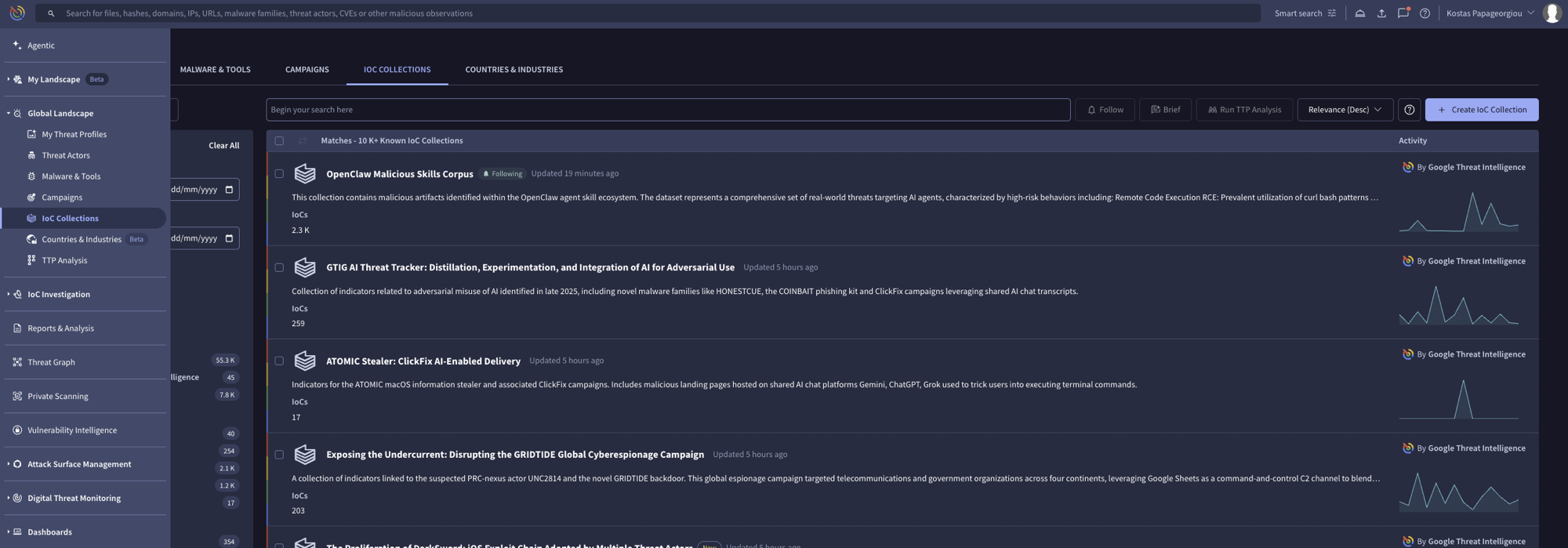
2. 다음으로 이동하세요: **IoC 컬렉션** 대시보드의 섹션에서
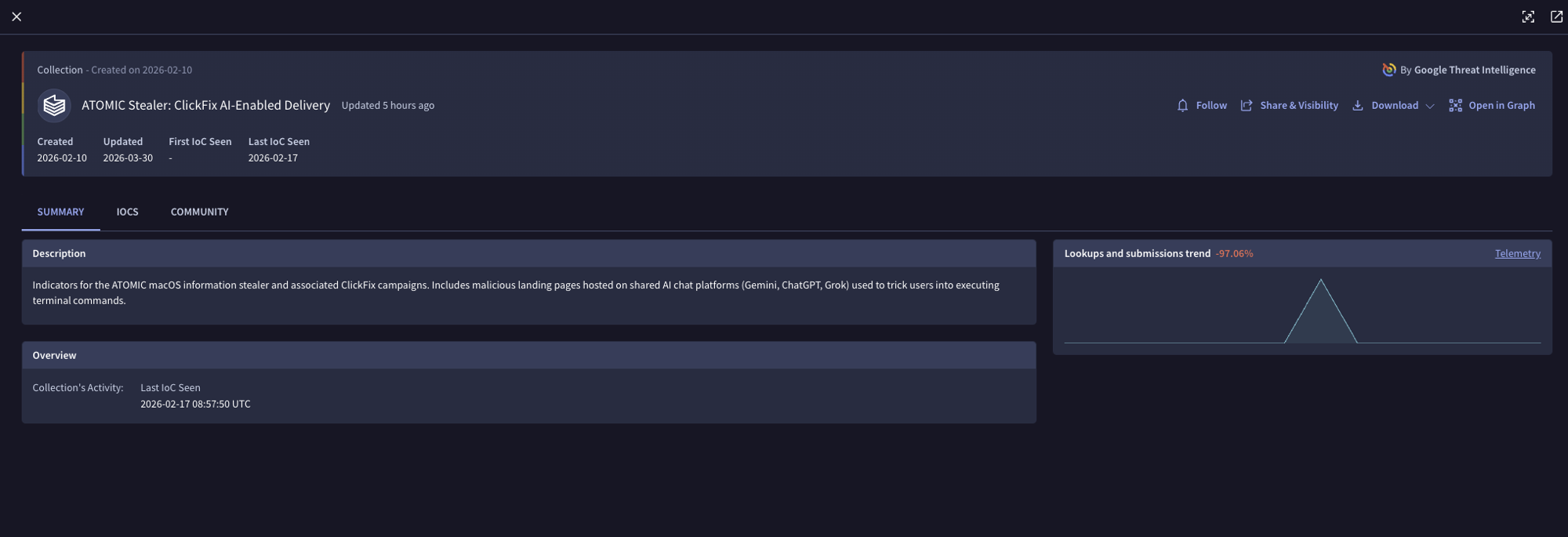
3. 관심 있는 컬렉션을 찾아 클릭합니다.
4. 모니터링할 각 컬렉션에 대해:
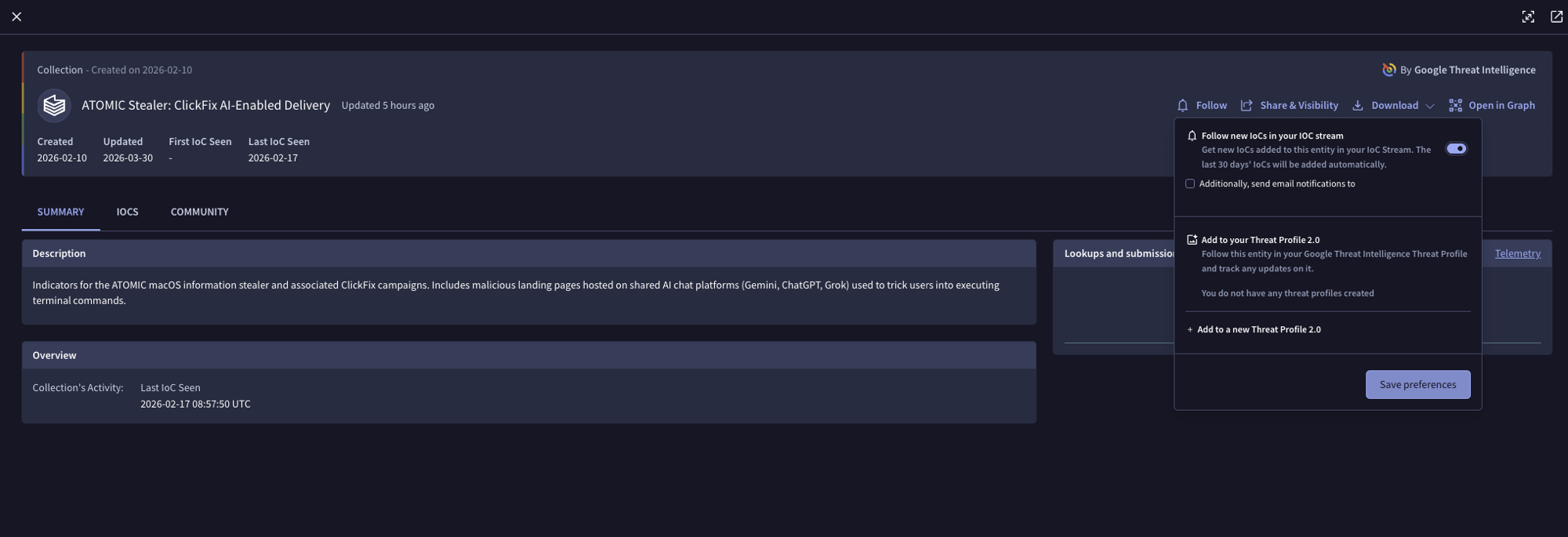
* 클릭합니다 **다음을 따르세요:**.
* 토글을 활성화하여 스트림에서 새 IoC를 받습니다.
* 클릭합니다 **설정 저장**.
5. 구독하려는 모든 컬렉션에 대해 반복합니다.
{% hint style="info" %}
IoC 스트림에 대한 자세한 안내는 [Google Threat Intelligence IoC Stream Guide](https://gtidocs.virustotal.com/docs/ioc-stream-guide).
{% endhint %}
### 2단계: Panther에서 Google Threat Intelligence 보강 생성
Panther에서 Google Threat Intelligence 보강을 구성하려면:
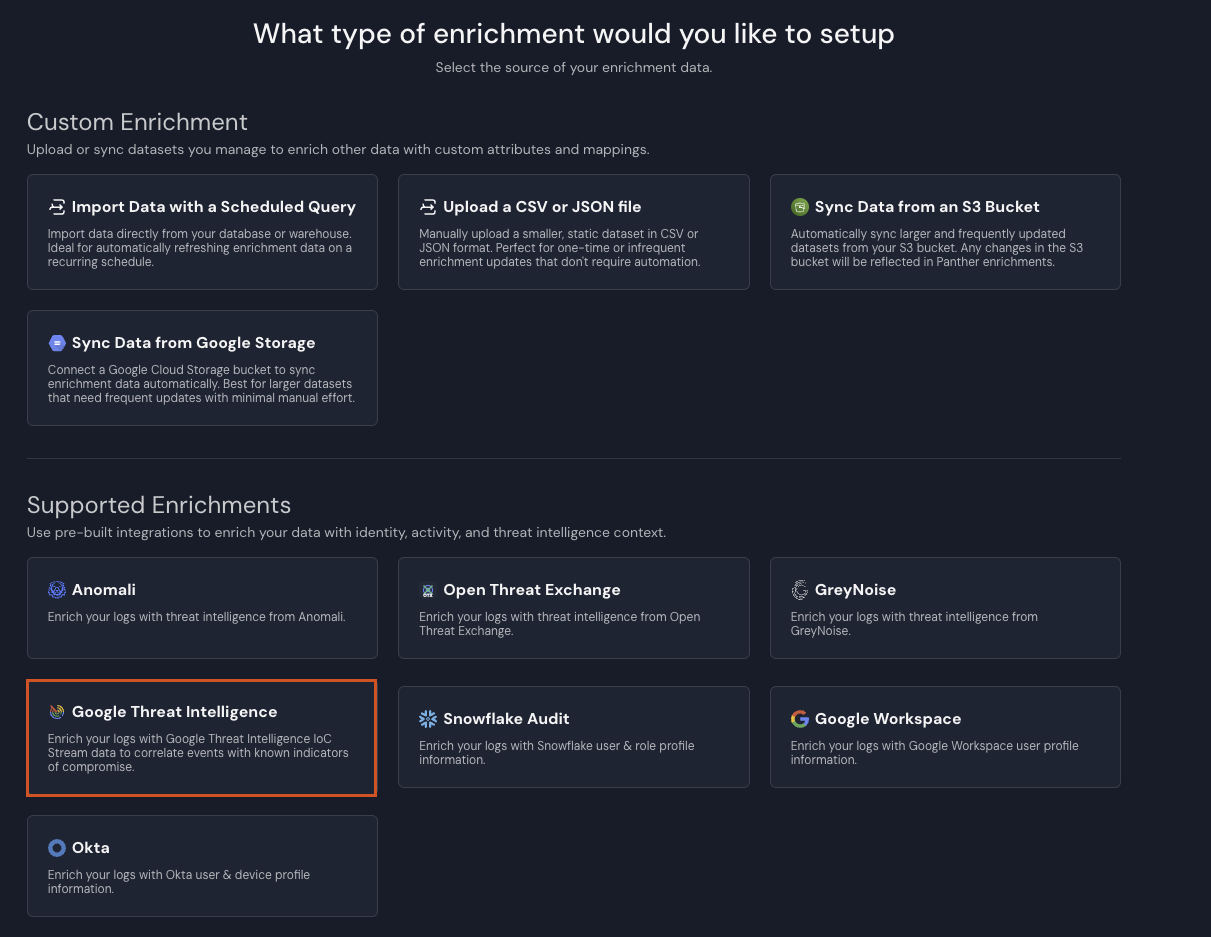
1. Panther Console의 왼쪽 탐색 모음에서 **보강**.
2. 오른쪽 상단에서 다음을 클릭하세요: **새로 만들기**.
3. 클릭합니다 **Google Threat Intelligence**.
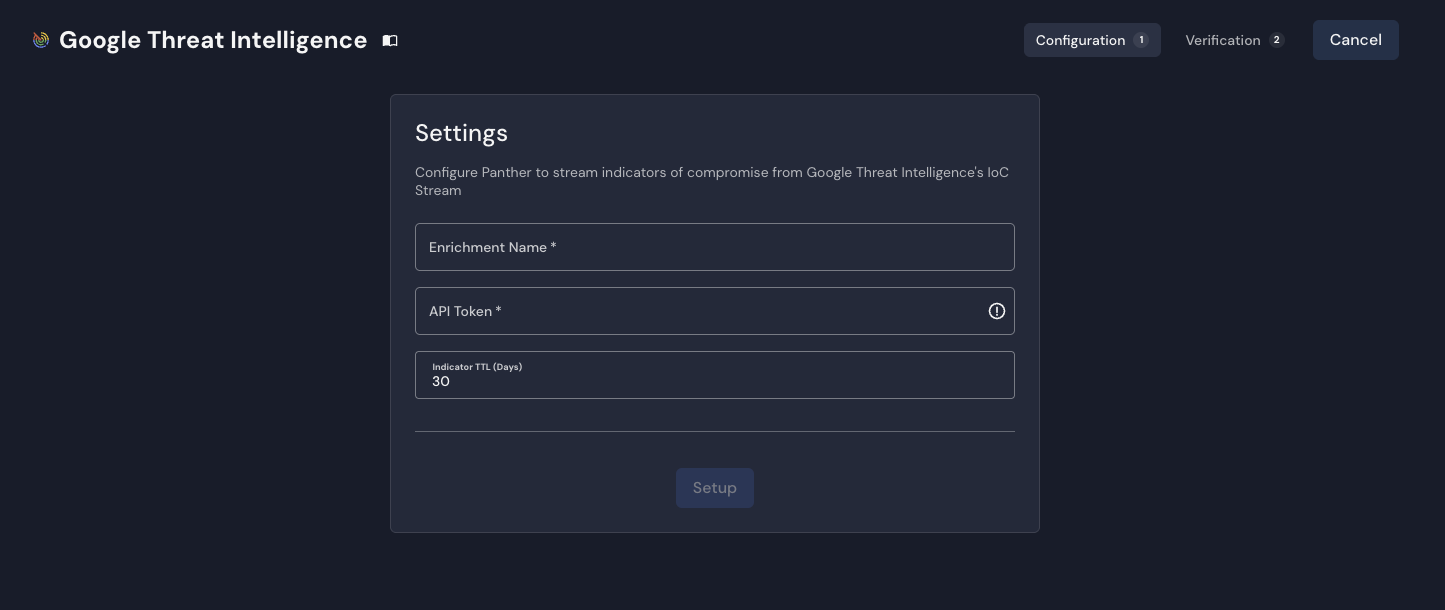
4. 다음 페이지에서 **구성** 탭에서, **설정** 양식에서 다음 필드의 값을 입력하세요:
* **보강 이름**: 통합에 대한 설명이 포함된 이름을 입력합니다.
* **API 토큰**: Google Threat Intelligence API 키를 입력합니다.
* **지표 TTL(일)**: 보강 테이블에 유지할 IoC의 최대 수명을 일 단위로 구성합니다. 이 기준보다 오래된 IoC는 각 새로고침 중 자동으로 필터링되며 영구적으로 제거됩니다.
5. 클릭합니다 **설정**.
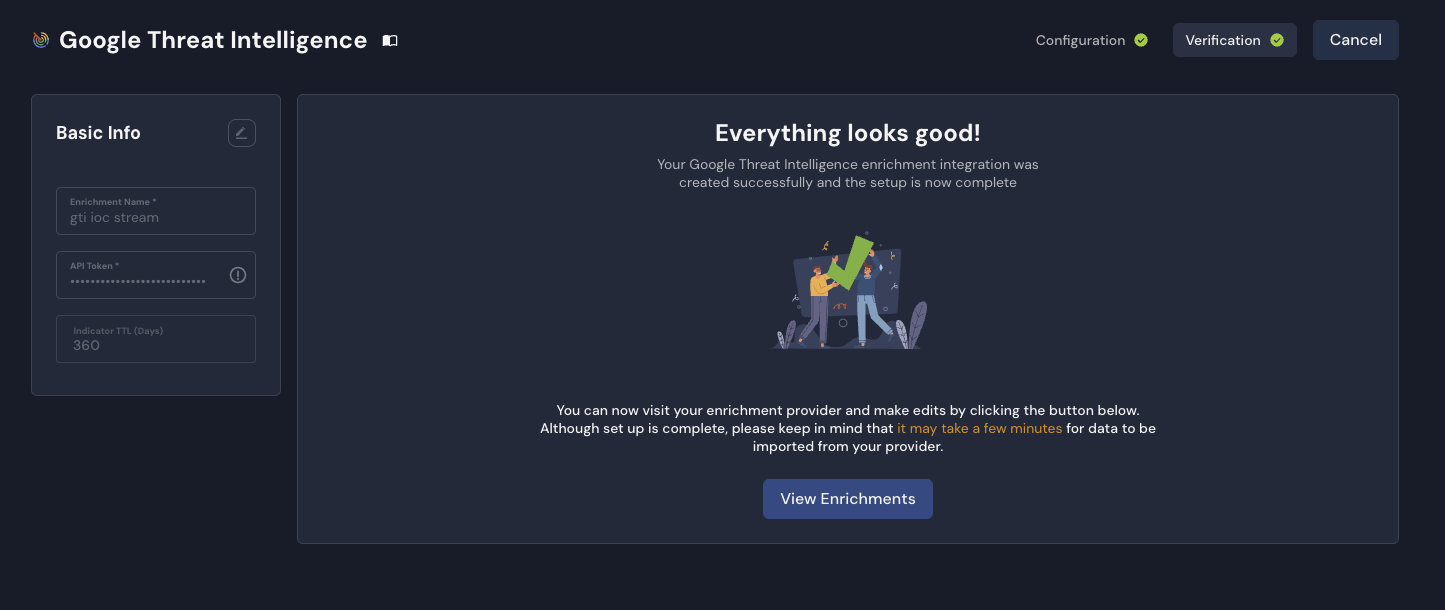
6. 다음 페이지에서 **확인** 탭에서 통합이 성공적으로 생성되었는지 확인한 다음 **보강 보기**.
* 새 Google Threat Intelligence 구성은 **보강** 페이지.
{% hint style="info" %}
Google Threat Intelligence 보강을 추가한 후, 들어오는 로그 데이터가 보강되기 시작하기까지 약간의 지연(몇 분)이 있을 수 있습니다. 이는 초기 데이터 동기화가 완료될 시간을 확보하기 위한 것입니다.
{% endhint %}
## 로그 유형에 대한 Google Threat Intelligence 보강 활성화, 비활성화 또는 수정
Google Threat Intelligence 보강은 Panther 인스턴스의 각 로그 유형에 대해 기본적으로 활성화되어 있습니다.
특정 로그 유형에 대해 Google Threat Intelligence 보강을 비활성화(또는 나중에 다시 활성화)하거나, 로그 유형의 선택기를 변경하려면:
1. Panther Console의 왼쪽 탐색 표시줄에서 다음을 클릭하세요. **보강**.
2. 보강 목록에서 수정하려는 Google Threat Intelligence 소스를 찾아 이름을 클릭합니다.
3. 다음을 클릭하세요: **엔리치된 로그 유형** 탭.
4. 오른쪽에서 **로그 유형 편집**.
* 이 엔리치먼트를 새 로그 유형에 활성화하려면 **로그 유형 추가**.
* 생성된 새 행에서 **로그 유형** 를 선택하고, **Selectors** 필드에는 최소 하나의 이벤트 필드를 추가하세요.
* 이 엔리치먼트를 로그 유형에서 비활성화하려면, 해당 로그 유형의 행을 찾아 휴지통 아이콘을 클릭하세요.
* 나열된 로그 유형이 보이지 않으면, 다음 옆의 드롭다운 화살표를 클릭하세요. **자동 매핑된 로그 유형**해당 로그 유형의 행을 찾아 편집 아이콘을 클릭하세요.
* 로그 유형의 Selectors를 변경하려면, 다음 **Selectors** 필드에서 이벤트 필드 선택 항목을 추가하거나 제거하세요.
5. 오른쪽 상단에서 다음을 클릭하세요: **저장**.
## Google Threat Intelligence 보강 테이블 항목 예시
아래는 Panther가 정규화한 Google Threat Intelligence IoC 항목의 예시입니다. 구독한 컬렉션의 각 IoC는 고유한 행을 생성하며, 지표 값은 `match` 필드.
```json
{
"match": ["198.51.100.42"],
"type": "ip_address",
"id": "198.51.100.42",
"gti_url": "https://www.virustotal.com/gui/ip-address/198.51.100.42",
"last_analysis_date": "2025-03-10T14:30:00Z",
"tags": ["malware", "c2"],
"country": "US",
"as_owner": "Example ISP",
"asn": 12345,
"network": "198.51.100.0/24",
"continent": "NA",
"regional_internet_registry": "ARIN",
"reputation": -15,
"last_analysis_stats": {
"malicious": 12,
"suspicious": 3,
"undetected": 55,
"harmless": 2,
"timeout": 0
},
"p_event_time": "2025-03-10T14:30:00Z",
"p_log_type": "GTI.IoCStream",
"p_parse_time": "2025-03-10T15:00:00Z",
"p_row_id": "abc123def456ghi789",
"p_schema_version": 0
}
```
### `GTI.IoCStream` 스키마
다음은 Panther 관리형 `GTI.IoCStream` 스키마로, Google Threat Intelligence IoC 데이터가 Panther에 저장되는 방식을 나타냅니다. 구독한 컬렉션의 각 지표는 고유한 행이 됩니다.
```yaml
스키마: GTI.IoCStream
설명: 파일, IP, 도메인, URL을 포함한 GTI IoC Stream API의 Google Threat Intelligence(GTI) 침해 지표(IoC)
referenceURL: https://gtidocs.virustotal.com/reference/ioc-collection-object
필드:
- 이름: match
필수: true
설명: 지표 값(예: 파일 해시, IP 주소, 도메인, URL).
유형: array
요소:
유형: string
지표:
- ip
- domain
- md5
- sha1
- sha256
- url
- 이름: type
필수: true
설명: '지표 유형: file, ip_address, domain 또는 url.'
유형: string
- name: gti_url
설명: Google Threat Intelligence에서 이 지표로 바로 연결되는 링크.
유형: string
- 이름: id
설명: 침해 지표의 고유 식별자.
유형: string
- name: last_analysis_date
설명: 지표가 마지막으로 스캔된 시점을 나타내는 UTC 타임스탬프.
유형: timestamp
시간 형식:
- unix
이벤트 시간 여부: true
- 이름: tags
설명: 이 지표와 관련된 대표 속성 목록.
유형: array
요소:
유형: string
- name: last_modified_date
설명: 지표 정보가 마지막으로 업데이트된 시점을 나타내는 UTC 타임스탬프(file/domain/url 유형).
유형: timestamp
시간 형식:
- unix
- name: last_modification_date
설명: 지표 정보가 마지막으로 업데이트된 시점을 나타내는 UTC 타임스탬프(ip_address 유형).
유형: timestamp
시간 형식:
- unix
- name: first_seen_itw_date
설명: 지표가 실제 환경에서 처음 관측된 시점의 UTC 타임스탬프.
유형: timestamp
시간 형식:
- unix
- name: last_seen_itw_date
설명: 실제 환경에서 지표가 가장 최근에 관측된 시점의 UTC 타임스탬프.
유형: timestamp
시간 형식:
- unix
- name: creation_date
설명: 가능한 경우 파일의 메타데이터 또는 도메인 WHOIS 데이터에서 추출한 UTC 타임스탬프.
유형: timestamp
시간 형식:
- unix
- name: last_submission_date
설명: 지표가 Google Threat Intelligence에 마지막으로 게시된 날짜의 UTC 타임스탬프.
유형: timestamp
시간 형식:
- unix
- name: type_tags
설명: 특정 파일 유형과 관련된 더 넓은 범주의 태그.
유형: array
요소:
유형: string
- name: threat_severity
설명: 심각도 수준(SEVERITY_NONE, LOW, MEDIUM, HIGH 또는 UNKNOWN)과 계산 시점을 포함한 위협 심각도 수준 및 세부 정보.
유형: json
- name: meaningful_name
설명: 파일의 모든 이름 중 가장 흥미로운 이름.
유형: string
- name: type_description
설명: 파일 유형을 설명합니다(예: PE32 실행 파일, PDF 문서).
유형: string
- 이름: country
설명: IP 주소가 지리적으로 위치한 곳을 나타내는 ISO-3166 국가 코드.
유형: string
- name: as_owner
설명: IP가 속한 자율 시스템의 소유자.
유형: string
- name: asn
설명: IP가 속한 자율 시스템 번호.
유형: bigint
- 이름: network
설명: IP가 속한 IPv4 네트워크 범위.
유형: string
지표:
- net_addr
- name: categories
설명: 분류 서비스를 도메인 또는 URL에 할당된 카테고리와 매핑하는 사전.
유형: json
- name: whois
설명: 관련 whois 서버에서 반환된 WHOIS 정보.
유형: string
- 이름: url
설명: 스캔된 원본 URL.
유형: string
지표:
- url
- name: last_final_url
설명: 원본 URL이 리디렉션되는 경우 최종 목적지 URL.
유형: string
지표:
- url
- 이름: md5
설명: 파일의 MD5 해시.
유형: string
지표:
- md5
- name: sha1
설명: 파일의 SHA-1 해시.
유형: string
지표:
- sha1
- 이름: sha256
설명: 파일의 SHA-256 해시.
유형: string
지표:
- sha256
- name: gti_confidence_score
설명: 악성일 가능성을 나타내는 신뢰도 점수(0-100).
유형: bigint
- name: reputation
설명: 커뮤니티 투표를 기반으로 계산된 점수.
유형: bigint
- 이름: size
설명: 바이트 단위의 파일 크기.
유형: bigint
- name: type_extension
설명: 파일 확장자를 지정합니다.
유형: string
- name: type_tag
설명: 검색에서 필터링하기 위해 파일 유형을 나타내는 태그.
유형: string
- name: names
설명: 파일과 연결된 모든 파일 이름.
유형: array
요소:
유형: string
- name: first_submission_date
설명: 지표가 Google Threat Intelligence에 처음 제출된 시점의 UTC 타임스탬프.
유형: timestamp
시간 형식:
- unix
- name: times_submitted
설명: 지표가 Google Threat Intelligence에 게시된 횟수.
유형: bigint
- name: unique_sources
설명: 파일이 게시된 서로 다른 소스의 수.
유형: bigint
- name: tlsh
설명: 파일의 TLSH 지역성 민감 해시.
유형: string
- name: permhash
설명: 파일의 Permhash.
유형: string
- name: vhash
설명: 자체 유사성 클러스터링 알고리즘 값.
유형: string
- name: capabilities_tags
설명: 파일 기능과 관련된 태그(프리미엄 전용).
유형: array
요소:
유형: string
- name: downloadable
설명: 파일을 다운로드할 수 있는지 여부(프리미엄 전용).
유형: boolean
- name: continent
설명: ISO-3166 형식을 사용하는 지리적 지역 코드.
유형: string
- name: jarm
설명: TLS 지문 인식을 위한 JARM 해시.
유형: string
- name: last_https_certificate_date
설명: SSL 인증서가 검색된 시점의 UTC 타임스탬프.
유형: timestamp
시간 형식:
- unix
- name: regional_internet_registry
설명: RIR 지정(AFRINIC, ARIN, APNIC, LACNIC 또는 RIPE NCC).
유형: string
- name: whois_date
설명: 마지막 WHOIS 레코드 새로고침의 UTC 타임스탬프.
유형: timestamp
시간 형식:
- unix
- name: last_http_response_code
설명: HTTP 응답 상태 코드.
유형: bigint
- name: last_http_response_content_length
설명: 응답 콘텐츠 크기(바이트).
유형: bigint
- name: last_http_response_content_sha256
설명: HTTP 응답 본문 콘텐츠의 SHA256 해시.
유형: string
지표:
- sha256
- name: outgoing_links
설명: 페이지에서 찾은 다른 도메인으로의 링크.
유형: array
요소:
유형: string
지표:
- url
- name: redirection_chain
설명: 리디렉션 기록 URL(최종 URL 제외).
유형: array
요소:
유형: string
지표:
- url
- 이름: title
설명: 웹페이지 제목.
유형: string
- name: has_content
설명: URL에 콘텐츠가 있는지 여부.
유형: boolean
- name: last_dns_records_date
설명: DNS 레코드가 검색된 시점의 UTC 타임스탬프.
유형: timestamp
시간 형식:
- unix
- name: last_update_date
설명: WHOIS에서 업데이트된 날짜(UTC).
유형: timestamp
시간 형식:
- unix
- name: registrar
설명: 도메인을 등록한 회사.
유형: string
- name: last_analysis_stats
설명: 악성, 의심, 미탐지, 무해, 시간 초과, 확인된 시간 초과, 실패, 유형 미지원 판정의 개수를 포함한 최신 스캔 결과 요약.
유형: json
- name: trid
설명: TrID 파일 유형 식별 결과로, 각각 감지된 file_type과 그 확률을 포함합니다.
유형: array
요소:
유형: json
- name: available_tools
설명: 파일에 사용할 수 있는 추가 분석 도구 목록(예: sigcheck, exiftool).
유형: array
요소:
유형: string
- name: detectiteasy
설명: Detect It Easy 파일 유형 식별 결과로, filetype과 type, name, info를 포함한 일치 값 배열이 포함됩니다.
유형: json
- name: popular_threat_classification
설명: 인기 있는 디택션 이름과 카테고리를 기반으로 한 위협 분류로, suggested_threat_label, popular_threat_name, popular_threat_category를 포함합니다.
유형: json
- name: exiftool
설명: ExifTool 유틸리티에서 추출한 메타데이터로, 파일 형식, MIME 형식, CPU 아키텍처 및 기타 형식별 메타데이터 필드를 포함합니다.
유형: json
- name: crowdsourced_ai_results
설명: 크라우드소싱 AI 분석 결과로, 자연어 분석 요약, 소스, 카테고리, 판정, 결과 ID를 각각 포함합니다.
유형: array
요소:
유형: json
- name: sources
설명: IoC 항목과 연결된 다양한 소스.
유형: array
요소:
유형: json
```
## 디택션에서 Google Threat Intelligence 데이터를 사용하는 예시
Google Threat Intelligence 보강 데이터는 알려진 위협을 식별하는 데 사용될 수 있습니다. 다음 예시는 이벤트가 Google Threat Intelligence 지표와 일치했는지, 그리고 악성으로 표시되었는지를 확인합니다:
```python
def 룰(event):
enrichment = event.get('p_enrichment', {})
gti_data = enrichment.get('GTI.IoCStream', {})
if not gti_data:
return False
# 악성 판정에 대한 분석 통계 확인
stats = gti_data.get('last_analysis_stats', {})
malicious_count = stats.get('malicious', 0)
return malicious_count > 0
```
## Google Threat Intelligence 보강 문제 해결
### 일반적인 문제
* **데이터가 전혀 수집되지 않음**: Google Threat Intelligence 계정에서 활성 IoC 컬렉션 구독이 있는지 확인하세요. Panther가 데이터를 받으려면 적어도 하나의 컬렉션을 팔로우하고 활성화해야 합니다. 또한 Panther에 구성된 API 키가 해당 컬렉션을 구독한 동일한 Google Threat Intelligence 사용자에게 속하는지 확인하세요. IoC 스트림은 사용자별로 범위가 지정되므로, 다른 사용자의 키를 사용하면 빈 스트림이 반환됩니다.
* **API 키 문제**: Google Threat Intelligence API 키가 유효한지, [프리미엄 API 키](https://virustotal.readme.io/reference/public-vs-premium-api)이며 IoC 스트림 액세스에 적절한 권한이 있는지 확인하세요.
* **데이터 최신성**: **지표 TTL(일)** 설정이 사용 사례에 적합한지 확인하세요. 이 임계값보다 오래된 IoC는 자동으로 필터링됩니다.
추가 문제 해결이 필요하면 Panther Knowledge Base를 방문하여 [보강 관련 문서를 확인하고](https://help.panther.com/Enrichment) 자주 묻는 질문에 대한 답변과 일반적인 오류 및 문제 해결 방법을 살펴보세요.
---
# Agent Instructions
This documentation is published with GitBook. GitBook is the documentation platform designed so that both humans and AI agents can read, navigate, and reason over technical content effectively. Learn more at gitbook.com.
## Querying This Documentation
If you need additional information that is not directly available in this page, you can query the documentation dynamically by asking a question.
Perform an HTTP GET request on the current page URL with the `ask` query parameter, and the optional `goal` query parameter:
```
GET https://docs.panther.com/ko/enrichment/google-threat-intelligence.md?ask=&goal=
```
`ask` is the immediate question: it should be specific, self-contained, and written in natural language.
`goal` is optional and describes the broader end goal you are ultimately trying to accomplish on behalf of the user. GitBook uses it to tailor the answer towards what is most useful for that goal.
The response will contain a direct answer to the question and relevant excerpts and sources from the documentation.
Use this mechanism when the answer is not explicitly present in the current page, you need clarification or additional context, or you want to retrieve related documentation sections.