> For the complete documentation index, see [llms.txt](https://docs.panther.com/llms.txt). Markdown versions of documentation pages are available by appending `.md` to page URLs; this page is available as [Markdown](https://docs.panther.com/ko/search/scheduled-searches/examples.md).
# 예약된 검색 예시
이 페이지에는 로그에서 의심스러운 활동을 조사할 때 사용할 수 있는 일반적인 사용 사례와 예시 검색이 포함되어 있습니다.
아래 예시는 효과적으로 사용하려면 로컬 환경에 맞게 일부 커스터마이징이 필요합니다. 모든 쿼리는 결과 크기를 제어해야 합니다. 이는 다음을 사용해 수행할 수 있습니다. `LIMIT` 또는 `GROUP BY` 절.
{% hint style="warning" %}
예약 검색이 실행될 때마다 회사의 데이터 플랫폼에 비용이 발생합니다. 쿼리가 지정된 시간 제한 내에 완료될 수 있는지 반드시 확인하세요.
{% endhint %}
### 스트리밍 룰
Panther를 사용하면 [예약된 검색](/ko/search/scheduled-searches.md) ([저장된 검색 ](/ko/search/scheduled-searches.md)를 실행할 수 있습니다(정해진 간격으로 실행) 그리고 예약 룰과 함께 사용하면 긴 시간 범위에 걸쳐 동작하고 여러 소스의 데이터를 집계하는 디택션을 만들 수 있습니다.
가능하면 스트리밍 룰을 사용해 디택션을 구현해 보세요. 스트리밍 룰은 지연 시간이 짧고 예약 검색보다 비용도 적게 듭니다. 그러나 디택션에 더 많은 컨텍스트가 필요한 경우에는 예약 검색이 적절한 해결책입니다.
### 데이터 지연 및 시점 고려 사항
효과적인 예약 룰을 작성하려면 이벤트가 기록된 시점부터 Panther에 도달할 때까지의 데이터 지연을 이해해야 합니다. 이 정보를 사용해 예약 시점과 사용되는 시간 창을 적절히 조정하세요.
예를 들어 AWS CloudTrail 데이터는 약 10분의 지연이 있습니다. 이는 Panther 기능 때문이 아니라 AWS의 제한 때문입니다. 마지막 1시간의 데이터를 분석하려면, 모범 사례로 검색을 매시 15분에 실행하도록 예약할 것을 권장합니다.
이것은 Panther 스트리밍 룰에서는 고려 사항이 아닙니다. 데이터가 시스템에 들어와 처음 처리될 때 적용되기 때문입니다. 예약 검색은 축적된 데이터를 주기적으로 되돌아보기 때문에 시점 고려 사항이 중요합니다.
## 예시
### AWS 콘솔 접근을 특정 IP 주소로 제한
예약 검색과 예약 룰을 사용해 디택션을 만드는 과정을 더 잘 이해하기 위해, 매우 간단한 종단 간 예시부터 시작해 보겠습니다. 회사 IP 대역의 IP 주소만 AWS 콘솔 접근에 허용하도록 매우 엄격히 제한한다고 가정해 봅시다. 이 제어를 검증하기 위해 모든 AWS 콘솔 로그인에 다음이 있었는지 확인하고자 합니다. `sourceIPAddress` 이 IP 대역 내부에서의 접근인지 여부를 확인합니다. 이러한 IP 블록의 테이블은 데이터레이크에 보관합니다. 참고: 이 예시는 단순한 동등성 조인 연산을 사용하며, IP 블록 테이블의 모든 항목이 /32 주소라고 가정합니다. 현실적인 구현에서는 IP 블록 테이블에 CIDR 블록이 들어 있고, 확인은 CIDR 블록 안에 없는 항목을 찾는 방식이 될 것입니다. 이는 독자를 위한 연습 문제로 남겨 둡니다.
15분마다 실행되도록 룰을 예약하고, 이전 30분을 확인한다고 가정해 봅시다(CloudTrail과 관련된 데이터의 본질적인 지연을 처리하기 위해 긴 윈도우를 사용합니다).
완전 공개하자면: 당신은 *할 수* Dynamodb 또는 S3에서 IP 허용 목록 테이블을 관리한다면 스트리밍 룰을 사용해 이 디택션을 구현할 수 있습니다. 로그 소스의 볼륨이 매우 큰 경우에는 아래와 같은 주기적 배치 조인이 더 효율적일 것입니다.
이 이벤트를 탐지하는 쿼리는 다음과 같습니다:
{% tabs %}
{% tab title="SQL" %}
```sql
SELECT
ct.*
FROM
panther_logs.public.aws_cloudtrail ct LEFT OUTER JOIN infrastructure.networking.egress_blocks egress
ON (ct.sourceIPAddress = egress.ip)
WHERE
p_occurs_since('30 minutes')
AND
ct.eventtype = 'AwsConsoleSignIn'
AND
egress.ip IS NULL -- 일치하지 않음!
LIMIT 1000 -- 이런 항목이 많을 것으로 예상하진 않지만 안전을 위해 넣어 둡니다!
```
다음에 주목하세요 `p_occurs_since()` 는 Panther [SQL 매크로](/ko/search/data-explorer.md) 로 예약 쿼리 작성이 더 쉬워집니다.
{% endtab %}
{% tab title="PantherFlow" %}
{% hint style="warning" %}
현재는 [예약된 검색](/ko/search/scheduled-searches.md) 에 [PantherFlow](/ko/pantherflow.md). 다음을 참조하세요. [PantherFlow의 제한 사항](/ko/pantherflow.md#limitations-of-pantherflow) 자세히 알아보려면
{% endhint %}
```kusto
panther_logs.public.aws_cloudtrail
| where p_event_time > time.ago(30m)
and eventtype == 'AwsConsoleSignIn'
| join kind=leftouter egress=(infrastructure.networking.egress_blocks)
on $left.sourceIPAddress == $right.ip
| where egress.ip == null
| limit 1000
```
{% endtab %}
{% endtabs %}
{% hint style="warning" %}
예약 검색의 출력은 예약 룰(Python)로 흐르므로 반환되는 행 수를 신중하게 제어하는 것이 중요합니다. 다음을 항상 권장합니다. *항상* 다음을 제공하고 `LIMIT` 절을 사용하거나 `GROUP BY` 제한된 수의 행만 반환하는 집계를 사용하세요(최대 수천 개 미만).
{% endhint %}
이를 구현하려면:
1. 예약된 검색 만들기 [다음 지침에 따라](/ko/search/scheduled-searches.md#how-to-create-a-scheduled-search).
* 아래 예시 화면에서는 30분마다를 선택했습니다.\

2. 예약 검색이 활성 상태인지 확인하세요.
3. 만드세요 [예약된 룰](/ko/detections/rules.md) 예약 검색의 출력에 맞는 룰을.\

예약 룰은 스트리밍 룰의 모든 기능을 갖추고 있어 알러트와 대상 전송 대상을 사용자 지정할 수 있습니다. Panther의 중복 제거는 알러트 폭주를 방지합니다. 위의 룰에서는 다음을 사용합니다. `sourceIPAddress` 30분마다 1개의 알러트만 생성하는 dedupe입니다.
목록과 조인하는 이 패턴은 IOC 디택션에도 사용할 수 있습니다(TOR Exit Node, 악성코드 해시 등과 같은 IOC 테이블을 유지).
### 명령 및 제어(C2) 비콘 디택션
이 예시에서는 집계를 사용해 C2 비콘 활동을 찾는 매우 단순하지만 효과적인 행동 기반 디택션을 만들어 보겠습니다.
{% hint style="info" %}
이것은 설명 목적의 지나치게 단순화된 디택션일 뿐입니다. 허용 목록 설정과 임계값 조정 같은 보완 없이 사용하면 과도한 오탐이 발생할 수 있습니다(“beacon”하는 비악성 프로세스도 많습니다). 다만 잘 이해된 네트워크와 적절한 허용 목록을 사용한다면 이 기법은 매우 효과적일 수 있습니다.
{% endhint %}
우리는 C2 비콘을 다음과 같이 정의합니다. IP 활동이 *최대* 하루 5회 이하로 발생하고 3일 이상 반복되는 경우입니다. 이를 구현하려면:
{% tabs %}
{% tab title="SQL" %}
```sql
WITH low_and_slow_daily_ip_activity AS (
SELECT
date(p_event_time) as day,
srcAddr as beacon_ip
FROM
panther_logs.public.aws_vpcflow
WHERE
p_occurs_since('1 week')
GROUP BY 1,2
HAVING count(1) <= 5 -- 활동이 적은 것만 해당하며, 이 부분은 조정이 필요합니다
)
SELECT
beacon_ip,
count(1) as days
FROM
low_and_slow_daily_ip_activity
GROUP BY
1
HAVING days >= 3 -- 적어도 이만큼의 날에 활동이 있는 것만 해당합니다
LIMIT 20 -- 알러트 폭주를 방지합니다!
```
{% endtab %}
{% tab title="PantherFlow" %}
{% hint style="warning" %}
현재는 [예약된 검색](/ko/search/scheduled-searches.md) 에 [PantherFlow](/ko/pantherflow.md). 다음을 참조하세요. [PantherFlow의 제한 사항](/ko/pantherflow.md#limitations-of-pantherflow) 자세히 알아보려면
{% endhint %}
```kusto
panther_logs.public.aws_vpcflow
| where p_event_time > time.ago(7d)
| summarize count=agg.count() by day=time.trunc('d', p_event_time), beacon_ip=srcAddr
| where count <= 5 // 활동이 적은 것만 해당하며, 이 부분은 조정이 필요합니다
| summarize days=agg.count() by beacon_ip
| where days >= 3 // 적어도 이만큼의 날에 활동이 있는 것만 해당합니다
| limit 20 // 알러트 폭주를 방지합니다!
```
{% endtab %}
{% endtabs %}
이를 구현하려면:
1. 예약된 검색 만들기 [다음 지침에 따라](/ko/search/scheduled-searches.md#how-to-create-a-scheduled-search).
* 아래 예시 화면에서는 Cron 표현식을 사용해 매일 자정 1분 후에 실행되도록 설정합니다.\

2. 예약 검색이 활성 상태인지 확인하세요.
3. 만드세요 [예약된 룰](/ko/detections/rules.md) 예약 검색의 출력에 맞게 설정된:\

### 내 엔드포인트 모니터링은 얼마나 잘 작동하고 있나?
이 가상의 예시에서는 엔드포인트 모니터링 소프트웨어로 CrowdStrike를 사용한다고 가정하겠습니다. Panther는 로그를 수집하도록 구성되어 있고, 다음이 있습니다. [CMDB](https://en.wikipedia.org/wiki/Configuration_management_database) 배포된 에이전트를 내부적으로 연결된 사용자와 매핑하도록 채워져 있습니다.
이 데이터로 물을 수 있는 *많은* 흥미로운 질문이 있지만, 이 예시에서는 특히 다음 질문을 하겠습니다: "지난 24시간 동안 ANY 데이터도 보고하지 않은 엔드포인트는 무엇인가?"
CrowdStrike 로그에서 배포된 에이전트의 고유 ID는 `aid` 라고 합니다. CMDB에는 다음에 대한 매핑이 있습니다. `aid` 참조 데이터에 대한 매핑입니다. 이 예시에서는 다음 속성이 있다고 가정합니다. `employee_name`, `employee_group` 및 `last_seen`. 직원 관련 속성은 현재 누가 엔드포인트를 사용하는지 식별하는 데 도움이 되며, `last_seen` 는 VPN 접근, DHCP 임대, 인증, 생존성 디텍션 등 네트워크 활동을 추적하는 백엔드 프로세스가 업데이트한다고 가정하는 타임스탬프입니다.
이 질문에 답하려면, CMDB에서 다음 조건을 만족하는 에이전트가 무엇인지 알아야 합니다. *는* 지난 24시간 동안 네트워크 활동은 있지만 *이 아니라* CrowdStrike 활동은 없는데, 이는 에이전트가 실행 중이 아니거나 비활성화되었을 수 있음을 의미할 수 있습니다(즉, 커버리지 공백이 있다는 뜻). 아래 쿼리는 특정 의심 엔드포인트를 포함한 직원 그룹별 보고서를 계산합니다.
{% tabs %}
{% tab title="SQL" %}
```sql
WITH active_aids AS (
SELECT
DISTINCT aid -- 고유 에이전트 ID만 매칭합니다
FROM panther_logs.public.crowdstrike_aidmaster
WHERE p_occurs_since('1 day') -- 로그 데이터의 지난 24시간 내
)
SELECT
cmdb.employee_group,
count(1) AS num_inactive_endpoints,
ARRAY_AGG(
DISTINCT cmdb.aid || ' ' || cmdb.employee_name || ' ' || cmdb.employee_group
) as endpoints -- 여기서 특정 엔드포인트를 수집합니다
FROM
infrastructure.inventory.cmdb AS cmdb LEFT OUTER JOIN active_aids cs USING(aid)
WHERE
cs.aid IS NULL -- 로그 데이터와 일치하는 것이 없음
AND
cmdb.last_seen BETWEEN current_date - 1 AND current_date -- 활성 상태일 가능성이 높음
GROUP BY 1
ORDER BY 2 desc
```
{% endtab %}
{% tab title="PantherFlow" %}
{% hint style="warning" %}
현재는 [예약된 검색](/ko/search/scheduled-searches.md) 에 [PantherFlow](/ko/pantherflow.md). 다음을 참조하세요. [PantherFlow의 제한 사항](/ko/pantherflow.md#limitations-of-pantherflow) 자세히 알아보려면
{% endhint %}
```kusto
let active_aids = panther_logs.public.crowdstrike_aidmaster
| where p_event_time > time.ago(1d)
| summarize by aid;
infrastructure.inventory.cmdb
| where last_seen > time.ago(1d)
| join kind=leftouter aa=(active_aids) on $left.aid == $right.aid
| where aid == null
| extend endpoints=strings.cat(aid, ' ', employee_name, ' ', employee_group)
| summarize num_inactive_endpoints=agg.count(),
endpoints=agg.make_set(endpoints) by employee_group
| sort num_inactive_endpoints
```
{% endtab %}
{% endtabs %}
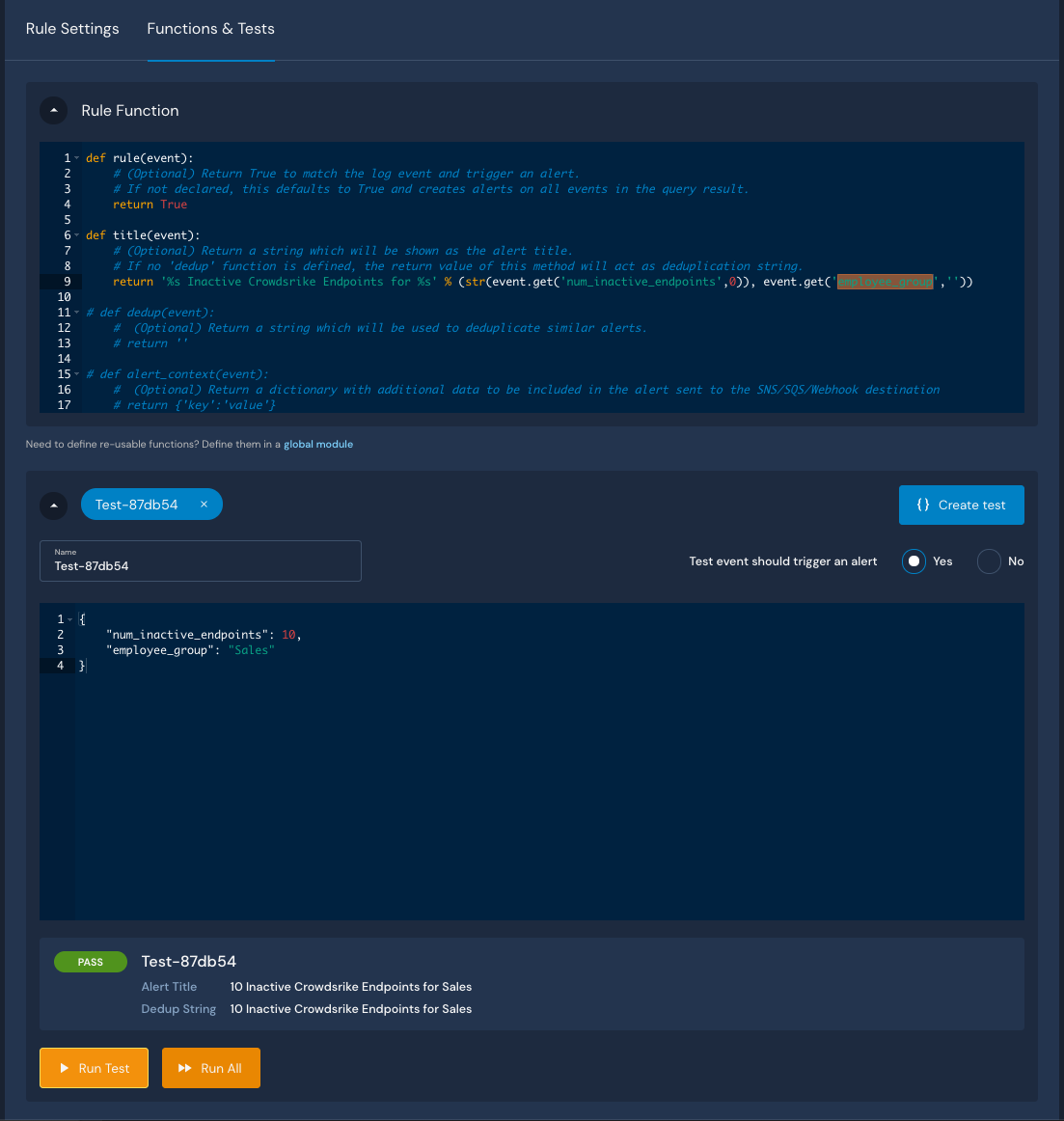
이를 구현하려면:
1. 예약된 검색 만들기 [다음 지침에 따라](/ko/search/scheduled-searches.md#how-to-create-a-scheduled-search).
* 아래 예시 화면에서는 Cron 표현식을 사용해 매일 자정 1분 후에 실행되도록 설정합니다.\

2. 예약 검색이 활성 상태인지 확인하세요.
3. 만드세요 [예약된 룰](/ko/detections/rules.md) 예약 검색의 출력에 맞게 설정된:
CrowdStrikeRule
알러트와 연결된 이벤트는 분석가가 검토할 수 있으며, 이는 직원 그룹당 최대 1개가 됩니다. "히트"는 `endpoints` 에 수집되며, 직원 정보를 사용해 쉽게 검토할 수 있습니다. 모든 Panther 룰과 마찬가지로 알러트 대상 전송 위치를 유연하게 사용자 지정할 수 있습니다. 예를 들어, `employee_group` 이 `C-Suite` 라면 온콜에 페이지를 보낼 수 있고, 기본 알러트는 단순히 다음 날 검토를 위한 작업 큐로 전달될 수 있습니다.
### 비정상적인 Okta 로그인
다음 [Okta 로그](/ko/data-onboarding/supported-logs/okta.md) 는 이벤트와 관련된 "누가", "어떤 장치로", "어디서"라는 질문에 대한 답을 제공합니다. 이 정보는 도난당한 자격 증명을 사용하는 공격자와 같은 의심스러운 행동을 식별하는 데 사용할 수 있습니다.
과제는 "의심스럽다"를 정의하는 것입니다. 의심스럽다는 것을 정의하는 한 가지 방법은 정상에서의 일탈입니다. 각 사용자에 대한 기준선을 만들 수 있다면, 유의미한 변화가 있을 때 알러트할 수 있습니다.
좋아 보이지만, 이제 유용한 보안 결과를 생성하도록(그리고 많은 오탐은 발생하지 않도록) "유의미한 변화"를 정의해야 합니다. 이 예시에서는 `클라이언트` 에 초점을 맞춰 도난당한 자격 증명을 시사할 수 있는 정보를 찾겠습니다. 참고: Okta 데이터는 문맥 정보가 매우 풍부하며, 이는 이 데이터를 활용하는 간단한 예시 중 하나일 뿐입니다.
VPN과 프록시 때문에, 의심스러운 활동을 식별할 때 특정 IP 주소나 관련 지리 정보를 사용하는 것만으로는 실용적이지 않은 경우가 많습니다. 마찬가지로 사용자는 새 장치를 사용하거나 여러 장치를 사용할 수 있어 장치가 바뀔 수도 있습니다. 정당한 사용자들 사이에는 상당한 변동이 있을 것으로 예상합니다. 그러나 특정 사용자에 대해서는 시간이 지날수록 더 일관성이 있을 것으로 기대합니다.
이 예시에서는 각 `actor`에 대해 과거 최대 30일 동안 다음을 계산하여 "정상"을 특성화하겠습니다:
* 사용된 고유 인증 클라이언트
* 사용된 고유 OS 버전
* 사용된 고유 장치
* 사용된 고유 위치(정의: 국가, 주, 도시)
네 가지 차원 중 어느 것과도 일치하지 않는 이벤트를 "의심스럽다"로 정의하겠습니다. 이는 다음을 의미합니다:
* 새 장치를 얻어도 알러트가 발생하지 않습니다.
* 위치를 변경해도 알러트가 발생하지 않습니다.
* 우리는 *은* 모든 속성이 한 번에 바뀔 때 알러트를 받습니다,
그리고 보안 관점에서 이것이 이상 징후이자 흥미로운 상황이라고 가정합니다.
또한 새 직원으로 인한 오탐을 피하기 위해, 최소 5일의 이력이 있는 actor만 고려하겠습니다.
이를 전날에 대해 하루 한 번 실행되도록 예약한다고 가정합니다.
이것은 단지 예시일 뿐이며, 다른 휴리스틱과 마찬가지로 조정이 필요하지만 actor별로 자동 보정된다는 장점이 있습니다.
위 내용을 계산하는 SQL은 다음과 같습니다:
{% tabs %}
{% tab title="SQL" %}
```sql
WITH actor_baseline AS (
SELECT
actor:id as actor_id,
ARRAY_AGG (DISTINCT client:id) as client_id_list,
ARRAY_AGG (DISTINCT client:userAgent.os) as client_os_list,
ARRAY_AGG (DISTINCT client:device) as client_devices_list,
ARRAY_AGG (DISTINCT
client:geographicalContext:country || client:geographicalContext:state || client:geographicalContext:city)
as client_locations_list
FROM
panther_logs.public.okta_systemlog
WHERE
p_occurs_since('30 days')
GROUP BY 1
HAVING
COUNT(DISTINCT date(p_event_time)) > 5 -- 최소 5일의 이력
)
-- 현재 날짜를 기준선과 비교하여, 기준선 속성 중 어느 것과도 일치하지 않는 이벤트를 반환합니다
SELECT
logs.*
FROM
panther_logs.public.okta_systemlog logs JOIN actor_baseline bl ON (actor:id = bl.actor_id)
WHERE
p_occurs_since('1 day')
AND
NOT ARRAY_CONTAINS(logs.client:id::variant, bl.client_id_list)
AND
NOT ARRAY_CONTAINS(logs.client:userAgent:os::variant, bl.client_os_list)
AND
NOT ARRAY_CONTAINS(logs.client:device::variant, bl.client_devices_list)
AND
NOT ARRAY_CONTAINS(
(client:geographicalContext:country ||
client:geographicalContext:state ||
client:geographicalContext:city)::variant, bl.client_locations_list)
```
이 검색이 실행될 때마다 이러한 기준선을 다시 계산하는 것은 그다지 효율적이지 않습니다. 향후 Panther는 요약 테이블을 생성하는 기능을 지원하여 위와 같은 방법을 더 효율적으로 만들 수 있게 될 것입니다.
{% endtab %}
{% tab title="PantherFlow" %}
{% hint style="warning" %}
현재는 [예약된 검색](/ko/search/scheduled-searches.md) 에 [PantherFlow](/ko/pantherflow.md). 다음을 참조하세요. [PantherFlow의 제한 사항](/ko/pantherflow.md#limitations-of-pantherflow) 자세히 알아보려면
{% endhint %}
```kusto
let actor_baseline = panther_logs.public.okta_systemlog
| where p_event_time > time.ago(30d)
| summarize unique_days=agg.count_distinct(time.trunc('d', p_event_time)),
client_id_list=agg.make_set(client.id),
cliend_os_list=agg.make_set(client.userAgent.os),
client_devices_list=agg.make_set(client.device),
client_locations_list=agg.make_set(strings.cat(client.geographicalContext.country,
client.geographicalContext.state,
client.geographicalContext.city)) by actor_id=actor.id
| where unique_days > 5;
panther_logs.public.okta_systemlog
| where p_event_time > time.ago(1d)
| join kind=inner ab=(actor_baseline) on $left.actor.id == $right.actor_id
| where client.id not in ab.client_id_list
and client.userAgent.os not in ab.client_os_list
and client.device not in ab.client_devices_list
and strings.cat(client.geographicalContext.country,
client.geographicalContext.state,
client.geographicalContext.city) not in ab.client_locations_list
```
{% endtab %}
{% endtabs %}
### 비밀번호 스프레이 디텍션
비밀번호 스프레이는 흔히 사용되는 몇 개의 비밀번호로 많은 계정(사용자 이름)에 접근을 시도하는 공격입니다. 전통적인 무차별 대입 공격은 비밀번호를 추측하여 단일 계정에 무단 접근하려고 시도합니다. 이는 쉽게 대상 계정이 잠기게 만들 수 있는데, 일반적인 계정 잠금 정책은 정해진 시간 동안 실패한 시도를 일정 횟수(보통 3\~5회)로 제한하기 때문입니다. 비밀번호 스프레이 공격(“low-and-slow” 방식이라고도 함)에서는 악의적 행위자가 널리 사용되는 단일 비밀번호(예: ‘password123’ 또는 ‘winter2017’)를 여러 계정에 시도한 뒤, 다음 비밀번호를 시도하고 이를 반복합니다. 이 기법은 빠르거나 빈번한 계정 잠금을 피함으로써 행위자가 탐지되지 않은 채 남아 있을 수 있게 합니다.
이러한 행동을 탐지하는 핵심은 시간에 따라 집계하고 실패한 로그인과 함께 나타나는 사용자 이름의 다양성을 살펴보는 것입니다. 아래 예시는 CloudTrail을 사용하지만, 유사한 기법은 어떤 인증 로그에도 사용할 수 있습니다. 선택한 임계값은 대상 네트워크에 맞게 조정해야 합니다.
{% tabs %}
{% tab title="SQL" %}
```sql
SELECT
-- 이 정보는 알러트 이벤트에 포함됩니다
awsRegion as region,
recipientAccountId as accountid,
COUNT(DISTINCT useridentity:userName) as distinctUserNames,
COUNT(1) as failures,
MIN(p_event_time) as first_attempt,
MAX(p_event_time) as last_attempt
FROM
panther_logs.public.aws_cloudtrail
WHERE
-- 이것은 3600초(1시간)를 되돌아보는 Panther 매크로입니다
p_occurs_since('1 hour')
AND
eventtype = 'AwsConsoleSignIn'
AND
responseElements:ConsoleLogin = 'Failure'
GROUP BY
region, accountid
HAVING
distinctUserNames > 5
AND
failures > 10
```
{% endtab %}
{% tab title="PantherFlow" %}
{% hint style="warning" %}
현재는 [예약된 검색](/ko/search/scheduled-searches.md) 에 [PantherFlow](/ko/pantherflow.md). 다음을 참조하세요. [PantherFlow의 제한 사항](/ko/pantherflow.md#limitations-of-pantherflow) 자세히 알아보려면
{% endhint %}
```kusto
panther_logs.public.aws_cloudtrail
| where p_event_time > time.ago(1h)
and eventType == 'AwsConsoleSignIn'
and responseElements.ConsoleLogin == 'Failure'
| summarize distinctUserNames=agg.count_distinct(useridentity.userName),
failures=agg.count(),
first_attempt=agg.min(p_event_time),
last_attempt=agg.max(p_event_time) by region=awsRegion, accountid=recipientAccountId
| where distinctUserNames > 5 and failures > 10
```
{% endtab %}
{% endtabs %}
### DNS 터널 디텍션
대부분의 네트워크에서는 DNS를 일반적으로 차단할 수 없기 때문에, DNS 기반 데이터 유출 및 C2는 매우 효과적일 수 있습니다. DNS 기반 터널을 만들 수 있는 도구도 많이 있습니다. 아이러니하게도 모든 DNS 터널이 악성인 것은 아니며, 많은 안티바이러스 도구가 원격 텔레메트리를 보내기 위해 DNS 터널을 사용하기도 합니다. 보안에 민감한 사람들은 DNS 터널을 불편하게 느끼기 때문에, 네트워크에서 이를 탐지하는 것은 유용합니다. 단순한 트래픽 분석으로도 이러한 터널을 쉽게 찾을 수 있지만, 합법적인 터널이 존재하므로 아래 예시는 임계값과 허용 목록 모두에 대해 로컬 환경에 맞는 조정이 필요합니다.
잠재적 DNS 터널을, 1시간 동안 충분한 양의 데이터를 이동시키면서도 몇 개의 고유한 도메인에만 이르는 DNS 서버(포트 53)로 정의하겠습니다.
이 검색을 매시간 실행하고, 1시간을 되돌아보며 이러한 터널을 식별한다고 가정합니다:
{% tabs %}
{% tab title="SQL" %}
```sql
SELECT
account_id,
region,
vpc_id,
srcAddr, -- 외부
srcIds:instance, -- 내부
COUNT(1) as message_count,
ARRAY_AGG(DISTINCT query_name) as query_names
FROM
panther_logs.public.aws_vpcdns
WHERE
p_occurs_since('1 hour')
AND
-- 간단한 허용 목록
query_name NOT LIKE '%amazonaws.com'
GROUP BY
1,2,3,4,5
HAVING
message_count >= 1000 -- 1시간 동안 꽤 많은 활동
AND
ARRAY_SIZE(query_names) <= 2 -- 고유 도메인이 매우 적음(실제 DNS 서버일 가능성은 낮음!)
```
{% endtab %}
{% tab title="PantherFlow" %}
{% hint style="warning" %}
현재는 [예약된 검색](/ko/search/scheduled-searches.md) 에 [PantherFlow](/ko/pantherflow.md). 다음을 참조하세요. [PantherFlow의 제한 사항](/ko/pantherflow.md#limitations-of-pantherflow) 자세히 알아보려면
{% endhint %}
```kusto
panther_logs.public.aws_vpcdns
| where p_event_time > time.ago(1h) and not strings.like(query_name, '%amazonaws.com')
| summarize message_count=agg.count(),
query_names=agg.make_set(query_name) by account_id,
region,
vpc_id,
srcAddr, // 외부
srcIds.instance, // 내부
| where message_count >= 1000 // 1시간 동안 꽤 많은 활동
and arrays.len(query_names) <=2 // 고유 도메인이 매우 적음(실제 DNS 서버일 가능성은 낮음!)
```
{% endtab %}
{% endtabs %}
### 클라우드 인프라의 월간 보고
Panther [Cloud Security](/ko/cloud-scanning.md) 가 AWS 인프라를 보고할 수 있으므로, `resource_history` 테이블을 사용해 운영과 보안 모두에 관심이 있을 수 있는 활동 통계를 계산할 수 있습니다.
간단한 예시는 아래 보고서입니다. 이 보고서는 이전 달에 대해 매월 1일에 실행되도록 예약하여 모니터링되는 계정의 활동을 보여줄 수 있습니다.
{% tabs %}
{% tab title="SQL" %}
```sql
WITH monthly_report AS (
SELECT
accountId,
changeType,
ARRAY_AGG(DISTINCT resourceType) as resourceTypes,
count(1) as objects
FROM
panther_cloudsecurity.public.resource_history
WHERE
DATE_TRUNC('MONTH', p_event_time) = DATE_TRUNC('MONTH', current_date - 1) -- 지난달 전체, 왜냐하면 우리는 1일에 실행하니까!
AND
changeType <> 'SYNC' -- 이들은 변경이 아니라 전체 레코드입니다
GROUP BY 1,2
)
-- Python 룰로 전달할 수 있는 JSON 객체의 단일 행으로 전체 보고서를 만들고자 합니다
SELECT
ARRAY_AGG(OBJECT_CONSTRUCT(*)) as monthly_report
FROM monthly_report
```
{% endtab %}
{% tab title="PantherFlow" %}
{% hint style="warning" %}
현재는 [예약된 검색](/ko/search/scheduled-searches.md) 에 [PantherFlow](/ko/pantherflow.md). 다음을 참조하세요. [PantherFlow의 제한 사항](/ko/pantherflow.md#limitations-of-pantherflow) 자세히 알아보려면
{% endhint %}
```kusto
let monthly_report = panther_cloudsecurity.public.resource_history
// TODO: 날짜에서 빼기
| where time.trunc('month', p_event_time) == time.trunc('month', time.now()-1d)
and changeType != 'SYNC' // 이들은 변경이 아니라 전체 레코드입니다
| summarize resourceTypes=agg.make_set(resourceType),
objects=agg.count() by accountId, changeType;
// Python 룰로 전달할 수 있는 JSON 객체의 단일 행으로 전체 보고서를 만들고자 합니다
monthly_report
| project report=object('accountId', accountId,
'changeType', changeType,
'resourceTypes', resourceTypes,
'objects', objects)
| summarize monthly_report=agg.make_set(report)
```
{% endtab %}
{% endtabs %}
예시 출력:
```javascript
{
"monthly_report": [
{
"ACCOUNTID": "34924069XXXX",
"CHANGETYPE": "DELETED",
"OBJECTS": 8,
"RESOURCETYPES": [
"AWS.IAM.Role"
]
},
{
"ACCOUNTID": "34924069XXXX",
"CHANGETYPE": "MODIFIED",
"OBJECTS": 2388,
"RESOURCETYPES": [
"AWS.CloudTrail.Meta",
"AWS.S3.Bucket",
"AWS.CloudFormation.Stack",
"AWS.CloudTrail",
"AWS.IAM.Role"
]
},
{
"ACCOUNTID": "34924069XXXX",
"CHANGETYPE": "CREATED",
"OBJECTS": 11,
"RESOURCETYPES": [
"AWS.IAM.Role",
"AWS.CloudFormation.Stack",
"AWS.KMS.Key"
]
}
]
}
```
다음 `resource_history` 테이블에는 특정 리소스까지 상세 정보가 있으므로, 원한다면 위 검색의 더 자세한 변형도 만들 수 있습니다.
### 데이터베이스(Snowflake) 모니터링
{% hint style="info" %}
다음을 사용해 Snowflake 활동을 모니터링할 수도 있습니다. [Snowflake Audit Logs](/ko/data-onboarding/supported-logs/snowflake.md) 통합.
{% endhint %}
민감한 데이터를 보관하는 데이터베이스는 공격의 표적이 되는 경우가 많으므로 광범위한 보안 모니터링이 필요합니다.
이러한 쿼리는 Panther의 읽기 전용 역할이 다음에 대한 접근 권한을 가지고 있어야 합니다. `snowflake.account_usage` 감사 데이터베이스(이 작업은 Snowflake 관리자에 의해 수행되어야 할 수 있습니다).
```sql
USE ROLE accountadmin;
GRANT IMPORTED PRIVILEGES ON DATABASE snowflake TO ROLE panther_readonly_role;
```
이 쿼리는 사용자 이름별 실패한 로그인 패턴을 찾으며 정기적으로 실행되어야 합니다:
{% tabs %}
{% tab title="SQL" %}
```sql
-- 이전 24시간 동안 실패한 로그인이 2회보다 많은 사용자를 반환
--이것은 SnowAlert 쿼리에서 수정되었습니다
SELECT
user_name,
reported_client_type,
ARRAY_AGG(DISTINCT error_code),
ARRAY_AGG(DISTINCT error_message),
COUNT(event_id) AS counts
FROM snowflake.account_usage.login_history
WHERE 1=1
AND DATEDIFF(HOUR, event_timestamp, CURRENT_TIMESTAMP) < 24
AND error_code IS NOT NULL
GROUP BY reported_client_type, user_name
HAVING counts >=3;
```
{% endtab %}
{% tab title="PantherFlow" %}
{% hint style="warning" %}
현재는 [예약된 검색](/ko/search/scheduled-searches.md) 에 [PantherFlow](/ko/pantherflow.md). 다음을 참조하세요. [PantherFlow의 제한 사항](/ko/pantherflow.md#limitations-of-pantherflow) 자세히 알아보려면
{% endhint %}
```kusto
snowflake.account_usage.login_history
| where time.diff('h', p_event_time, time.now()) < 24 and error_code != null
| summarize error_codes=agg.make_set(error_code),
error_msgs=agg.make_set(error_message),
counts=agg.count() by reported_client_type, user_name
| where counts >= 3
```
{% endtab %}
{% endtabs %}
단일 IP별 Snowflake 실패 로그인은 24시간 동안 IP별 로그인 시도를 확인하고 실패한 로그인이 2회보다 많은 IP를 반환합니다. 이는 잠재적으로 의심스러운 활동을 강조하기 위해 24시간마다 실행되도록 예약할 수 있습니다. 이 접근 방식의 효과는 기업이 회사 내부 IP 주소를 어떻게 처리하는지에 따라 달라질 수 있습니다.
{% tabs %}
{% tab title="SQL" %}
```sql
--이전 24시간 동안 실패한 로그인이 2회보다 많은 IP를 반환
--이것은 SnowAlert 쿼리에서 수정되었습니다
SELECT
client_ip,
MIN(event_timestamp) event_start,
MAX(event_timestamp) event_end,
timediff(second, event_start, event_end) as event_duration,
reported_client_type,
ARRAY_AGG(DISTINCT error_code),
ARRAY_AGG(DISTINCT error_message),
COUNT(event_id) AS counts
FROM snowflake.account_usage.login_history
WHERE 1=1
AND DATEDIFF(HOUR, event_timestamp, CURRENT_TIMESTAMP) < 24
AND error_code IS NOT NULL
GROUP BY client_ip, reported_client_type
HAVING counts >= 3;
```
{% endtab %}
{% tab title="PantherFlow" %}
{% hint style="warning" %}
현재는 [예약된 검색](/ko/search/scheduled-searches.md) 에 [PantherFlow](/ko/pantherflow.md). 다음을 참조하세요. [PantherFlow의 제한 사항](/ko/pantherflow.md#limitations-of-pantherflow) 자세히 알아보려면
{% endhint %}
```kusto
snowflake.account_usage.login_history
| where time.diff('h', event_timestamp, time.now()) < 24 and error_code != null
| summarize error_codes=agg.make_set(error_code),
error_msgs=agg.make_set(error_message),
event_start=agg.min(p_event_time),
event_end=agg.max(p_event_time),
counts=agg.count() by client_ip, reported_client_type
| extend event_duration=time.trunc('s', event_end) - time.trunc('s', event_start)
| where counts >= 3
```
{% endtab %}
{% endtabs %}
Snowflake에서 관리 권한 부여, 7일을 되돌아봅니다. 이는 반드시 의심스러운 것은 아니지만, Snowflake 관리자가 추적해 두고 싶을 수 있는 사항일 수 있습니다.
{% tabs %}
{% tab title="SQL" %}
```sql
SELECT
current_account() AS environment
, REGEXP_SUBSTR(query_text, '\\s([^\\s]+)\\s+to\\s',1,1,'ie') AS role_granted
, start_time AS event_time
, query_text AS event_data
, user_name AS user_name
, role_name
, query_type
, query_id AS query_id
FROM snowflake.account_usage.query_history
WHERE 1=1
AND DATEDIFF(DAY, start_time, CURRENT_TIMESTAMP) <= 7
AND query_type='GRANT'
AND execution_status='SUCCESS'
AND (role_granted ILIKE '%securityadmin%' OR role_granted ILIKE '%accountadmin%' OR role_granted ILIKE '%admin%')
```
{% endtab %}
{% tab title="PantherFlow" %}
{% hint style="warning" %}
현재는 [예약된 검색](/ko/search/scheduled-searches.md) 에 [PantherFlow](/ko/pantherflow.md). 다음을 참조하세요. [PantherFlow의 제한 사항](/ko/pantherflow.md#limitations-of-pantherflow) 자세히 알아보려면
{% endhint %}
```kusto
snowflake.account_usage.query_history
| where time.diff('d', event_timestamp, time.now()) < 7
and query_type == 'GRANT'
and execution_status == 'SUCCESS'
and (strings.ilike(role_granted, '%securityadmin%') OR
strings.ilike(role_granted, '%accountadmin%') OR
strings.ilike(role_granted, '%admin%'))
| project event_time=start_time,
event_data=query_text,
user_name,
role_name,
query_type,
query_id,
role_granted=re.substr(query_text, '\\s([^\\s]+)\\s+to\\s',1,1,'ie')
```
{% endtab %}
{% endtabs %}
#### 계정 사용량 뷰 쿼리하기
추가 정보를 위한 Snowflake의 문서를 참조하세요 [계정 사용량 쿼리 예제](https://docs.snowflake.com/en/sql-reference/account-usage#querying-the-account-usage-views).
---
# Agent Instructions
This documentation is published with GitBook. GitBook is the documentation platform designed so that both humans and AI agents can read, navigate, and reason over technical content effectively. Learn more at gitbook.com.
## Querying This Documentation
If you need additional information that is not directly available in this page, you can query the documentation dynamically by asking a question.
Perform an HTTP GET request on the current page URL with the `ask` query parameter, and the optional `goal` query parameter:
```
GET https://docs.panther.com/ko/search/scheduled-searches/examples.md?ask=&goal=
```
`ask` is the immediate question: it should be specific, self-contained, and written in natural language.
`goal` is optional and describes the broader end goal you are ultimately trying to accomplish on behalf of the user. GitBook uses it to tailor the answer towards what is most useful for that goal.
The response will contain a direct answer to the question and relevant excerpts and sources from the documentation.
Use this mechanism when the answer is not explicitly present in the current page, you need clarification or additional context, or you want to retrieve related documentation sections.