> For the complete documentation index, see [llms.txt](https://docs.panther.com/llms.txt). Markdown versions of documentation pages are available by appending `.md` to page URLs; this page is available as [Markdown](https://docs.panther.com/ko/resources/panther-architecture.md).
# Panther 시스템 아키텍처
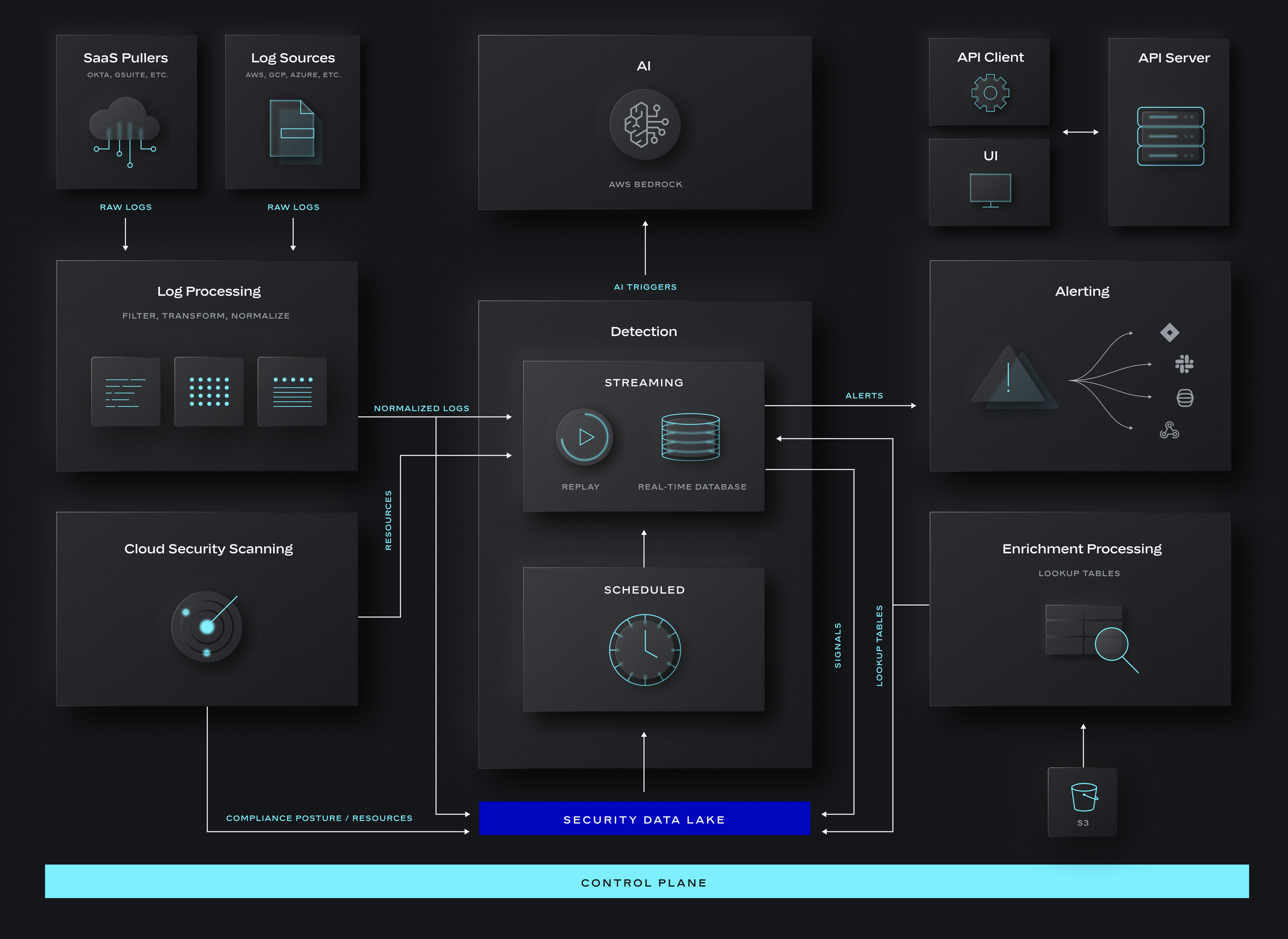
Panther 시스템 아키텍처의 다이어그램과 설명
## Panther 시스템 개요
위의 다이어그램은 대략 왼쪽에서 오른쪽으로 흐르며, 다음 단계로 읽을 수 있습니다:
1. 원시 로그 데이터는 다양한 로그 소스에서 Panther로 유입되며, 여기에는 SaaS puller(예: [Okta](/ko/data-onboarding/supported-logs/okta.md)) 및 데이터 전송 소스(예: [AWS S3](/ko/data-onboarding/data-transports/aws/s3.md)). 이러한 원시 로그는 다음에서 파싱, 필터링 및 정규화됩니다. [로그 처리](#log-processing-subsystem) 서브시스템.
* 의 출력은 [로그 처리](#log-processing-subsystem) 두 개의 서브시스템으로 흐릅니다: [데이터 레이크](#data-lake-subsystem) 및 [디택션](#detection-subsystem).
2. 활성화되어 있으면, [클라우드 보안 스캐닝](/ko/cloud-scanning.md) 온보딩된 클라우드 인프라를 스캔한 다음, 발견한 리소스를 다음으로 전달합니다. [디택션](#detection-subsystem) 서브시스템.
3. 해당 [Enrichment](#enrichment-subsystem) 서브시스템은 옵션으로 다음으로 흘러드는 데이터에 추가 컨텍스트를 더합니다. [디택션](#detection-subsystem) 서브시스템으로, 디택션 효과를 높이는 데 사용할 수 있습니다(예: [IPinfo](/ko/enrichment/ipinfo.md), [Okta Profiles](/ko/enrichment/okta.md)).
4. 해당 [디택션](#detection-subsystem) 서브시스템은 다음 입력에 디택션을 적용합니다:
* 출처 [로그 처리](#log-processing-subsystem): 로그 이벤트
* 출처 [예약된 검색](/ko/search/scheduled-searches.md): 로그 이벤트
* 출처 [클라우드 보안 스캐닝](/ko/cloud-scanning.md): 인프라 리소스
5. 해당 [AI](#ai-subsystem) 서브시스템은 알러트 분류에 사용되며, 알러트가 생성될 때 자동으로 트리거되도록 구성할 수 있습니다. AI 서비스는 API와 다양한 [콘솔 UI 진입점](/ko/ai.md#where-to-use-panther-ai).
6. 디택션이 알러트를 생성하면, 다음으로 전송됩니다. [알러트 처리](#alerting-subsystem) 서브시스템으로 보내져 적절한 알러트 [대상](/ko/alerts/destinations.md) (예: Slack, Jira, 웹훅 등). 하나의 알러트는 둘 이상의 대상지로 라우팅될 수 있습니다.
다이어그램 하단의 Control Plane은 위의 서브시스템들(데이터 플레인)을 구성하고 제어하는 횡단 인프라를 나타냅니다. 이는 아래 각 서브시스템 설명에서 더 자세히 다뤄집니다. [API Server](#api-subsystem) 오른쪽 상단에 표시된 것은 Control Plane으로 들어가는 외부 진입점입니다.
### 일반 고려 사항
#### AWS
* 각 Panther 고객은 전용 AWS 계정에 배포된 Panther 인스턴스를 보유합니다.
* 고객은 AWS 계정을 직접 소유하거나 Panther가 계정을 관리하도록 선택할 수 있습니다.
* 고객 간에는 데이터가 공유되거나 접근할 수 없습니다.
* AWS 계정은 애플리케이션의 권한 경계를 형성합니다.
* 네트워킹이 필요한 서비스에는 단일 VPC가 사용됩니다.
* 처리는 AWS Lambda 및 Fargate 인스턴스를 통해 이루어집니다.
* 독자적인 Control Plane이 비용을 최소화하기 위해 최적의 컴퓨트를 동적으로 선택합니다(아래 참조).
* 컴퓨트 리소스는 서로 직접 통신하지 않고 AWS 서비스를 통해 통신합니다. 다시 말해, "east/west" 네트워크 트래픽은 없고 "north/south" 네트워크 트래픽만 있습니다
* 해당[ 최소 권한 원칙](https://en.wikipedia.org/wiki/Principle_of_least_privilege) 은 각 인프라 구성 요소에 대해 최소한의 범위로 지정된 IAM 역할을 사용하여 따릅니다.
#### 데이터 레이크
각 Panther 고객은 다음 중 하나를 보유합니다: [Snowflake](/ko/search/backend/snowflake.md) 또는 [Databricks](/ko/search/backend/databricks.md) 인스턴스.
Snowflake
* 전용 Snowflake 계정에 배포된 Panther Snowflake 인스턴스입니다.
* 고객은 Snowflake 계정을 직접 소유하거나 Panther가 계정을 관리하도록 선택할 수 있습니다.
* 고객 간에는 데이터가 공유되거나 접근할 수 없습니다.
* Snowflake 시크릿은 AWS Secret Manager에서 RSA 키를 사용하여 관리되며, 매일 교체됩니다.
Databricks
* 고객은 자체 Databricks 인스턴스를 보유해야 합니다.
* 고객 간에는 데이터가 공유되거나 접근할 수 없습니다.
#### 기타
* 모든 데이터는 전송 중과 저장 시 암호화됩니다.
* 모든 외부 상호작용은 다음을 사용하여 수행됩니다. [API](#api-subsystem):
* Panther Console은 API 서버와 연동되는 React 애플리케이션입니다.
* 공개 API는 [GraphQL](/ko/panther/api/graphql.md) 및 [REST](/ko/panther/api/rest.md) 엔드포인트를 제공합니다.
* 모든 API 동작은 다음으로 기록됩니다. [Panther 감사 로그](/ko/data-onboarding/supported-logs/panther-audit-logs.md), 이후 Panther에서 로그 소스로 수집할 수 있습니다.
* 외부 통합과 관련된 시크릿은 다음에서 관리됩니다. [Amazon DynamoDB](https://aws.amazon.com/dynamodb/) KMS로 암호화된 필드를 사용하여.
* 시스템은 부하에 따라 확장 및 축소됩니다.
* Panther 인프라는 다음에 의해 관리됩니다. [Pulumi](https://www.pulumi.com/).
* 모든 인프라는 태그가 지정되어 있어(예: 리소스 이름, 서브시스템) 효과적인 비용 분석이 가능합니다.
* 자체 AWS 계정을 소유한 고객은 [자체 태그를 추가](/ko/system-configuration/panther-deployment-types/cloud-connected.md#custom-tags-on-aws-resources) 하여 이를 더 큰 조직의 비용 보고에 통합할 수 있습니다.
* 모니터링은 다음의 조합을 사용하여 수행됩니다. [CloudWatch](https://aws.amazon.com/cloudwatch/), [Sentry](https://sentry.io/), 그리고 [Datadog](https://www.datadoghq.com/).
## API 서브시스템
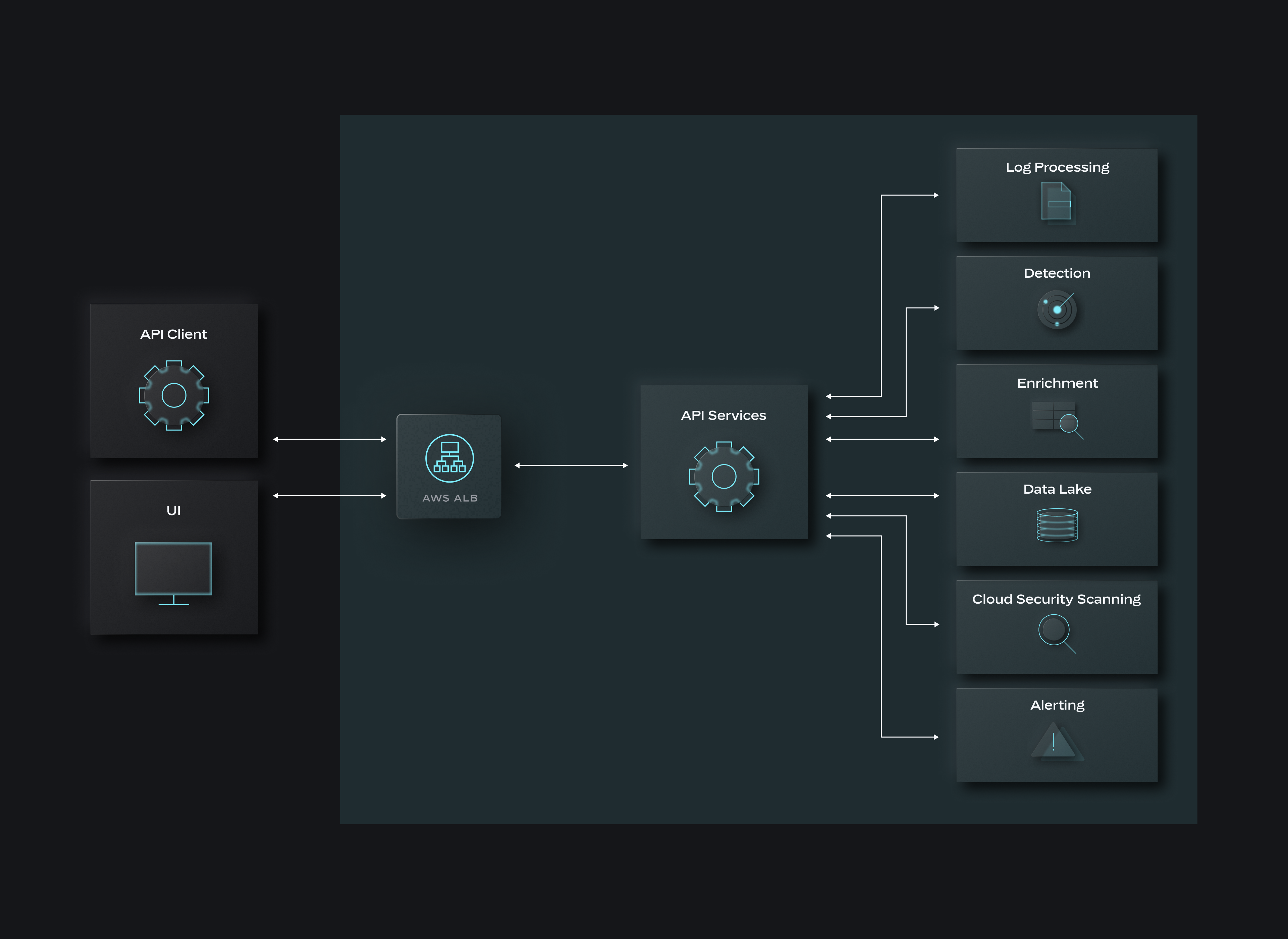
해당 [Panther API](/ko/panther/api.md) Panther와의 모든 외부 상호작용을 위한 진입점입니다. Console은, [GraphQL](/ko/panther/api/graphql.md), 그리고 [REST](/ko/panther/api/rest.md) 클라이언트는 AWS ALB를 통해 연결합니다. 고객은 IP CIDR을 사용하여 ALB 접근 허용 목록을 선택적으로 구성할 수 있습니다.
API 인증은 AWS Cognito를 사용하여 수행됩니다. GraphQL 및 REST 클라이언트는 [토큰을](/ko/panther/api.md#how-to-create-a-panther-api-token)사용하는 반면, Panther Console은 [JWT를](https://docs.aws.amazon.com/cognito/latest/developerguide/amazon-cognito-user-pools-using-tokens-with-identity-providers.html) AWS Cognito가 관리합니다. Console은 다음을 지원합니다. [Single Sign-On (SSO)](/ko/system-configuration/saml.md) AWS Cognito를 통해.
요청을 처리하는 내부 API 서버가 있습니다. 일부 요청은 API 서버 내에서 완전히 처리되며, 다른 요청은 AWS Lambda 함수로 구현된 다른 내부 서비스에 대한 하나 이상의 호출이 필요합니다.
## 로그 처리 서브시스템
이 서브시스템에 입력되는 모든 데이터는 AWS S3 및 S3 알림을 통해 전달됩니다. S3 기반이 아닌 업스트림 소스(예: SaaS puller, [HTTP Source](/ko/data-onboarding/data-transports/http.md), [Google Cloud Storage Source](/ko/data-onboarding/data-transports/google/cloud-storage.md))는 [Amazon Data Firehose](https://docs.aws.amazon.com/firehose/latest/dev/what-is-this-service.html) 를 사용하여 이벤트를 S3 객체로 집계합니다. 이러한 알림은 마스터 [Amazon SNS](https://docs.aws.amazon.com/sns/latest/dg/welcome.html) 토픽을 통해 라우팅됩니다. Log Processing 및 Event Sampling 워크플로는 각각 이 SNS 토픽을 구독합니다.
로그 처리 계산은 AWS Lambda와 Fargate로 구현됩니다.
{% hint style="info" %}
동적 컴퓨트 비용 최적화
Panther는 컴퓨트 선택, 집계 및 확장을 조율하는 효율적인 독자적 Control Plane을 사용합니다.
트래픽이 증가하면 추가 컴퓨트가 필요합니다. Panther의 Control Plane은 트래픽에 맞게 확장되며, 이는 데이터 집계를 극대화하고 비용을 최소화하기 위해 사용되는 컴퓨트 인스턴스 수를 최소화한다는 의미입니다.
Lambda는 낮은 지연 시간 덕분에 트래픽 변동을 빠르게 따라갈 수 있어, 돌발적이고 가벼운 트래픽 부하에 대해 비용 효율적이므로 Panther의 핵심 컴퓨트로 사용됩니다. 그러나 Lambda의 단위 시간당 비용은 다른 컴퓨트 옵션보다 높습니다. 지속적이고 예측 가능한 트래픽의 경우 Lambda는 다른 컴퓨트 옵션만큼 비용 효율적이지 않습니다. 따라서 Control Plane이 안정적인 대량 트래픽을 감지하면, 비용을 최소화하기 위해 Lambda 대신 Fargate(Fargate Spot 사용 가능 시)를 사용합니다.
{% endhint %}
수신된 각 알림에 대해 다음 단계가 수행됩니다:
1. S3 객체와 연결된 통합 소스는 DynamoDB에서 조회되고, 읽기를 위해 해당 역할이 assume됩니다.
2. 데이터는 S3에서 읽힙니다.
3. 각 이벤트는 연결된 [스키마](/ko/data-onboarding/custom-log-types/reference.md) 에 따라 파싱됩니다.
* 분류 또는 파싱 오류가 발생하면, [시스템 오류](/ko/system-configuration/notifications/system-errors.md) 알러트가 생성되고 관련 "bad" 데이터는 데이터 레이크의 `classification_failures` 테이블에 저장됩니다.
4. [수집 필터](/ko/data-onboarding/ingestion-filters.md) 및 [변환](/ko/data-onboarding/custom-log-types/transformations.md) 이 적용됩니다.
5. [인디케이터 필드](/ko/search/panther-fields.md#indicator-fields) (`p_any` 필드)는 추출되고, [표준 필드](/ko/search/panther-fields.md) 가 삽입됩니다.
6. 처리된 이벤트는 S3 객체로 기록되고 알림은 내부 SNS 토픽으로 전송됩니다. 이 토픽을 [데이터 레이크](#data-lake-subsystem) 및 [디택션](#detection-subsystem) 서브시스템들이 구독합니다.
선택적으로 다음을 구성할 수 있습니다. [이벤트 임계값 알러트](/ko/data-onboarding.md#configuring-event-threshold-alarms) 각 온보딩된 로그 소스에 대해 트래픽이 예기치 않게 중단되면 알러트하도록 설정할 수 있습니다.
{% hint style="info" %}
S3 알림은 Event Sampling 서브시스템으로도 라우팅되며, 이는 다음에 사용됩니다. [로그 스키마 필드 발견](/ko/data-onboarding/custom-log-types.md#enabling-field-discovery). 데이터에서 새 속성이 발견되면, 분석되어 스키마(및 관련 Data Lake 테이블)에 자동으로 추가됩니다.
{% endhint %}
## 엔리치먼트 서브시스템
[Enrichment](/ko/enrichment.md) Panther에서 는 Lookup Tables(LUTs)를 통해 구현됩니다. LUT는 고유한 기본 키와 연결된 데이터를 포함하는 테이블입니다. LUT에는 스키마에서 기본 키로의 매핑도 있어, 다음에서 자동 엔리치를 가능하게 합니다. [디택션](#detection-subsystem) 서브시스템. 디택션은 함수 호출 인터페이스를 사용하여 데이터를 조회할 수도 있습니다.
[IPinfo](/ko/enrichment/ipinfo.md), 예를 들어, 는 지리 위치 데이터를 포함하는 Panther가 관리하는 엔리치먼트 제공자입니다. 로그 이벤트의 IP 주소는 위치, ASN 및 개인정보 정보로 자동 엔리치됩니다. 고객은 자체 [사용자 정의 LUT를](/ko/enrichment/custom.md) 만들어 비즈니스 및 보안 관심사와 관련된 컨텍스트를 가져올 수도 있습니다.
LUT는 Panther Console 또는 CLI 워크플로(YAML 사양 파일 사용)를 통해 생성됩니다. LUT 데이터는 여러 방식으로 Panther에서 사용할 수 있도록 만들 수 있습니다: Console에 업로드, CLI 구성의 파일로 포함, 또는 S3 객체로 저장. 일반적으로 LUT 데이터를 관리하는 가장 유용한 방법은 S3 객체 참조로 관리하는 것입니다. 즉, 자신의 계정에서 S3 객체를 만들 수 있고, Panther가 변경 사항을 폴링합니다.
LUT와 연결된 메타데이터는 DynamoDB에 저장됩니다. 새 데이터가 생기면 Lookup Table Processor가 메타데이터에서 지정된 역할을 assume하고 S3 데이터를 처리합니다. 그러면 두 가지 출력이 생성됩니다: EFS의 실시간 데이터베이스는 다음에서 사용됩니다. [디택션](#detection-subsystem) 서브시스템, 그리고 다음의 테이블 [데이터 레이크](#data-lake-subsystem). 데이터 레이크의 테이블은 다음에서 사용할 수 있습니다. [예약된 검색](/ko/search/scheduled-searches.md) 조인을 사용하여 이벤트를 엔리치하는 데.
## 디택션 서브시스템
스트리밍 디택션 프로세서는 Python 기반 디택션이 다음의 로그 이벤트에서 실행되도록 합니다. [로그 처리](#log-processing-subsystem) 및 [예약된 검색](/ko/search/scheduled-searches.md), 그리고 다음의 리소스에서도 마찬가지입니다. [클라우드 보안 스캐닝](/ko/cloud-scanning.md). 스트리밍 디택션 프로세서는 Python의 고속 실행에 최적화된 AWS Lambda 함수(또는 Fargate 인스턴스)로 실행됩니다. (그러나 이 프로세서는 단순한 Python Lambda는 아닙니다. Panther 인프라의 초기 버전에서는 그랬지만, 수년간의 경험을 통해 단순한 Python Lambda 구현은 효율적이지도 비용 효율적이지도 않다는 것을 알게 되었습니다.)
스트리밍 디택션 프로세서는 다음 유형의 디택션을 평가합니다:
* [스트리밍 디택션](https://docs.panther.com/detections/rules) (룰): 하나 이상의 로그 스키마를 대상으로 함(또는 `로그 유형`)
* [예약된 디택션](https://docs.panther.com/detections/rules) (예약된 룰): 하나 이상의 출력물을 대상으로 함 [예약된 검색](/ko/search/scheduled-searches.md)
* [정책 디택션](/ko/detections/policies.md): 리소스를 대상으로 함
이러한 소스의 데이터 처리는 다음 단계를 따릅니다:
1. 활성화된 모든 Lookup Table에 대해 일치 항목이 `p_enrichment` 필드에 적용되어 정보가 디택션에 사용 가능해집니다.
2. 주어진 `LogType`, 클라우드 리소스 또는 Scheduled Search와 관련된 모든 디택션이 찾아집니다.
3. 각 디택션의 `룰()` 함수가 이벤트/리소스에서 실행됩니다. 반환값이 `True`이면 다른 선택적 함수들이 실행되고 알러트가 다음으로 전송됩니다. [알러트 처리](#alerting-subsystem) 서브시스템. 룰 및 예약된 룰의 경우, 알러트는 디택션의 다음 [중복 제거 창](/ko/detections/rules.md#deduplication-of-alerts).
4. 디택션과 연결된 이벤트는 S3 객체에 기록되고 S3 알림은 내부 SNS 토픽으로 전송됩니다.
* 해당 [데이터 레이크](#data-lake-subsystem) 서브시스템은 SNS 토픽을 구독하여 룰 일치 항목과 [시그널](/ko/detections/signals.md) 테이블로 데이터를 수집합니다.
When a [Scheduled Search](/ko/search/scheduled-searches.md) 실행이 완료되면, 스트리밍 디택션 프로세서 Lambda가 쿼리 결과에 대한 참조와 함께 호출됩니다. 결과를 읽고 각 이벤트는 위 단계에 따라 처리됩니다.
[Data Replay](/ko/detections/testing/data-replay.md) 과거 데이터에서 디택션을 테스트할 수 있습니다. 이는 라이브 인프라와 독립적인 "미러" 인프라 세트를 통해 구현됩니다.
## 데이터 레이크 서브시스템
Panther 고객은 다음 중 하나를 사용할 수 있습니다. [Snowflake](/ko/search/backend/snowflake.md) 또는 [Databricks](/ko/search/backend/databricks.md) 보안 데이터 레이크로.
#### Snowflake
Panther는 다음을 사용합니다. [Snowflake Snowpipe 서비스](https://docs.snowflake.com/en/user-guide/data-load-snowpipe-intro) Snowflake로 데이터를 수집합니다. 이 서비스는 AWS IAM 권한을 사용하므로 쿼리 및 관리를 위해 구성된 Snowflake 사용자에 의존하지 않습니다. Panther에서 새 데이터 소스를 온보딩하면 Admin database API Lambda를 사용하여 관련 테이블과 Snowpipe 인프라가 생성됩니다. 이 Lambda에는 다음 권한을 가진 관련 사용자가 있습니다. `읽기/쓰기` Panther 데이터베이스 및 스키마에 대한 권한. 이 Lambda를 호출하기 위한 직접적인 외부 연결은 없다는 점에 유의하세요. 대신 이 Lambda는 내부 Control Plane에 의해 구동됩니다.
테이블은 `p_event_time` 를 클러스터 키로 사용합니다.
Snowflake 시크릿은 다음에 저장됩니다. [AWS Secrets Manger](https://docs.aws.amazon.com/secretsmanager/latest/userguide/intro.html). [RSA 시크릿이 사용되며 매일 교체됩니다](https://docs.snowflake.com/en/user-guide/key-pair-auth).
#### Databricks
Panther에는 로드할 파일에 대한 S3 알림을 수신하는 내부 SNS 토픽을 듣는 로더 프로세스가 있습니다. 로더 프로세스는 모든 테이블을 관리하며 다음을 사용해 S3 파일을 일괄 로드합니다. `COPY INTO` 명령.
테이블은 [리퀴드 클러스터링](https://docs.databricks.com/aws/en/delta/clustering) 의 `p_event_time` 컬럼의 값입니다.
[Databricks OAuth ](https://docs.databricks.com/aws/en/dev-tools/auth/oauth-u2m#automatic-authorization-with-unified-authentication)자격 증명은 다음에 저장됩니다. [AWS Secrets Manger](https://docs.aws.amazon.com/secretsmanager/latest/userguide/intro.html) 고객의 Databricks AWS 계정에.
#### 쿼리
쿼리는 다음을 사용하여 실행됩니다. `읽기 전용` 데이터베이스 API Lambda. 이 Lambda에는 다음 권한을 가진 관련 사용자가 있습니다. `읽기 전용` 권한.
쿼리는 비동기입니다. 쿼리를 실행하기 위한 API 요청이 만들어지면, 관련 SQL이 Datalake에서 실행되고 다음을 반환합니다. `queryId`. 이후 다음을 사용해 API 호출이 이루어집니다. `queryId` 상태를 확인하고 관련 결과를 읽습니다. 쿼리 실행 상태는 DynamoDB에서 추적됩니다.
쿼리 결과는 EFS에 30일 동안 저장됩니다(이 기간은 구성 가능). 고객은 Panther의 [검색 기록](/ko/search/search-history.md) 에서 이전 검색 결과를 볼 수 있습니다.
[예약된 검색](/ko/search/scheduled-searches.md) 사용됨 [디택션](#detection-subsystem) AWS Step Function을 통해 실행됩니다. 쿼리 실행이 완료되면 스트리밍 디택션 프로세서가 쿼리 결과에 대한 참조와 함께 호출되어 추가 처리를 수행합니다.
다음 경우 [로그 유형별 RBAC](/ko/system-configuration/rbac.md#rbac-per-log-type-1) (현재 Snowflake만 지원) 이 활성화되면 각 역할마다 고유한 관리형 읽기 전용 사용자가 생성됩니다.
## 알러트 처리 하위 시스템
해당 [디택션](#detection) 하위 시스템은 알러트를 DynamoDB 테이블에 삽입하며, 알러트 전송 Lambda는 이 스트림을 수신합니다. 이 Lambda는 [구성된 통합](/ko/alerts/destinations.md) 대상으로 알러트를 전송하는 데 사용됩니다.
Panther Console에 알러트를 표시하려면 핵심 알러트 데이터는 DynamoDB에서 가져오고, 알러트와 연결된 이벤트는 Data Lake에서 가져옵니다.
해당 [알러트 제한 기능](/ko/alerts.md#limiting-alerts) 는 (대개) 잘못 구성된 디택션으로 인해 발생하는 "알러트 폭주"가 대상 시스템을 과부하시키는 것을 방지하기 위한 것입니다. 동일한 디택션에서 1시간 동안 1000개가 넘는 알러트가 생성되면 알러트는 억제됩니다. (이 제한은 구성할 수 있습니다.) 제한에 도달하면 디택션은 계속 실행되어 이벤트를 Data Lake에 저장하므로 데이터 손실은 없지만, 알러트는 생성되지 않습니다. 이 경우, [시스템 오류](/ko/system-configuration/notifications/system-errors.md) 고객에게 알리기 위해 생성되며, 고객은 Console에서 알러트 억제를 수동으로 제거할 수 있습니다(아마도 일부 디택션 조정 후).
Jira와 Slack에는 알러트 상태를 동기화하기 위해 Panther에 "콜백"하는 특수 인증 엔드포인트가 있습니다(예: 알러트의 상태를 `해결됨`).
## AI 하위 시스템
해당 [Panther AI](/ko/ai.md) 하위 시스템은 구조적으로 복잡하지 않습니다. 구성 요소는 다음과 같습니다:
* 서버: 요청을 수신하고 응답 및 영속성을 조율합니다
* 진입 지점과 컨텍스트에 따라 시스템 프롬프트를 동적으로 생성합니다
* 할당량과 권한을 강제합니다
* 와 인터페이스합니다 [Amazon Bedrock](https://aws.amazon.com/bedrock/) API
* 조율합니다 [도구](/ko/ai.md#tools) 사용(이는 내부 Panther API를 호출하는 것으로 구성됩니다)
* 에 응답을 저장하는 작업을 관리합니다 [Amazon DynamoDB](https://aws.amazon.com/dynamodb/)
* [Amazon Bedrock](https://aws.amazon.com/bedrock/): 서버는 모든 AI 추론을 위해 Bedrock와 통신합니다
* [Amazon DynamoDB](https://aws.amazon.com/dynamodb/): AI 응답의 저장에 사용됩니다
* 응답은 명시적으로 허용되지 않는 한 30일 후 삭제됩니다 [저장될 수 있으며](/ko/ai/using-panther-ai/managing-ai-response-history.md#saving-an-ai-response)
### Panther AI 워크플로
[Panther AI](/ko/ai.md) 인간 Panther 사용자에게 제공되는 많은 서비스를 다음과 같은 형태로 제공합니다 [도구](/ko/ai.md#tools). Panther AI는 필요에 따라 도구를 사용하므로(즉, 컨텍스트와 작업에 따라), 워크플로는 종종 가변적입니다. 아래에는 일반적인 [알러트 트리아지](/ko/alerts.md#panther-ai-alert-triage) 워크플로가 나와 있습니다.
### FAQ: Panther AI 아키텍처 및 보안
Panther는 AI를 학습시키기 위해 고객 데이터를 사용하나요?
아니요. Panther는 AI 학습에 고객 데이터를 사용하지 않습니다. Panther AI는 다음을 사용하여 AI 추론만 수행합니다 [Amazon Bedrock 파운데이션 모델](https://docs.aws.amazon.com/bedrock/latest/userguide/foundation-models-reference.html).
Panther AI는 어떤 파운데이션 모델을 사용하나요?
Panther AI는 [Anthropic Claude](https://www.anthropic.com/claude) 모델을 사용합니다.
AI 응답은 어떻게 저장되고 보호되나요?
AI 응답은 다음에 저장됩니다 [Amazon DynamoDB](https://aws.amazon.com/dynamodb/), Panther 고객 계정 내에 저장됩니다. 응답은 명시적으로 허용되지 않는 한 30일 후 삭제됩니다 [저장될 수 있으며](/ko/ai/using-panther-ai/managing-ai-response-history.md#saving-an-ai-response).
모든 AI 추론은 호출한 사용자의 ID와 권한 하에서 실행됩니다. 즉, Panther AI는 사용자가 Console이나 API를 통해 직접 수행할 수 없는 데이터 접근, 리소스 수정 또는 작업 수행을 할 수 없습니다.
Panther AI는 다음을 강제합니다 [로그 유형 접근 제한](/ko/system-configuration/rbac.md#how-to-restrict-log-types-for-a-certain-role), 현재 사용자의 역할에 대해 설정된 경우. 이는 다음을 의미합니다:
* 알러트에 대한 응답은 알러트에 대한 사용자의 권한에 따라 접근이 제한됩니다.
* Search 결과에 대한 응답은 Data Lake에 대한 사용자의 권한에 따라 접근이 제한됩니다.
AI 대화의 기본 표시 여부는 진입 지점에 따라 다릅니다. Panther AI 페이지에서 시작한 대화는 기본적으로 비공개이며(개인정보 보호 제어가 활성화된 경우), 알러트 트리아지 및 다른 진입 지점은 기본적으로 공유로 설정됩니다. 사용자는 언제든지 모든 대화를 공유와 비공개 사이에서 전환할 수 있습니다. 다음 권한을 가진 다른 사용자들은 **AI 비공개 응답 보기** 권한이 있으면 비공개 대화를 계속 볼 수 있습니다.
Panther AI에 가드레일이 있나요?
Panther AI에는 다음과 같은 비용 안전 제어 할당량이 있습니다(요청 시 변경될 수 있습니다):
* 시간당 추론 수(기본값은 100)
* 시간당 실행되는 Data Lake 쿼리 수(기본값은 100)
추가로, [Cloud Connected](/ko/system-configuration/panther-deployment-types/cloud-connected.md) 고객은 다음을 구현할 수 있습니다 [Amazon Bedrock Guard Rails](https://aws.amazon.com/bedrock/guardrails/).
Panther는 또한 다음을 제공합니다 [CloudTrail 디택션](https://github.com/panther-labs/panther-analysis/blob/develop/rules/aws_cloudtrail_rules/aws_bedrock_guardrail_update_delete.py) Amazon Bedrock를 모니터링하기 위해
Panther에 모든 AI 추론과 도구 호출에 대한 감사 로그가 있나요?
예, 각 추론과 관련 도구 호출은 다음에 기록됩니다 [Panther 감사 로그](/ko/data-onboarding/supported-logs/panther-audit-logs.md), 이는 data lake에서 사용할 수 있습니다. 메타데이터만 기록되며 민감한 데이터는 기록되지 않습니다.
Panther AI를 API 호출로 사용할 수 있나요?
예, [Cloud Connected](/ko/system-configuration/panther-deployment-types/cloud-connected.md) 고객과 [SaaS](/ko/system-configuration/panther-deployment-types/saas.md) "pass-through billing"을 사용하는 고객은 AI API 작업을 사용할 수 있습니다. API를 통해 호출되면 Panther AI는 요청 인증에 사용된 API 토큰의 권한으로 실행됩니다 — [도구](/ko/ai.md#tools) 사용, Data Lake 쿼리 및 기타 모든 작업은 토큰과 연결된 권한을 따릅니다.
Panther에서 생성된 오류나 운영 로그(예: CloudWatch 또는 Datadog)에 AI 콘텐츠가 포함되나요?
아니요. AI 콘텐츠는 Panther 오류나 운영 로그에 기록되지 않으며, 메타데이터만 기록됩니다.
---
# Agent Instructions
This documentation is published with GitBook. GitBook is the documentation platform designed so that both humans and AI agents can read, navigate, and reason over technical content effectively. Learn more at gitbook.com.
## Querying This Documentation
If you need additional information that is not directly available in this page, you can query the documentation dynamically by asking a question.
Perform an HTTP GET request on the current page URL with the `ask` query parameter, and the optional `goal` query parameter:
```
GET https://docs.panther.com/ko/resources/panther-architecture.md?ask=&goal=
```
`ask` is the immediate question: it should be specific, self-contained, and written in natural language.
`goal` is optional and describes the broader end goal you are ultimately trying to accomplish on behalf of the user. GitBook uses it to tailor the answer towards what is most useful for that goal.
The response will contain a direct answer to the question and relevant excerpts and sources from the documentation.
Use this mechanism when the answer is not explicitly present in the current page, you need clarification or additional context, or you want to retrieve related documentation sections.