> For the complete documentation index, see [llms.txt](https://docs.panther.com/llms.txt). Markdown versions of documentation pages are available by appending `.md` to page URLs; this page is available as [Markdown](https://docs.panther.com/ko/detections/rules/python/data-models.md).

# 데이터 모델

## 개요

모든 로그 유형에 걸쳐 통합된 필드 집합을 구성하려면 Data Models를 사용하여 다음을 생성하세요. [매핑](#datamodel-mappings) 다양한 로그 유형의 이벤트 필드와 통합 Data Model 이름 간의 매핑을 만들 수 있습니다. 다음을 활용할 수 있습니다. [Panther에서 관리하는 Data Models](#panther-managed-data-models), 그리고 [사용자 지정 항목을 만들 수 있습니다](#how-to-create-custom-data-models).

### Data Models 사용 사례

네트워크 트래픽 로그에서 특정 소스 IP 주소를 확인하는 디택션이 있고, 이를 여러 로그 유형에 사용하고 싶다고 가정해 보겠습니다. 이러한 로그 유형은 DNS, Zeek, Apache와 같이 서로 다른 범주를 포함할 수도 있고, 다른 벤더의 로그일 수도 있습니다. 공통 로깅 표준이 없으면, 이러한 각 로그 유형은 소스 IP를 다음과 같이 서로 다른 필드 이름으로 나타낼 수 있습니다. `ipAddress`, `srcIP`, 또는 `ipaddr`. 모니터링하려는 로그 유형이 많을수록 이 검사 로직은 더 복잡하고 번거로워집니다. 예를 들어, 다음과 같이 보일 수 있습니다:

```python
(event.get('ipAddress') == '127.0.0.1' or 
event.get('srcIP') == '127.0.0.1' or 
event.get('ipaddr') == '127.0.0.1')
```

대신 이러한 각 로그 유형에 대한 Data Model을 정의하면 이벤트의 필드 이름을 Data Model 이름으로 변환할 수 있으므로, 디택션은 Data Model 버전만 참조하면 됩니다. 그러면 위의 로직은 다음과 같이 단순화됩니다:

```python
event.udm('source_ip') == '127.0.0.1'
```

## Panther에서 관리하는 Data Models

기본적으로 Panther에는 다음과 같은 여러 로그 유형에 대한 내장 Data Models가 포함되어 있습니다. `AWS.S3ServerAccess`, `AWS.VPCFlow`, 그리고 `Okta.SystemLog`. 현재 지원되는 모든 data models는 다음에서 찾을 수 있습니다. [panther-analysis 저장소, 여기](https://github.com/panther-labs/panther-analysis/tree/main/data_models).

지원되는 Data Model 매핑 이름은 다음에 나열되어 있습니다. [아래의 Panther-managed Data Model 매핑 이름 표](#panther-managed-data-model-mapping-names).

## 사용자 지정 Data Models 만드는 방법

사용자 지정 Data Models는 몇 가지 방법으로 만들 수 있습니다: Panther Console에서, 다음을 사용하여 [Panther Analysis Tool (PAT)](/ko/panther/detections-repo/pat.md), 또는 다음에서 [Panther API](/ko/panther/api.md). 각 방법의 생성 지침은 아래 탭에서 확인하세요.

사용자 지정 Data Model 매핑은 다음을 사용할 수 있습니다. [Panther-managed Data Models에 참조된 이름](#panther-managed-data-model-mapping-names), 또는 자신만의 사용자 지정 이름을 사용할 수 있습니다. 각 매핑은 `이름` 이벤트 필드에 매핑될 수 있습니다( `경로` 또는 **필드 경로**) `필드 메서드` 또는 **메서드**). 메서드에 매핑하는 경우, 별도의 Python 파일에서 해당 메서드를 정의해야 합니다(CLI 워크플로로 작업하는 경우). 이 파일은 YAML 파일에서 다음을 사용하여 참조됩니다. `파일 이름`, 또는 다음에서 **Python 모듈** Console의 필드입니다.

각 로그 유형에는 활성화된 Data Model을 하나만 지정할 수 있습니다(단일 Data Model에는 여러 매핑이 포함될 수 있습니다). 기존 Data Model을 변경하거나 업데이트하려면 기존 것을 비활성화한 다음 새 활성화된 것을 만드세요.

{% tabs %}
{% tab title="Panther Console" %}
Panther Console에서 새 Data Model을 만들려면:

1. Panther 콘솔의 왼쪽 탐색 표시줄에서 다음을 클릭합니다: **디택션**.
2. 다음을 클릭합니다: **데이터 모델** &#xD0ED;**.**\
   .![The list of Data Models in the Panther Console is displayed](/files/393c2b90705220d1aecee1b5c6ce0c59e72f3ee9)
3. 오른쪽 상단에서 다음을 클릭합니다: **새로 만들기**.
4. 다음에서 **설정**, 양식 필드를 채우세요.
   * **표시 이름**: 이 Data Model의 사용자 친화적인 표시 이름을 입력하세요.
   * **ID**: 이 Data Model의 고유 ID를 입력하세요.
   * **로그 유형**: 이 Data Model이 적용될 로그 유형을 선택하세요. Data Model당 로그 유형은 하나만 허용됩니다.
   * **활성화**: 이 Data Model을 활성화할지 비활성화할지 선택하세요.\
     ![In the Panther Console, the New Data Model screen is displayed. It contains fields for Display Name, ID, and Log Type. Under "Data Model Mappings" there are fields are Name, Field Path, and Field Method.](/files/ba856293c3d3741351a726490bef4fea3af94d71)
5. 다음에서 **데이터 모델 매핑**, 생성 **이름**/**필드 경로** 또는 **이름**/**필드 메서드** 쌍.
6. 다음을 사용한 경우 **필드 메서드** 필드를 사용했다면, 메서드(들)를 다음에 정의하세요 **Python 모듈&#x20;*****(선택 사항)*** 섹션.
7. 오른쪽 상단 모서리에서 다음을 클릭하세요 **저장**.
   * 이제 룰에서 이 데이터 모델을 참조할 수 있습니다. 자세한 내용은 [룰에서 데이터 모델 참조하기](#referencing-data-models-in-a-rule).
     {% endtab %}

{% tab title="CLI (PAT)" %}
**CLI 워크플로에서 데이터 모델을 만드는 방법**

**폴더 설정**

사용자 지정 데이터 모델과 관련된 모든 파일은 이름에 다음을 포함하는 폴더에 저장해야 합니다 `data_models` (이는 최상위 `data_models` 디렉터리이거나, 이름이 다음과 일치하는 하위 디렉터리일 수 있습니다 `*data_models*`).

**파일 설정**

1. 데이터 모델 사양 YAML 파일을 생성합니다(예: `data_models/aws_cloudtrail_datamodel.yml`):

   ```yaml
   AnalysisType: datamodel
   LogTypes: 
     - AWS.CloudTrail
   DataModelID: AWS.CloudTrail
   Filename: aws_cloudtrail_data_model.py
   Enabled: true
   Mappings:
     - Name: actor_user
       Path: $.userIdentity.userName
     - Name: event_type
       Method: get_event_type
     - Name: source_ip
       Path: sourceIPAddress
     - Name: user_agent
       Path: userAgent
   ```

   * 설정 `AnalysisType` 에서 `datamodel`.
   * 대상 `LogTypes`, 로그 유형 중 하나의 이름을 제공하세요. 이 필드는 목록을 사용하지만, Data Model당 하나의 로그 유형만 지원됩니다.
   * 다음의 값을 제공하세요 `DataModelID` 필드에 붙여넣습니다.
   * 내에서 `매핑`, 생성 `이름` / `경로` 또는 `이름` / `메서드` 쌍.
     * 자세한 내용은 `매핑` 구문 [아래의 DataModel에서 `매핑`](#datamodel-mappings).
   * 참조 [데이터 모델 사양 참조](#datamodel-specification-reference) 아래에서 필수 및 선택 필드의 전체 목록을 확인하세요.
2. 하나 이상의 `메서드` 필드를 포함한 경우 `매핑`, 관련 Python 파일 (`data_models/aws_cloudtrail_datamodel.py`), 그리고 참조된 메서드를 정의하세요.
   * 이 경우, 다음도 추가해야 합니다 `파일 이름` 필드를 Data Model YAML 파일에 추가해야 합니다. 만약 없다면 `메서드` 필드가 존재하며, Python 파일이 없습니다/`파일 이름` 필드가 필요합니다.

     ```python
     from panther_base_helpers import deep_get
     def get_event_type(event):
         if event.get('eventName') == 'ConsoleLogin' and deep_get(event, 'userIdentity', 'type') == 'IAMUser':
             if event.get('responseElements', {}).get('ConsoleLogin') == 'Failure':
                 return "failed_login"
             if event.get('responseElements', {}).get('ConsoleLogin') == 'Success':
                 return "successful_login"
         return None
     ```
3. Panther 인스턴스에 데이터 모델을 업로드하려면 다음을 사용하세요 [PAT `업로드` 명령](/ko/panther/detections-repo/pat/pat-commands.md#upload-uploading-packages-to-panther-directly).
   * 이제 룰에서 이 데이터 모델을 참조할 수 있습니다. 자세한 내용은 [룰에서 데이터 모델 참조하기](#referencing-data-models-in-a-rule).
     {% endtab %}

{% tab title="API" %}
**Panther API를 사용하여 데이터 모델을 만드는 방법**

* 다음을 참조하세요 `POST` 에 대한 작업 [데이터 모델](/ko/panther/api/rest/data-models.md).
  {% endtab %}
  {% endtabs %}

### 에서 필드가 존재하는지 평가하기 `경로`

내에서 `경로` 값에는 특정 이벤트 필드가 존재하는지 확인하는 로직을 포함할 수 있습니다. 존재하면 매핑이 적용되고, 존재하지 않으면 매핑이 적용되지 않습니다.

예를 들어, 다음 Path 값들을 [Panther에서 관리하는 `gsuite_data_model.yml`](https://github.com/panther-labs/panther-analysis/blob/main/data_models/gsuite_data_model.yml):

```yaml
  - 이름: assigned_admin_role
    경로: $.events[*].parameters[?(@.name == 'ROLE_NAME')].value
```

## 데이터 모델 사용

### 룰에서 데이터 모델 참조하기

룰에서 데이터 모델 필드를 참조하려면:

1. 룰의 YAML 파일에서 다음을 확인하세요 `LogTypes` field에 적용하려는 데이터 모델의 로그 유형이 포함되도록 하세요:

   ```yaml
   AnalysisType: 룰
   DedupPeriodMinutes: 60
   DisplayName: 데이터 모델 예시 룰
   Enabled: true
   Filename: my_new_룰.py
   룰ID: DataModel.Example.룰
   심각도: 높음
   LogTypes:
     # 이 룰이 적용되는 LogTypes 추가
     # 그리고 해당 LogType에 대한 Data Model이 존재함
     - AWS.CloudTrail
   Tags:
     - 태그
   설명: >
     이 룰은 Panther CLI의 CLI 워크플로를 검증하기 위해 존재합니다
   런북: >
     먼저, 이 스펙 형식을 누가 작성했는지 알아낸 다음, 피드백과 함께 그들에게 알리세요.
   테스트:
     - 이름: 테스트 룰
       예상 결과: true
       # 'p_log_type' 필드의 테스트 사양에 LogType을 추가합니다
       로그: {
         "p_log_type": "AWS.CloudTrail"
       }
   ```
2. 모든 룰의 로그 유형을 추가합니다 `테스트` 사례, 다음의 `p_log_type` 필드에 붙여넣습니다.
3. 사용합니다 [다음 `event.udm()` 메서드](/ko/detections/rules/python.md#udm) 룰의 Python 로직에서:

   ```python
   def 룰(event):    
       # 통합 데이터 모델 필드에서 이벤트를 필터링합니다
       return event.udm('event_type') == 'failed_login'


   def title(event):
       # 제목에서 통합 데이터 모델 필드를 사용
       return '{}: User [{}] from IP [{}] has exceeded the failed logins threshold'.format(
           event.get('p_log_type'), event.udm('actor_user'),
           event.udm('source_ip'))
   ```

### Enrichment를 사용한 데이터 모델

Panther는 event 객체에 다음과 같은 내장 메서드를 제공합니다 `event.udm_path()`. 이는 Data Model에 사용된 원래 경로를 반환합니다.

#### AWS.VPCFlow 로그 예시

아래 예시에서 다음을 호출하면 `event.udm_path('destination_ip')` 가 반환됩니다 `'dstAddr'`, 이는 해당 로그 유형의 Data Model에 정의된 경로이기 때문입니다.

```python
from panther_base_helpers import deep_get

def 룰(event):
    return True

def title(event):
    return event.udm_path('destination_ip')

def 알러트_context(event):
    enriched_data = deep_get(event, 'p_enrichment', 'lookup_table_name', event.udm_path('destination_ip'))
    return {'enriched_data':enriched_data}
```

이를 테스트하려면 다음 테스트 케이스를 사용할 수 있습니다:

```json
{   
  "p_log_type": "AWS.VPCFlow",
   "dstAddr": "1.1.1.1",
   "p_enrichment": {
      "lookup_table_name": {
        "dstAddr": {
          "datakey": "datavalue" }}}}
```

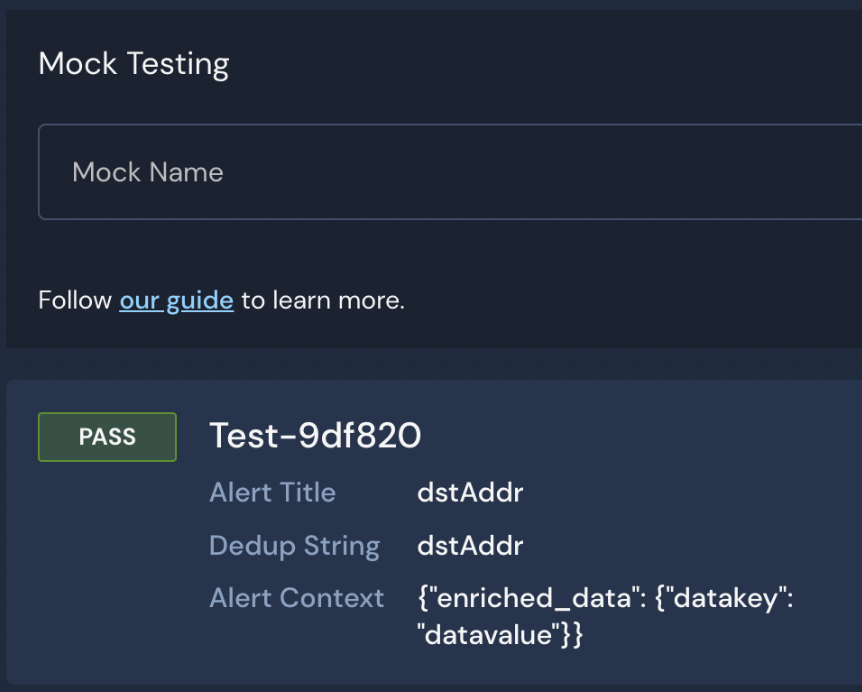
이 테스트 케이스는 다음 알러트를 반환하며, 알러트 컨텍스트에는 다음 값이 포함됩니다 `dstAddr` (또는 `{"datakey": "datavalue"}`)는 다음의 값으로 `enriched_data`.

<figure><img src="/files/20dd1c399dff09f7682f7a9306d5d279052a9c4e" alt="The screen shot shows a passing test in the Panther Console including the alert context with the data key and data value" width="375"><figcaption></figcaption></figure>

### 데이터 모델 테스트

데이터 모델을 테스트하려면 다음을 작성하세요 [단위 테스트](/ko/detections/testing.md) Data Model 매핑을 참조하는 디택션에 대한 [`event.udm()`](/ko/detections/rules/python.md#udm) 그것의 `룰()` 로직.

## DataModel 사양 참조

DataModel 사양 필드의 전체 목록:

<table data-header-hidden><thead><tr><th width="172">필드 이름</th><th width="100.18672199170126">필수</th><th width="271">설명</th><th>예상 값</th></tr></thead><tbody><tr><td>필드 이름</td><td>필수</td><td>설명</td><td>예상 값</td></tr><tr><td><code>AnalysisType</code></td><td>예</td><td>이 사양이 룰, 정책, 데이터 모델 또는 전역 항목을 정의하는지 나타냅니다</td><td><code>datamodel</code></td></tr><tr><td><code>DataModelID</code></td><td>예</td><td>데이터 모델의 고유 식별자</td><td>문자열</td></tr><tr><td><code>표시 이름</code></td><td>아니요</td><td>UI와 알림에 표시할 이름입니다. The <code>DataModelID</code> 이 필드가 설정되지 않으면 표시됩니다.</td><td>문자열</td></tr><tr><td><code>활성화</code></td><td>예</td><td>이 데이터 모델이 활성화되어 있는지 여부</td><td>불리언</td></tr><tr><td><code>파일 이름</code></td><td>아니요</td><td>Python 데이터 모델 본문에 대한 경로(파일 확장자 포함)</td><td>문자열</td></tr><tr><td><code>LogTypes</code></td><td>예</td><td>이 데이터 모델이 적용될 로그 유형</td><td>문자열의 단일 항목 목록<br>참고: 비록 <code>LogTypes</code> 문자열 목록을 허용하지만, 데이터 모델당 하나의 로그 유형만 지정할 수 있습니다</td></tr><tr><td><code>매핑</code></td><td>예</td><td>원본 필드 이름 또는 메서드에서 통합 데이터 모델 필드 이름으로의 매핑</td><td><a href="#datamodel-mappings">목록 <code>매핑</code></a></td></tr></tbody></table>

### 데이터 모델 `매핑`

매핑은 변환합니다 `로그 유형` 필드를 통합 데이터 모델 필드로. 각 `매핑` 항목은 다음을 정의해야 합니다:

* `이름`: 탐지에서 이 데이터 모델을 참조하는 방법.
* 다음 중 하나:
  * `경로`: 원본 로그 유형의 스키마에서 해당 필드의 경로입니다. 이 값은 단순한 필드 이름이거나 JSON 경로일 수 있습니다. jsonpath-ng에 대한 자세한 내용은 [pypi.org의 문서 여기](https://pypi.org/project/jsonpath-ng/).
  * `메서드`: 메서드의 이름입니다. 해당 메서드는 데이터 모델 사양에 나열된 파일에서 정의되어 있어야 합니다. `파일 이름` 필드에 붙여넣습니다.

예:

```yaml
Mappings:
  - Name: source_ip
    Path: srcIp
  - Name: user
    Path: $.events[*].parameters[?(@.name == 'USER_EMAIL')].value
  - Name: event_type
    Method: get_event_type
```

해당 `경로` 의 값 `user` 데이터 모델에는 다음이 존재하는지 확인하는 로직이 있습니다: `USER_EMAIL` 이벤트 필드가 존재합니다. 자세한 내용은 [에서 필드가 존재하는지 평가하기 `경로`](#evaluating-whether-a-field-exists-in-path).

## Panther가 관리하는 데이터 모델 매핑 이름

해당 [Panther가 관리하는 데이터 모델](https://github.com/panther-labs/panther-analysis/tree/main/data_models) 매핑 이름은 아래에 설명되어 있습니다. 다음과 같이 [직접 데이터 모델 매핑을 만들 때](#how-to-create-custom-data-models), 사용자 지정 이름 외에도 아래 이름들을 사용할 수 있습니다.

<table data-header-hidden><thead><tr><th width="252">통합 데이터 모델 필드 이름</th><th>설명</th></tr></thead><tbody><tr><td>데이터 모델 매핑 이름</td><td>설명</td></tr><tr><td><code>actor_user</code></td><td>이벤트를 트리거하기 위해 조치의 대상이 된 사용자의 ID 또는 사용자 이름입니다.</td></tr><tr><td><code>assigned_admin_role</code></td><td>이벤트에서 사용자에게 할당된 관리자 역할의 ID 또는 이름입니다.</td></tr><tr><td><code>destination_ip</code></td><td>트래픽의 대상 IP</td></tr><tr><td><code>destination_port</code></td><td>트래픽의 대상 포트</td></tr><tr><td><code>event_type</code></td><td>이벤트 유형에 대한 사용자 지정 설명입니다. 이벤트 유형에 대한 기본 제공 지원은 global, <code>panther_event_type_helpers.py</code>.</td></tr><tr><td><code>http_status</code></td><td>트래픽의 숫자 HTTP 상태 코드</td></tr><tr><td><code>source_ip</code></td><td>트래픽의 원본 IP</td></tr><tr><td><code>source_port</code></td><td>트래픽의 원본 포트</td></tr><tr><td><code>user_agent</code></td><td>이벤트에서 클라이언트와 연결된 사용자 에이전트입니다.</td></tr><tr><td><code>user</code></td><td>이벤트를 트리거하기 위해 조치의 대상이 된 사용자의 ID 또는 사용자 이름입니다.</td></tr></tbody></table>


---

# Agent Instructions
This documentation is published with GitBook. GitBook is the documentation platform designed so that both humans and AI agents can read, navigate, and reason over technical content effectively. Learn more at gitbook.com.

## Querying This Documentation
If you need additional information that is not directly available in this page, you can query the documentation dynamically by asking a question.

Perform an HTTP GET request on the current page URL with the `ask` query parameter:

```
GET https://docs.panther.com/ko/detections/rules/python/data-models.md?ask=<question>
```

The question should be specific, self-contained, and written in natural language.
The response will contain a direct answer to the question and relevant excerpts and sources from the documentation.

Use this mechanism when the answer is not explicitly present in the current page, you need clarification or additional context, or you want to retrieve related documentation sections.
