> For the complete documentation index, see [llms.txt](https://docs.panther.com/llms.txt). Markdown versions of documentation pages are available by appending `.md` to page URLs; this page is available as [Markdown](https://docs.panther.com/ko/data-onboarding/supported-logs/microsoft-defender-xdr.md).
# Microsoft Defender XDR 로그(베타)
Microsoft Defender XDR 로그를 Panther 콘솔에 연결
## 개요
{% hint style="info" %}
Microsoft Defender XDR 로그 수집은 Panther 버전 1.114부터 공개 베타로 제공되며, 모든 고객이 사용할 수 있습니다. 버그 보고와 기능 요청은 Panther 지원 팀과 공유해 주세요.
{% endhint %}
Panther는 수집을 지원합니다 [Microsoft Defender XDR](https://www.microsoft.com/en-us/security/business/siem-and-xdr/microsoft-defender-xdr) 공통을 통한 로그 [데이터 전송](https://docs.panther.com/data-onboarding/data-transports) 옵션, 예를 들어 Azure [Event Hub](/ko/data-onboarding/data-transports/azure/event-hub.md) 및 [Blob Storage](/ko/data-onboarding/data-transports/azure/blob-storage.md).
## Microsoft Defender XDR 로그를 Panther에 온보딩하는 방법
먼저 Panther에서 Azure Blob Storage 또는 Azure Event Hub 소스를 만든 다음, Azure를 구성하여 로그를 해당 위치로 내보내도록 합니다.
### 사전 요구 사항
Microsoft Defender XDR 로그를 Panther에 온보딩하기 전에 다음을 확인하세요:
* Azure 구독이 있고 사용자가 다음 권한 중 하나를 보유하고 있습니다 [소유자](https://learn.microsoft.com/en-us/azure/role-based-access-control/built-in-roles/privileged#owner) 또는 [기여자](https://learn.microsoft.com/en-us/azure/role-based-access-control/built-in-roles/privileged#contributor) 역할을 가져야 합니다.
* Defender XDR 로그를 다음을 통해 수집할 계획이라면 [Event Hub Data Transport](/ko/data-onboarding/data-transports/azure/event-hub.md), 이미 생성된 [Event Hubs 네임스페이스](https://learn.microsoft.com/en-us/azure/event-hubs/event-hubs-features#namespace) 및 Event Hub(다음에 명시된 대로 [전제 조건](/ko/data-onboarding/data-transports/azure/event-hub.md#prerequisites)).
* Defender XDR 로그를 다음을 통해 수집할 계획이라면 [Blob Storage Data Transport](/ko/data-onboarding/data-transports/azure/blob-storage.md), 스토리지 계정을 미리 생성해 둘 필요는 없습니다.
* 사용자에게 네임스페이스 또는 스토리지 계정에 메시지를 게시할 권한이 있습니다.
### 1단계: Panther에서 Microsoft Defender XDR 소스 만들기
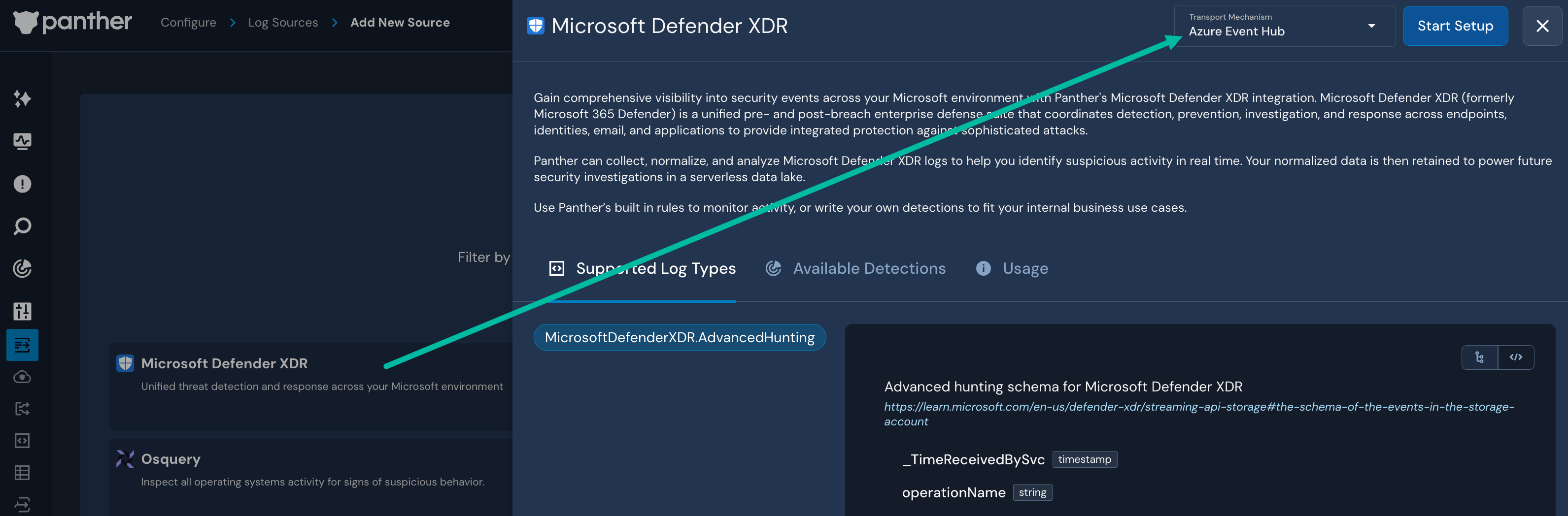
1. Panther Console의 왼쪽 탐색 모음에서 **로그 소스**.
2. 클릭합니다 **새로 만들기**.
3. “Microsoft Defender XDR”를 검색한 다음 해당 타일을 클릭하세요.
* 슬라이드아웃 패널에서 **전송 메커니즘** 오른쪽 상단의 드롭다운에는 다음이 미리 채워집니다 **Azure Event Hub** 옵션. 이 선택을 그대로 두거나 선택합니다. **Azure Blob Storage**.
4. 클릭합니다 **설정 시작**.
5. Panther의 지침에 따라 다음을 구성하세요 [Azure Event Hub](/ko/data-onboarding/data-transports/azure/event-hub.md) 또는 [Azure Blob Storage 소스](/ko/data-onboarding/data-transports/azure/blob-storage.md).
* Azure Blob Storage를 선택하고 ...하는 동안 [2단계: 필요한 Azure 인프라 생성](/ko/data-onboarding/data-transports/azure/blob-storage.md#step-2-create-required-azure-infrastructure) Azure 리소스를 Terraform 대신 수동으로 만들기로 선택한 경우, 건 [Azure 컨테이너를 만드는 단계](https://docs.panther.com/data-onboarding/data-transports/azure/blob-storage#step-5-create-container-and-add-permission), 아래 2단계에서 스토리지 계정에 자동으로 생성되기 때문입니다.
### 2단계: 스트리밍 API로 Microsoft Defender XDR 로그 내보내기
Microsoft Defender XDR 로그를 Event Hubs 또는 스토리지 계정으로 내보내려면 아래 지침을 따르세요.
{% hint style="info" %}
추가 지원이 필요하면 Microsoft의 [Advanced Hunting 이벤트를 Event Hubs 및/또는 Azure 스토리지 계정으로 스트리밍](https://learn.microsoft.com/en-us/defender-xdr/streaming-api#stream-advanced-hunting-events-to-event-hubs-andor-azure-storage-account) 문서.
{% endhint %}
1. Azure Portal에서 Microsoft Defender 포털의 다음 위치로 이동하세요: [https://security.microsoft.com/](https://intune.microsoft.com/).
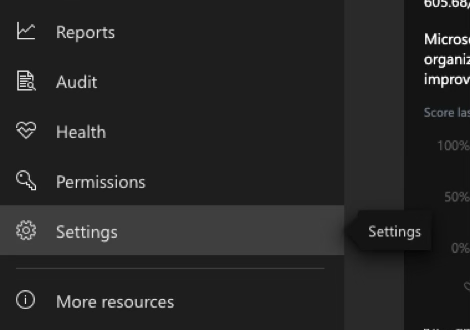
2. 왼쪽 탐색 모음에서 **설정**.\
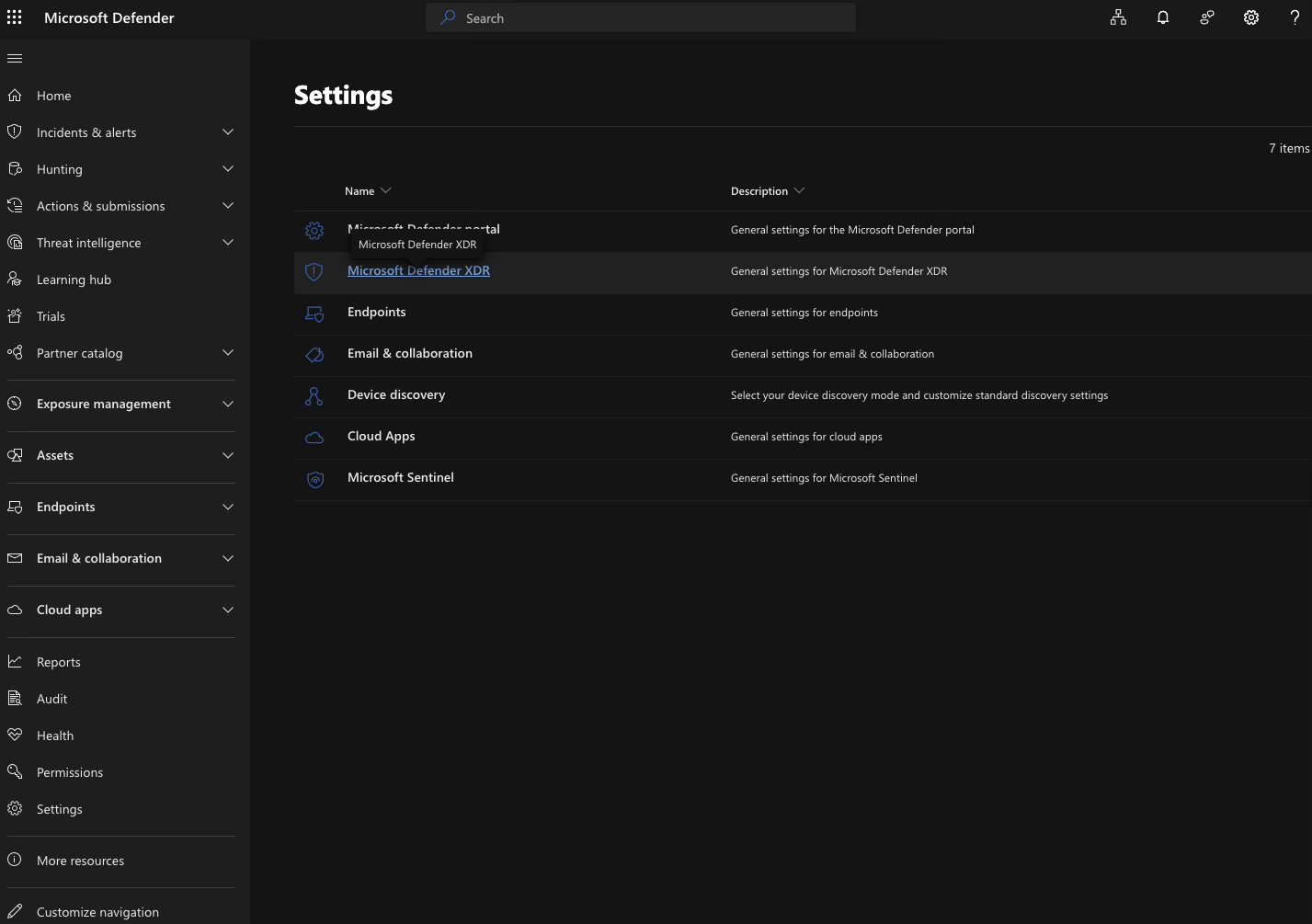
3. 클릭합니다 **Microsoft Defender XDR**.\
4. 아래 **일반**, 다음을 클릭하세요. **스트리밍 API**.\

5. 아래 **스트리밍 API**, 다음을 클릭하세요. **+ 추가**.
6. 양식을 작성하세요:
* **이름**: 설명이 되는 이름을 입력합니다. 예: `Panther 포워더`.
* 다음 중 하나를 선택합니다: **이벤트를 Azure Storage로 전달** 또는 **이벤트를 Event Hub로 전달**, Panther에서 만든 로그 소스 유형에 따라 [1단계](#step-1-create-the-microsoft-defender-xdr-source-in-panther).
* 선택한 경우 **이벤트를 Azure Storage로 전달**에서 **스토리지 계정 리소스 ID** 필드에 스토리지 계정 ID를 입력하세요.
* 선택한 경우 **이벤트를 Event Hub로 전달**에서 **Event-Hub 리소스 ID** 필드에 Event Hub ID를 입력하세요.
* **이벤트 유형**: Panther로 보내려는 로그 범주를 선택하세요. 자세한 내용을 보려면 [이벤트 유형의 전체 목록은 여기에서 확인하세요](https://learn.microsoft.com/en-us/defender-xdr/supported-event-types).\

7. 클릭합니다 **제출**.
## 지원되는 로그 유형
### MicrosoftDefenderXDR.AdvancedHunting
```yaml
스키마: MicrosoftDefenderXDR.AdvancedHunting
설명: Microsoft Defender XDR용 Advanced Hunting 스키마
참조 URL: https://learn.microsoft.com/en-us/defender-xdr/streaming-api-storage#the-schema-of-the-events-in-the-storage-account
필드:
- name: _TimeReceivedBySvc
유형: timestamp
시간 형식:
- rfc3339
- '%Y-%m-%d %H:%M:%S.%N'
- '%Y-%m-%dT%H:%M:%S.%N'
- name: operationName
유형: string
- name: Tenant
유형: string
- name: time
필수: true
설명: Microsoft Defender XDR가 이벤트를 수신한 시간
유형: timestamp
시간 형식:
- rfc3339
- '%Y-%m-%d %H:%M:%S.%N'
- name: tenantId
필수: true
description: 조직의 테넌트 ID
유형: string
- 이름: category
필수: true
설명: 'AdvancedHunting-' 접두사가 붙은 Advanced Hunting 테이블 이름
유형: string
- name: properties
필수: true
설명: Microsoft Defender XDR Advanced Hunting 이벤트 속성 (https://learn.microsoft.com/en-us/defender-xdr/supported-event-types#hunting-tables-support-status-in-event-streaming-api)
유형: object
필드:
- name: AadDeviceId
설명: Microsoft Entra ID에서 장치의 고유 식별자
유형: string
- 이름: AccountDisplayName
설명: 로그온에 관련된 계정의 표시 이름
유형: string
- 이름: AccountDomain
설명: 변경을 수행한 계정의 도메인
유형: string
지표:
- domain
- 이름: AccountId
설명: Microsoft Defender for Cloud Apps의 계정 식별자
유형: string
- 이름: AccountName
설명: 변경을 수행한 계정의 이름
유형: string
- 이름: AccountObjectId
설명: 변경을 수행한 계정의 Microsoft Entra ID 개체 ID
유형: string
- 이름: AccountSid
설명: 변경을 수행한 계정의 SID
유형: string
- 이름: AccountType
설명: 사용자 계정 유형(Regular, System, Admin, Application)
유형: string
- 이름: AccountUpn
설명: 변경을 수행한 계정의 UPN
유형: string
지표:
- email
- 이름: ActionType
설명: 디렉터리 변경 유형(예: AddMember, RemoveMember, ModifyGroup)
유형: string
- 이름: ActivityObjects
설명: 기록된 활동에 관련된 개체 목록
유형: json
- name: ActivityType
설명: 이벤트를 트리거한 활동 유형
유형: string
- 이름: AdditionalFields
설명: JSON 배열 형식의 추가 메타데이터
유형: json
내장 JSON: true
- 이름: 알러트Id
설명: 알러트의 고유 식별자
유형: string
- 이름: AppGuardContainerId
설명: Application Guard에서 사용하는 가상화된 컨테이너의 식별자
유형: string
- 이름: AppInstanceId
설명: 애플리케이션 인스턴스의 고유 식별자
유형: int
- 이름: Application
설명: 기록된 작업을 수행한 애플리케이션
유형: string
- name: ApplicationId
설명: 애플리케이션의 고유 식별자
유형: bigint
- 이름: AssetValue
설명: 장치에 할당된 비즈니스 가치(Low, Normal, High)
유형: string
- 이름: AttachmentCount
설명: 이메일의 첨부 파일 수
유형: int
- 이름: AttachmentId
설명: 첨부 파일의 고유 식별자
유형: string
- 이름: AttackTechniques
설명: 알러트와 관련된 MITRE ATT&CK 기법
유형: array
요소:
유형: string
지표:
- ip
내장 JSON: true
- 이름: AuditSource
설명: 감사 데이터 소스(예: 세션 제어, 앱 커넥터)
유형: string
- 이름: AuthenticationDetails
설명: DMARC, DKIM, SPF 같은 이메일 인증 프로토콜 또는 여러 인증 유형의 조합(CompAuth)에 대한 통과/실패 판정 목록
유형: string
- 이름: AwsResourceName
설명: 장치의 AWS 리소스 이름
유형: string
- 이름: AzureResourceId
설명: 장치와 연결된 Azure 리소스 ID
유형: string
- 이름: AzureVmId
설명: 장치에 할당된 Azure VM ID
유형: string
- 이름: AzureVmSubscriptionId
설명: 장치의 Azure 구독 ID
유형: string
- 이름: BehaviorId
설명: 동작의 고유 식별자
유형: string
- 이름: BulkComplaintLevel
설명: 대량 메일 발신자로부터 온 이메일에 할당되는 임계값입니다. 높은 bulk complaint level(BCL)은 해당 이메일이 불만을 유발할 가능성이 높고, 따라서 스팸일 가능성도 높다는 뜻입니다.
유형: int
- 이름: Categories
설명: 정보가 속한 범주 목록(JSON 배열 형식)
유형: json
내장 JSON: true
- 이름: Category
설명: 알러트가 식별한 위협 지표 또는 침해 활동 유형
유형: string
- 이름: CertificateCountersignatureTime
설명: 인증서에 반대 서명이 된 날짜와 시간
유형: timestamp
시간 형식:
- rfc3339
- 이름: CertificateCreationTime
설명: 인증서가 생성된 날짜와 시간
유형: timestamp
시간 형식:
- rfc3339
- '%Y-%m-%d %H:%M:%S.%N'
- 이름: CertificateExpirationTime
설명: 인증서가 만료되는 날짜와 시간
유형: timestamp
시간 형식:
- rfc3339
- '%Y-%m-%d %H:%M:%S.%N'
- 이름: CertificateSerialNumber
설명: CA가 발급한 인증서의 고유 식별자
유형: string
- 이름: City
설명: 클라이언트 IP 주소의 지리적 위치가 확인된 도시
유형: string
- 이름: ClickAction
설명: URL과의 사용자 상호작용 유형(예: ClickedThrough, Blocked)
유형: string
- 이름: ClickVerdict
설명: URL 클릭 시 반환된 최종 판정(예: Malicious, Clean)
유형: string
- 이름: ClientVersion
설명: 장치에서 실행 중인 엔드포인트 에이전트 또는 센서의 버전
유형: string
- 이름: CloudPlatform
설명: 해당 리소스가 속한 클라우드 플랫폼으로, Azure, Amazon Web Services 또는 Google Cloud Platform일 수 있습니다.
유형: string
- 이름: CloudPlatforms
설명: 장치가 속한 클라우드 플랫폼
유형: string
- 이름: CloudResource
설명: 이벤트와 관련된 클라우드 리소스 이름
유형: string
- 이름: ClusterId
설명: 조사 중 이메일을 연결하는 데 사용되는 클러스터 ID
유형: string
- 이름: ConfidenceLevel
설명: 스팸 또는 피싱 판정의 신뢰도 수준 목록입니다. 스팸의 경우 이 열은 스팸 신뢰도 수준(SCL)을 표시하며, 이메일이 건너뛰어졌는지(-1), 스팸이 아닌 것으로 판정되었는지(0,1), 중간 신뢰도로 스팸으로 판정되었는지(5,6), 또는 높은 신뢰도로 스팸으로 판정되었는지(9)를 나타냅니다. 피싱의 경우 이 열은 신뢰도 수준이 "High"인지 "Low"인지 표시합니다.
유형: string
- 이름: ConnectedNetwork
설명: 연결과 관련된 네트워크 이름 또는 SSID
유형: string
- 이름: ConnectionType
설명: 네트워크 연결 유형(예: Ethernet, Wi-Fi, Loopback)
유형: string
- 이름: ConnectivityType
설명: 장치에서 클라우드로의 연결 유형
유형: string
- 이름: Connectors
설명: 조직의 메일 흐름과 이메일이 라우팅된 방식을 정의하는 사용자 지정 지침
유형: string
- name: CountryCode
설명: IP의 지리적 위치가 확인된 국가의 두 글자 코드
유형: string
- 이름: CreatedProcessSessionId
설명: 생성된 프로세스의 Windows 세션 ID
유형: bigint
- 이름: CrlDistributionPointUrls
설명: 인증서 또는 CRL이 포함된 네트워크 공유의 URL
유형: json
- 이름: DHCPServer
설명: 장치가 사용하는 DHCP 서버의 IP 주소
유형: string
지표:
- ip
- 이름: DNSAddresses
설명: 장치에 구성된 DNS 서버 목록(세미콜론으로 구분)
유형: array
요소:
유형: string
지표:
- ip
내장 JSON: true
- 이름: DataSources
설명: 동작에 대한 정보를 제공한 제품 또는 서비스
유형: string
- 이름: DefaultGateway
설명: 장치가 사용하는 기본 게이트웨이 주소
유형: string
지표:
- ip
- 이름: DeliveryAction
설명: 이메일의 최종 전달 결과
유형: string
- 이름: DeliveryLocation
설명: 이메일이 전달된 위치(예: Inbox, Junk, Quarantine)
유형: string
- 이름: Description
설명: 동작 설명
유형: string
- 이름: DetailedEntityRole
설명: 동작에서 엔터티의 역할
유형: string
- 이름: 디택션Methods
설명: 이메일에서 발견된 악성 코드, 피싱 또는 기타 위협을 탐지하는 데 사용된 방법
유형: string
- 이름: 디택션Source
설명: 눈에 띄는 구성 요소 또는 활동을 식별한 디택션 기술 또는 센서
유형: string
- 이름: DeviceCategory
설명: 장치의 분류(Endpoint, IoT 등)
유형: string
- 이름: DeviceDynamicTags
설명: 동적으로 생성된 장치 태그
유형: string
- 이름: DeviceId
설명: 서비스 내 장치의 고유 식별자
유형: string
- 이름: DeviceManualTags
설명: 수동으로 생성된 장치 태그
유형: string
- name: DeviceName
설명: 이벤트가 발생한 장치의 정규화된 도메인 이름(FQDN)
유형: string
- 이름: DeviceSubtype
설명: 태블릿 또는 스마트폰과 같은 추가 구분
유형: string
- name: DeviceType
설명: 장치 유형(예: workstation, server)
유형: string
- 이름: DiscoverySources
설명: 장치를 발견한 제품 또는 서비스
유형: string
- 이름: EmailAction
설명: 이메일에 대해 수행된 작업(예: Delivered, Quarantined)
유형: string
- 이름: EmailActionPolicy
설명: 작업을 트리거한 정책의 이름
유형: string
- 이름: EmailActionPolicyGuid
설명: 최종 메일 작업을 결정한 정책의 고유 식별자
유형: string
- 이름: EmailActionSource
설명: 작업의 출처(예: User, Microsoft, Admin)
유형: string
- 이름: EmailClusterId
설명: 내용의 휴리스틱 분석을 기반으로 군집화된 유사한 이메일 그룹의 식별자
유형: string
- 이름: EmailDirection
설명: 이메일 방향(Inbound, Outbound, Intra-org)
유형: string
- 이름: EmailLanguage
설명: 이메일 내용에서 감지된 언어
유형: string
- 이름: EmailSubject
설명: URL이 포함된 이메일의 제목
유형: string
- 이름: EndTime
설명: 동작과 관련된 마지막 활동의 날짜와 시간
유형: timestamp
시간 형식:
- rfc3339
- 이름: EntityRole
설명: 엔터티가 영향을 받는지, 아니면 단순히 관련된 것인지를 나타냅니다
유형: string
- 이름: EntityType
설명: 파일, 프로세스, 장치 또는 사용자와 같은 개체 유형
유형: string
- 이름: EvidenceDirection
설명: 엔터티가 네트워크 연결의 출발지인지 목적지인지 나타냅니다
유형: string
- 이름: EvidenceRole
설명: 엔터티가 알러트에 어떻게 관련되는지, 즉 영향을 받는지 아니면 단순히 관련된 것인지를 나타냅니다
유형: string
- 이름: ExclusionReason
설명: 장치 제외 사유
유형: string
- 이름: ExposureLevel
설명: 취약성 노출 수준(Low, Medium, High)
유형: string
- name: FailureReason
설명: 기록된 작업이 실패한 이유를 설명하는 정보
유형: string
- 이름: FileExtension
설명: 첨부된 파일의 확장자
유형: string
- 이름: FileName
설명: 기록된 작업이 적용된 파일의 이름
유형: string
- 이름: FileNames
설명: 파일 첨부의 이름
유형: array
요소:
유형: string
- 이름: FileOriginIP
설명: 파일을 다운로드한 IP 주소
유형: string
지표:
- ip
- 이름: FileOriginReferrerUrl
설명: 파일 다운로드를 위한 리퍼러 URL
유형: string
지표:
- url
- 이름: FileOriginUrl
설명: 파일을 다운로드한 URL
유형: string
지표:
- url
- 이름: FileSize
설명: 파일 크기(바이트)
유형: bigint
- 이름: FolderPath
설명: 기록된 작업이 적용된 파일이 포함된 폴더
유형: string
- 이름: GcpFullResourceName
설명: 장치의 GCP 전체 리소스 이름
유형: string
- 이름: HardwareUuid
설명: 장치의 하드웨어 UUID
유형: string
- 이름: HostDeviceId
설명: WSL을 실행 중인 경우 호스트 장치의 ID
유형: string
- 이름: IPAddress
설명: 통신 중 장치에 할당된 IP 주소
유형: string
지표:
- ip
- 이름: IPAddressType
설명: IP 주소 유형(Public, Private, Reserved 등)
유형: string
- 이름: IPCategory
설명: IP 주소에 대한 추가 정보
유형: string
- 이름: IPTags
설명: IP 주소 또는 범위에 대한 고객 정의 태그
유형: json
- 이름: IPv6Address
설명: 네트워크 어댑터에 할당된 IPv6 주소
유형: string
지표:
- ip
- 이름: InitiatingProcessAccountDomain
설명: 초기 프로세스를 실행한 계정의 도메인
유형: string
- 이름: InitiatingProcessAccountName
설명: 초기 프로세스를 실행한 계정의 사용자 이름
유형: string
- 이름: InitiatingProcessAccountObjectId
설명: 초기 계정의 Microsoft Entra 개체 ID
유형: string
- 이름: InitiatingProcessAccountSid
설명: 초기 계정의 보안 식별자(SID)
유형: string
- 이름: InitiatingProcessAccountUpn
설명: 초기 계정의 사용자 주체 이름(UPN)
유형: string
지표:
- email
- 이름: InitiatingProcessCommandLine
설명: 초기 프로세스를 실행하는 데 사용된 명령줄
유형: string
- 이름: InitiatingProcessCreationTime
설명: 초기 프로세스가 시작된 날짜와 시간
유형: timestamp
시간 형식:
- rfc3339
- '%Y-%m-%d %H:%M:%S.%N'
- 이름: InitiatingProcessFileName
설명: 초기 프로세스의 파일 이름
유형: string
- 이름: InitiatingProcessFileSize
설명: 초기 프로세스 파일 크기(바이트)
유형: bigint
- 이름: InitiatingProcessFolderPath
설명: 초기 프로세스가 포함된 폴더 경로
유형: string
- 이름: InitiatingProcessId
설명: 초기 프로세스의 PID
유형: bigint
- 이름: InitiatingProcessIntegrityLevel
설명: 이벤트를 시작한 프로세스의 무결성 수준
유형: string
- 이름: InitiatingProcessLogonId
설명: 이벤트를 시작한 프로세스의 로그온 세션 식별자
유형: bigint
- 이름: InitiatingProcessMD5
설명: 초기 프로세스의 MD5 해시
유형: string
지표:
- md5
- 이름: InitiatingProcessName
설명: 변경을 시작한 프로세스의 이름
유형: string
- 이름: InitiatingProcessParentAccountDomain
설명: 이벤트를 발생시킨 프로세스를 생성한 상위 프로세스를 실행한 계정의 도메인
유형: string
- 이름: InitiatingProcessParentAccountName
설명: 이벤트를 발생시킨 프로세스를 생성한 상위 프로세스를 실행한 계정의 사용자 이름
유형: string
- 이름: InitiatingProcessParentAccountObjectId
설명: Microsoft Entra ID에서 계정의 고유 식별자
유형: string
- 이름: InitiatingProcessParentAccountSid
설명: 이벤트를 발생시킨 프로세스를 생성한 상위 프로세스를 실행한 계정의 보안 식별자(SID)
유형: string
- 이름: InitiatingProcessParentAccountUpn
설명: 이벤트를 발생시킨 프로세스를 생성한 상위 프로세스를 실행한 계정의 사용자 주체 이름(UPN)
유형: string
지표:
- email
- 이름: InitiatingProcessParentCreationTime
설명: 상위 프로세스가 시작된 날짜와 시간
유형: timestamp
시간 형식:
- rfc3339
- '%Y-%m-%d %H:%M:%S.%N'
- 이름: InitiatingProcessParentFileName
설명: 상위 프로세스의 파일 이름 또는 경로
유형: string
- 이름: InitiatingProcessParentFolderPath
설명: 이벤트를 발생시킨 프로세스를 생성한 상위 프로세스(이미지 파일)가 포함된 폴더
유형: string
- 이름: InitiatingProcessParentId
설명: 상위 프로세스의 PID
유형: bigint
- 이름: InitiatingProcessParentIntegrityLevel
설명: 이벤트를 발생시킨 프로세스를 생성한 상위 프로세스의 무결성 수준
유형: string
- 이름: InitiatingProcessParentLogonId
설명: 이벤트를 발생시킨 프로세스를 생성한 상위 프로세스의 로그온 세션 식별자
유형: int
- 이름: InitiatingProcessParentMD5
설명: 이벤트를 발생시킨 프로세스를 생성한 상위 프로세스(이미지 파일)의 MD5 해시
유형: string
지표:
- md5
- 이름: InitiatingProcessParentSHA1
설명: 이벤트를 발생시킨 프로세스를 생성한 상위 프로세스(이미지 파일)의 SHA-1
유형: string
지표:
- sha1
- 이름: InitiatingProcessParentSHA256
설명: 이벤트를 발생시킨 프로세스를 생성한 상위 프로세스(이미지 파일)의 SHA-256
유형: string
지표:
- sha256
- 이름: InitiatingProcessParentTokenElevation
설명: 이벤트를 발생시킨 프로세스를 생성한 상위 프로세스에 적용된 사용자 액세스 제어(UAC) 권한 상승의 유무를 나타내는 토큰 유형
유형: string
- 이름: InitiatingProcessRemoteSessionDeviceName
설명: RDP 세션이 시작된 장치 이름
유형: string
- 이름: InitiatingProcessRemoteSessionIP
설명: RDP 세션의 원격 장치 IP 주소
유형: string
지표:
- ip
- 이름: InitiatingProcessSHA1
설명: 초기 프로세스의 SHA-1 해시
유형: string
지표:
- sha1
- 이름: InitiatingProcessSHA256
설명: 초기 프로세스의 SHA-256 해시
유형: string
지표:
- sha256
- 이름: InitiatingProcessSessionId
설명: 초기 프로세스의 Windows 세션 ID
유형: bigint
- 이름: InitiatingProcessTokenElevation
설명: UAC 권한 상승이 적용되었는지 나타냅니다
유형: string
- 이름: InitiatingProcessUniqueId
설명: 시작 프로세스의 고유 식별자(프로세스 시작 키와 동일)
유형: string
- 이름: InitiatingProcessVersionInfoCompanyName
설명: 시작 프로세스 버전 정보의 회사 이름
유형: string
- 이름: InitiatingProcessVersionInfoFileDescription
설명: 시작 프로세스 버전 정보의 파일 설명
유형: string
- 이름: InitiatingProcessVersionInfoInternalFileName
설명: 시작 프로세스 버전 정보의 내부 파일 이름
유형: string
- 이름: InitiatingProcessVersionInfoOriginalFileName
설명: 시작 프로세스 버전 정보의 원래 파일 이름
유형: string
- 이름: InitiatingProcessVersionInfoProductName
설명: 시작 프로세스 버전 정보의 제품 이름
유형: string
- 이름: InitiatingProcessVersionInfoProductVersion
설명: 시작 프로세스 버전 정보의 제품 버전
유형: string
- 이름: InternetMessageId
설명: Message-ID 헤더의 고유 메시지 식별자
유형: string
- 이름: IsAdminOperation
설명: 해당 작업이 관리자에 의해 수행되었는지 나타냅니다
유형: boolean
- 이름: IsAnonymousProxy
설명: IP 주소가 알려진 익명 프록시에 속하는지 나타냅니다
유형: boolean
- 이름: IsAzureADJoined
설명: 장치가 Microsoft Entra ID에 조인되어 있는지 여부
유형: boolean
- 이름: IsAzureInfoProtectionApplied
설명: Azure Information Protection이 적용되었는지 나타냅니다
유형: boolean
- 이름: IsDomainJoined
설명: 장치가 도메인에 조인되어 있는지 여부
유형: boolean
- 이름: IsExcluded
설명: 장치가 취약성 관리에서 제외되었는지 여부
유형: boolean
- 이름: IsExternalUser
설명: 사용자가 조직의 도메인 외부 사용자인지 나타냅니다
유형: boolean
- 이름: IsImpersonated
설명: 해당 작업이 가장된 사용자에 의해 수행되었는지 나타냅니다
유형: boolean
- 이름: IsInitiatingProcessRemoteSession
설명: 시작 프로세스가 RDP 세션 아래에서 실행되었는지 여부
유형: boolean
- 이름: IsInternetFacing
설명: 장치가 인터넷에 노출되어 있는지 여부
유형: boolean
- 이름: IsLocalAdmin
설명: 사용자가 장치의 로컬 관리자인지 여부
유형: boolean
- 이름: IsLocalLogon
설명: 로컬 계정을 사용해 로그온했는지 여부
유형: boolean
- 이름: IsProcessRemoteSession
설명: 생성된 프로세스가 RDP 아래에서 실행되었는지 여부
유형: boolean
- 이름: IsRootSignerMicrosoft
설명: 루트 인증서가 Microsoft에서 발급되었는지 나타냅니다
유형: boolean
- 이름: IsSigned
설명: 파일이 서명되었는지 나타냅니다
유형: boolean
- 이름: IsTransient
설명: 장치가 일시적이거나 수명이 짧은지 여부
유형: boolean
- 이름: IsTrusted
설명: 인증서 검증을 기반으로 파일이 신뢰되는지 나타냅니다
유형: boolean
- 이름: Isp
설명: IP 주소와 연결된 인터넷 서비스 제공업체
유형: string
- 이름: Issuer
설명: 발급 인증 기관(CA)에 대한 정보
유형: string
- 이름: IssuerHash
설명: 발급 인증 기관(CA)을 식별하는 고유 해시 값
유형: string
- name: JoinType
설명: Microsoft Entra ID 조인 유형
유형: string
- 이름: LastSeenForUser
설명: 사용자에 대한 마지막 확인 지표 속성
유형: json
- 이름: LatestDeliveryAction
설명: 서비스 또는 관리자가 수동 수정으로 이메일에 대해 시도한 마지막으로 알려진 작업
유형: string
- 이름: LatestDeliveryLocation
설명: 이메일의 마지막으로 알려진 위치
유형: string
- 이름: LocalIP
설명: 통신 중 사용된 로컬 장치에 할당된 IP 주소
유형: string
지표:
- ip
- 이름: LocalPort
설명: 통신에 사용된 로컬 장치의 TCP 포트
유형: int
- 이름: LoggedOnUsers
설명: JSON 배열 형식의 로그인한 사용자 목록
유형: string
- 이름: LogonId
설명: 로그온 세션의 고유 ID
유형: bigint
- 이름: LogonType
설명: 로그온 세션 유형(예: 대화형, 원격 대화형, 네트워크)
유형: string
- 이름: MD5
설명: 첨부 파일의 MD5 해시
유형: string
지표:
- md5
- 이름: MacAddress
설명: 네트워크 어댑터의 MAC 주소
유형: string
- 이름: MachineGroup
설명: 역할 기반 액세스 제어에 사용되는 장치 그룹
유형: string
- 이름: MalwareFamily
설명: 첨부 파일에서 식별된 악성코드 패밀리 이름
유형: string
- 이름: MergedDeviceIds
설명: 동일한 장치에 할당되었던 이전 장치 ID
유형: string
- 이름: MergedToDeviceId
설명: 장치의 가장 최근 장치 ID
유형: string
- 이름: MitigationStatus
설명: 장치에 적용된 완화 작업
유형: string
- name: Model
설명: 장치의 모델 이름 또는 번호
유형: string
- name: ModifiedProperties
설명: 변경된 특성의 키-값 매핑
유형: json
- 이름: NetworkAdapterAlias
설명: 네트워크 어댑터의 사용자 친화적 이름 또는 별칭
유형: string
- 이름: NetworkAdapterName
설명: 장치의 네트워크 어댑터 이름
유형: string
- 이름: NetworkAdapterStatus
설명: 네트워크 어댑터의 현재 운영 상태
유형: string
- 이름: NetworkMessageId
설명: Microsoft 365 Defender 전체에서 이메일의 고유 식별자
유형: string
- 이름: NetworkMessageParentId
설명: 여러 수신자에게 전송된 메시지 간 중복 제거에 사용되는 식별자
유형: string
- 이름: OAuthAppId
설명: OAuth 애플리케이션의 고유 식별자
유형: string
- 이름: OAuthApplicationId
설명: 타사 OAuth 애플리케이션의 고유 식별자
유형: string
- 이름: OSArchitecture
설명: 운영 체제 아키텍처
유형: string
- 이름: OSBuild
설명: 운영 체제 빌드 버전
유형: bigint
- 이름: OSDistribution
설명: Ubuntu 또는 RedHat과 같은 OS 배포판
유형: string
- 이름: OSPlatform
설명: 장치의 운영 체제 플랫폼
유형: string
- name: OSVersion
description: 운영 체제 버전
유형: string
- 이름: OSVersionInfo
설명: 추가 OS 버전 정보(예: 코드명)
유형: string
- name: ObjectId
설명: 작업이 적용된 개체의 고유 식별자
유형: string
- name: ObjectName
설명: 기록된 작업이 적용된 개체의 이름
유형: string
- name: ObjectType
설명: 파일이나 폴더와 같은 개체 유형
유형: string
- 이름: OnboardingStatus
설명: Microsoft Defender for Endpoint 온보딩 상태
유형: string
- 이름: OrgLevelAction
설명: 조직 전체 작업(예: ZAP의 정크/격리로 이동)
유형: string
- 이름: OrgLevelPolicy
설명: 이메일에 수행된 작업을 유발한 조직 정책
유형: string
- 이름: OsBuildRevision
설명: 운영 체제의 빌드 개정판
유형: string
- 이름: PreviousFileName
설명: 이름이 변경되기 전의 원래 파일 이름
유형: string
- 이름: PreviousFolderPath
설명: 작업 전 파일의 원래 폴더
유형: string
- 이름: PreviousRegistryValueData
설명: 기록된 변경 전에 레지스트리 값에 저장되어 있던 데이터
유형: string
- 이름: PreviousRegistryValueType
설명: 변경이 발생하기 전에 저장되어 있던 데이터 형식
유형: string
- 이름: ProcessCommandLine
설명: 새 프로세스를 생성하는 데 사용된 명령줄
유형: string
- 이름: ProcessCreationTime
설명: 프로세스가 생성된 날짜와 시간
유형: timestamp
시간 형식:
- rfc3339
- '%Y-%m-%d %H:%M:%S.%N'
- 이름: ProcessId
설명: 새로 생성된 프로세스의 프로세스 ID(PID)
유형: int
- 이름: ProcessIntegrityLevel
설명: 새로 생성된 프로세스의 무결성 수준
유형: string
- 이름: ProcessRemoteSessionDeviceName
설명: 생성된 프로세스를 시작한 RDP 세션의 장치 이름
유형: string
- 이름: ProcessRemoteSessionIP
설명: 생성된 프로세스를 시작한 RDP 세션의 IP 주소
유형: string
지표:
- ip
- 이름: ProcessTokenElevation
설명: 새로 생성된 프로세스에 적용된 UAC 권한 상승의 존재 여부를 나타내는 토큰 유형
유형: string
- 이름: ProcessUniqueId
설명: 프로세스의 고유 식별자(프로세스 시작 키와 동일)
유형: string
- 이름: Protocol
설명: 통신에 사용된 네트워크 프로토콜
유형: string
- name: PublicIP
설명: 온보딩된 장치에서 사용된 공용 IP 주소
유형: string
지표:
- ip
- 이름: Query
설명: 도메인 컨트롤러에서 실행된 실제 LDAP 쿼리
유형: string
- 이름: QueryEngine
설명: 사용된 검색 엔진 또는 인터페이스(예: LDAP)
유형: string
- 이름: QueryScope
설명: LDAP 쿼리의 범위(예: Base, OneLevel, Subtree)
유형: string
- 이름: QueryTarget
설명: 쿼리의 고유 이름(DN) 또는 기준
유형: string
- 이름: QueryTargetDeviceId
설명: 쿼리를 수신한 도메인 컨트롤러의 고유 식별자
유형: string
- 이름: QueryTargetDeviceName
설명: 쿼리를 수신한 도메인 컨트롤러의 이름
유형: string
- 이름: RawEventData
설명: 원본 애플리케이션 또는 서비스의 원시 이벤트 데이터
유형: json
- 이름: RecipientEmailAddress
설명: URL을 클릭한 사용자의 이메일 주소
유형: string
지표:
- email
- 이름: RecipientObjectId
설명: 수신자의 Microsoft Entra ID 개체 ID
유형: string
- 이름: RegistryDeviceTag
설명: 레지스트리를 통해 추가된 장치 태그
유형: string
- 이름: RegistryKey
설명: 기록된 작업이 적용된 레지스트리 키
유형: string
- 이름: RegistryValueData
설명: 기록된 작업이 적용된 레지스트리 값의 데이터
유형: string
- 이름: RegistryValueName
설명: 기록된 작업이 적용된 레지스트리 값의 이름
유형: string
- 이름: RegistryValueType
설명: 레지스트리 값의 데이터 형식(예: REG_SZ, REG_DWORD)
유형: string
- 이름: RemoteDeviceName
설명: 원격 장치의 이름(사용 가능한 경우)
유형: string
- 이름: RemoteDnsDomain
설명: 원격 장치의 최상위 DNS 도메인
유형: string
지표:
- domain
- 이름: RemoteIP
설명: URL을 클릭한 시스템의 IP 주소
유형: string
지표:
- ip
- 이름: RemoteIPType
설명: IP 주소 분류(예: 공용, 사설)
유형: string
- 이름: RemotePort
설명: 통신에 사용된 원격 장치의 TCP 포트
유형: int
- 이름: RemoteUrl
설명: 연결하려던 URL 또는 FQDN(정규화된 도메인 이름)
유형: string
지표:
- url
- 이름: ReportId
설명: 반복되는 카운터를 기반으로 한 이벤트 식별자
유형: string
- 이름: RequestAccountDomain
설명: 원격 계정의 도메인
유형: string
- 이름: RequestAccountName
설명: 원격 계정의 사용자 이름
유형: string
- 이름: RequestAccountSid
설명: 원격 계정의 SID
유형: string
- 이름: RequestProtocol
설명: 활동을 시작하는 데 사용된 네트워크 프로토콜
유형: string
- 이름: RequestSourceIP
설명: 원격 장치의 소스 IP 주소
유형: string
지표:
- ip
- 이름: RequestSourcePort
설명: 원격 장치의 소스 포트
유형: int
- 이름: ResourceID
설명: 클라우드 리소스의 고유 식별자
유형: string
- 이름: ResourceType
설명: 클라우드 리소스의 유형
유형: string
- 이름: SHA1
설명: 기록된 작업이 적용된 파일의 SHA-1
유형: string
지표:
- sha1
- 이름: SHA256
설명: 첨부 파일의 SHA-256 해시
유형: string
지표:
- sha256
- 이름: SenderDisplayName
설명: 보낸 사람의 표시 이름
유형: string
- 이름: SenderFromAddress
설명: 이메일의 From 필드에 있는 이메일 주소
유형: string
지표:
- email
- 이름: SenderFromDomain
설명: 보낸 사람의 From 주소에서 추출한 도메인
유형: string
지표:
- domain
- 이름: SenderIP
설명: 보낸 사람의 IP 주소
유형: string
지표:
- ip
- 이름: SenderIPv4
설명: 메시지를 릴레이한 마지막으로 감지된 메일 서버의 IPv4 주소
유형: string
지표:
- ip
- 이름: SenderIPv6
설명: 메시지를 릴레이한 마지막으로 감지된 메일 서버의 IPv6 주소
유형: string
지표:
- ip
- 이름: SenderMailFromAddress
설명: 보낸 사람의 SMTP MAIL FROM 주소
유형: string
지표:
- email
- 이름: SenderMailFromDomain
설명: SMTP MAIL FROM 명령의 도메인
유형: string
지표:
- domain
- 이름: SenderObjectId
설명: Microsoft Entra ID에서 보낸 사람 계정의 고유 식별자
유형: string
- 이름: SensitivityLabel
설명: 파일에 적용된 민감도 레이블
유형: string
- 이름: SensitivitySubLabel
설명: 기본 민감도 레이블 아래에 적용된 하위 레이블
유형: string
- 이름: SensorHealthState
설명: 장치의 EDR 센서 상태
유형: string
- 이름: ServiceSource
설명: 알러트 정보를 제공한 제품 또는 서비스
유형: string
- 이름: SessionData
설명: 액세스/세션 제어를 위한 Defender for Cloud Apps 세션 ID
유형: json
- 이름: Severity
설명: 알러트에 의해 식별된 위협 지표 또는 침해 활동의 잠재적 영향(높음, 중간 또는 낮음)을 나타냅니다
유형: string
- 이름: ShareName
설명: 공유 폴더 이름
유형: string
- 이름: SignatureType
설명: 서명이 어떻게 획득되었는지 나타냅니다(임베디드 또는 카탈로그)
유형: string
- 이름: Signer
설명: 파일 서명자에 대한 정보
유형: string
- 이름: SignerHash
설명: 서명자를 식별하는 고유 해시 값
유형: string
- 이름: Site
설명: 장치의 물리적 위치
유형: string
- name: StartTime
설명: 해당 행위와 관련된 첫 활동의 날짜와 시간
유형: timestamp
시간 형식:
- '%Y-%m-%d %H:%M:%S.%N'
- rfc3339
- 이름: Subject
설명: 이메일 제목
유형: string
- 이름: SubnetPrefix
설명: 할당된 IP 주소와 연결된 서브넷 프리픽스 또는 넷마스크
유형: string
- 이름: SubscriptionId
설명: 클라우드 서비스 구독의 고유 식별자
유형: string
- 이름: TargetAccountDomain
설명: 수정된 개체의 도메인
유형: string
지표:
- domain
- 이름: TargetAccountName
설명: 수정된 개체의 이름
유형: string
- 이름: TargetAccountObjectId
설명: 수정된 계정의 Microsoft Entra ID 개체 ID
유형: string
- 이름: TargetAccountSid
설명: 수정된 개체의 SID
유형: string
- 이름: TargetAccountUpn
설명: 수정된 개체의 UPN(해당되는 경우)
유형: string
지표:
- email
- 이름: ThreatFamily
설명: 의심스럽거나 악성인 파일 또는 프로세스가 분류된 악성코드 패밀리
유형: string
- 이름: ThreatNames
설명: 발견된 악성코드 또는 기타 위협의 디택션 이름
유형: string
- 이름: ThreatTypes
설명: URL과 관련된 감지된 위협(여러 개인 경우 세미콜론으로 구분)
유형: string
- name: Timestamp
설명: URL 클릭 이벤트가 기록된 날짜와 시간
유형: timestamp
시간 형식:
- rfc3339
- '%Y-%m-%d %H:%M:%S.%N'
이벤트 시간 여부: true
- 이름: Title
설명: 알러트의 제목
유형: string
- 이름: UncommonForUser
설명: 사용자에게는 흔치 않은 이벤트 속성
유형: json
- 이름: Url
설명: 사용자가 클릭한 전체 URL
유형: string
지표:
- url
- 이름: UrlCount
설명: 이메일에 포함된 URL 수
유형: int
- 이름: UrlDomain
설명: 클릭된 URL에서 추출한 도메인
유형: string
지표:
- domain
- 이름: UserAgent
설명: 웹 브라우저 또는 클라이언트 앱의 사용자 에이전트
유형: string
- 이름: UserAgentTags
설명: 오래된 브라우저나 OS와 같은 클라이언트 정보 태그
유형: json
- 이름: UserLevelAction
설명: 수신자가 정의한 사서함 정책과 일치하여 이메일에 대해 수행된 작업
유형: string
- 이름: UserLevelPolicy
설명: 이메일에 수행된 작업을 유발한 최종 사용자 사서함 정책
유형: string
- 이름: Vendor
설명: 장치 공급업체 또는 제조업체
유형: string
```
---
# Agent Instructions
This documentation is published with GitBook. GitBook is the documentation platform designed so that both humans and AI agents can read, navigate, and reason over technical content effectively. Learn more at gitbook.com.
## Querying This Documentation
If you need additional information that is not directly available in this page, you can query the documentation dynamically by asking a question.
Perform an HTTP GET request on the current page URL with the `ask` query parameter, and the optional `goal` query parameter:
```
GET https://docs.panther.com/ko/data-onboarding/supported-logs/microsoft-defender-xdr.md?ask=&goal=
```
`ask` is the immediate question: it should be specific, self-contained, and written in natural language.
`goal` is optional and describes the broader end goal you are ultimately trying to accomplish on behalf of the user. GitBook uses it to tailor the answer towards what is most useful for that goal.
The response will contain a direct answer to the question and relevant excerpts and sources from the documentation.
Use this mechanism when the answer is not explicitly present in the current page, you need clarification or additional context, or you want to retrieve related documentation sections.
 3. 클릭합니다 **Microsoft Defender XDR**.\
  4. 아래 **일반**, 다음을 클릭하세요. **스트리밍 API**.\

5. 아래 **스트리밍 API**, 다음을 클릭하세요. **+ 추가**.
6. 양식을 작성하세요:
* **이름**: 설명이 되는 이름을 입력합니다. 예: `Panther 포워더`.
* 다음 중 하나를 선택합니다: **이벤트를 Azure Storage로 전달** 또는 **이벤트를 Event Hub로 전달**, Panther에서 만든 로그 소스 유형에 따라 [1단계](#step-1-create-the-microsoft-defender-xdr-source-in-panther).
* 선택한 경우 **이벤트를 Azure Storage로 전달**에서 **스토리지 계정 리소스 ID** 필드에 스토리지 계정 ID를 입력하세요.
* 선택한 경우 **이벤트를 Event Hub로 전달**에서 **Event-Hub 리소스 ID** 필드에 Event Hub ID를 입력하세요.
* **이벤트 유형**: Panther로 보내려는 로그 범주를 선택하세요. 자세한 내용을 보려면 [이벤트 유형의 전체 목록은 여기에서 확인하세요](https://learn.microsoft.com/en-us/defender-xdr/supported-event-types).\

7. 클릭합니다 **제출**.
## 지원되는 로그 유형
### MicrosoftDefenderXDR.AdvancedHunting
```yaml
스키마: MicrosoftDefenderXDR.AdvancedHunting
설명: Microsoft Defender XDR용 Advanced Hunting 스키마
참조 URL: https://learn.microsoft.com/en-us/defender-xdr/streaming-api-storage#the-schema-of-the-events-in-the-storage-account
필드:
- name: _TimeReceivedBySvc
유형: timestamp
시간 형식:
- rfc3339
- '%Y-%m-%d %H:%M:%S.%N'
- '%Y-%m-%dT%H:%M:%S.%N'
- name: operationName
유형: string
- name: Tenant
유형: string
- name: time
필수: true
설명: Microsoft Defender XDR가 이벤트를 수신한 시간
유형: timestamp
시간 형식:
- rfc3339
- '%Y-%m-%d %H:%M:%S.%N'
- name: tenantId
필수: true
description: 조직의 테넌트 ID
유형: string
- 이름: category
필수: true
설명: 'AdvancedHunting-' 접두사가 붙은 Advanced Hunting 테이블 이름
유형: string
- name: properties
필수: true
설명: Microsoft Defender XDR Advanced Hunting 이벤트 속성 (https://learn.microsoft.com/en-us/defender-xdr/supported-event-types#hunting-tables-support-status-in-event-streaming-api)
유형: object
필드:
- name: AadDeviceId
설명: Microsoft Entra ID에서 장치의 고유 식별자
유형: string
- 이름: AccountDisplayName
설명: 로그온에 관련된 계정의 표시 이름
유형: string
- 이름: AccountDomain
설명: 변경을 수행한 계정의 도메인
유형: string
지표:
- domain
- 이름: AccountId
설명: Microsoft Defender for Cloud Apps의 계정 식별자
유형: string
- 이름: AccountName
설명: 변경을 수행한 계정의 이름
유형: string
- 이름: AccountObjectId
설명: 변경을 수행한 계정의 Microsoft Entra ID 개체 ID
유형: string
- 이름: AccountSid
설명: 변경을 수행한 계정의 SID
유형: string
- 이름: AccountType
설명: 사용자 계정 유형(Regular, System, Admin, Application)
유형: string
- 이름: AccountUpn
설명: 변경을 수행한 계정의 UPN
유형: string
지표:
- email
- 이름: ActionType
설명: 디렉터리 변경 유형(예: AddMember, RemoveMember, ModifyGroup)
유형: string
- 이름: ActivityObjects
설명: 기록된 활동에 관련된 개체 목록
유형: json
- name: ActivityType
설명: 이벤트를 트리거한 활동 유형
유형: string
- 이름: AdditionalFields
설명: JSON 배열 형식의 추가 메타데이터
유형: json
내장 JSON: true
- 이름: 알러트Id
설명: 알러트의 고유 식별자
유형: string
- 이름: AppGuardContainerId
설명: Application Guard에서 사용하는 가상화된 컨테이너의 식별자
유형: string
- 이름: AppInstanceId
설명: 애플리케이션 인스턴스의 고유 식별자
유형: int
- 이름: Application
설명: 기록된 작업을 수행한 애플리케이션
유형: string
- name: ApplicationId
설명: 애플리케이션의 고유 식별자
유형: bigint
- 이름: AssetValue
설명: 장치에 할당된 비즈니스 가치(Low, Normal, High)
유형: string
- 이름: AttachmentCount
설명: 이메일의 첨부 파일 수
유형: int
- 이름: AttachmentId
설명: 첨부 파일의 고유 식별자
유형: string
- 이름: AttackTechniques
설명: 알러트와 관련된 MITRE ATT&CK 기법
유형: array
요소:
유형: string
지표:
- ip
내장 JSON: true
- 이름: AuditSource
설명: 감사 데이터 소스(예: 세션 제어, 앱 커넥터)
유형: string
- 이름: AuthenticationDetails
설명: DMARC, DKIM, SPF 같은 이메일 인증 프로토콜 또는 여러 인증 유형의 조합(CompAuth)에 대한 통과/실패 판정 목록
유형: string
- 이름: AwsResourceName
설명: 장치의 AWS 리소스 이름
유형: string
- 이름: AzureResourceId
설명: 장치와 연결된 Azure 리소스 ID
유형: string
- 이름: AzureVmId
설명: 장치에 할당된 Azure VM ID
유형: string
- 이름: AzureVmSubscriptionId
설명: 장치의 Azure 구독 ID
유형: string
- 이름: BehaviorId
설명: 동작의 고유 식별자
유형: string
- 이름: BulkComplaintLevel
설명: 대량 메일 발신자로부터 온 이메일에 할당되는 임계값입니다. 높은 bulk complaint level(BCL)은 해당 이메일이 불만을 유발할 가능성이 높고, 따라서 스팸일 가능성도 높다는 뜻입니다.
유형: int
- 이름: Categories
설명: 정보가 속한 범주 목록(JSON 배열 형식)
유형: json
내장 JSON: true
- 이름: Category
설명: 알러트가 식별한 위협 지표 또는 침해 활동 유형
유형: string
- 이름: CertificateCountersignatureTime
설명: 인증서에 반대 서명이 된 날짜와 시간
유형: timestamp
시간 형식:
- rfc3339
- 이름: CertificateCreationTime
설명: 인증서가 생성된 날짜와 시간
유형: timestamp
시간 형식:
- rfc3339
- '%Y-%m-%d %H:%M:%S.%N'
- 이름: CertificateExpirationTime
설명: 인증서가 만료되는 날짜와 시간
유형: timestamp
시간 형식:
- rfc3339
- '%Y-%m-%d %H:%M:%S.%N'
- 이름: CertificateSerialNumber
설명: CA가 발급한 인증서의 고유 식별자
유형: string
- 이름: City
설명: 클라이언트 IP 주소의 지리적 위치가 확인된 도시
유형: string
- 이름: ClickAction
설명: URL과의 사용자 상호작용 유형(예: ClickedThrough, Blocked)
유형: string
- 이름: ClickVerdict
설명: URL 클릭 시 반환된 최종 판정(예: Malicious, Clean)
유형: string
- 이름: ClientVersion
설명: 장치에서 실행 중인 엔드포인트 에이전트 또는 센서의 버전
유형: string
- 이름: CloudPlatform
설명: 해당 리소스가 속한 클라우드 플랫폼으로, Azure, Amazon Web Services 또는 Google Cloud Platform일 수 있습니다.
유형: string
- 이름: CloudPlatforms
설명: 장치가 속한 클라우드 플랫폼
유형: string
- 이름: CloudResource
설명: 이벤트와 관련된 클라우드 리소스 이름
유형: string
- 이름: ClusterId
설명: 조사 중 이메일을 연결하는 데 사용되는 클러스터 ID
유형: string
- 이름: ConfidenceLevel
설명: 스팸 또는 피싱 판정의 신뢰도 수준 목록입니다. 스팸의 경우 이 열은 스팸 신뢰도 수준(SCL)을 표시하며, 이메일이 건너뛰어졌는지(-1), 스팸이 아닌 것으로 판정되었는지(0,1), 중간 신뢰도로 스팸으로 판정되었는지(5,6), 또는 높은 신뢰도로 스팸으로 판정되었는지(9)를 나타냅니다. 피싱의 경우 이 열은 신뢰도 수준이 "High"인지 "Low"인지 표시합니다.
유형: string
- 이름: ConnectedNetwork
설명: 연결과 관련된 네트워크 이름 또는 SSID
유형: string
- 이름: ConnectionType
설명: 네트워크 연결 유형(예: Ethernet, Wi-Fi, Loopback)
유형: string
- 이름: ConnectivityType
설명: 장치에서 클라우드로의 연결 유형
유형: string
- 이름: Connectors
설명: 조직의 메일 흐름과 이메일이 라우팅된 방식을 정의하는 사용자 지정 지침
유형: string
- name: CountryCode
설명: IP의 지리적 위치가 확인된 국가의 두 글자 코드
유형: string
- 이름: CreatedProcessSessionId
설명: 생성된 프로세스의 Windows 세션 ID
유형: bigint
- 이름: CrlDistributionPointUrls
설명: 인증서 또는 CRL이 포함된 네트워크 공유의 URL
유형: json
- 이름: DHCPServer
설명: 장치가 사용하는 DHCP 서버의 IP 주소
유형: string
지표:
- ip
- 이름: DNSAddresses
설명: 장치에 구성된 DNS 서버 목록(세미콜론으로 구분)
유형: array
요소:
유형: string
지표:
- ip
내장 JSON: true
- 이름: DataSources
설명: 동작에 대한 정보를 제공한 제품 또는 서비스
유형: string
- 이름: DefaultGateway
설명: 장치가 사용하는 기본 게이트웨이 주소
유형: string
지표:
- ip
- 이름: DeliveryAction
설명: 이메일의 최종 전달 결과
유형: string
- 이름: DeliveryLocation
설명: 이메일이 전달된 위치(예: Inbox, Junk, Quarantine)
유형: string
- 이름: Description
설명: 동작 설명
유형: string
- 이름: DetailedEntityRole
설명: 동작에서 엔터티의 역할
유형: string
- 이름: 디택션Methods
설명: 이메일에서 발견된 악성 코드, 피싱 또는 기타 위협을 탐지하는 데 사용된 방법
유형: string
- 이름: 디택션Source
설명: 눈에 띄는 구성 요소 또는 활동을 식별한 디택션 기술 또는 센서
유형: string
- 이름: DeviceCategory
설명: 장치의 분류(Endpoint, IoT 등)
유형: string
- 이름: DeviceDynamicTags
설명: 동적으로 생성된 장치 태그
유형: string
- 이름: DeviceId
설명: 서비스 내 장치의 고유 식별자
유형: string
- 이름: DeviceManualTags
설명: 수동으로 생성된 장치 태그
유형: string
- name: DeviceName
설명: 이벤트가 발생한 장치의 정규화된 도메인 이름(FQDN)
유형: string
- 이름: DeviceSubtype
설명: 태블릿 또는 스마트폰과 같은 추가 구분
유형: string
- name: DeviceType
설명: 장치 유형(예: workstation, server)
유형: string
- 이름: DiscoverySources
설명: 장치를 발견한 제품 또는 서비스
유형: string
- 이름: EmailAction
설명: 이메일에 대해 수행된 작업(예: Delivered, Quarantined)
유형: string
- 이름: EmailActionPolicy
설명: 작업을 트리거한 정책의 이름
유형: string
- 이름: EmailActionPolicyGuid
설명: 최종 메일 작업을 결정한 정책의 고유 식별자
유형: string
- 이름: EmailActionSource
설명: 작업의 출처(예: User, Microsoft, Admin)
유형: string
- 이름: EmailClusterId
설명: 내용의 휴리스틱 분석을 기반으로 군집화된 유사한 이메일 그룹의 식별자
유형: string
- 이름: EmailDirection
설명: 이메일 방향(Inbound, Outbound, Intra-org)
유형: string
- 이름: EmailLanguage
설명: 이메일 내용에서 감지된 언어
유형: string
- 이름: EmailSubject
설명: URL이 포함된 이메일의 제목
유형: string
- 이름: EndTime
설명: 동작과 관련된 마지막 활동의 날짜와 시간
유형: timestamp
시간 형식:
- rfc3339
- 이름: EntityRole
설명: 엔터티가 영향을 받는지, 아니면 단순히 관련된 것인지를 나타냅니다
유형: string
- 이름: EntityType
설명: 파일, 프로세스, 장치 또는 사용자와 같은 개체 유형
유형: string
- 이름: EvidenceDirection
설명: 엔터티가 네트워크 연결의 출발지인지 목적지인지 나타냅니다
유형: string
- 이름: EvidenceRole
설명: 엔터티가 알러트에 어떻게 관련되는지, 즉 영향을 받는지 아니면 단순히 관련된 것인지를 나타냅니다
유형: string
- 이름: ExclusionReason
설명: 장치 제외 사유
유형: string
- 이름: ExposureLevel
설명: 취약성 노출 수준(Low, Medium, High)
유형: string
- name: FailureReason
설명: 기록된 작업이 실패한 이유를 설명하는 정보
유형: string
- 이름: FileExtension
설명: 첨부된 파일의 확장자
유형: string
- 이름: FileName
설명: 기록된 작업이 적용된 파일의 이름
유형: string
- 이름: FileNames
설명: 파일 첨부의 이름
유형: array
요소:
유형: string
- 이름: FileOriginIP
설명: 파일을 다운로드한 IP 주소
유형: string
지표:
- ip
- 이름: FileOriginReferrerUrl
설명: 파일 다운로드를 위한 리퍼러 URL
유형: string
지표:
- url
- 이름: FileOriginUrl
설명: 파일을 다운로드한 URL
유형: string
지표:
- url
- 이름: FileSize
설명: 파일 크기(바이트)
유형: bigint
- 이름: FolderPath
설명: 기록된 작업이 적용된 파일이 포함된 폴더
유형: string
- 이름: GcpFullResourceName
설명: 장치의 GCP 전체 리소스 이름
유형: string
- 이름: HardwareUuid
설명: 장치의 하드웨어 UUID
유형: string
- 이름: HostDeviceId
설명: WSL을 실행 중인 경우 호스트 장치의 ID
유형: string
- 이름: IPAddress
설명: 통신 중 장치에 할당된 IP 주소
유형: string
지표:
- ip
- 이름: IPAddressType
설명: IP 주소 유형(Public, Private, Reserved 등)
유형: string
- 이름: IPCategory
설명: IP 주소에 대한 추가 정보
유형: string
- 이름: IPTags
설명: IP 주소 또는 범위에 대한 고객 정의 태그
유형: json
- 이름: IPv6Address
설명: 네트워크 어댑터에 할당된 IPv6 주소
유형: string
지표:
- ip
- 이름: InitiatingProcessAccountDomain
설명: 초기 프로세스를 실행한 계정의 도메인
유형: string
- 이름: InitiatingProcessAccountName
설명: 초기 프로세스를 실행한 계정의 사용자 이름
유형: string
- 이름: InitiatingProcessAccountObjectId
설명: 초기 계정의 Microsoft Entra 개체 ID
유형: string
- 이름: InitiatingProcessAccountSid
설명: 초기 계정의 보안 식별자(SID)
유형: string
- 이름: InitiatingProcessAccountUpn
설명: 초기 계정의 사용자 주체 이름(UPN)
유형: string
지표:
- email
- 이름: InitiatingProcessCommandLine
설명: 초기 프로세스를 실행하는 데 사용된 명령줄
유형: string
- 이름: InitiatingProcessCreationTime
설명: 초기 프로세스가 시작된 날짜와 시간
유형: timestamp
시간 형식:
- rfc3339
- '%Y-%m-%d %H:%M:%S.%N'
- 이름: InitiatingProcessFileName
설명: 초기 프로세스의 파일 이름
유형: string
- 이름: InitiatingProcessFileSize
설명: 초기 프로세스 파일 크기(바이트)
유형: bigint
- 이름: InitiatingProcessFolderPath
설명: 초기 프로세스가 포함된 폴더 경로
유형: string
- 이름: InitiatingProcessId
설명: 초기 프로세스의 PID
유형: bigint
- 이름: InitiatingProcessIntegrityLevel
설명: 이벤트를 시작한 프로세스의 무결성 수준
유형: string
- 이름: InitiatingProcessLogonId
설명: 이벤트를 시작한 프로세스의 로그온 세션 식별자
유형: bigint
- 이름: InitiatingProcessMD5
설명: 초기 프로세스의 MD5 해시
유형: string
지표:
- md5
- 이름: InitiatingProcessName
설명: 변경을 시작한 프로세스의 이름
유형: string
- 이름: InitiatingProcessParentAccountDomain
설명: 이벤트를 발생시킨 프로세스를 생성한 상위 프로세스를 실행한 계정의 도메인
유형: string
- 이름: InitiatingProcessParentAccountName
설명: 이벤트를 발생시킨 프로세스를 생성한 상위 프로세스를 실행한 계정의 사용자 이름
유형: string
- 이름: InitiatingProcessParentAccountObjectId
설명: Microsoft Entra ID에서 계정의 고유 식별자
유형: string
- 이름: InitiatingProcessParentAccountSid
설명: 이벤트를 발생시킨 프로세스를 생성한 상위 프로세스를 실행한 계정의 보안 식별자(SID)
유형: string
- 이름: InitiatingProcessParentAccountUpn
설명: 이벤트를 발생시킨 프로세스를 생성한 상위 프로세스를 실행한 계정의 사용자 주체 이름(UPN)
유형: string
지표:
- email
- 이름: InitiatingProcessParentCreationTime
설명: 상위 프로세스가 시작된 날짜와 시간
유형: timestamp
시간 형식:
- rfc3339
- '%Y-%m-%d %H:%M:%S.%N'
- 이름: InitiatingProcessParentFileName
설명: 상위 프로세스의 파일 이름 또는 경로
유형: string
- 이름: InitiatingProcessParentFolderPath
설명: 이벤트를 발생시킨 프로세스를 생성한 상위 프로세스(이미지 파일)가 포함된 폴더
유형: string
- 이름: InitiatingProcessParentId
설명: 상위 프로세스의 PID
유형: bigint
- 이름: InitiatingProcessParentIntegrityLevel
설명: 이벤트를 발생시킨 프로세스를 생성한 상위 프로세스의 무결성 수준
유형: string
- 이름: InitiatingProcessParentLogonId
설명: 이벤트를 발생시킨 프로세스를 생성한 상위 프로세스의 로그온 세션 식별자
유형: int
- 이름: InitiatingProcessParentMD5
설명: 이벤트를 발생시킨 프로세스를 생성한 상위 프로세스(이미지 파일)의 MD5 해시
유형: string
지표:
- md5
- 이름: InitiatingProcessParentSHA1
설명: 이벤트를 발생시킨 프로세스를 생성한 상위 프로세스(이미지 파일)의 SHA-1
유형: string
지표:
- sha1
- 이름: InitiatingProcessParentSHA256
설명: 이벤트를 발생시킨 프로세스를 생성한 상위 프로세스(이미지 파일)의 SHA-256
유형: string
지표:
- sha256
- 이름: InitiatingProcessParentTokenElevation
설명: 이벤트를 발생시킨 프로세스를 생성한 상위 프로세스에 적용된 사용자 액세스 제어(UAC) 권한 상승의 유무를 나타내는 토큰 유형
유형: string
- 이름: InitiatingProcessRemoteSessionDeviceName
설명: RDP 세션이 시작된 장치 이름
유형: string
- 이름: InitiatingProcessRemoteSessionIP
설명: RDP 세션의 원격 장치 IP 주소
유형: string
지표:
- ip
- 이름: InitiatingProcessSHA1
설명: 초기 프로세스의 SHA-1 해시
유형: string
지표:
- sha1
- 이름: InitiatingProcessSHA256
설명: 초기 프로세스의 SHA-256 해시
유형: string
지표:
- sha256
- 이름: InitiatingProcessSessionId
설명: 초기 프로세스의 Windows 세션 ID
유형: bigint
- 이름: InitiatingProcessTokenElevation
설명: UAC 권한 상승이 적용되었는지 나타냅니다
유형: string
- 이름: InitiatingProcessUniqueId
설명: 시작 프로세스의 고유 식별자(프로세스 시작 키와 동일)
유형: string
- 이름: InitiatingProcessVersionInfoCompanyName
설명: 시작 프로세스 버전 정보의 회사 이름
유형: string
- 이름: InitiatingProcessVersionInfoFileDescription
설명: 시작 프로세스 버전 정보의 파일 설명
유형: string
- 이름: InitiatingProcessVersionInfoInternalFileName
설명: 시작 프로세스 버전 정보의 내부 파일 이름
유형: string
- 이름: InitiatingProcessVersionInfoOriginalFileName
설명: 시작 프로세스 버전 정보의 원래 파일 이름
유형: string
- 이름: InitiatingProcessVersionInfoProductName
설명: 시작 프로세스 버전 정보의 제품 이름
유형: string
- 이름: InitiatingProcessVersionInfoProductVersion
설명: 시작 프로세스 버전 정보의 제품 버전
유형: string
- 이름: InternetMessageId
설명: Message-ID 헤더의 고유 메시지 식별자
유형: string
- 이름: IsAdminOperation
설명: 해당 작업이 관리자에 의해 수행되었는지 나타냅니다
유형: boolean
- 이름: IsAnonymousProxy
설명: IP 주소가 알려진 익명 프록시에 속하는지 나타냅니다
유형: boolean
- 이름: IsAzureADJoined
설명: 장치가 Microsoft Entra ID에 조인되어 있는지 여부
유형: boolean
- 이름: IsAzureInfoProtectionApplied
설명: Azure Information Protection이 적용되었는지 나타냅니다
유형: boolean
- 이름: IsDomainJoined
설명: 장치가 도메인에 조인되어 있는지 여부
유형: boolean
- 이름: IsExcluded
설명: 장치가 취약성 관리에서 제외되었는지 여부
유형: boolean
- 이름: IsExternalUser
설명: 사용자가 조직의 도메인 외부 사용자인지 나타냅니다
유형: boolean
- 이름: IsImpersonated
설명: 해당 작업이 가장된 사용자에 의해 수행되었는지 나타냅니다
유형: boolean
- 이름: IsInitiatingProcessRemoteSession
설명: 시작 프로세스가 RDP 세션 아래에서 실행되었는지 여부
유형: boolean
- 이름: IsInternetFacing
설명: 장치가 인터넷에 노출되어 있는지 여부
유형: boolean
- 이름: IsLocalAdmin
설명: 사용자가 장치의 로컬 관리자인지 여부
유형: boolean
- 이름: IsLocalLogon
설명: 로컬 계정을 사용해 로그온했는지 여부
유형: boolean
- 이름: IsProcessRemoteSession
설명: 생성된 프로세스가 RDP 아래에서 실행되었는지 여부
유형: boolean
- 이름: IsRootSignerMicrosoft
설명: 루트 인증서가 Microsoft에서 발급되었는지 나타냅니다
유형: boolean
- 이름: IsSigned
설명: 파일이 서명되었는지 나타냅니다
유형: boolean
- 이름: IsTransient
설명: 장치가 일시적이거나 수명이 짧은지 여부
유형: boolean
- 이름: IsTrusted
설명: 인증서 검증을 기반으로 파일이 신뢰되는지 나타냅니다
유형: boolean
- 이름: Isp
설명: IP 주소와 연결된 인터넷 서비스 제공업체
유형: string
- 이름: Issuer
설명: 발급 인증 기관(CA)에 대한 정보
유형: string
- 이름: IssuerHash
설명: 발급 인증 기관(CA)을 식별하는 고유 해시 값
유형: string
- name: JoinType
설명: Microsoft Entra ID 조인 유형
유형: string
- 이름: LastSeenForUser
설명: 사용자에 대한 마지막 확인 지표 속성
유형: json
- 이름: LatestDeliveryAction
설명: 서비스 또는 관리자가 수동 수정으로 이메일에 대해 시도한 마지막으로 알려진 작업
유형: string
- 이름: LatestDeliveryLocation
설명: 이메일의 마지막으로 알려진 위치
유형: string
- 이름: LocalIP
설명: 통신 중 사용된 로컬 장치에 할당된 IP 주소
유형: string
지표:
- ip
- 이름: LocalPort
설명: 통신에 사용된 로컬 장치의 TCP 포트
유형: int
- 이름: LoggedOnUsers
설명: JSON 배열 형식의 로그인한 사용자 목록
유형: string
- 이름: LogonId
설명: 로그온 세션의 고유 ID
유형: bigint
- 이름: LogonType
설명: 로그온 세션 유형(예: 대화형, 원격 대화형, 네트워크)
유형: string
- 이름: MD5
설명: 첨부 파일의 MD5 해시
유형: string
지표:
- md5
- 이름: MacAddress
설명: 네트워크 어댑터의 MAC 주소
유형: string
- 이름: MachineGroup
설명: 역할 기반 액세스 제어에 사용되는 장치 그룹
유형: string
- 이름: MalwareFamily
설명: 첨부 파일에서 식별된 악성코드 패밀리 이름
유형: string
- 이름: MergedDeviceIds
설명: 동일한 장치에 할당되었던 이전 장치 ID
유형: string
- 이름: MergedToDeviceId
설명: 장치의 가장 최근 장치 ID
유형: string
- 이름: MitigationStatus
설명: 장치에 적용된 완화 작업
유형: string
- name: Model
설명: 장치의 모델 이름 또는 번호
유형: string
- name: ModifiedProperties
설명: 변경된 특성의 키-값 매핑
유형: json
- 이름: NetworkAdapterAlias
설명: 네트워크 어댑터의 사용자 친화적 이름 또는 별칭
유형: string
- 이름: NetworkAdapterName
설명: 장치의 네트워크 어댑터 이름
유형: string
- 이름: NetworkAdapterStatus
설명: 네트워크 어댑터의 현재 운영 상태
유형: string
- 이름: NetworkMessageId
설명: Microsoft 365 Defender 전체에서 이메일의 고유 식별자
유형: string
- 이름: NetworkMessageParentId
설명: 여러 수신자에게 전송된 메시지 간 중복 제거에 사용되는 식별자
유형: string
- 이름: OAuthAppId
설명: OAuth 애플리케이션의 고유 식별자
유형: string
- 이름: OAuthApplicationId
설명: 타사 OAuth 애플리케이션의 고유 식별자
유형: string
- 이름: OSArchitecture
설명: 운영 체제 아키텍처
유형: string
- 이름: OSBuild
설명: 운영 체제 빌드 버전
유형: bigint
- 이름: OSDistribution
설명: Ubuntu 또는 RedHat과 같은 OS 배포판
유형: string
- 이름: OSPlatform
설명: 장치의 운영 체제 플랫폼
유형: string
- name: OSVersion
description: 운영 체제 버전
유형: string
- 이름: OSVersionInfo
설명: 추가 OS 버전 정보(예: 코드명)
유형: string
- name: ObjectId
설명: 작업이 적용된 개체의 고유 식별자
유형: string
- name: ObjectName
설명: 기록된 작업이 적용된 개체의 이름
유형: string
- name: ObjectType
설명: 파일이나 폴더와 같은 개체 유형
유형: string
- 이름: OnboardingStatus
설명: Microsoft Defender for Endpoint 온보딩 상태
유형: string
- 이름: OrgLevelAction
설명: 조직 전체 작업(예: ZAP의 정크/격리로 이동)
유형: string
- 이름: OrgLevelPolicy
설명: 이메일에 수행된 작업을 유발한 조직 정책
유형: string
- 이름: OsBuildRevision
설명: 운영 체제의 빌드 개정판
유형: string
- 이름: PreviousFileName
설명: 이름이 변경되기 전의 원래 파일 이름
유형: string
- 이름: PreviousFolderPath
설명: 작업 전 파일의 원래 폴더
유형: string
- 이름: PreviousRegistryValueData
설명: 기록된 변경 전에 레지스트리 값에 저장되어 있던 데이터
유형: string
- 이름: PreviousRegistryValueType
설명: 변경이 발생하기 전에 저장되어 있던 데이터 형식
유형: string
- 이름: ProcessCommandLine
설명: 새 프로세스를 생성하는 데 사용된 명령줄
유형: string
- 이름: ProcessCreationTime
설명: 프로세스가 생성된 날짜와 시간
유형: timestamp
시간 형식:
- rfc3339
- '%Y-%m-%d %H:%M:%S.%N'
- 이름: ProcessId
설명: 새로 생성된 프로세스의 프로세스 ID(PID)
유형: int
- 이름: ProcessIntegrityLevel
설명: 새로 생성된 프로세스의 무결성 수준
유형: string
- 이름: ProcessRemoteSessionDeviceName
설명: 생성된 프로세스를 시작한 RDP 세션의 장치 이름
유형: string
- 이름: ProcessRemoteSessionIP
설명: 생성된 프로세스를 시작한 RDP 세션의 IP 주소
유형: string
지표:
- ip
- 이름: ProcessTokenElevation
설명: 새로 생성된 프로세스에 적용된 UAC 권한 상승의 존재 여부를 나타내는 토큰 유형
유형: string
- 이름: ProcessUniqueId
설명: 프로세스의 고유 식별자(프로세스 시작 키와 동일)
유형: string
- 이름: Protocol
설명: 통신에 사용된 네트워크 프로토콜
유형: string
- name: PublicIP
설명: 온보딩된 장치에서 사용된 공용 IP 주소
유형: string
지표:
- ip
- 이름: Query
설명: 도메인 컨트롤러에서 실행된 실제 LDAP 쿼리
유형: string
- 이름: QueryEngine
설명: 사용된 검색 엔진 또는 인터페이스(예: LDAP)
유형: string
- 이름: QueryScope
설명: LDAP 쿼리의 범위(예: Base, OneLevel, Subtree)
유형: string
- 이름: QueryTarget
설명: 쿼리의 고유 이름(DN) 또는 기준
유형: string
- 이름: QueryTargetDeviceId
설명: 쿼리를 수신한 도메인 컨트롤러의 고유 식별자
유형: string
- 이름: QueryTargetDeviceName
설명: 쿼리를 수신한 도메인 컨트롤러의 이름
유형: string
- 이름: RawEventData
설명: 원본 애플리케이션 또는 서비스의 원시 이벤트 데이터
유형: json
- 이름: RecipientEmailAddress
설명: URL을 클릭한 사용자의 이메일 주소
유형: string
지표:
- email
- 이름: RecipientObjectId
설명: 수신자의 Microsoft Entra ID 개체 ID
유형: string
- 이름: RegistryDeviceTag
설명: 레지스트리를 통해 추가된 장치 태그
유형: string
- 이름: RegistryKey
설명: 기록된 작업이 적용된 레지스트리 키
유형: string
- 이름: RegistryValueData
설명: 기록된 작업이 적용된 레지스트리 값의 데이터
유형: string
- 이름: RegistryValueName
설명: 기록된 작업이 적용된 레지스트리 값의 이름
유형: string
- 이름: RegistryValueType
설명: 레지스트리 값의 데이터 형식(예: REG_SZ, REG_DWORD)
유형: string
- 이름: RemoteDeviceName
설명: 원격 장치의 이름(사용 가능한 경우)
유형: string
- 이름: RemoteDnsDomain
설명: 원격 장치의 최상위 DNS 도메인
유형: string
지표:
- domain
- 이름: RemoteIP
설명: URL을 클릭한 시스템의 IP 주소
유형: string
지표:
- ip
- 이름: RemoteIPType
설명: IP 주소 분류(예: 공용, 사설)
유형: string
- 이름: RemotePort
설명: 통신에 사용된 원격 장치의 TCP 포트
유형: int
- 이름: RemoteUrl
설명: 연결하려던 URL 또는 FQDN(정규화된 도메인 이름)
유형: string
지표:
- url
- 이름: ReportId
설명: 반복되는 카운터를 기반으로 한 이벤트 식별자
유형: string
- 이름: RequestAccountDomain
설명: 원격 계정의 도메인
유형: string
- 이름: RequestAccountName
설명: 원격 계정의 사용자 이름
유형: string
- 이름: RequestAccountSid
설명: 원격 계정의 SID
유형: string
- 이름: RequestProtocol
설명: 활동을 시작하는 데 사용된 네트워크 프로토콜
유형: string
- 이름: RequestSourceIP
설명: 원격 장치의 소스 IP 주소
유형: string
지표:
- ip
- 이름: RequestSourcePort
설명: 원격 장치의 소스 포트
유형: int
- 이름: ResourceID
설명: 클라우드 리소스의 고유 식별자
유형: string
- 이름: ResourceType
설명: 클라우드 리소스의 유형
유형: string
- 이름: SHA1
설명: 기록된 작업이 적용된 파일의 SHA-1
유형: string
지표:
- sha1
- 이름: SHA256
설명: 첨부 파일의 SHA-256 해시
유형: string
지표:
- sha256
- 이름: SenderDisplayName
설명: 보낸 사람의 표시 이름
유형: string
- 이름: SenderFromAddress
설명: 이메일의 From 필드에 있는 이메일 주소
유형: string
지표:
- email
- 이름: SenderFromDomain
설명: 보낸 사람의 From 주소에서 추출한 도메인
유형: string
지표:
- domain
- 이름: SenderIP
설명: 보낸 사람의 IP 주소
유형: string
지표:
- ip
- 이름: SenderIPv4
설명: 메시지를 릴레이한 마지막으로 감지된 메일 서버의 IPv4 주소
유형: string
지표:
- ip
- 이름: SenderIPv6
설명: 메시지를 릴레이한 마지막으로 감지된 메일 서버의 IPv6 주소
유형: string
지표:
- ip
- 이름: SenderMailFromAddress
설명: 보낸 사람의 SMTP MAIL FROM 주소
유형: string
지표:
- email
- 이름: SenderMailFromDomain
설명: SMTP MAIL FROM 명령의 도메인
유형: string
지표:
- domain
- 이름: SenderObjectId
설명: Microsoft Entra ID에서 보낸 사람 계정의 고유 식별자
유형: string
- 이름: SensitivityLabel
설명: 파일에 적용된 민감도 레이블
유형: string
- 이름: SensitivitySubLabel
설명: 기본 민감도 레이블 아래에 적용된 하위 레이블
유형: string
- 이름: SensorHealthState
설명: 장치의 EDR 센서 상태
유형: string
- 이름: ServiceSource
설명: 알러트 정보를 제공한 제품 또는 서비스
유형: string
- 이름: SessionData
설명: 액세스/세션 제어를 위한 Defender for Cloud Apps 세션 ID
유형: json
- 이름: Severity
설명: 알러트에 의해 식별된 위협 지표 또는 침해 활동의 잠재적 영향(높음, 중간 또는 낮음)을 나타냅니다
유형: string
- 이름: ShareName
설명: 공유 폴더 이름
유형: string
- 이름: SignatureType
설명: 서명이 어떻게 획득되었는지 나타냅니다(임베디드 또는 카탈로그)
유형: string
- 이름: Signer
설명: 파일 서명자에 대한 정보
유형: string
- 이름: SignerHash
설명: 서명자를 식별하는 고유 해시 값
유형: string
- 이름: Site
설명: 장치의 물리적 위치
유형: string
- name: StartTime
설명: 해당 행위와 관련된 첫 활동의 날짜와 시간
유형: timestamp
시간 형식:
- '%Y-%m-%d %H:%M:%S.%N'
- rfc3339
- 이름: Subject
설명: 이메일 제목
유형: string
- 이름: SubnetPrefix
설명: 할당된 IP 주소와 연결된 서브넷 프리픽스 또는 넷마스크
유형: string
- 이름: SubscriptionId
설명: 클라우드 서비스 구독의 고유 식별자
유형: string
- 이름: TargetAccountDomain
설명: 수정된 개체의 도메인
유형: string
지표:
- domain
- 이름: TargetAccountName
설명: 수정된 개체의 이름
유형: string
- 이름: TargetAccountObjectId
설명: 수정된 계정의 Microsoft Entra ID 개체 ID
유형: string
- 이름: TargetAccountSid
설명: 수정된 개체의 SID
유형: string
- 이름: TargetAccountUpn
설명: 수정된 개체의 UPN(해당되는 경우)
유형: string
지표:
- email
- 이름: ThreatFamily
설명: 의심스럽거나 악성인 파일 또는 프로세스가 분류된 악성코드 패밀리
유형: string
- 이름: ThreatNames
설명: 발견된 악성코드 또는 기타 위협의 디택션 이름
유형: string
- 이름: ThreatTypes
설명: URL과 관련된 감지된 위협(여러 개인 경우 세미콜론으로 구분)
유형: string
- name: Timestamp
설명: URL 클릭 이벤트가 기록된 날짜와 시간
유형: timestamp
시간 형식:
- rfc3339
- '%Y-%m-%d %H:%M:%S.%N'
이벤트 시간 여부: true
- 이름: Title
설명: 알러트의 제목
유형: string
- 이름: UncommonForUser
설명: 사용자에게는 흔치 않은 이벤트 속성
유형: json
- 이름: Url
설명: 사용자가 클릭한 전체 URL
유형: string
지표:
- url
- 이름: UrlCount
설명: 이메일에 포함된 URL 수
유형: int
- 이름: UrlDomain
설명: 클릭된 URL에서 추출한 도메인
유형: string
지표:
- domain
- 이름: UserAgent
설명: 웹 브라우저 또는 클라이언트 앱의 사용자 에이전트
유형: string
- 이름: UserAgentTags
설명: 오래된 브라우저나 OS와 같은 클라이언트 정보 태그
유형: json
- 이름: UserLevelAction
설명: 수신자가 정의한 사서함 정책과 일치하여 이메일에 대해 수행된 작업
유형: string
- 이름: UserLevelPolicy
설명: 이메일에 수행된 작업을 유발한 최종 사용자 사서함 정책
유형: string
- 이름: Vendor
설명: 장치 공급업체 또는 제조업체
유형: string
```
---
# Agent Instructions
This documentation is published with GitBook. GitBook is the documentation platform designed so that both humans and AI agents can read, navigate, and reason over technical content effectively. Learn more at gitbook.com.
## Querying This Documentation
If you need additional information that is not directly available in this page, you can query the documentation dynamically by asking a question.
Perform an HTTP GET request on the current page URL with the `ask` query parameter, and the optional `goal` query parameter:
```
GET https://docs.panther.com/ko/data-onboarding/supported-logs/microsoft-defender-xdr.md?ask=
4. 아래 **일반**, 다음을 클릭하세요. **스트리밍 API**.\

5. 아래 **스트리밍 API**, 다음을 클릭하세요. **+ 추가**.
6. 양식을 작성하세요:
* **이름**: 설명이 되는 이름을 입력합니다. 예: `Panther 포워더`.
* 다음 중 하나를 선택합니다: **이벤트를 Azure Storage로 전달** 또는 **이벤트를 Event Hub로 전달**, Panther에서 만든 로그 소스 유형에 따라 [1단계](#step-1-create-the-microsoft-defender-xdr-source-in-panther).
* 선택한 경우 **이벤트를 Azure Storage로 전달**에서 **스토리지 계정 리소스 ID** 필드에 스토리지 계정 ID를 입력하세요.
* 선택한 경우 **이벤트를 Event Hub로 전달**에서 **Event-Hub 리소스 ID** 필드에 Event Hub ID를 입력하세요.
* **이벤트 유형**: Panther로 보내려는 로그 범주를 선택하세요. 자세한 내용을 보려면 [이벤트 유형의 전체 목록은 여기에서 확인하세요](https://learn.microsoft.com/en-us/defender-xdr/supported-event-types).\

7. 클릭합니다 **제출**.
## 지원되는 로그 유형
### MicrosoftDefenderXDR.AdvancedHunting
```yaml
스키마: MicrosoftDefenderXDR.AdvancedHunting
설명: Microsoft Defender XDR용 Advanced Hunting 스키마
참조 URL: https://learn.microsoft.com/en-us/defender-xdr/streaming-api-storage#the-schema-of-the-events-in-the-storage-account
필드:
- name: _TimeReceivedBySvc
유형: timestamp
시간 형식:
- rfc3339
- '%Y-%m-%d %H:%M:%S.%N'
- '%Y-%m-%dT%H:%M:%S.%N'
- name: operationName
유형: string
- name: Tenant
유형: string
- name: time
필수: true
설명: Microsoft Defender XDR가 이벤트를 수신한 시간
유형: timestamp
시간 형식:
- rfc3339
- '%Y-%m-%d %H:%M:%S.%N'
- name: tenantId
필수: true
description: 조직의 테넌트 ID
유형: string
- 이름: category
필수: true
설명: 'AdvancedHunting-' 접두사가 붙은 Advanced Hunting 테이블 이름
유형: string
- name: properties
필수: true
설명: Microsoft Defender XDR Advanced Hunting 이벤트 속성 (https://learn.microsoft.com/en-us/defender-xdr/supported-event-types#hunting-tables-support-status-in-event-streaming-api)
유형: object
필드:
- name: AadDeviceId
설명: Microsoft Entra ID에서 장치의 고유 식별자
유형: string
- 이름: AccountDisplayName
설명: 로그온에 관련된 계정의 표시 이름
유형: string
- 이름: AccountDomain
설명: 변경을 수행한 계정의 도메인
유형: string
지표:
- domain
- 이름: AccountId
설명: Microsoft Defender for Cloud Apps의 계정 식별자
유형: string
- 이름: AccountName
설명: 변경을 수행한 계정의 이름
유형: string
- 이름: AccountObjectId
설명: 변경을 수행한 계정의 Microsoft Entra ID 개체 ID
유형: string
- 이름: AccountSid
설명: 변경을 수행한 계정의 SID
유형: string
- 이름: AccountType
설명: 사용자 계정 유형(Regular, System, Admin, Application)
유형: string
- 이름: AccountUpn
설명: 변경을 수행한 계정의 UPN
유형: string
지표:
- email
- 이름: ActionType
설명: 디렉터리 변경 유형(예: AddMember, RemoveMember, ModifyGroup)
유형: string
- 이름: ActivityObjects
설명: 기록된 활동에 관련된 개체 목록
유형: json
- name: ActivityType
설명: 이벤트를 트리거한 활동 유형
유형: string
- 이름: AdditionalFields
설명: JSON 배열 형식의 추가 메타데이터
유형: json
내장 JSON: true
- 이름: 알러트Id
설명: 알러트의 고유 식별자
유형: string
- 이름: AppGuardContainerId
설명: Application Guard에서 사용하는 가상화된 컨테이너의 식별자
유형: string
- 이름: AppInstanceId
설명: 애플리케이션 인스턴스의 고유 식별자
유형: int
- 이름: Application
설명: 기록된 작업을 수행한 애플리케이션
유형: string
- name: ApplicationId
설명: 애플리케이션의 고유 식별자
유형: bigint
- 이름: AssetValue
설명: 장치에 할당된 비즈니스 가치(Low, Normal, High)
유형: string
- 이름: AttachmentCount
설명: 이메일의 첨부 파일 수
유형: int
- 이름: AttachmentId
설명: 첨부 파일의 고유 식별자
유형: string
- 이름: AttackTechniques
설명: 알러트와 관련된 MITRE ATT&CK 기법
유형: array
요소:
유형: string
지표:
- ip
내장 JSON: true
- 이름: AuditSource
설명: 감사 데이터 소스(예: 세션 제어, 앱 커넥터)
유형: string
- 이름: AuthenticationDetails
설명: DMARC, DKIM, SPF 같은 이메일 인증 프로토콜 또는 여러 인증 유형의 조합(CompAuth)에 대한 통과/실패 판정 목록
유형: string
- 이름: AwsResourceName
설명: 장치의 AWS 리소스 이름
유형: string
- 이름: AzureResourceId
설명: 장치와 연결된 Azure 리소스 ID
유형: string
- 이름: AzureVmId
설명: 장치에 할당된 Azure VM ID
유형: string
- 이름: AzureVmSubscriptionId
설명: 장치의 Azure 구독 ID
유형: string
- 이름: BehaviorId
설명: 동작의 고유 식별자
유형: string
- 이름: BulkComplaintLevel
설명: 대량 메일 발신자로부터 온 이메일에 할당되는 임계값입니다. 높은 bulk complaint level(BCL)은 해당 이메일이 불만을 유발할 가능성이 높고, 따라서 스팸일 가능성도 높다는 뜻입니다.
유형: int
- 이름: Categories
설명: 정보가 속한 범주 목록(JSON 배열 형식)
유형: json
내장 JSON: true
- 이름: Category
설명: 알러트가 식별한 위협 지표 또는 침해 활동 유형
유형: string
- 이름: CertificateCountersignatureTime
설명: 인증서에 반대 서명이 된 날짜와 시간
유형: timestamp
시간 형식:
- rfc3339
- 이름: CertificateCreationTime
설명: 인증서가 생성된 날짜와 시간
유형: timestamp
시간 형식:
- rfc3339
- '%Y-%m-%d %H:%M:%S.%N'
- 이름: CertificateExpirationTime
설명: 인증서가 만료되는 날짜와 시간
유형: timestamp
시간 형식:
- rfc3339
- '%Y-%m-%d %H:%M:%S.%N'
- 이름: CertificateSerialNumber
설명: CA가 발급한 인증서의 고유 식별자
유형: string
- 이름: City
설명: 클라이언트 IP 주소의 지리적 위치가 확인된 도시
유형: string
- 이름: ClickAction
설명: URL과의 사용자 상호작용 유형(예: ClickedThrough, Blocked)
유형: string
- 이름: ClickVerdict
설명: URL 클릭 시 반환된 최종 판정(예: Malicious, Clean)
유형: string
- 이름: ClientVersion
설명: 장치에서 실행 중인 엔드포인트 에이전트 또는 센서의 버전
유형: string
- 이름: CloudPlatform
설명: 해당 리소스가 속한 클라우드 플랫폼으로, Azure, Amazon Web Services 또는 Google Cloud Platform일 수 있습니다.
유형: string
- 이름: CloudPlatforms
설명: 장치가 속한 클라우드 플랫폼
유형: string
- 이름: CloudResource
설명: 이벤트와 관련된 클라우드 리소스 이름
유형: string
- 이름: ClusterId
설명: 조사 중 이메일을 연결하는 데 사용되는 클러스터 ID
유형: string
- 이름: ConfidenceLevel
설명: 스팸 또는 피싱 판정의 신뢰도 수준 목록입니다. 스팸의 경우 이 열은 스팸 신뢰도 수준(SCL)을 표시하며, 이메일이 건너뛰어졌는지(-1), 스팸이 아닌 것으로 판정되었는지(0,1), 중간 신뢰도로 스팸으로 판정되었는지(5,6), 또는 높은 신뢰도로 스팸으로 판정되었는지(9)를 나타냅니다. 피싱의 경우 이 열은 신뢰도 수준이 "High"인지 "Low"인지 표시합니다.
유형: string
- 이름: ConnectedNetwork
설명: 연결과 관련된 네트워크 이름 또는 SSID
유형: string
- 이름: ConnectionType
설명: 네트워크 연결 유형(예: Ethernet, Wi-Fi, Loopback)
유형: string
- 이름: ConnectivityType
설명: 장치에서 클라우드로의 연결 유형
유형: string
- 이름: Connectors
설명: 조직의 메일 흐름과 이메일이 라우팅된 방식을 정의하는 사용자 지정 지침
유형: string
- name: CountryCode
설명: IP의 지리적 위치가 확인된 국가의 두 글자 코드
유형: string
- 이름: CreatedProcessSessionId
설명: 생성된 프로세스의 Windows 세션 ID
유형: bigint
- 이름: CrlDistributionPointUrls
설명: 인증서 또는 CRL이 포함된 네트워크 공유의 URL
유형: json
- 이름: DHCPServer
설명: 장치가 사용하는 DHCP 서버의 IP 주소
유형: string
지표:
- ip
- 이름: DNSAddresses
설명: 장치에 구성된 DNS 서버 목록(세미콜론으로 구분)
유형: array
요소:
유형: string
지표:
- ip
내장 JSON: true
- 이름: DataSources
설명: 동작에 대한 정보를 제공한 제품 또는 서비스
유형: string
- 이름: DefaultGateway
설명: 장치가 사용하는 기본 게이트웨이 주소
유형: string
지표:
- ip
- 이름: DeliveryAction
설명: 이메일의 최종 전달 결과
유형: string
- 이름: DeliveryLocation
설명: 이메일이 전달된 위치(예: Inbox, Junk, Quarantine)
유형: string
- 이름: Description
설명: 동작 설명
유형: string
- 이름: DetailedEntityRole
설명: 동작에서 엔터티의 역할
유형: string
- 이름: 디택션Methods
설명: 이메일에서 발견된 악성 코드, 피싱 또는 기타 위협을 탐지하는 데 사용된 방법
유형: string
- 이름: 디택션Source
설명: 눈에 띄는 구성 요소 또는 활동을 식별한 디택션 기술 또는 센서
유형: string
- 이름: DeviceCategory
설명: 장치의 분류(Endpoint, IoT 등)
유형: string
- 이름: DeviceDynamicTags
설명: 동적으로 생성된 장치 태그
유형: string
- 이름: DeviceId
설명: 서비스 내 장치의 고유 식별자
유형: string
- 이름: DeviceManualTags
설명: 수동으로 생성된 장치 태그
유형: string
- name: DeviceName
설명: 이벤트가 발생한 장치의 정규화된 도메인 이름(FQDN)
유형: string
- 이름: DeviceSubtype
설명: 태블릿 또는 스마트폰과 같은 추가 구분
유형: string
- name: DeviceType
설명: 장치 유형(예: workstation, server)
유형: string
- 이름: DiscoverySources
설명: 장치를 발견한 제품 또는 서비스
유형: string
- 이름: EmailAction
설명: 이메일에 대해 수행된 작업(예: Delivered, Quarantined)
유형: string
- 이름: EmailActionPolicy
설명: 작업을 트리거한 정책의 이름
유형: string
- 이름: EmailActionPolicyGuid
설명: 최종 메일 작업을 결정한 정책의 고유 식별자
유형: string
- 이름: EmailActionSource
설명: 작업의 출처(예: User, Microsoft, Admin)
유형: string
- 이름: EmailClusterId
설명: 내용의 휴리스틱 분석을 기반으로 군집화된 유사한 이메일 그룹의 식별자
유형: string
- 이름: EmailDirection
설명: 이메일 방향(Inbound, Outbound, Intra-org)
유형: string
- 이름: EmailLanguage
설명: 이메일 내용에서 감지된 언어
유형: string
- 이름: EmailSubject
설명: URL이 포함된 이메일의 제목
유형: string
- 이름: EndTime
설명: 동작과 관련된 마지막 활동의 날짜와 시간
유형: timestamp
시간 형식:
- rfc3339
- 이름: EntityRole
설명: 엔터티가 영향을 받는지, 아니면 단순히 관련된 것인지를 나타냅니다
유형: string
- 이름: EntityType
설명: 파일, 프로세스, 장치 또는 사용자와 같은 개체 유형
유형: string
- 이름: EvidenceDirection
설명: 엔터티가 네트워크 연결의 출발지인지 목적지인지 나타냅니다
유형: string
- 이름: EvidenceRole
설명: 엔터티가 알러트에 어떻게 관련되는지, 즉 영향을 받는지 아니면 단순히 관련된 것인지를 나타냅니다
유형: string
- 이름: ExclusionReason
설명: 장치 제외 사유
유형: string
- 이름: ExposureLevel
설명: 취약성 노출 수준(Low, Medium, High)
유형: string
- name: FailureReason
설명: 기록된 작업이 실패한 이유를 설명하는 정보
유형: string
- 이름: FileExtension
설명: 첨부된 파일의 확장자
유형: string
- 이름: FileName
설명: 기록된 작업이 적용된 파일의 이름
유형: string
- 이름: FileNames
설명: 파일 첨부의 이름
유형: array
요소:
유형: string
- 이름: FileOriginIP
설명: 파일을 다운로드한 IP 주소
유형: string
지표:
- ip
- 이름: FileOriginReferrerUrl
설명: 파일 다운로드를 위한 리퍼러 URL
유형: string
지표:
- url
- 이름: FileOriginUrl
설명: 파일을 다운로드한 URL
유형: string
지표:
- url
- 이름: FileSize
설명: 파일 크기(바이트)
유형: bigint
- 이름: FolderPath
설명: 기록된 작업이 적용된 파일이 포함된 폴더
유형: string
- 이름: GcpFullResourceName
설명: 장치의 GCP 전체 리소스 이름
유형: string
- 이름: HardwareUuid
설명: 장치의 하드웨어 UUID
유형: string
- 이름: HostDeviceId
설명: WSL을 실행 중인 경우 호스트 장치의 ID
유형: string
- 이름: IPAddress
설명: 통신 중 장치에 할당된 IP 주소
유형: string
지표:
- ip
- 이름: IPAddressType
설명: IP 주소 유형(Public, Private, Reserved 등)
유형: string
- 이름: IPCategory
설명: IP 주소에 대한 추가 정보
유형: string
- 이름: IPTags
설명: IP 주소 또는 범위에 대한 고객 정의 태그
유형: json
- 이름: IPv6Address
설명: 네트워크 어댑터에 할당된 IPv6 주소
유형: string
지표:
- ip
- 이름: InitiatingProcessAccountDomain
설명: 초기 프로세스를 실행한 계정의 도메인
유형: string
- 이름: InitiatingProcessAccountName
설명: 초기 프로세스를 실행한 계정의 사용자 이름
유형: string
- 이름: InitiatingProcessAccountObjectId
설명: 초기 계정의 Microsoft Entra 개체 ID
유형: string
- 이름: InitiatingProcessAccountSid
설명: 초기 계정의 보안 식별자(SID)
유형: string
- 이름: InitiatingProcessAccountUpn
설명: 초기 계정의 사용자 주체 이름(UPN)
유형: string
지표:
- email
- 이름: InitiatingProcessCommandLine
설명: 초기 프로세스를 실행하는 데 사용된 명령줄
유형: string
- 이름: InitiatingProcessCreationTime
설명: 초기 프로세스가 시작된 날짜와 시간
유형: timestamp
시간 형식:
- rfc3339
- '%Y-%m-%d %H:%M:%S.%N'
- 이름: InitiatingProcessFileName
설명: 초기 프로세스의 파일 이름
유형: string
- 이름: InitiatingProcessFileSize
설명: 초기 프로세스 파일 크기(바이트)
유형: bigint
- 이름: InitiatingProcessFolderPath
설명: 초기 프로세스가 포함된 폴더 경로
유형: string
- 이름: InitiatingProcessId
설명: 초기 프로세스의 PID
유형: bigint
- 이름: InitiatingProcessIntegrityLevel
설명: 이벤트를 시작한 프로세스의 무결성 수준
유형: string
- 이름: InitiatingProcessLogonId
설명: 이벤트를 시작한 프로세스의 로그온 세션 식별자
유형: bigint
- 이름: InitiatingProcessMD5
설명: 초기 프로세스의 MD5 해시
유형: string
지표:
- md5
- 이름: InitiatingProcessName
설명: 변경을 시작한 프로세스의 이름
유형: string
- 이름: InitiatingProcessParentAccountDomain
설명: 이벤트를 발생시킨 프로세스를 생성한 상위 프로세스를 실행한 계정의 도메인
유형: string
- 이름: InitiatingProcessParentAccountName
설명: 이벤트를 발생시킨 프로세스를 생성한 상위 프로세스를 실행한 계정의 사용자 이름
유형: string
- 이름: InitiatingProcessParentAccountObjectId
설명: Microsoft Entra ID에서 계정의 고유 식별자
유형: string
- 이름: InitiatingProcessParentAccountSid
설명: 이벤트를 발생시킨 프로세스를 생성한 상위 프로세스를 실행한 계정의 보안 식별자(SID)
유형: string
- 이름: InitiatingProcessParentAccountUpn
설명: 이벤트를 발생시킨 프로세스를 생성한 상위 프로세스를 실행한 계정의 사용자 주체 이름(UPN)
유형: string
지표:
- email
- 이름: InitiatingProcessParentCreationTime
설명: 상위 프로세스가 시작된 날짜와 시간
유형: timestamp
시간 형식:
- rfc3339
- '%Y-%m-%d %H:%M:%S.%N'
- 이름: InitiatingProcessParentFileName
설명: 상위 프로세스의 파일 이름 또는 경로
유형: string
- 이름: InitiatingProcessParentFolderPath
설명: 이벤트를 발생시킨 프로세스를 생성한 상위 프로세스(이미지 파일)가 포함된 폴더
유형: string
- 이름: InitiatingProcessParentId
설명: 상위 프로세스의 PID
유형: bigint
- 이름: InitiatingProcessParentIntegrityLevel
설명: 이벤트를 발생시킨 프로세스를 생성한 상위 프로세스의 무결성 수준
유형: string
- 이름: InitiatingProcessParentLogonId
설명: 이벤트를 발생시킨 프로세스를 생성한 상위 프로세스의 로그온 세션 식별자
유형: int
- 이름: InitiatingProcessParentMD5
설명: 이벤트를 발생시킨 프로세스를 생성한 상위 프로세스(이미지 파일)의 MD5 해시
유형: string
지표:
- md5
- 이름: InitiatingProcessParentSHA1
설명: 이벤트를 발생시킨 프로세스를 생성한 상위 프로세스(이미지 파일)의 SHA-1
유형: string
지표:
- sha1
- 이름: InitiatingProcessParentSHA256
설명: 이벤트를 발생시킨 프로세스를 생성한 상위 프로세스(이미지 파일)의 SHA-256
유형: string
지표:
- sha256
- 이름: InitiatingProcessParentTokenElevation
설명: 이벤트를 발생시킨 프로세스를 생성한 상위 프로세스에 적용된 사용자 액세스 제어(UAC) 권한 상승의 유무를 나타내는 토큰 유형
유형: string
- 이름: InitiatingProcessRemoteSessionDeviceName
설명: RDP 세션이 시작된 장치 이름
유형: string
- 이름: InitiatingProcessRemoteSessionIP
설명: RDP 세션의 원격 장치 IP 주소
유형: string
지표:
- ip
- 이름: InitiatingProcessSHA1
설명: 초기 프로세스의 SHA-1 해시
유형: string
지표:
- sha1
- 이름: InitiatingProcessSHA256
설명: 초기 프로세스의 SHA-256 해시
유형: string
지표:
- sha256
- 이름: InitiatingProcessSessionId
설명: 초기 프로세스의 Windows 세션 ID
유형: bigint
- 이름: InitiatingProcessTokenElevation
설명: UAC 권한 상승이 적용되었는지 나타냅니다
유형: string
- 이름: InitiatingProcessUniqueId
설명: 시작 프로세스의 고유 식별자(프로세스 시작 키와 동일)
유형: string
- 이름: InitiatingProcessVersionInfoCompanyName
설명: 시작 프로세스 버전 정보의 회사 이름
유형: string
- 이름: InitiatingProcessVersionInfoFileDescription
설명: 시작 프로세스 버전 정보의 파일 설명
유형: string
- 이름: InitiatingProcessVersionInfoInternalFileName
설명: 시작 프로세스 버전 정보의 내부 파일 이름
유형: string
- 이름: InitiatingProcessVersionInfoOriginalFileName
설명: 시작 프로세스 버전 정보의 원래 파일 이름
유형: string
- 이름: InitiatingProcessVersionInfoProductName
설명: 시작 프로세스 버전 정보의 제품 이름
유형: string
- 이름: InitiatingProcessVersionInfoProductVersion
설명: 시작 프로세스 버전 정보의 제품 버전
유형: string
- 이름: InternetMessageId
설명: Message-ID 헤더의 고유 메시지 식별자
유형: string
- 이름: IsAdminOperation
설명: 해당 작업이 관리자에 의해 수행되었는지 나타냅니다
유형: boolean
- 이름: IsAnonymousProxy
설명: IP 주소가 알려진 익명 프록시에 속하는지 나타냅니다
유형: boolean
- 이름: IsAzureADJoined
설명: 장치가 Microsoft Entra ID에 조인되어 있는지 여부
유형: boolean
- 이름: IsAzureInfoProtectionApplied
설명: Azure Information Protection이 적용되었는지 나타냅니다
유형: boolean
- 이름: IsDomainJoined
설명: 장치가 도메인에 조인되어 있는지 여부
유형: boolean
- 이름: IsExcluded
설명: 장치가 취약성 관리에서 제외되었는지 여부
유형: boolean
- 이름: IsExternalUser
설명: 사용자가 조직의 도메인 외부 사용자인지 나타냅니다
유형: boolean
- 이름: IsImpersonated
설명: 해당 작업이 가장된 사용자에 의해 수행되었는지 나타냅니다
유형: boolean
- 이름: IsInitiatingProcessRemoteSession
설명: 시작 프로세스가 RDP 세션 아래에서 실행되었는지 여부
유형: boolean
- 이름: IsInternetFacing
설명: 장치가 인터넷에 노출되어 있는지 여부
유형: boolean
- 이름: IsLocalAdmin
설명: 사용자가 장치의 로컬 관리자인지 여부
유형: boolean
- 이름: IsLocalLogon
설명: 로컬 계정을 사용해 로그온했는지 여부
유형: boolean
- 이름: IsProcessRemoteSession
설명: 생성된 프로세스가 RDP 아래에서 실행되었는지 여부
유형: boolean
- 이름: IsRootSignerMicrosoft
설명: 루트 인증서가 Microsoft에서 발급되었는지 나타냅니다
유형: boolean
- 이름: IsSigned
설명: 파일이 서명되었는지 나타냅니다
유형: boolean
- 이름: IsTransient
설명: 장치가 일시적이거나 수명이 짧은지 여부
유형: boolean
- 이름: IsTrusted
설명: 인증서 검증을 기반으로 파일이 신뢰되는지 나타냅니다
유형: boolean
- 이름: Isp
설명: IP 주소와 연결된 인터넷 서비스 제공업체
유형: string
- 이름: Issuer
설명: 발급 인증 기관(CA)에 대한 정보
유형: string
- 이름: IssuerHash
설명: 발급 인증 기관(CA)을 식별하는 고유 해시 값
유형: string
- name: JoinType
설명: Microsoft Entra ID 조인 유형
유형: string
- 이름: LastSeenForUser
설명: 사용자에 대한 마지막 확인 지표 속성
유형: json
- 이름: LatestDeliveryAction
설명: 서비스 또는 관리자가 수동 수정으로 이메일에 대해 시도한 마지막으로 알려진 작업
유형: string
- 이름: LatestDeliveryLocation
설명: 이메일의 마지막으로 알려진 위치
유형: string
- 이름: LocalIP
설명: 통신 중 사용된 로컬 장치에 할당된 IP 주소
유형: string
지표:
- ip
- 이름: LocalPort
설명: 통신에 사용된 로컬 장치의 TCP 포트
유형: int
- 이름: LoggedOnUsers
설명: JSON 배열 형식의 로그인한 사용자 목록
유형: string
- 이름: LogonId
설명: 로그온 세션의 고유 ID
유형: bigint
- 이름: LogonType
설명: 로그온 세션 유형(예: 대화형, 원격 대화형, 네트워크)
유형: string
- 이름: MD5
설명: 첨부 파일의 MD5 해시
유형: string
지표:
- md5
- 이름: MacAddress
설명: 네트워크 어댑터의 MAC 주소
유형: string
- 이름: MachineGroup
설명: 역할 기반 액세스 제어에 사용되는 장치 그룹
유형: string
- 이름: MalwareFamily
설명: 첨부 파일에서 식별된 악성코드 패밀리 이름
유형: string
- 이름: MergedDeviceIds
설명: 동일한 장치에 할당되었던 이전 장치 ID
유형: string
- 이름: MergedToDeviceId
설명: 장치의 가장 최근 장치 ID
유형: string
- 이름: MitigationStatus
설명: 장치에 적용된 완화 작업
유형: string
- name: Model
설명: 장치의 모델 이름 또는 번호
유형: string
- name: ModifiedProperties
설명: 변경된 특성의 키-값 매핑
유형: json
- 이름: NetworkAdapterAlias
설명: 네트워크 어댑터의 사용자 친화적 이름 또는 별칭
유형: string
- 이름: NetworkAdapterName
설명: 장치의 네트워크 어댑터 이름
유형: string
- 이름: NetworkAdapterStatus
설명: 네트워크 어댑터의 현재 운영 상태
유형: string
- 이름: NetworkMessageId
설명: Microsoft 365 Defender 전체에서 이메일의 고유 식별자
유형: string
- 이름: NetworkMessageParentId
설명: 여러 수신자에게 전송된 메시지 간 중복 제거에 사용되는 식별자
유형: string
- 이름: OAuthAppId
설명: OAuth 애플리케이션의 고유 식별자
유형: string
- 이름: OAuthApplicationId
설명: 타사 OAuth 애플리케이션의 고유 식별자
유형: string
- 이름: OSArchitecture
설명: 운영 체제 아키텍처
유형: string
- 이름: OSBuild
설명: 운영 체제 빌드 버전
유형: bigint
- 이름: OSDistribution
설명: Ubuntu 또는 RedHat과 같은 OS 배포판
유형: string
- 이름: OSPlatform
설명: 장치의 운영 체제 플랫폼
유형: string
- name: OSVersion
description: 운영 체제 버전
유형: string
- 이름: OSVersionInfo
설명: 추가 OS 버전 정보(예: 코드명)
유형: string
- name: ObjectId
설명: 작업이 적용된 개체의 고유 식별자
유형: string
- name: ObjectName
설명: 기록된 작업이 적용된 개체의 이름
유형: string
- name: ObjectType
설명: 파일이나 폴더와 같은 개체 유형
유형: string
- 이름: OnboardingStatus
설명: Microsoft Defender for Endpoint 온보딩 상태
유형: string
- 이름: OrgLevelAction
설명: 조직 전체 작업(예: ZAP의 정크/격리로 이동)
유형: string
- 이름: OrgLevelPolicy
설명: 이메일에 수행된 작업을 유발한 조직 정책
유형: string
- 이름: OsBuildRevision
설명: 운영 체제의 빌드 개정판
유형: string
- 이름: PreviousFileName
설명: 이름이 변경되기 전의 원래 파일 이름
유형: string
- 이름: PreviousFolderPath
설명: 작업 전 파일의 원래 폴더
유형: string
- 이름: PreviousRegistryValueData
설명: 기록된 변경 전에 레지스트리 값에 저장되어 있던 데이터
유형: string
- 이름: PreviousRegistryValueType
설명: 변경이 발생하기 전에 저장되어 있던 데이터 형식
유형: string
- 이름: ProcessCommandLine
설명: 새 프로세스를 생성하는 데 사용된 명령줄
유형: string
- 이름: ProcessCreationTime
설명: 프로세스가 생성된 날짜와 시간
유형: timestamp
시간 형식:
- rfc3339
- '%Y-%m-%d %H:%M:%S.%N'
- 이름: ProcessId
설명: 새로 생성된 프로세스의 프로세스 ID(PID)
유형: int
- 이름: ProcessIntegrityLevel
설명: 새로 생성된 프로세스의 무결성 수준
유형: string
- 이름: ProcessRemoteSessionDeviceName
설명: 생성된 프로세스를 시작한 RDP 세션의 장치 이름
유형: string
- 이름: ProcessRemoteSessionIP
설명: 생성된 프로세스를 시작한 RDP 세션의 IP 주소
유형: string
지표:
- ip
- 이름: ProcessTokenElevation
설명: 새로 생성된 프로세스에 적용된 UAC 권한 상승의 존재 여부를 나타내는 토큰 유형
유형: string
- 이름: ProcessUniqueId
설명: 프로세스의 고유 식별자(프로세스 시작 키와 동일)
유형: string
- 이름: Protocol
설명: 통신에 사용된 네트워크 프로토콜
유형: string
- name: PublicIP
설명: 온보딩된 장치에서 사용된 공용 IP 주소
유형: string
지표:
- ip
- 이름: Query
설명: 도메인 컨트롤러에서 실행된 실제 LDAP 쿼리
유형: string
- 이름: QueryEngine
설명: 사용된 검색 엔진 또는 인터페이스(예: LDAP)
유형: string
- 이름: QueryScope
설명: LDAP 쿼리의 범위(예: Base, OneLevel, Subtree)
유형: string
- 이름: QueryTarget
설명: 쿼리의 고유 이름(DN) 또는 기준
유형: string
- 이름: QueryTargetDeviceId
설명: 쿼리를 수신한 도메인 컨트롤러의 고유 식별자
유형: string
- 이름: QueryTargetDeviceName
설명: 쿼리를 수신한 도메인 컨트롤러의 이름
유형: string
- 이름: RawEventData
설명: 원본 애플리케이션 또는 서비스의 원시 이벤트 데이터
유형: json
- 이름: RecipientEmailAddress
설명: URL을 클릭한 사용자의 이메일 주소
유형: string
지표:
- email
- 이름: RecipientObjectId
설명: 수신자의 Microsoft Entra ID 개체 ID
유형: string
- 이름: RegistryDeviceTag
설명: 레지스트리를 통해 추가된 장치 태그
유형: string
- 이름: RegistryKey
설명: 기록된 작업이 적용된 레지스트리 키
유형: string
- 이름: RegistryValueData
설명: 기록된 작업이 적용된 레지스트리 값의 데이터
유형: string
- 이름: RegistryValueName
설명: 기록된 작업이 적용된 레지스트리 값의 이름
유형: string
- 이름: RegistryValueType
설명: 레지스트리 값의 데이터 형식(예: REG_SZ, REG_DWORD)
유형: string
- 이름: RemoteDeviceName
설명: 원격 장치의 이름(사용 가능한 경우)
유형: string
- 이름: RemoteDnsDomain
설명: 원격 장치의 최상위 DNS 도메인
유형: string
지표:
- domain
- 이름: RemoteIP
설명: URL을 클릭한 시스템의 IP 주소
유형: string
지표:
- ip
- 이름: RemoteIPType
설명: IP 주소 분류(예: 공용, 사설)
유형: string
- 이름: RemotePort
설명: 통신에 사용된 원격 장치의 TCP 포트
유형: int
- 이름: RemoteUrl
설명: 연결하려던 URL 또는 FQDN(정규화된 도메인 이름)
유형: string
지표:
- url
- 이름: ReportId
설명: 반복되는 카운터를 기반으로 한 이벤트 식별자
유형: string
- 이름: RequestAccountDomain
설명: 원격 계정의 도메인
유형: string
- 이름: RequestAccountName
설명: 원격 계정의 사용자 이름
유형: string
- 이름: RequestAccountSid
설명: 원격 계정의 SID
유형: string
- 이름: RequestProtocol
설명: 활동을 시작하는 데 사용된 네트워크 프로토콜
유형: string
- 이름: RequestSourceIP
설명: 원격 장치의 소스 IP 주소
유형: string
지표:
- ip
- 이름: RequestSourcePort
설명: 원격 장치의 소스 포트
유형: int
- 이름: ResourceID
설명: 클라우드 리소스의 고유 식별자
유형: string
- 이름: ResourceType
설명: 클라우드 리소스의 유형
유형: string
- 이름: SHA1
설명: 기록된 작업이 적용된 파일의 SHA-1
유형: string
지표:
- sha1
- 이름: SHA256
설명: 첨부 파일의 SHA-256 해시
유형: string
지표:
- sha256
- 이름: SenderDisplayName
설명: 보낸 사람의 표시 이름
유형: string
- 이름: SenderFromAddress
설명: 이메일의 From 필드에 있는 이메일 주소
유형: string
지표:
- email
- 이름: SenderFromDomain
설명: 보낸 사람의 From 주소에서 추출한 도메인
유형: string
지표:
- domain
- 이름: SenderIP
설명: 보낸 사람의 IP 주소
유형: string
지표:
- ip
- 이름: SenderIPv4
설명: 메시지를 릴레이한 마지막으로 감지된 메일 서버의 IPv4 주소
유형: string
지표:
- ip
- 이름: SenderIPv6
설명: 메시지를 릴레이한 마지막으로 감지된 메일 서버의 IPv6 주소
유형: string
지표:
- ip
- 이름: SenderMailFromAddress
설명: 보낸 사람의 SMTP MAIL FROM 주소
유형: string
지표:
- email
- 이름: SenderMailFromDomain
설명: SMTP MAIL FROM 명령의 도메인
유형: string
지표:
- domain
- 이름: SenderObjectId
설명: Microsoft Entra ID에서 보낸 사람 계정의 고유 식별자
유형: string
- 이름: SensitivityLabel
설명: 파일에 적용된 민감도 레이블
유형: string
- 이름: SensitivitySubLabel
설명: 기본 민감도 레이블 아래에 적용된 하위 레이블
유형: string
- 이름: SensorHealthState
설명: 장치의 EDR 센서 상태
유형: string
- 이름: ServiceSource
설명: 알러트 정보를 제공한 제품 또는 서비스
유형: string
- 이름: SessionData
설명: 액세스/세션 제어를 위한 Defender for Cloud Apps 세션 ID
유형: json
- 이름: Severity
설명: 알러트에 의해 식별된 위협 지표 또는 침해 활동의 잠재적 영향(높음, 중간 또는 낮음)을 나타냅니다
유형: string
- 이름: ShareName
설명: 공유 폴더 이름
유형: string
- 이름: SignatureType
설명: 서명이 어떻게 획득되었는지 나타냅니다(임베디드 또는 카탈로그)
유형: string
- 이름: Signer
설명: 파일 서명자에 대한 정보
유형: string
- 이름: SignerHash
설명: 서명자를 식별하는 고유 해시 값
유형: string
- 이름: Site
설명: 장치의 물리적 위치
유형: string
- name: StartTime
설명: 해당 행위와 관련된 첫 활동의 날짜와 시간
유형: timestamp
시간 형식:
- '%Y-%m-%d %H:%M:%S.%N'
- rfc3339
- 이름: Subject
설명: 이메일 제목
유형: string
- 이름: SubnetPrefix
설명: 할당된 IP 주소와 연결된 서브넷 프리픽스 또는 넷마스크
유형: string
- 이름: SubscriptionId
설명: 클라우드 서비스 구독의 고유 식별자
유형: string
- 이름: TargetAccountDomain
설명: 수정된 개체의 도메인
유형: string
지표:
- domain
- 이름: TargetAccountName
설명: 수정된 개체의 이름
유형: string
- 이름: TargetAccountObjectId
설명: 수정된 계정의 Microsoft Entra ID 개체 ID
유형: string
- 이름: TargetAccountSid
설명: 수정된 개체의 SID
유형: string
- 이름: TargetAccountUpn
설명: 수정된 개체의 UPN(해당되는 경우)
유형: string
지표:
- email
- 이름: ThreatFamily
설명: 의심스럽거나 악성인 파일 또는 프로세스가 분류된 악성코드 패밀리
유형: string
- 이름: ThreatNames
설명: 발견된 악성코드 또는 기타 위협의 디택션 이름
유형: string
- 이름: ThreatTypes
설명: URL과 관련된 감지된 위협(여러 개인 경우 세미콜론으로 구분)
유형: string
- name: Timestamp
설명: URL 클릭 이벤트가 기록된 날짜와 시간
유형: timestamp
시간 형식:
- rfc3339
- '%Y-%m-%d %H:%M:%S.%N'
이벤트 시간 여부: true
- 이름: Title
설명: 알러트의 제목
유형: string
- 이름: UncommonForUser
설명: 사용자에게는 흔치 않은 이벤트 속성
유형: json
- 이름: Url
설명: 사용자가 클릭한 전체 URL
유형: string
지표:
- url
- 이름: UrlCount
설명: 이메일에 포함된 URL 수
유형: int
- 이름: UrlDomain
설명: 클릭된 URL에서 추출한 도메인
유형: string
지표:
- domain
- 이름: UserAgent
설명: 웹 브라우저 또는 클라이언트 앱의 사용자 에이전트
유형: string
- 이름: UserAgentTags
설명: 오래된 브라우저나 OS와 같은 클라이언트 정보 태그
유형: json
- 이름: UserLevelAction
설명: 수신자가 정의한 사서함 정책과 일치하여 이메일에 대해 수행된 작업
유형: string
- 이름: UserLevelPolicy
설명: 이메일에 수행된 작업을 유발한 최종 사용자 사서함 정책
유형: string
- 이름: Vendor
설명: 장치 공급업체 또는 제조업체
유형: string
```
---
# Agent Instructions
This documentation is published with GitBook. GitBook is the documentation platform designed so that both humans and AI agents can read, navigate, and reason over technical content effectively. Learn more at gitbook.com.
## Querying This Documentation
If you need additional information that is not directly available in this page, you can query the documentation dynamically by asking a question.
Perform an HTTP GET request on the current page URL with the `ask` query parameter, and the optional `goal` query parameter:
```
GET https://docs.panther.com/ko/data-onboarding/supported-logs/microsoft-defender-xdr.md?ask=